@robhowley/pi-session-deck
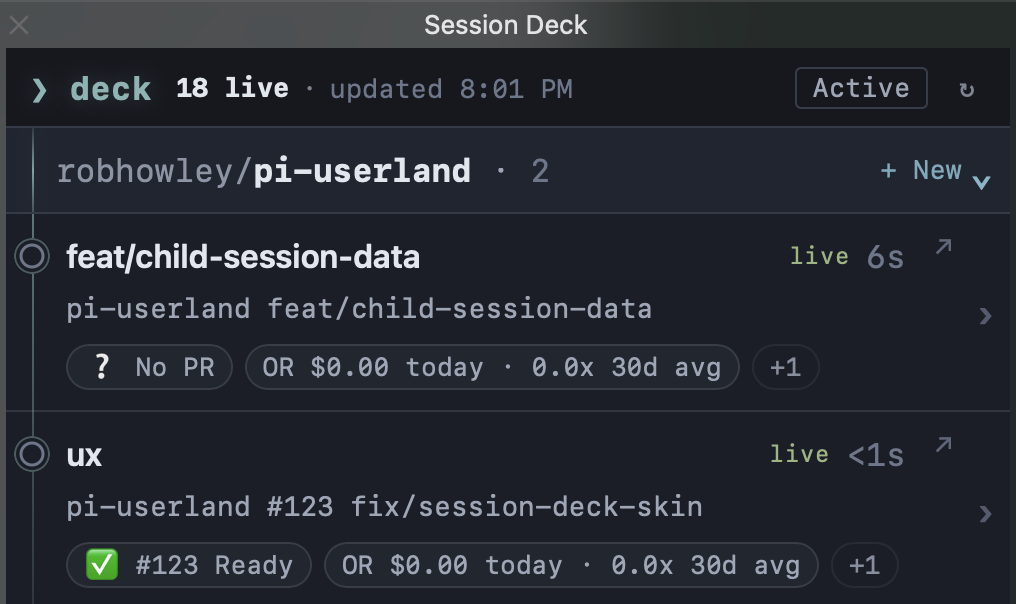
The full Pi session lifecycle in one place: create and organize sessions across repos and worktrees, see what each agent is doing or waiting on, and reopen or end them from a TUI, desktop app, or iTerm2 Toolbelt.
Package details
Install @robhowley/pi-session-deck from npm and Pi will load the resources declared by the package manifest.
$ pi install npm:@robhowley/pi-session-deck- Package
@robhowley/pi-session-deck- Version
0.14.1- Published
- Aug 4, 2026
- Downloads
- 1,341/mo · 502/wk
- Author
- robhowley
- License
- MIT
- Types
- extension
- Size
- 1.3 MB
- Dependencies
- 0 dependencies · 3 peers
Pi manifest JSON
{
  "extensions": [
    "./extensions/session-deck"
  ],
  "image": "https://raw.githubusercontent.com/robhowley/pi-userland/main/packages/pi-session-deck/img/session-deck-toolbelt-overview.png"
}
Security note
Pi packages can execute code and influence agent behavior. Review the source before installing third-party packages.
README
pi-session-deck
The full Pi session lifecycle in one place.
Create and organize Pi sessions across repos and worktrees, see what each agent is doing or waiting on, and reopen or end them from a TUI, desktop app, or iTerm2 Toolbelt.
Session Deck turns agents scattered across terminals, repos, worktrees, and background tmux sessions into one operational view.
The session lifecycle
- Launch isolated agents. Create a branch, Git worktree, and detached tmux session in one flow. The agent can keep working without occupying a terminal tab.
- Know what every agent is doing at a glance. See which agents are working, waiting, or need attention.
- Keep work in context. Sessions stay grouped by repo with their branch, worktree, pull request, status chips, and current activity close at hand.
- Return without hunting. Focus an existing terminal or reattach to the agent's tmux session directly from the deck.
- End sessions cleanly. Stop an agent when its work is done without deleting its session history.
Session Deck gives each activity state its own icon, so the deck remains scannable without relying on color alone.
Temporary child runtimes stay folded into their parent session, keeping the deck readable while still showing how many spawned agents are active.
One deck, three surfaces
Use Session Deck wherever it fits your workflow:
- Native Pi TUI for a fast, keyboard-driven view inside Pi.
- Desktop app for a dedicated, always-available session window.
- iTerm2 Toolbelt for an operational sidebar beside your terminals.
Each surface shows the same underlying sessions and gives you the same path through their lifecycle: launch, monitor, reopen, restart, and end.
Launch, reopen, restart, and end
Use w in the Pi TUI or + New in the Toolbelt to launch Pi on a new branch. Session Deck creates an isolated Git worktree and detached tmux session, allowing the agent to continue headlessly.
Use o or ↗ Open to return to an agent. Session Deck focuses its existing iTerm2 session when possible or reattaches to its tmux session. It never launches a duplicate.
Use uppercase R or Restart Session when a Session Deck-managed tmux Pi is unresponsive. Restart resumes the exact session file in the same pane and keeps its Session Deck runtime ID. It may force-kill Pi after two seconds and can lose in-flight work. Legacy, manual, direct-terminal, self-hosting TUI, and sessions with live child processes are not restartable.
Use k or End session when the agent is done. Its runtime stops, but its session history remains available to Pi. End Session keeps its existing SIGTERM-only behavior.
Installation
pi install npm:@robhowley/pi-session-deck
Native Pi TUI
Run inside Pi:
/session-deck
Desktop app
Install the Session Deck desktop app:
/session-deck desktop install
If macOS blocks first launch, leave the app installed at the initial warning, then use System Settings → Privacy & Security → Open Anyway.
iTerm2 Toolbelt
Install Session Deck as an iTerm2 Toolbelt:
/session-deck iterm2 install
Enable the iTerm2 Python API if prompted, fully quit and reopen iTerm2, then open Toolbelt → Session Deck.
Command reference
| Command | Purpose |
|---|---|
/session-deck |
Browse current sessions. |
/session-deck --all |
Include stale, dead, and unknown sessions. |
/session-deck --reap |
Clear expired sessions from the deck. |
/session-deck --identity |
Show full session identity details. |
/session-deck --json --session-id <id> |
Print one visible session record as JSON. |
/session-deck iterm2 install |
Install the iTerm2 Toolbelt integration. |
/session-deck iterm2 doctor |
Diagnose Toolbelt setup and runtime issues. |
/session-deck iterm2 uninstall |
Remove the iTerm2 Toolbelt integration. |
/session-deck desktop install |
Install the desktop app. |
/session-deck desktop doctor |
Diagnose the desktop app setup and runtime. |
/session-deck desktop uninstall |
Remove the desktop app. |
Flags can be combined.
TUI controls
| Key | Action |
|---|---|
↑ / ↓ |
Move between sessions. |
← / → |
Switch repo filters. |
enter |
Toggle session details. |
w |
Launch Pi on a generated worktree in detached tmux. |
o |
Open or focus the selected agent's terminal. |
R |
Restart an eligible managed tmux session. |
k |
End the selected session. |
r |
Refresh the deck. |
q |
Close Session Deck. |
esc |
Cancel an open prompt or close Session Deck. |
Privacy
Session Deck observes operational state, not conversation history.
- It does not persist prompts, transcript content, tool arguments, or tool output.
- Status chips contain sanitized visible text only.
- Tool and assistant errors are reduced to compact, safe summaries.
- Managed restart recipes are private user-only files. They contain only the fixed executable/PATH, agent/session directory intent, cwd, exact tmux target, session binding, and process generation needed to restart safely.
- JSON output, restart results, the desktop app, and the Toolbelt omit recipes, session-file paths, commands, PATH, raw terminal metadata, and tmux attachment details.