@scottrbk/pi-agentshell-extension
Delegate Pi tasks to other coding agents through AgentShell
Package details
Install @scottrbk/pi-agentshell-extension from npm and Pi will load the resources declared by the package manifest.
$ pi install npm:@scottrbk/pi-agentshell-extension- Package
@scottrbk/pi-agentshell-extension- Version
1.0.5- Published
- Aug 2, 2026
- Downloads
- 586/mo · 586/wk
- Author
- scottrbk
- License
- MIT
- Types
- extension
- Size
- 2.2 MB
- Dependencies
- 0 dependencies · 4 peers
Pi manifest JSON
{
  "extensions": [
    "./extensions/agentshell.ts"
  ]
}
Security note
Pi packages can execute code and influence agent behavior. Review the source before installing third-party packages.
README
Pi AgentShell Extension
A Pi extension for delegating tasks to other coding harnesses, including Pi, through AgentShell.
Architecture
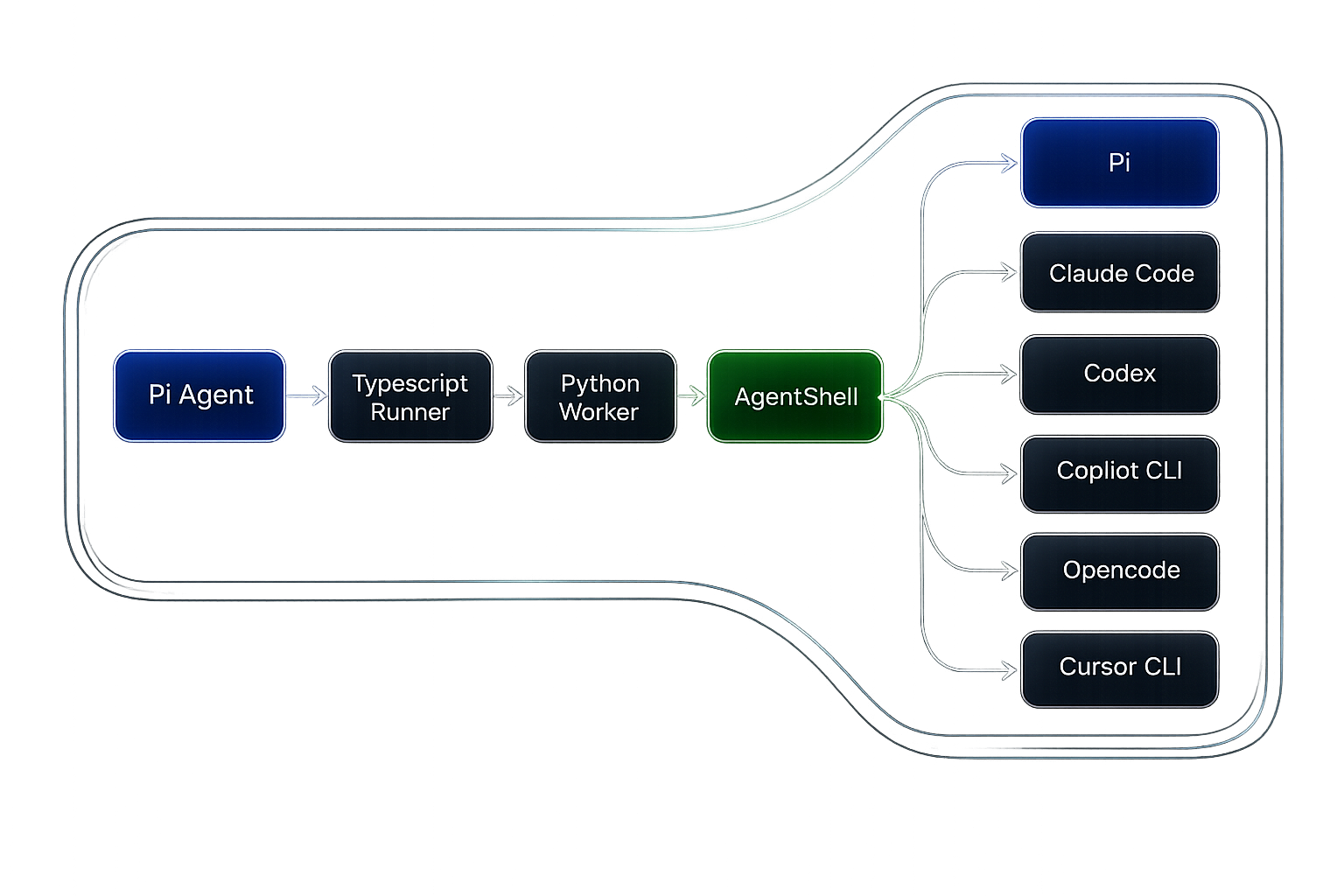
Pi submits each delegation to a session-scoped job registry. The existing TypeScript runner and Python worker execute it in the background through AgentShell. Completion is then delivered back to Pi as a conversation message.
Requirements
- Linux, macOS, or WSL2
- Pi
- uv
- Python 3.12 or newer, which uv can provide
Installation
pi install npm:@scottrbk/pi-agentshell-extension
To install the latest source from GitHub instead:
pi install git:github.com/ScottRBK/pi-agentshell-extension
Getting Started
The first time Pi starts with the extension installed, it will:
- Check whether
uvis available - Ask for permission to run
uv sync --locked, which installs AgentShell - Register the tool immediately after setup
Usage
Once in a Pi session, you can ask it to delegate a task to another coding agent.
For example:
Ask Codex to review this project and identify any bugs.
See AgentShell's list of supported agent types.
The tool accepts the following parameters:
| Parameter | Required | Description |
|---|---|---|
agent_type |
Yes | AgentShell agent type, such as claude_code or codex. |
task_name |
Yes | Short display name for the job, from 1 to 40 characters. |
prompt |
Yes | Task given to the subagent. |
cwd |
No | Working directory; defaults to Pi's current working directory. |
model |
No | Model identifier passed to AgentShell. |
effort |
No | Reasoning effort; supported values depend on the agent. |
session_id |
No | Session ID of an earlier call, to continue that conversation. |
auto_approve |
No | Allows automatic tool approval; defaults to false. |
allowed_tools |
No | Tool allow-list; support varies by agent. |
disallowed_tools |
No | Tool deny-list; support varies by agent. |
AgentShell warnings are included in the completion message when an agent cannot enforce a control.
Discovering Models
Use subagent_list_models to find the exact model selectors currently advertised for an agent:
subagent_list_models({
  agent_type: "codex",
  cwd: "/path/to/project"
})
cwd is optional and defaults to Pi's current working directory. The tool returns a JSON array;
pass a returned string unchanged as subagent's model value. The list is account- and
workspace-aware, but it does not prove that a model has credentials, quota, or provider health.
An empty array is a valid result. If an existing runtime predates model discovery, the normal
subagent tools remain available and Pi explains how to update the runtime.
Asynchronous Jobs
The subagent tool returns immediately with a session-scoped Job ID. The parent agent and user can
continue their conversation while the delegated agent runs in the background.
When the job finishes, its response is delivered to the parent as a follow-up message. If the parent is idle, this starts a turn immediately. If the parent is already working, Pi queues the completion until that work finishes. Do not poll the process or run sleep commands while waiting.
Use these commands to inspect or cancel active jobs. The job list includes each task name, harness, model, effort, status, and full Job ID:
/agentshell-jobs
/agentshell-cancel <job-id>
Parent agents can cancel a known Job ID through the subagent_cancel tool, so cancellation does not
require the user to enter a slash command.
While jobs are active, Pi shows a compact widget above the editor. Each row identifies the task by
name, harness, model, effort, and shortened Job ID. The widget displays the three oldest jobs and
summarises any additional jobs as +N more running. Cancelling jobs remain visible until their
workers stop. Finished jobs then show delivering… until Pi starts displaying their queued
follow-up messages. The widget disappears when no jobs or pending results remain.
A Job ID only identifies the background job; it is not a resumable subagent session ID. The real session ID arrives with a successful completion result. Only active jobs remain in the registry. Completed, failed, and cancelled jobs are removed after their result is delivered because the result is already stored in Pi's conversation history. Job IDs and active jobs belong to the current Pi session. Session shutdown cancels remaining work.
Silent Mode
Run /agentshell-silent to hide successful subagent responses in Pi. Run it again to restore normal
output. Silent calls display ✓ Completed, while warnings and errors remain visible.
The parent agent still receives the complete response. Each job captures the output mode when it is
submitted. The setting belongs to the current Pi session and survives /reload and session
resumption. New sessions start with normal output.
Resuming a Subagent
Every successful completion message ends with the subagent's session ID:
Reviewed the project and found two bugs.

Session ID: 0199f0c1-9a2b-7c3d-8e4f-5a6b7c8d9e0f
Passing that value back as session_id continues the same subagent conversation, so the
subagent keeps the context of its earlier work:
Ask Codex to fix the bugs it found, resuming session 0199f0c1-9a2b-7c3d-8e4f-5a6b7c8d9e0f.
The subagent harness owns the stored session; this extension only forwards the ID.
Output Limits
The extension stops a subagent if any of these limits are exceeded:
| Setting | Default | What it limits |
|---|---|---|
maxOutputBytes |
64 KiB | Text returned to Pi. |
maxProtocolBytes |
2 MiB | Total data sent by the AgentShell worker. |
maxMessageBytes |
256 KiB | One message sent by the AgentShell worker. |
maxStderrBytes |
256 KiB | Diagnostic output from the AgentShell worker. |
When subagent text output exceeds its limit, the failed completion message includes a UTF-8-safe
truncated prefix. A model list that exceeds maxOutputBytes is not returned.
To override the defaults, create ~/.pi/agent/extensions/agentshell.json:
{
  "maxOutputBytes": 131072,
  "maxProtocolBytes": 4194304,
  "maxMessageBytes": 524288,
  "maxStderrBytes": 524288
}
Overrides may be partial. Values are positive whole numbers in bytes. maxOutputBytes and
maxMessageBytes cannot exceed maxProtocolBytes. Run /reload after changing the file.
Safety and Limitations
- Child processes run with the user's permissions
- Approval bypass is disabled by default
- Child Pi sessions do not receive the subagent tool, preventing recursive delegation
- Active jobs are cancelled when their owning Pi session shuts down
- Stopping a parent turn does not stop background jobs; use
/agentshell-cancelwhen needed
Removal
pi remove npm:@scottrbk/pi-agentshell-extension