@senad-d/analyseme
Read-only SonarQube and SonarCloud analysis tools for Pi agents.
Package details
Install @senad-d/analyseme from npm and Pi will load the resources declared by the package manifest.
$ pi install npm:@senad-d/analyseme- Package
@senad-d/analyseme- Version
0.1.3- Published
- Jul 4, 2026
- Downloads
- 406/mo · 25/wk
- Author
- senad-d
- License
- MIT
- Types
- extension
- Size
- 211.1 KB
- Dependencies
- 0 dependencies · 3 peers
Pi manifest JSON
{
  "extensions": [
    "./src/extension.ts"
  ],
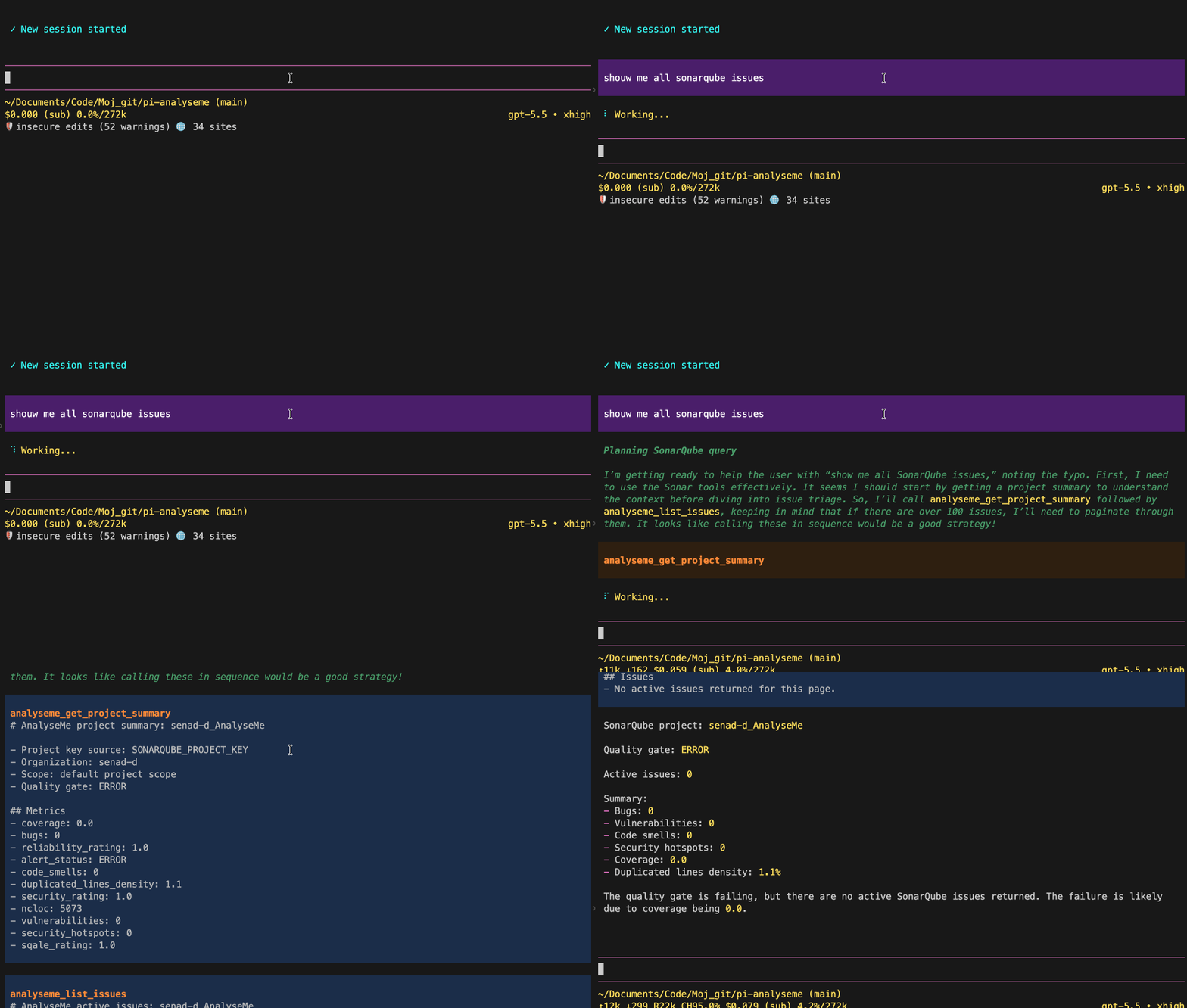
  "image": "https://raw.githubusercontent.com/senad-d/AnalyseMe/main/img/demo.gif"
}
Security note
Pi packages can execute code and influence agent behavior. Review the source before installing third-party packages.
README
AnalyseMe is a Pi extension for coding agents. It reads existing SonarQube/SonarCloud analysis data, summarizes project health, lists actionable findings, and fetches issue or hotspot details with Sonar-provided guidance.
- Read-only boundary: no Sonar mutations, repository writes, comments, assignments, or configuration changes.
- Agent-ready context: quality gates, metrics, locations, snippets, rule guidance, and hotspot guidance are returned in pi tool output.
- Project-aware: resolves project keys from tool input, environment, or
sonar-project.properties. - Scope-aware: supports branch and pull request analysis contexts.
- Secret-safe: Sonar tokens are masked in command output, tool output, details, errors, and tests.
Security: pi packages run with your full system permissions. AnalyseMe reads local configuration and sends read-only requests to your configured Sonar URL. Read
SECURITY.md.
Table of Contents
- Quick Start
- Installation
- Configuration
- Commands and Tools
- Troubleshooting
- Development and Validation
- Update and Uninstall
- Publishing
- License
Quick Start
pi install npm:@senad-d/analyseme
Set the Sonar variables shown in Configuration, then start pi:
pi
Check status and help:
/analyseme
/analyseme help
Ask the agent to use AnalyseMe:
Use AnalyseMe to inspect the project summary and list the top 10 active Sonar issues.
AnalyseMe reads existing Sonar analysis data; it does not run a scanner.
Installation
| Scope | Command | Notes |
|---|---|---|
| Global | pi install npm:@senad-d/analyseme |
Loads in every trusted pi project. |
| Project-local | pi install npm:@senad-d/analyseme -l |
Writes to .pi/settings.json in the current project. |
| One run | pi -e npm:@senad-d/analyseme |
Try without changing settings. |
| Git | pi install git:github.com/senad-d/analyseme@<tag> |
Pin a tag or commit. |
| Local checkout | pi --no-extensions -e . |
Develop or smoke-test this repository in isolation. |
Source checkout:
git clone https://github.com/senad-d/analyseme.git
cd analyseme
npm ci
npm run validate
pi --no-extensions -e .
Configuration
AnalyseMe reads shell environment variables first, then a local project .env file. Shell variables win, and AnalyseMe never writes configuration files.
| Variable | Required | Meaning |
|---|---|---|
SONARQUBE_URL |
Yes | SonarQube/SonarCloud base URL. Use HTTPS unless explicitly testing a trusted local HTTP server. |
SONARQUBE_TOKEN |
Yes | Sonar API token with read access to the target project. |
SONARQUBE_ORGANIZATION |
SonarCloud usually | SonarCloud organization. |
SONARQUBE_PROJECT_KEY |
Usually | Default project key when no tool projectKey is passed. |
SONARQUBE_BRANCH |
No | Branch analysis scope. Do not set with SONARQUBE_PULL_REQUEST. |
SONARQUBE_PULL_REQUEST |
No | Pull request analysis scope. Do not set with SONARQUBE_BRANCH. |
SONARQUBE_ALLOW_INSECURE_HTTP=true |
No | Development-only opt-in for trusted non-TLS Sonar URLs. |
Minimal local setup:
SONARQUBE_URL="https://sonarcloud.io"
SONARQUBE_TOKEN="replace-with-local-token"
SONARQUBE_ORGANIZATION="your-organization"
SONARQUBE_PROJECT_KEY="your-project-key"
Resolution order:
- Project key: explicit tool input →
SONARQUBE_PROJECT_KEY→sonar-project.propertiessonar.projectKey. - Analysis scope: explicit tool input → configured branch/PR variable → GitHub Actions context.
GitHub Actions example:
jobs:
  analyseme:
    runs-on: ubuntu-latest
    steps:
      - uses: actions/checkout@v4
      - name: Run Pi with AnalyseMe
        env:
          SONARQUBE_URL: ${{ secrets.SONARQUBE_URL }}
          SONARQUBE_TOKEN: ${{ secrets.SONARQUBE_TOKEN }}
          SONARQUBE_ORGANIZATION: ${{ secrets.SONARQUBE_ORGANIZATION }}
          SONARQUBE_PROJECT_KEY: ${{ vars.SONARQUBE_PROJECT_KEY }}
          SONARQUBE_BRANCH: ${{ github.ref_name }}
        run: |
          pi --no-session -e npm:@senad-d/analyseme \
            -p "Use AnalyseMe to inspect the project summary and active issues."
Commands and Tools
| Surface | Name | Use it for |
|---|---|---|
| Command | /analyseme |
Show masked configuration/status output. |
| Command | /analyseme help |
Show setup, CI, and usage guidance. |
| Tool | analyseme_get_project_summary |
Quality gate and summary metrics. |
| Tool | analyseme_list_issues |
Active actionable issues with pagination. |
| Tool | analyseme_get_issue |
One issue's location, flows, source snippets, links, and Sonar rule guidance. |
| Tool | analyseme_list_security_hotspots |
Security hotspots requiring review. |
| Tool | analyseme_get_security_hotspot |
One hotspot's location, source context, links, and Sonar security guidance. |
Suggested workflow:
- Start with
analyseme_get_project_summary. - Page through
analyseme_list_issuesoranalyseme_list_security_hotspotswith a boundedlimit. - Fetch a specific issue or hotspot before changing code.
Large results include visible truncation notices and structured metadata in details.
Troubleshooting
| Problem | Try |
|---|---|
| Missing URL or token | Set SONARQUBE_URL and SONARQUBE_TOKEN. |
| SonarCloud cannot find the project | Set SONARQUBE_ORGANIZATION and SONARQUBE_PROJECT_KEY, or pass them as tool inputs. |
| Wrong project is queried | Pass projectKey explicitly or fix SONARQUBE_PROJECT_KEY. |
| Branch/PR conflict | Set only one of SONARQUBE_BRANCH or SONARQUBE_PULL_REQUEST. |
| HTTP URL is rejected | Prefer HTTPS, or set SONARQUBE_ALLOW_INSECURE_HTTP=true only for trusted local development. |
| 401/403 response | Verify the token can read the target project and analysis scope. |
| Too much output | Use limit, page, or fetch a single issue/hotspot. |
Development and Validation
npm ci
npm run typecheck
npm run lint
npm run format:check
npm run test
npm run check:pack
npm run validate
npm run smoke:pi
Isolated interactive smoke test:
PI_SKIP_VERSION_CHECK=1 PI_TELEMETRY=0 pi --no-extensions -e .
npm run validate includes type checking, linting, formatting checks, tests, package script checks, and package dry-run validation. CI runs the same validation chain.
Project docs:
docs/STRUCTURE.md— repository layout and boundaries.docs/VALIDATION.md— validation and smoke-test details.specs/spec-architecture.md— architecture plan.specs/spec-guidelines.md— implementation guidelines.specs/spec-tasks.md— implementation task list.
Update and Uninstall
pi update --extensions                       # update installed pi packages
pi update npm:@senad-d/analyseme          # update AnalyseMe only
pi remove npm:@senad-d/analyseme          # remove global install
pi remove npm:@senad-d/analyseme -l       # remove project-local install
Publishing
AnalyseMe publishes to npm as @senad-d/analyseme.
npm login
npm whoami
node scripts/publish-npm.mjs
Run the publish script only from a clean working tree after updating CHANGELOG.md.
License
MIT