@senad-d/branchme
Minimal Pi extension for current-repository git branch, push, and pull request workflows.
Package details
Install @senad-d/branchme from npm and Pi will load the resources declared by the package manifest.
$ pi install npm:@senad-d/branchme- Package
@senad-d/branchme- Version
0.1.6- Published
- Jul 17, 2026
- Downloads
- 567/mo · 170/wk
- Author
- senad-d
- License
- MIT
- Types
- extension
- Size
- 1,010.1 KB
- Dependencies
- 0 dependencies · 3 peers
Pi manifest JSON
{
  "extensions": [
    "./src/extension.ts"
  ],
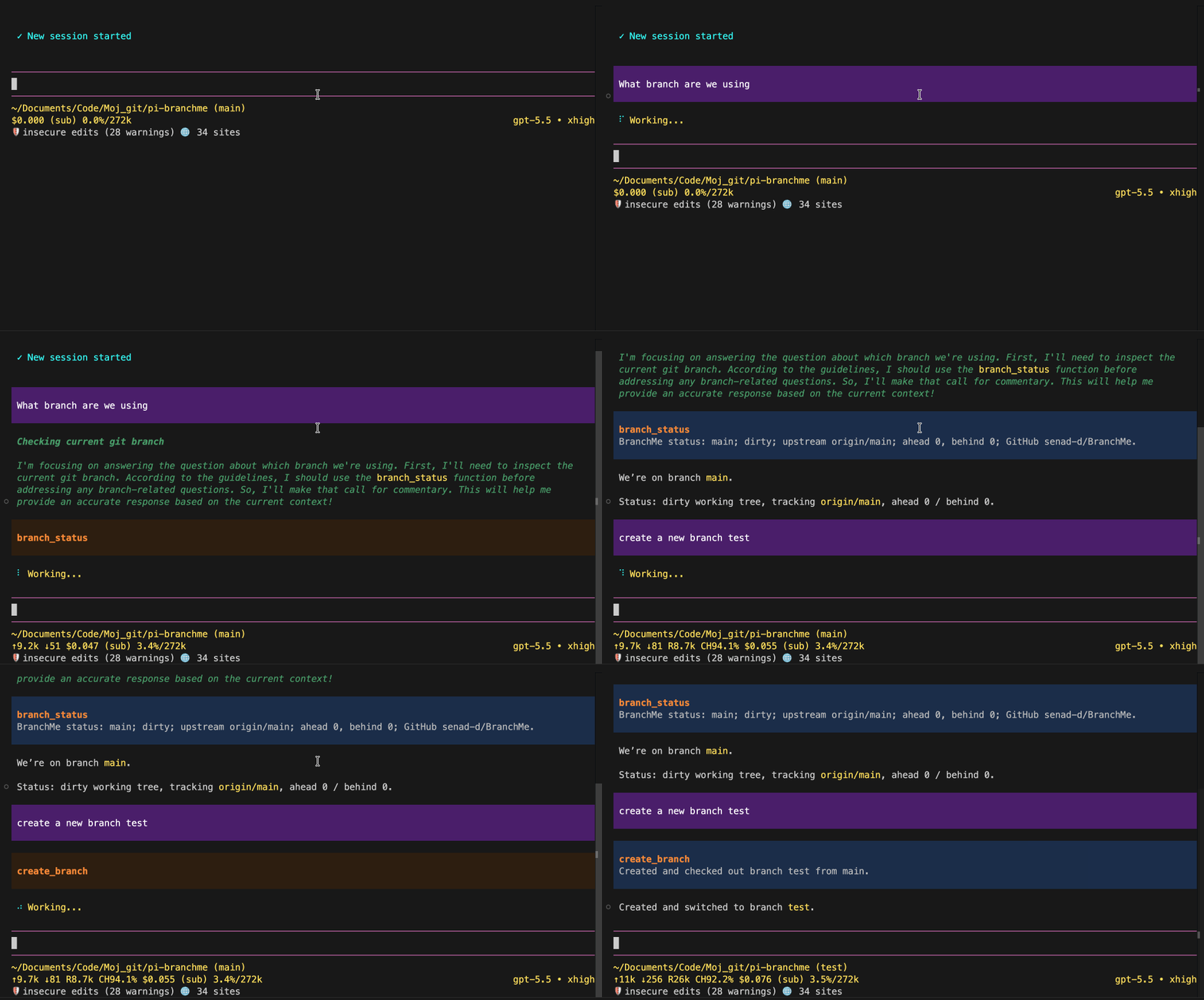
  "image": "https://raw.githubusercontent.com/senad-d/BranchMe/main/img/demo.gif"
}
Security note
Pi packages can execute code and influence agent behavior. Review the source before installing third-party packages.
README
BranchMe is a Pi extension for safe branch workflow automation. Before each agent run, it appends a bounded, read-only snapshot of the current Git repository to the system prompt. It also adds an informational /branchme command and eight agent-callable tools that explicitly refresh state, switch to an existing local branch, fetch its configured upstream remote, fast-forward or rebase the clean current branch onto its upstream, create a branch from the current HEAD, push the current branch, and create a GitHub pull request.
- Context-aware: every agent run starts with bounded branch, working-tree, related-PR, and recent-commit metadata; repository metadata is untrusted data, not instructions.
- Current-repository only: Git and GitHub operations are scoped to the checkout where pi is running; fetch, pull, and rebase resolve the current branch's configured upstream.
- Explicit history rewrites:
rebase_branchruns only when explicitly requested, requires a clean current branch with an upstream, disables autostash and multi-ref updates, and automatically attempts to abort on failure. - Commit-safe: context collection is read-only, and BranchMe never stages files, creates user-authored commits, generates commit messages, force-pushes, creates merge commits, resets, or edits files directly.
- Strict tools: tool schemas reject extra properties such as
force,stash,discard,owner,repo,path, orbaseRef. - PR-ready: create GitHub pull requests from existing local branches after verifying the
headBranchmatches GitHub and the base is visible, with explicit PR fields andGITHUB_TOKENorGH_TOKENfrom the process environment or a local.envfallback.
Security: pi packages run with your full system permissions. BranchMe runs local
gitcommands, may make an automatic authenticated GitHub request to find a related open pull request, can fetch remotes, switch/create/pull/rebase branches, push the current branch, and create GitHub pull requests. ReadSECURITY.md.
Table of Contents
- Quick Start
- Installation
- Repository and GitHub Setup
- Configuration
- Commands
- Tools
- Workflow and Boundaries
- GitHub Actions
- Troubleshooting
- Diagnostics
- Update and Uninstall
- Development
- Publishing
- License
Quick Start
pi install npm:@senad-d/branchme
cd /path/to/your/git/repo
pi
Inside pi:
/branchme
/branchme help
A normal prompt can use the automatic start-of-run snapshot without a tool call. Ask for an explicit refresh when needed, for example:
Refresh the repository state with branch_status, then create a branch named feature/update-docs with create_branch.
A typical BranchMe flow is:
- Use the automatic snapshot to understand state at the start of the agent run.
- Use
branch_statuswhen you explicitly need fresh state, especially after a Git mutation in the same run. - Switch to the local base branch with
change_branch. - Update it from its configured upstream with
pull_branch, which requires a clean worktree and uses fast-forward-only semantics. - Create from the updated
HEADwithcreate_branch. - Make edits and commit outside BranchMe.
- Push the current branch with
push_branch. - After
push_branchcompletes and GitHub can see the branches, create a pull request withpull_request.
To refresh the current branch's configured remote-tracking ref without changing the local branch or working tree, use fetch_branch. To reconcile the clean current branch by rewriting its local commits, run fetch_branch, wait for it to complete, and then run rebase_branch. Both tools require a configured upstream; rebase_branch automatically attempts git rebase --abort if rebasing fails.
BranchMe is tool-based. The slash command is informational only and never changes or updates branches, fetches, rebases, pushes, commits, stages, edits files, or opens pull requests.
Installation
| Scope | Command | Notes |
|---|---|---|
| Global | pi install npm:@senad-d/branchme |
Loads in every trusted pi project. |
| Project-local | pi install npm:@senad-d/branchme -l |
Writes to .pi/settings.json in the current project. |
| One run | pi -e npm:@senad-d/branchme |
Try without changing settings. |
| Git | pi install git:github.com/senad-d/branchme@<tag> |
Pin a tag or commit. |
| Local checkout | pi --no-extensions -e . |
Develop or test this repository in isolation. |
Once loaded, BranchMe collects automatic Git context before each agent run. This happens for ordinary prompts; there is no /branchme context command and no additional tool to enable it.
Source checkout:
git clone https://github.com/senad-d/branchme.git
cd branchme
npm install --ignore-scripts
npm run validate
pi --no-extensions -e .
Use the checkout globally while developing:
pi install /absolute/path/to/branchme
Repository and GitHub Setup
BranchMe does not bundle Git and does not create repositories. Start pi from inside the repository you want BranchMe to manage:
cd /path/to/your/git/repo
git status
git remote get-url origin
pi
For pull requests, the repository must resolve to GitHub from local origin and/or GITHUB_REPOSITORY:
git remote set-url origin git@github.com:OWNER/REPO.git
# or
export GITHUB_REPOSITORY=OWNER/REPO
For automatic related-PR lookup and pull_request, set a token in the process environment before starting pi:
export GITHUB_TOKEN=github_pat_...
# or
export GH_TOKEN=ghp_...
pi
Or copy .env.example to .env in the repository root and fill in one token value:
cp .env.example .env
$EDITOR .env
pi
fetch_branch, pull_branch, and push_branch use your normal Git remote credentials. BranchMe does not inject GITHUB_TOKEN into git fetch, git pull, or git push. rebase_branch operates on the locally available configured upstream ref and makes no network request itself.
When the current branch already has an upstream, BranchMe pushes an explicit HEAD:<upstream-branch-ref> refspec to the configured upstream remote instead of relying on a bare git push.
Run pull_request only after push_branch has completed; pull_request preflights the GitHub headBranch and baseBranch before creating the PR and fails with retry guidance if a branch is not visible yet or the GitHub headBranch commit does not match the local branch.
Configuration
BranchMe has no project config file. It reads process environment variables for automatic related-PR lookup, GitHub pull request creation, and optional repository boundary checks, with a local .env token fallback when no process token is set. Token lookup checks process.env.GITHUB_TOKEN, then process.env.GH_TOKEN; if neither is set, BranchMe reads .env from the verified git root and checks GITHUB_TOKEN, then GH_TOKEN.
| Variable | Meaning |
|---|---|
GITHUB_TOKEN |
Preferred token for automatic related-PR lookup and pull_request; process environment first, then local .env fallback. |
GH_TOKEN |
Fallback token for automatic related-PR lookup and pull_request; process environment first, then local .env fallback. |
GITHUB_REPOSITORY=owner/repo |
Optional CI fallback and boundary check for the current GitHub repository; process environment only. |
BranchMe reads only GITHUB_TOKEN and GH_TOKEN from a small regular .env file; it rejects directories, symlinks, special files, and oversized files. BranchMe does not import other .env keys, read shell profiles, GitHub CLI credentials, or local credential stores. Token values are redacted from automatic context, errors, tool content, and tool details.
If local origin and GITHUB_REPOSITORY both resolve but disagree, pull_request fails closed.
Commands
| Command | Description |
|---|---|
/branchme |
Show a compact status panel or fallback message with current branch, GitHub repository resolution, token presence, and workflow notes. |
/branchme help |
Show concise BranchMe workflow help and runtime requirements. |
/branchme --help |
Alias for /branchme help. |
/branchme -h |
Alias for /branchme help. |
Commands are informational only. BranchMe actions are performed by agent-callable tools. /branchme uses the TUI panel in TUI mode, notifications in RPC mode, plain text only in print mode, and stays stdout-silent in JSON mode to avoid corrupting protocol output. Unsupported non-empty /branchme arguments return guidance to use /branchme help where the current mode can display it safely.
Tools
| Tool | Schema | Behavior |
|---|---|---|
branch_status |
{} |
Explicitly refreshes the same bounded context used at agent start: repo root in structured details, branch/detached state, upstream and ahead/behind counts, working-tree counts and unstaged/untracked paths, related open PR, and recent commits. It is read-only. |
change_branch |
{ "branchName": string } |
Validates branchName, requires refs/heads/<branchName> to exist locally, rejects dirty worktrees, and runs git switch <branchName>. |
fetch_branch |
{} |
Requires a current branch with a configured upstream and runs git fetch --no-tags --no-recurse-submodules <upstream-remote> <upstream-branch-ref>:<remote-tracking-ref>; only that tracking ref is refreshed without changing local branches or working-tree files. |
pull_branch |
{} |
Requires a clean current branch with a configured upstream and runs git pull --ff-only --no-rebase --no-autostash <upstream-remote> <upstream-branch-ref>; divergence fails without rebasing or creating a merge commit. |
rebase_branch |
{} |
Requires a clean current branch with a configured upstream and runs git rebase --no-autostash --no-update-refs <upstream>; it rewrites local commits and automatically attempts git rebase --abort on failure. |
create_branch |
{ "branchName": string } |
Validates branchName, rejects existing local branches, and runs git switch -c <branchName> from current HEAD. |
push_branch |
{} |
Pushes the current branch to its configured upstream remote with an explicit HEAD:<upstream-branch-ref> refspec, or publishes it with git push --set-upstream origin <currentBranch> when no upstream exists. |
pull_request |
{ "headBranch": string, "baseBranch": string, "title": string, "body": string, "draft": boolean } |
Preflights GitHub branch visibility and verifies the GitHub headBranch commit matches the local branch, then creates a pull request in the resolved current repository via POST /repos/{owner}/{repo}/pulls; branch refs must exist locally and cannot use owner:branch. |
All schemas reject additional properties. change_branch never accepts baseRef, force, stash, discard, create, owner, repo, or path inputs. fetch_branch, pull_branch, and rebase_branch have strict empty schemas and never accept a branch, remote, refspec, force, autostash, or arbitrary rebase target. pull_request never accepts owner, repo, or owner-prefixed branch refs; BranchMe resolves the repository from local origin and/or matching GITHUB_REPOSITORY.
Workflow and Boundaries
Automatic context and freshness
Before each agent run, BranchMe appends an Automatic Git Context snapshot to the existing system prompt. The snapshot contains these fields in order:
- current branch or detached
HEAD, plus upstream and ahead/behind counts when available; - working-tree state and staged, unstaged, and untracked counts;
- up to 20 unstaged or untracked change entries with Git status, path, and original path for renames/copies;
- related open PR status and, when found, its number, title, repository, head/base branches, URL, state, and draft flag;
- up to 5 recent commits with short hash, date, and subject.
Collection defaults are a 5-second timeout per local Git command, a 4-second related-PR lookup timeout, at most 512 characters per metadata value, and at most 4,000 characters for the rendered snapshot. GitHub response bodies are limited to 64 KiB. The formatter can further shorten values or omit entries to stay within the total limit.
The snapshot is fresh at agent start but is not live. A fetch, branch switch, pull, rebase, commit, file change, push, or other mutation later in the same run can make it stale. branch_status performs an explicit current-state refresh through the same shared collector and remains read-only; it does not mutate files, Git state, or GitHub state.
Related-PR metadata does not come from Git alone. When repository, branch, and credentials resolve, automatic collection and explicit branch_status may make an authenticated GET /repos/{owner}/{repo}/pulls?state=open&head={owner}:{branch}&per_page=1 request. Without a token there is no unauthenticated fallback or GitHub request; the PR field is reported as unavailable while local Git context remains usable.
Repository paths, commit subjects, branch names, and PR titles are treated as untrusted metadata. BranchMe redacts token values, escapes control characters, quotes and bounds values before prompt insertion, and never captures diffs or file contents. Staged files contribute only to the staged count; the path list is limited to unstaged and untracked entries.
Use BranchMe from pi prompts or automation that drives pi with explicit tool calls:
Use branch_status.
Switch to the base branch with change_branch, then use pull_branch after the switch completes.
Fetch the current branch upstream with fetch_branch, wait for it to complete, then rebase with rebase_branch.
Create branch feature/docs-refresh from the updated current HEAD with create_branch.
Push the current branch with push_branch.
After push_branch completes, create a draft pull request from feature/docs-refresh to main titled "Refresh docs" with this body: "...".
BranchMe operates only on the repository where pi is running:
- Automatic collection and
branch_statusrun bounded, read-only Git commands from the verified git root. - Git commands use
pi.exec("git", args, { cwd, signal, timeout })with argv arrays; repository mutations run from the verified git root. change_branchswitches only to existing local branches and has noforce,stash,discard, remote, or path input.fetch_branchrequires a configured upstream, uses an explicit source-to-remote-tracking refspec with tags and submodule recursion disabled, and does not change local branches or working-tree files.pull_branchrequires a clean worktree and configured upstream, updates only the current branch withgit pull --ff-only --no-rebase --no-autostash, and has no branch, remote, force, or rebase input.rebase_branchrequires a clean worktree and configured upstream, rewrites only the current branch onto the locally available upstream with autostash and multi-ref updates disabled, and automatically attempts to abort on failure.create_branchcreates from the currentHEADonly and has nobaseRefinput.push_branchpushes only the current branch, uses no bare upstreamgit push, and has nobranchNameinput.pull_requestcreates PRs only for the resolved current GitHub repository, requiresheadBranchandbaseBranchto exist locally, requires the GitHubheadBranchcommit to match the local branch, queues behind in-flight same-repository git mutation windows when possible, and rejectsowner:branchhead refs.- If local
originandGITHUB_REPOSITORYboth resolve but disagree,pull_requestfails closed.
BranchMe intentionally does not stage files, create user-authored commits, force checkout, stash changes, discard changes, force-push, create merge commits, edit files directly, or generate commit messages. Rebase-driven commit rewriting occurs only through explicit rebase_branch calls.
GitHub Actions
GitHub Actions example:
name: branchme-smoke
on:
  workflow_dispatch:

permissions:
  contents: write
  pull-requests: write

jobs:
  branchme:
    runs-on: ubuntu-latest
    env:
      GITHUB_TOKEN: ${{ secrets.GITHUB_TOKEN }}
      GITHUB_REPOSITORY: ${{ github.repository }}
    steps:
      - uses: actions/checkout@v4
        with:
          fetch-depth: 0
      - uses: actions/setup-node@v4
        with:
          node-version: 22
      - run: npm install -g --ignore-scripts @earendil-works/pi-coding-agent
      - run: pi --no-extensions -e npm:@senad-d/branchme --help
Ensure the token and Git credentials have permission for the branch and pull request operation you ask BranchMe to perform.
Troubleshooting
| Problem | Try |
|---|---|
| Not a git repository | Start pi from inside a git checkout. |
Detached HEAD |
Use change_branch to switch to an existing local branch, or checkout a branch before fetch_branch, pull_branch, rebase_branch, create_branch, or push_branch. |
| Branch already exists | Choose a new local branch name for create_branch, or use change_branch to switch to it. |
| Branch does not exist locally | Create a local branch first; change_branch does not checkout remote branches. |
| Dirty worktree before branch switch, pull, or rebase | Commit, stash, or discard changes outside BranchMe before using change_branch, pull_branch, or rebase_branch. |
| Fetch, pull, or rebase has no upstream | Configure the current branch upstream outside BranchMe, then retry the tool. |
| Pull is not a fast-forward | Run fetch_branch, wait for it to complete, then explicitly run rebase_branch if rewriting local commits is intended; otherwise reconcile outside BranchMe. |
| Rebase fails or conflicts | rebase_branch automatically attempts git rebase --abort. Inspect repository state before continuing if automatic cleanup also fails. |
| Push fails | Confirm the current branch is correct and your normal Git remote credentials can push. |
| Related PR is unavailable | Set GITHUB_TOKEN or GH_TOKEN before starting pi if related-PR context is wanted. Without a token, BranchMe keeps local context and intentionally makes no unauthenticated GitHub request. |
| PR auth fails | Set GITHUB_TOKEN or GH_TOKEN before starting pi, or copy .env.example to .env and fill in one token. |
| PR branch does not exist locally | Create or fetch/check out the local headBranch and baseBranch branches first; BranchMe does not use remote-only or cross-repository PR refs. |
| PR branch is not visible or is stale on GitHub | Run push_branch, wait for it to complete, then retry pull_request; do not batch push_branch and pull_request in the same assistant tool call. |
| Repository mismatch | Make origin and GITHUB_REPOSITORY refer to the same owner/repo. |
| Need a commit | Use BranchMe or normal git commands; BranchMe never commits. |
| Other extensions interfere | Test with pi --no-extensions -e .. |
Diagnostics
From a source checkout:
npm run validate
npm run check:pack
printf '/branchme help\n/quit\n' | pi --no-extensions -e .
Validation covers TypeScript typechecking, formatting checks, automatic context collection and prompt injection, mocked GitHub lookup, unit tests, package checks, checkout Pi runtime smoke, and package-content verification. The checkout smoke loads BranchMe through Pi, then uses a temporary verifier command to confirm all eight BranchMe tools are visible through pi.getAllTools() with strict schemas and prompt metadata. Smoke-test notes are recorded in docs/SMOKE_TEST.md, and TUI/help captures are stored in docs/TUI_CAPTURE.md.
Refresh TUI captures intentionally with:
UPDATE_TUI_CAPTURE=1 node --test test/tui-capture.test.mjs
Update and Uninstall
pi update --extensions                  # update installed pi packages
pi update npm:@senad-d/branchme        # update BranchMe only
pi remove npm:@senad-d/branchme        # remove global install
pi remove npm:@senad-d/branchme -l     # remove project-local install
Development
npm install
npm run typecheck
npm run format:check
npm run test
npm run check:pack
npm run validate
npm run smoke:pi:packed
pi --no-extensions -e .
npm run check:pack verifies the npm package does not include local state, specs, caches, node_modules, real environment files, or other private development artifacts. The safe .env.example template is included.
npm run smoke:pi is the checkout runtime smoke and verifies BranchMe command output plus real Pi tool registration metadata.
npm run smoke:pi:packed is the release-gate smoke: it packs the npm artifact into a temporary directory, installs it with production dependency settings, and runs pi against the installed package.
Publishing
BranchMe publishes to npm as @senad-d/branchme. You need an npm account with publish access to the @senad-d scope.
npm login
npm whoami
npm run release:check # optional preflight; the publish script runs this too
node scripts/publish-npm.mjs
The publish script requires a clean working tree, asks for the version number, runs npm run release:check (validation plus installed-package smoke), runs npm version <version> to update package.json and package-lock.json, creates the v<version> git tag, publishes with npm publish --access public, and then offers to push the release commit and tag.
Run it only from a clean working tree after updating CHANGELOG.md.
License
MIT