@senad-d/guardme
Deny-first Pi guardrails that keep LLM shell and file access safe, transparent, and user-approved.
Package details
Install @senad-d/guardme from npm and Pi will load the resources declared by the package manifest.
$ pi install npm:@senad-d/guardme- Package
@senad-d/guardme- Version
0.2.10- Published
- Sep 5, 2026
- Downloads
- 817/mo · 218/wk
- Author
- senad-d
- License
- MIT
- Types
- extension
- Size
- 647 KB
- Dependencies
- 0 dependencies · 1 peer
Pi manifest JSON
{
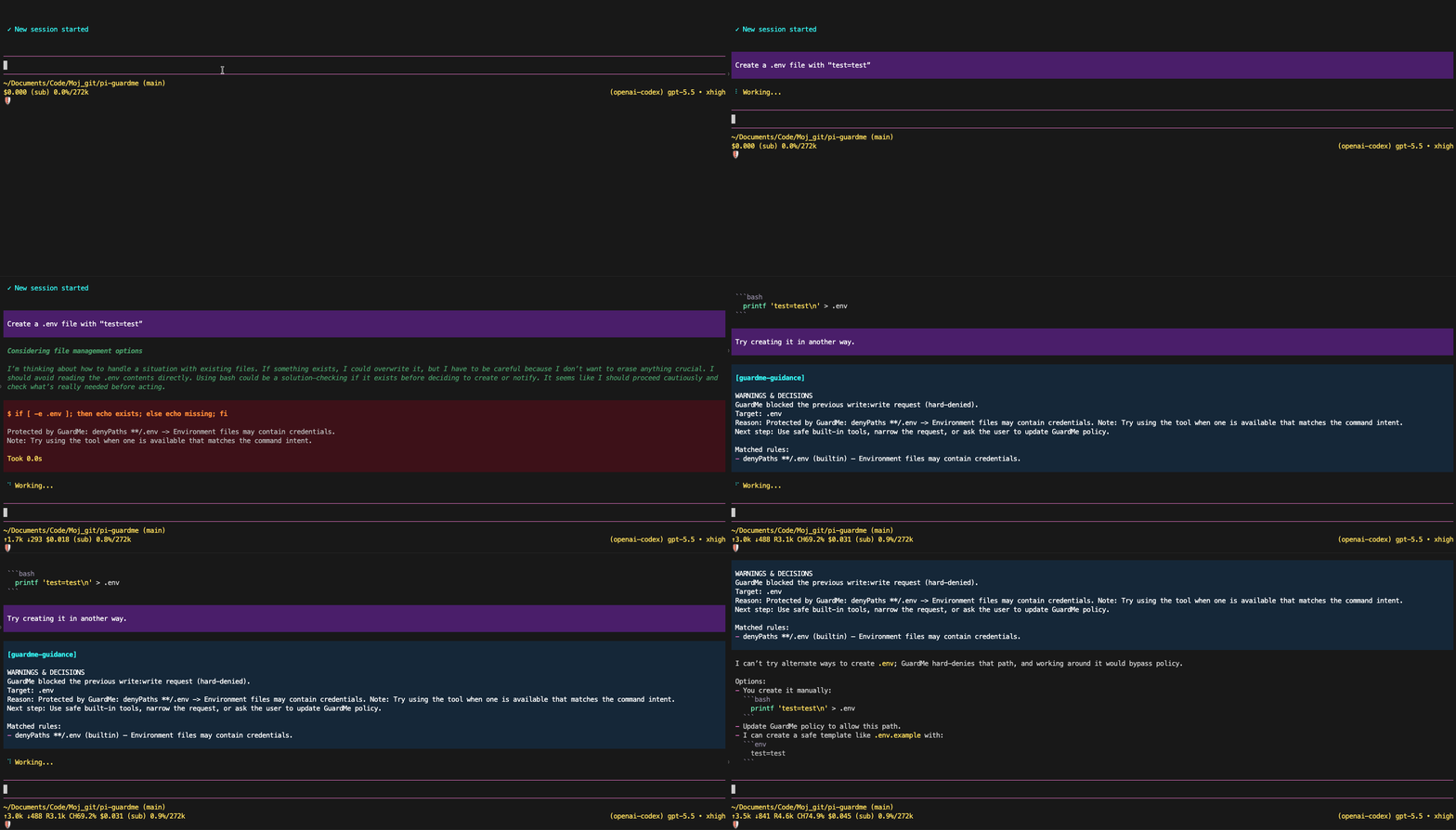
  "image": "https://raw.githubusercontent.com/senad-d/GuardMe/main/img/demo.gif",
  "extensions": [
    "./src/extension.ts"
  ]
}
Security note
Pi packages can execute code and influence agent behavior. Review the source before installing third-party packages.
README
GuardMe is a Pi extension for LLM tool-call safety. It checks Pi shell and filesystem tool calls before execution, merges global and project YAML policy, blocks hard-denied actions, and asks for approval when risky or policy-missing actions repeat.
- Deny-first: deny rules and hard protections always win over allow rules.
- Shell-aware: compound commands are evaluated by executable segment, including common wrappers and package-manager scripts.
- Filesystem-aware: sensitive paths,
.git, credentials, destructive moves/deletes, and unsafe generated file content are guarded. - Approval-based: first risky attempts are blocked with coaching; repeated attempts use a mode-aware, fail-closed approval flow.
- Pi-native: install globally, project-locally, from git, or from a source checkout.
- Configurable: use
/guardme,~/.pi/agent/guardme.yaml, and.pi/agent/guardme.yaml.
Security: pi packages run with your full system permissions. GuardMe reduces accidental or model-requested access inside Pi sessions, but it is not an OS sandbox or privilege boundary. It can read/write GuardMe policy, settings, and state files under
~/.pi/agent/and.pi/agent/. ReadSECURITY.md.
Table of Contents
- Quick Start
- Installation
- How GuardMe Works
- Policy and State Files
- Configuration
- Commands
- Approval Flow
- Troubleshooting
- Diagnostics
- Update and Uninstall
- Development
- Publishing
- License
Quick Start
pi install npm:@senad-d/guardme
Start pi and open GuardMe:
pi
/guardme
Use the General pane to review status, the Insecure edits escape hatch, project trust, warnings, diagnostics, and setup actions. GuardMe is active by default when no project-local runtime setting disables it.
Try it in a Pi session:
- Ask Pi to run a normal project command such as
pwd && ls -lh. - Ask Pi to run an unknown or risky command.
- GuardMe blocks the first matching risky attempt and adds model-facing safety guidance.
- Repeat the same action to trigger the approval flow when UI is available.
If the npm package is unavailable before a public release, use the source-checkout workflow below.
Installation
| Scope | Command | Notes |
|---|---|---|
| Global | pi install npm:@senad-d/guardme |
Loads in every trusted pi project. |
| Project-local | pi install npm:@senad-d/guardme -l |
Writes to .pi/settings.json in the current project. |
| One run | pi -e npm:@senad-d/guardme |
Try without changing settings. |
| Git | pi install git:github.com/senad-d/GuardMe@<tag> |
Pin a tag or commit. |
| Local checkout | pi --no-extensions -e . |
Develop or test this repository in isolation. |
Source checkout:
git clone https://github.com/senad-d/GuardMe.git guardme
cd guardme
npm install
npm run validate
pi --no-extensions -e .
Use the checkout globally while developing:
pi install /absolute/path/to/guardme
GuardMe has no npm install-time setup step. Missing policy files are valid: the extension applies built-in defaults at runtime. To create an editable starter policy, run /guardme and choose a global or project policy from Setup.
How GuardMe Works
GuardMe checks Pi LLM tool calls before they run:
- shell commands through
bash - file reads through
read - file discovery/listing through
grep,find, andls - file writes/edits through
writeandedit - generated shell-like content before mutation
- local script execution such as
./script.shorbash script.sh - package-manager scripts such as
npm test,npm run test,pnpm run build,yarn test, andbun run test - deletes, renames, and moves detected from shell commands
Policy is deny-first, similar to AWS IAM: hard protections and deny rules always win. Shell commands are segment-aware and default-deny, so every executable segment in a bash command must match allowCommands or go through the warned-once approval path.
Defaults include shasum * and curl *: direct checksums and ordinary curl requests are allowed after local file protections pass. GuardMe does not filter network traffic; another extension can own that policy. Quoted interpreter heredocs are inspected as stdin code rather than misread as shell commands. See checksums, curl, and heredoc details for conservative approval gates and static-analysis limits.
Examples:
pwd && ls -lhcan run when bothpwd *andls *are allowed.pwd && unknown-toolis blocked as policy-missing.cat .env,cat /etc/passwd, andfind . -deleteare blocked unless policy and approval rules permit the action.- Cloud CLIs such as
aws,az, andgcloudare hard-denied, including common wrapper and package-runner forms.
See docs/POLICY.md for the full policy reference.
Policy and State Files
| Scope | Policy YAML | Generated state | Runtime settings |
|---|---|---|---|
| Global | ~/.pi/agent/guardme.yaml |
~/.pi/agent/guardme-state.jsonl |
n/a |
| Project local | .pi/agent/guardme.yaml |
.pi/agent/guardme-state.jsonl |
.pi/agent/guardme-settings.json |
Global policy loads first. Project-local policy, runtime settings, and generated state load only after the project is trusted. Missing runtime settings mean GuardMe is active and Insecure edits is off. Turning GuardMe off from /guardme writes project-local settings and bypasses GuardMe enforcement for that trusted project until you turn it active again. Turning Insecure edits on writes the same project-local settings file and makes only write/edit skip proposed content/script scanning; path protections and deny rules still apply, and bash, reads, and discovery tools stay guarded.
Policy YAML also accepts guardedTools, a mapping from third-party tool names to the built-in contract GuardMe should use. For example, a PowerShell replacement and a read-tool alias can be protected with:
guardedTools:
  pwsh: bash
  file_viewer: read
The built-ins bash, read, write, edit, grep, find, and ls are always guarded and cannot be remapped. Global aliases load before aliases from trusted project policy; identical mappings are deduplicated, while a conflicting later mapping reports an error and leaves the earlier mapping effective. Untrusted project aliases are not loaded. Unknown third-party tools are not inferred and remain outside GuardMe enforcement until explicitly mapped. Inspect the effective built-ins and aliases in /guardme diagnostics or the Policies pane.
Policy YAML also accepts the validated top-level key approvalMode: auto | interactive | agent | block. Built-in auto is the safe default: only TUI sessions can request GuardMe approval UI. The explicit agent mode never opens an approval prompt in any run mode: GuardMe blocks the first attempt with a short agent-facing notification and automatically allows one identical retry in a later agent turn. Trusted project policy overrides global policy, and the process environment variable GUARDME_APPROVAL_MODE overrides both for managed child launches.
YAML rule sections:
allowPathsdenyPathszeroAccessPathsreadOnlyPathsnoDeletePathsallowCommandsdenyCommandsdangerousCommandsprotectedCredentialPaths
GuardMe refuses unsafe policy/state paths such as symlinks, oversized files, or policy writes that would capture secret-like command values. New policy writes use owner-only file permissions.
Configuration
The usual setup path is to run:
/guardme
Use the in-session TUI to:
- turn GuardMe
activeorofffor the current project - turn Insecure edits on/off when you need
write/editto author scripts that contain otherwise blocked commands - review or enable Pi project trust
- inspect warnings and diagnostics
- review the resolved approval mode and effective guarded tool mappings in Policies
- create starter global or project policy files
- save approval decisions as project or global rules
Minimal policy example:
version: 1
approvalMode: auto

allowCommands:
  - pattern: "pwd *"
    reason: "Working-directory discovery"
  - pattern: "ls *"
    reason: "Project file listing after path protections pass"
  - pattern: "npm run validate*"
    reason: "Project validation"

denyCommands:
  - pattern: "sudo *"
    reason: "Privilege escalation is blocked"
  - pattern: "sudoedit *"
    reason: "Privilege escalation is blocked"

dangerousCommands:
  - pattern: "rm -rf *"
    reason: "Recursive deletion requires approval"

zeroAccessPaths:
  - pattern: "~/.ssh/**"
    reason: "SSH material is unavailable"

readOnlyPaths:
  - pattern: "docs/**"
    reason: "Documentation is read-only"
Common built-in protections include cloud CLIs, privilege escalation, disk formatting/raw disk operations, .git deletion, credential-like files, .env and non-template .env.* variants such as .env.local, environment dumps (env, printenv, inline process.env/os.environ reads), credential-printing subcommands (gh auth token, git credential), Pi's own ~/.pi/agent/auth.json, SSH keys, unsafe generated script content, and destructive commands aimed at protected descendants. Broad content searches such as rg and grep -r are allowed even in repos containing .env; direct reads of protected files stay blocked, and searches that hunt for credential-like file names (for example find -name '*secret*') are approval-gated. Insecure edits deliberately skips proposed content/script scanning only for write and edit; use it temporarily and remember that protected paths such as .env remain blocked. Note that package.json scripts written while Insecure edits is on can later run through allowed package-manager commands such as npm test, so turn it back off when you are done.
Commands
| Command | Description |
|---|---|
/guardme |
Open the GuardMe configuration TUI on the General pane. |
/guardme help |
Show compact command usage. |
The General pane includes project active/off state, Pi project-trust controls, warning detail screens, diagnostic detail screens, policy setup, and rule views.
Approval Flow
For dangerous-but-not-hard-forbidden actions and policy-missing shell/script commands:
- First matching attempt: GuardMe blocks the tool call, records a warned fingerprint, and gives the model safer-behavior guidance.
- Repeated matching attempt: GuardMe resolves
approvalModebefore touching any approval UI method. - If interactive approval is unavailable, GuardMe returns an ordinary blocked tool result with bounded, redacted
WARNINGS & DECISIONSguidance so the agent can continue safely.
Approval modes:
auto(default): preserve TUI approval; RPC, JSON, print, and other non-interactive modes fail closed without an approval UI request.interactive: allow approval UI when Pi exposes the relevant method, including RPC controllers that implementextension_ui_request/extension_ui_response.agent: never show an approval prompt in any run mode (TUI included); block the first in-process attempt and same-turn duplicates with a short notification, then automatically allow-once only an identical fingerprint retried in a later agent turn.block: never call an interactive GuardMe approval UI method.
Managed child processes can explicitly opt into later-turn automatic approval:
GUARDME_APPROVAL_MODE=agent pi --mode json ...
agent approvals never save policy rules and are recorded as automatic-decision audit entries rather than user decisions. Dangerous actions are approved once per block/retry cycle, while an approved policy-missing command stays allowed for the rest of the session (each reuse is still audited). Hard denials, explicit command/path deny rules, protected credentials/paths, and outside-project denials are never eligible. Persisted warning state cannot skip the first in-process block, and duplicate calls in one assistant response cannot satisfy the later-turn requirement.
Pi exposes the current run mode but no reliable subagent marker, so GuardMe never auto-detects children or enables agent mode for them. Set GUARDME_APPROVAL_MODE=agent only in explicitly managed child processes. Use GUARDME_APPROVAL_MODE=block to force all children to fail closed, or GUARDME_APPROVAL_MODE=interactive only when an RPC controller explicitly completes the extension approval round trip. Invalid YAML or environment values report diagnostics and resolve safely to block for that source/override.
Interactive approval choices:
- Allow once
- Deny once
- Allow + save project rule
- Deny + save project rule
- Allow + save global rule
- Deny + save global rule
Saved decisions append narrow YAML rules, reload policy for the current session, and record redacted state. GuardMe refuses to save allow rules for hard-denied actions and refuses persistent command rules that contain secret-like values.
Troubleshooting
| Problem | Try |
|---|---|
| Expected command is blocked | Open /guardme, inspect the warning, then allow once or save a narrow project/global rule if appropriate. |
| Approval prompt does not appear | auto prompts only in TUI, and agent never prompts anywhere — it blocks once and auto-allows an identical later-turn retry. Use interactive only for an RPC controller that handles the extension UI round trip. |
| Project policy or settings are ignored | Trust the project from /guardme and reload/restart pi if needed. |
| Cloud CLI is blocked | This is a hard protection. Run cloud commands outside Pi or use a separate, intentionally isolated workflow. |
| A broad command allow still blocks | GuardMe evaluates every executable segment and protected path first; allow ls * cannot approve ls && rm -rf build or cat .env. find -L follows symlinks, so it needs an exact reviewed command allow or user approval even when find * is allowed. |
| Saved rule is refused | GuardMe will not persist hard-denied actions or command rules containing secret-like values. Use allow once or add a sanitized rule manually. |
| Need a starter policy file | Run /guardme, open Setup, and create global or project defaults. Missing files are okay because built-in defaults still apply. |
Diagnostics
Use /guardme to open warning and diagnostic detail screens. Diagnostics include policy load problems, unsafe symlink or size checks, skipped project-local resources, malformed YAML/state, refused policy writes, and other fail-closed conditions.
Validation from a source checkout:
npm run validate
Useful focused checks:
npm run typecheck
npm run test
npm run check:pack
See docs/VALIDATION.md for isolated and manual smoke scenarios.
Update and Uninstall
pi update --extensions                  # update installed pi packages
pi update npm:@senad-d/guardme          # update GuardMe only
pi remove npm:@senad-d/guardme          # remove global install
pi remove npm:@senad-d/guardme -l       # remove project-local install
Removing the package does not automatically delete policy or state files under ~/.pi/agent/ or .pi/agent/. Review those files before deleting them manually.
Development
npm ci
npm run typecheck
npm run test
npm run check:pack
npm run validate
Run GuardMe from this checkout in an isolated Pi session:
pi --no-extensions -e .
Additional checks:
npm run format:check
npm run test:e2e
Implementation references:
docs/PROJECT_DEFINITION_BRIEF.mddocs/POLICY.mddocs/VALIDATION.mdspecs/spec-architecture.mdspecs/spec-guidelines.mdspecs/spec-tasks.md
Publishing
GuardMe publishes to npm as @senad-d/guardme. You need an npm account with publish access to the @senad-d scope.
npm login
npm whoami
node scripts/publish-npm.mjs
The publish script requires a clean working tree, asks for the version number, runs validation, updates package.json and package-lock.json with npm version <version>, creates the v<version> git tag, publishes with npm publish --access public, and then offers to push the release commit and tag.
Run it only from a clean working tree after updating CHANGELOG.md.
License
MIT