@senad-d/protectme
Pi extension that guards agent network and website access with global and project allow lists.
Package details
Install @senad-d/protectme from npm and Pi will load the resources declared by the package manifest.
$ pi install npm:@senad-d/protectme- Package
@senad-d/protectme- Version
0.1.2- Published
- Jul 4, 2026
- Downloads
- not available
- Author
- senad-d
- License
- MIT
- Types
- extension
- Size
- 224.5 KB
- Dependencies
- 1 dependency · 4 peers
Pi manifest JSON
{
  "extensions": [
    "./src/extension.ts"
  ],
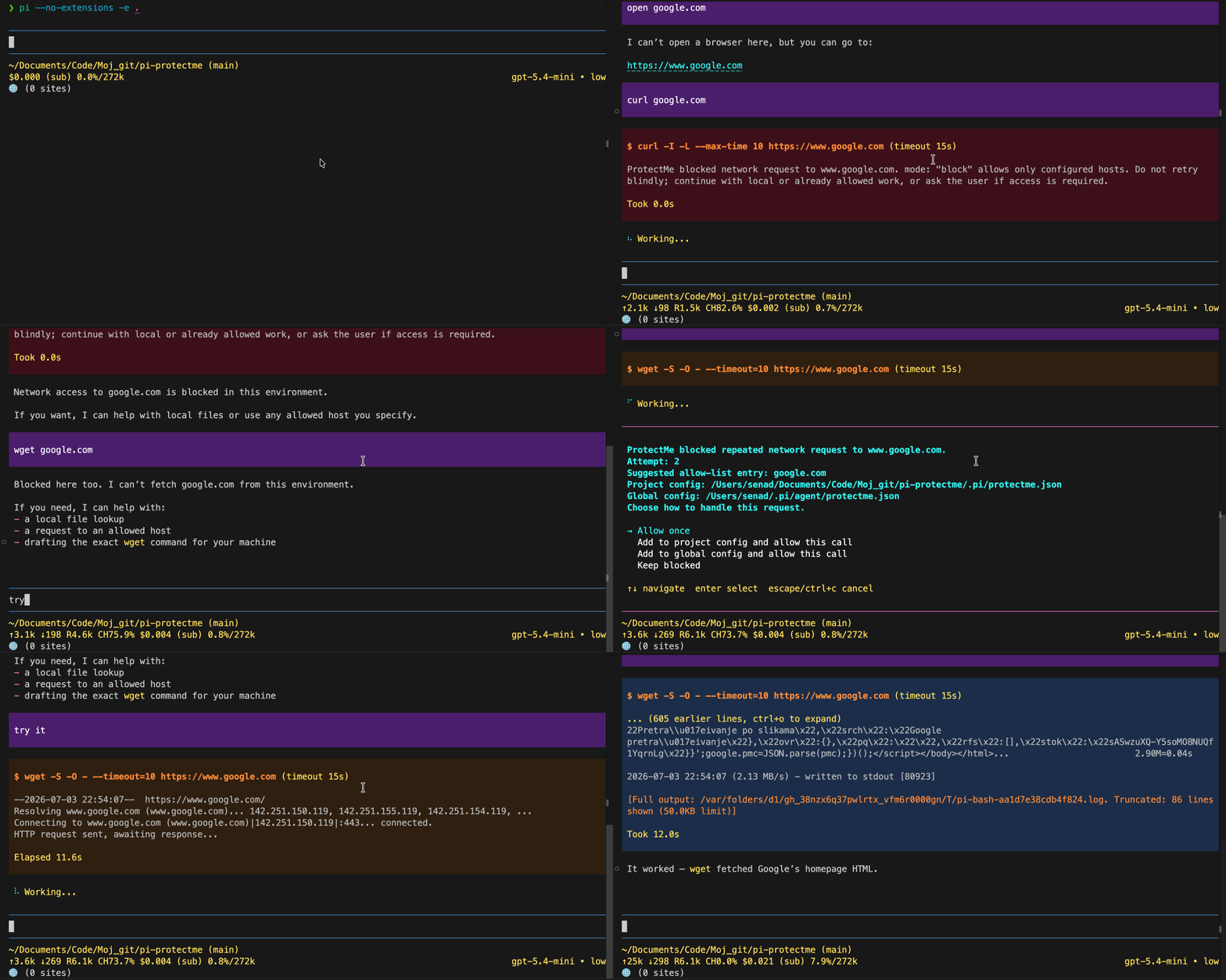
  "image": "https://raw.githubusercontent.com/senad-d/ProtectMe/main/img/demo.gif"
}
Security note
Pi packages can execute code and influence agent behavior. Review the source before installing third-party packages.
README
ProtectMe is a Pi extension for coding agents. It guards supported shell-network requests made by Pi agents or direct !/!! user bash commands, checks destinations against global and project allow lists, and blocks disallowed hosts before execution.
- Network guard boundary: covers supported
curl,wget,http, andhttpsinvocations from Pi agentbashcalls and Pi user bash commands. - Allow-list policy: default
blockmode permits a small developer starter list and denies other unknown hosts;allowmode is available as an explicit temporary bypass. - Project-aware configuration: trusted project config can extend global allow lists and override mode.
- Prompted approvals: repeated blocked hosts can be allowed once or added to a user-selected project/global config when Pi UI confirmation is available.
- Secret-aware logging: blocked-attempt logs are local, bounded, and redact common credential-bearing command fragments.
Security: pi packages run with your full system permissions. ProtectMe is a guardrail for supported Pi command flows, not a sandbox, firewall, or proxy. Read
SECURITY.md.
Table of Contents
- Quick Start
- Installation
- Configuration
- Commands and Tools
- Troubleshooting
- Development and Validation
- Update and Uninstall
- Publishing
- License
Quick Start
pi install npm:@senad-d/protectme
Review the built-in starter allow list and add any narrow project-specific hosts as shown in Configuration, then start pi:
pi
Open the ProtectMe panel:
/protectme
Try a guarded request through Pi:
Ask the agent to run curl https://example.com only if ProtectMe allows the host; otherwise explain the block.
ProtectMe guards supported request-making shell commands. It does not run scanners, make network calls itself, or require API credentials.
Installation
| Scope | Command | Notes |
|---|---|---|
| Global | pi install npm:@senad-d/protectme |
Loads in every trusted pi project. |
| Project-local | pi install npm:@senad-d/protectme -l |
Writes to .pi/settings.json in the current project. |
| One run | pi -e npm:@senad-d/protectme |
Try without changing settings. |
| Git | pi install git:github.com/senad-d/ProtectMe@<tag> |
Pin a tag or commit. |
| Local checkout | pi --no-extensions -e . |
Develop or smoke-test this repository in isolation. |
Source checkout:
git clone https://github.com/senad-d/ProtectMe.git
cd ProtectMe
npm ci
npm run validate
pi --no-extensions -e .
Configuration
ProtectMe reads JSON config from global and project-local files. It does not require secrets. On runtime load, it creates a missing global config at ~/.pi/agent/protectme.json with the built-in defaults; project config is still only written when you explicitly confirm a /protectme edit or repeated-block prompt.
| Scope | Path | Notes |
|---|---|---|
| Global | ~/.pi/agent/protectme.json |
Applies across projects. PI_CODING_AGENT_DIR moves this path in standard Pi installations. |
| Project | .pi/protectme.json |
Applies only when Pi reports the project as trusted. |
| Block log | .pi/agent/protectme_log.jsonl |
Append-only local log for blocked attempts. Allowed requests are not logged. |
Schema:
{
  "mode": "block",
  "allowList": ["example.com", "api.example2.com"]
}
Fields:
| Field | Required | Meaning |
|---|---|---|
mode |
No | "block" blocks disallowed hosts. "allow" permits detected requests without prompts or blocked-attempt logs. |
allowList |
No | Host entries allowed in block mode. Entries are normalized and deduplicated. |
A missing global config is initialized automatically with mode: "block" and this built-in starter allow list:
{
  "mode": "block",
  "allowList": [
    "localhost",
    "127.0.0.1",
    "::1",
    "pi.dev",
    "github.com",
    "npmjs.com",
    "registry.npmjs.org",
    "nodejs.org"
  ]
}
Resolution order:
- Built-in starter entries load first.
- Global config appends additional
allowListentries. - Trusted project config appends additional
allowListentries. - Trusted project
modeoverrides globalmodewhen present. - Untrusted project config is ignored without reading project-local contents.
- Invalid or unreadable loaded config fails closed with
mode: "block"and an empty effective allow list.
Host matching rules:
example.comallowsexample.com, paths on that host, and child subdomains such asapi.example.com.api.example2.comallows itself and child subdomains, but not parent domainexample2.com.- Public suffix entries such as
comorco.ukare ignored and reported as warnings. - Single-label non-localhost entries such as
internal-servicematch only that exact host. localhost, IPv4, and IPv6 entries match exactly, including ports such aslocalhost:3000.- Local subdomains such as
app.localhostare not covered bylocalhost; addapp.localhostor another exact local hostname to your project allow list when needed.
Blocked-attempt log retention:
.pi/agent/protectme_log.jsonlis append-only local state for blocked attempts.- ProtectMe reads recent entries with a bounded tail window and does not compact, upload, or delete the log.
- Delete or truncate
.pi/agent/protectme_log.jsonlif you want to clear local history.
Commands and Tools
| Surface | Name | Use it for |
|---|---|---|
| Command | /protectme |
Inspect effective config, edit project settings, and view recent blocked hosts in Pi TUI mode. |
| Event guard | tool_call |
Block unsupported destinations in agent bash tool calls before execution. |
| Event guard | user_bash |
Block unsupported destinations in direct Pi !/!! user bash commands before execution. |
| Custom tools | None | ProtectMe is event-based and does not register agent tools. |
Guarded request CLIs:
curlwgethttphttps
ProtectMe also inspects approved non-network wrappers such as sudo, env, time, timeout, and nice when they launch a supported request CLI. URL-bearing proxy and resolver options are treated as additional destinations. Static option sources that can hide destinations, such as curl --config or wget --input-file, fail closed.
Suggested workflow:
- Start with
/protectmeto inspect mode, trust status, and allow-list counts. - Keep
modeasblockand add only the narrow project-specific hosts you need, such asapp.localhostfor local subdomain testing. - Let the agent or direct Pi
!/!!commands run supported request CLIs normally. - Review repeated-block prompts carefully before allowing once or choosing which config file receives a saved allow-list entry.
Troubleshooting
| Problem | Try |
|---|---|
| Unexpected block | Run /protectme, inspect mode and counts, then add the intended host to project config or global config. |
| Config warning | Fix invalid JSON, schema errors, unreadable files, or ignored invalid allow-list entries. |
| Project config ignored | Trust the project in Pi or use global config. ProtectMe does not read untrusted .pi/protectme.json. |
| Prompt unavailable | Use Pi TUI mode for confirmation prompts, or edit config manually. Repeated attempts fail closed without UI confirmation. |
| Direct shell command was not blocked | Run commands through Pi !/!!; commands outside Pi are outside ProtectMe's boundary. |
| Unsupported CLI was not blocked | ProtectMe v1 covers curl, wget, http, and https; use OS/container controls for other network tools. |
| Need a temporary bypass | Set project config to { "mode": "allow" }, then switch back to block when finished. |
| Want a clean smoke test | Run pi --no-extensions -e . from this repository. |
Development and Validation
npm ci
npm run typecheck
npm run lint
npm run format:check
npm run test
npm run test:coverage
npm run check:pack
npm run validate
Isolated interactive smoke test:
pi --no-extensions -e .
npm run validate includes type checking, ESLint, formatting checks, script syntax checks, automated tests, and package dry-run validation. CI runs the same validation chain.
Project docs:
docs/STRUCTURE.md— repository layout and runtime boundaries.docs/manual-smoke-test.md— isolated Pi smoke-test checklist.docs/configuration-tui-design-standard.md—/protectmeTUI design standard.specs/spec-protectme-architecture.md— architecture plan.specs/spec-protectme-guidelines.md— implementation guidelines.specs/spec-protectme-tasks.md— implementation task list.
Update and Uninstall
pi update --extensions                    # update installed pi packages
pi update npm:@senad-d/protectme          # update ProtectMe only
pi remove npm:@senad-d/protectme          # remove global install
pi remove npm:@senad-d/protectme -l       # remove project-local install
Publishing
ProtectMe publishes to npm as @senad-d/protectme.
npm login
npm whoami
node scripts/publish-npm.mjs
Run the publish script only from a clean working tree after updating CHANGELOG.md.
License
MIT