@shennguyenrs/pi-emote
Opinionated CGx's pi-emote — Animated pixel-art emote widget for pi TUI
Package details
Install @shennguyenrs/pi-emote from npm and Pi will load the resources declared by the package manifest.
$ pi install npm:@shennguyenrs/pi-emote- Package
@shennguyenrs/pi-emote- Version
0.3.2- Published
- Oct 9, 2026
- Downloads
- 245/mo · 15/wk
- Author
- shennguyenrs
- License
- MIT
- Types
- extension
- Size
- 2.7 MB
- Dependencies
- 0 dependencies · 0 peers
Pi manifest JSON
{
  "extensions": [
    "./src/index.ts"
  ]
}
Security note
Pi packages can execute code and influence agent behavior. Review the source before installing third-party packages.
README
CGx's pi-emote
Live status dashboard & animated pixel-art emote that lives in your pi TUI session. It provides a visual indicator of the agent's state while displaying critical session metadata like model info, context usage, token stats, git status, and extension statuses.
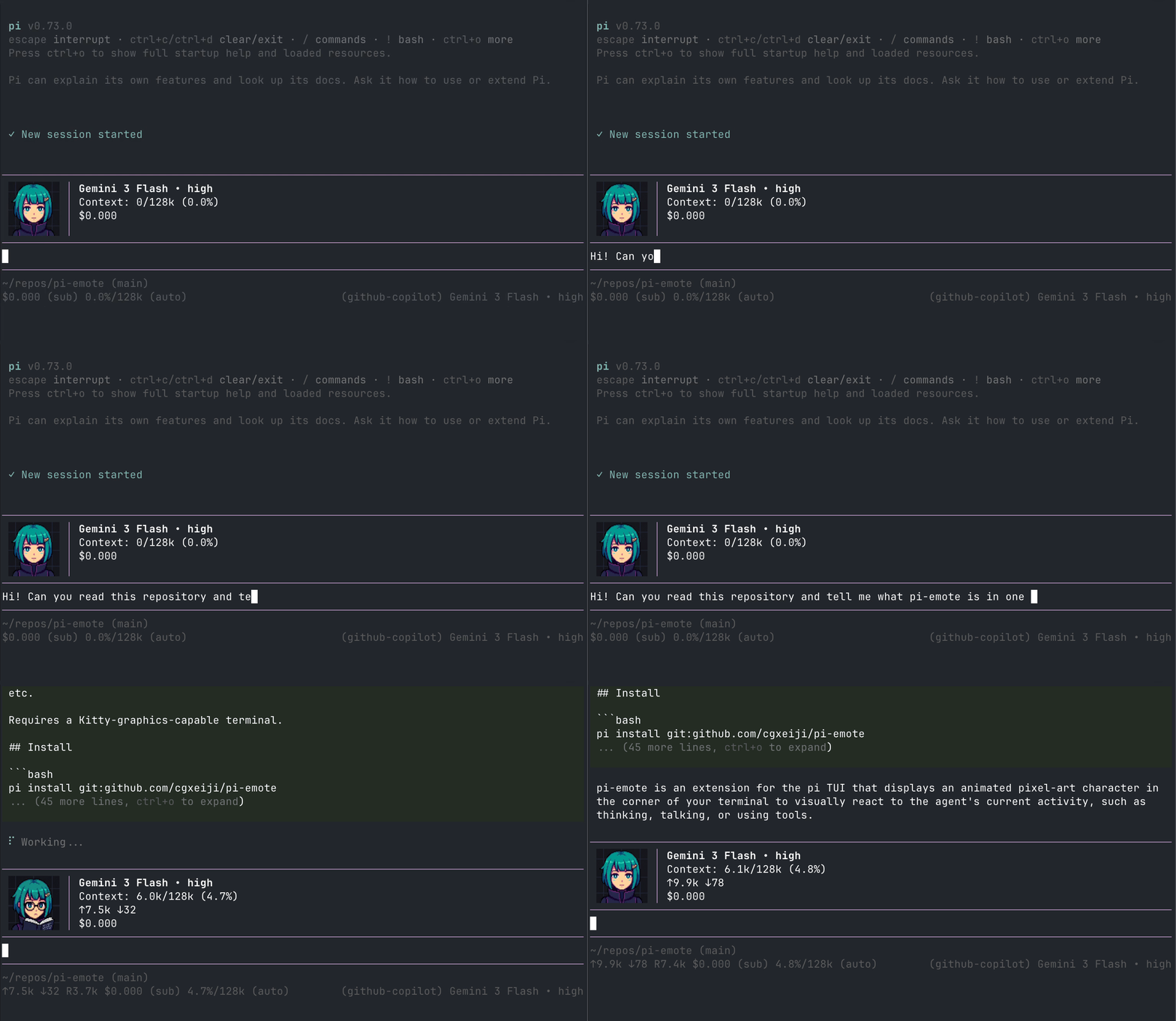
Requires a terminal capable of Kitty graphics or iTerm2 inline images (or automatically falls back to ASCII text emotes).
Features
- Animated Emote: Reacts to agent actions (thinking, talking, reading, writing, compacting context, etc.) with blink and cycle animations.
- Status Dashboard (Placed above editor): Displays:
- Model & Thinking Depth: Active model name and thinking/reasoning level styled with thinking-level colors.
- Context Window Progress Bar: Real-time visual bar representing context usage with breakdown of cached vs. input tokens and hit percentages.
- Session Token & Cost Metrics: Accumulated input (
↑) and output (↓) tokens, cache hit rate (⇄), and estimated session cost. - Environment & Git Info: Shortened CWD path (
~), current Git branch, and pending diff changes (git diff --shortstat). - Extension Integration: Aggregates status badges and messages from other active extensions.
- Dynamic Theming: Configurable colors for all dashboard elements, including dynamic adaptation to the active thinking level.
Cross-Terminal Support
- Kitty / Ghostty / Warp: Full high-resolution Kitty image graphics support.
- iTerm2 / WezTerm: High-resolution iTerm2 inline image support.
- Tmux: Robust rendering inside Tmux sessions:
- DCS Passthrough: High-fidelity images for Kitty and iTerm2 (
allow-passthrough onrequired). - Kitty Unicode Placeholders: Allows images to behave like regular text, respecting pane boundaries and scrolling.
- DCS Passthrough: High-fidelity images for Kitty and iTerm2 (
- Zellij / Screen / Others: Automatic fallback to text/ASCII-based emotes.
Install
pi install git:github.com/shennguyenrs/pi-emote
pi install npm:@shennguyenrs/pi-emote
States
| State | Trigger |
|---|---|
| hi | Session start / Character switch |
| idle | Nothing happening (blinks occasionally) |
| think | Reasoning tokens streaming |
| talk | Text response streaming |
| read | read tool / reading tool output |
| write | write or edit tool |
| tool | Any other tool |
| success | Successful tool execution |
| failure | Failed tool execution (e.g. bash error) |
| compact | Context compaction |
Config
config.json is looked for in the following locations (highest precedence first):
.pi/extensions/pi-emote/emotes/config.json(Project-specific)~/.pi/agent/extensions/pi-emote/emotes/config.json(User global)- Extension's built-in
emotes/config.json(Default fallback)
Example Configuration
{
  "enabled": true,
  "size": 8,
  "character": "aza_choi",
  "hideBelow": 80,
  "terminals": [
    { "match": "zellij", "render": "ascii" },
    { "match": "tmux", "render": "auto" },
    { "match": "screen", "render": "ascii" },
    { "match": "wezterm", "render": "iterm2" },
    { "match": "ghostty", "render": "kitty" },
    { "match": "warpterminal", "render": "kitty" }
  ],
  "holdDuration": {
    "hi": 2000,
    "success": 1200,
    "failure": 1200
  },
  "blinkInterval": [3000, 6000],
  "talkTickMs": 120,
  "cycleMs": 500,
  "idle": {
    "default": "idle.png",
    "blink": "idle_blink.png"
  },
  "talk": {
    "weights": {
      "talk_close.png": 0.15,
      "talk_small.png": 0.3,
      "talk_mid.png": 0.35,
      "talk_wide.png": 0.2
    }
  },
  "theme": {
    "model-name": "thinking-level-color",
    "progress-bar": {
      "default": "text",
      "cache-hit": "success",
      "cache-miss": "error",
      "almost-full": "warning"
    },
    "token-info": "dim",
    "working-directory": "dim",
    "border": "thinking-level-color",
    "vertical-separator": "thinking-level-color"
  },
  "modelCharacters": {
    "gemini*": "pi",
    "gpt*": "ascii"
  },
  "emotes": [
    {
      "model": "*claude*",
      "thinking-level": "high",
      "emote-set": "aza_choi"
    }
  ]
}
Configuration Options
enabled(boolean): Enable or disable the emote widget.size(number): Image width/height in terminal cells (for image-capable terminals).character(string): Default character name (e.g."aza_choi","pi", or"ascii").hideBelow(number): Hide the widget when terminal width is narrower than this many columns (default:80).terminals(array): Custom terminal detection mappings. Supported renderers:"kitty","kitty-unicode","iterm2","ascii","auto".holdDuration(object): Duration (ms) to hold temporary states (hi,success,failure).blinkInterval([min, max]): Random interval range (ms) between idle blinks.talkTickMs/cycleMs(number): Animation tick intervals for talking and cycling states.theme(object): Color theme overrides (model-name,progress-bar,token-info,working-directory,border,vertical-separator). Colors support standard theme colors or"thinking-level-color".modelCharacters(object): Map model name glob patterns to character names.emotes(array): Advanced mappings based on model and thinking level.
Built-in Characters
aza_choi(Default): Pixel-art character with rich animation frames across all states.aza_choi_nobg: Transparent background variant of Aza Choi.pi: The original pi mascot.ascii: Text-based fallback emote set.ascii-bear: Text-based bear emotes.ascii-bot: Text-based robot emotes.
Character Selection & Commands
Switch between characters or bind characters to models directly from chat:
/emote switch— Opens an interactive selection menu to switch the global default character./emote set-model— Sets and persists the character associated with the currently active model.
Custom Characters & Emotes
The extension scans the following directories in order of precedence:
- Local Project:
.pi/extensions/pi-emote/emotes/<character>/ - User Global:
~/.pi/agent/extensions/pi-emote/emotes/<character>/ - Built-in: Extension's
emotes/<character>/
Folder Structure
emotes/<character>/
├── emotes.json          # Optional character-specific animation settings
├── idle/
│   ├── idle.png
│   └── idle_blink.png
├── hi/
├── think/
├── talk/
├── read/
├── write/
├── tool/
├── success/
├── failure/
└── compact/
Guides for Creating Characters
- EXAMPLE_PROMPT.md: Sample prompts for Image-to-Image generation.
- CHARACTER_TEMPLATE.md: A generalized template for any character style.
- ASCII Emotes: Defined in
<character>/fallback.json.
License
MIT