@siesing/pi-shortcuts
Shortcut overlay extension for Pi coding-agent
Package details
Install @siesing/pi-shortcuts from npm and Pi will load the resources declared by the package manifest.
$ pi install npm:@siesing/pi-shortcuts- Package
@siesing/pi-shortcuts- Version
1.0.1- Published
- Apr 28, 2026
- Downloads
- 193/mo · 193/wk
- Author
- siesing
- License
- MIT
- Types
- extension
- Size
- 61.8 KB
- Dependencies
- 0 dependencies · 2 peers
Pi manifest JSON
{
  "extensions": [
    "./index.ts"
  ],
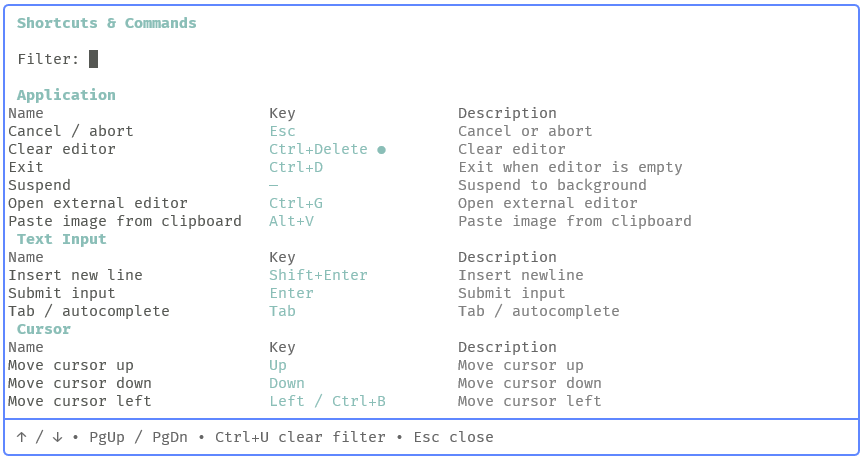
  "image": "https://raw.githubusercontent.com/siesing/pi-shortcuts/main/assets/pi-shortcuts-screenshot.png"
}
Security note
Pi packages can execute code and influence agent behavior. Review the source before installing third-party packages.
README
pi-shortcuts

A small pi coding-agent extension that adds a searchable keyboard and command shortcuts overlay.
It gives you a fast in-app reference for pi's built-in keybindings and any extension commands currently loaded in the session.
Features
- Shows pi built-in keybindings grouped by category
- Refreshes built-in keybindings from the installed pi version at startup
- Falls back to a bundled built-in snapshot if refresh fails
- Includes extension slash commands in the same overlay
- Supports live filtering as you type
- Highlights the first match in each row
- Detects overrides from
~/.pi/agent/keybindings.json - Marks customized built-in keybindings in the UI
- Opens from both a slash command and a keyboard shortcut
Installation
Option A: Global Install (recommended)
pi install npm:@siesing/pi-shortcuts
Option B: Single Project-Local Install
cd my-project
pi install -l npm:@siesing/pi-shortcuts
Usage
Open the overlay with either:
/shortcutsCtrl+Alt+K
Screenshot:

Inside the overlay:
- Type to filter results
↑/↓scroll one linePgUp/PgDnscroll by pageCtrl+Uclears the filterEsccloses the overlay
[!NOTE] Built-in keybindings are loaded from a startup-generated snapshot derived from the installed pi version. The extension caches that snapshot in
.pi-shortcuts-cache/builtin-keybindings.cache.jsonand refreshes it when the pi version, platform, or snapshot schema changes. The package also ships with a bundled fallback snapshot, so the overlay still works if refresh fails. If you customize pi keybindings in~/.pi/agent/keybindings.json, matching built-in entries are updated in the overlay and marked as customized.
How it works
The extension builds the overlay from two sources:
- A startup-generated snapshot of pi built-in keybindings
- Extension commands returned by
pi.getCommands()
At startup, the extension:
- Loads the bundled fallback snapshot
- Reads the cached snapshot, if present
- Regenerates the snapshot from pi's internal keybinding definitions when the cache is stale
- Converts snapshot bindings into overlay rows using extension-owned presentation metadata
- Applies runtime overrides from
~/.pi/agent/keybindings.json - Appends live extension commands from
pi.getCommands()
Built-in rows come from pi's internal keybinding definitions, while naming, grouping, and ordering remain extension-owned metadata. The final rows are normalized into a searchable table, filtered client-side, and rendered in a centered overlay.
Development
Install dependencies:
npm install
Run tests:
npm run tests
Run typecheck:
npm run typecheck
Package structure
index.ts                           Extension entry point and snapshot loading
builtin-metadata.ts                Built-in naming, grouping, and ordering metadata
cache.ts                           Snapshot cache helpers
generator.ts                       Installed-pi snapshot generator
generated/builtin-keybindings.json Bundled fallback snapshot
key-format.ts                      Shared keybinding formatting helpers
overlay.ts                         Overlay UI, filtering, flattening, rendering
highlight.ts                       Match detection and highlighting helpers
snapshot.ts                        Snapshot parsing and row conversion
types.ts                           Shared types
tests/                             Unit tests