@signalridge/pi-tab-status
Terminal tab status indicators for Pi sessions.
Package details
Install @signalridge/pi-tab-status from npm and Pi will load the resources declared by the package manifest.
$ pi install npm:@signalridge/pi-tab-status- Package
@signalridge/pi-tab-status- Version
1.2.7- Published
- Oct 18, 2026
- Downloads
- 431/mo · 24/wk
- Author
- signalridge
- License
- MIT
- Types
- extension
- Size
- 132.4 KB
- Dependencies
- 0 dependencies · 3 peers
Pi manifest JSON
{
  "extensions": [
    "./tab-status.ts"
  ]
}
Security note
Pi packages can execute code and influence agent behavior. Review the source before installing third-party packages.
README
pi-tab-status
Manage as many parallel Pis as your mind can handle without forgetting any of them.
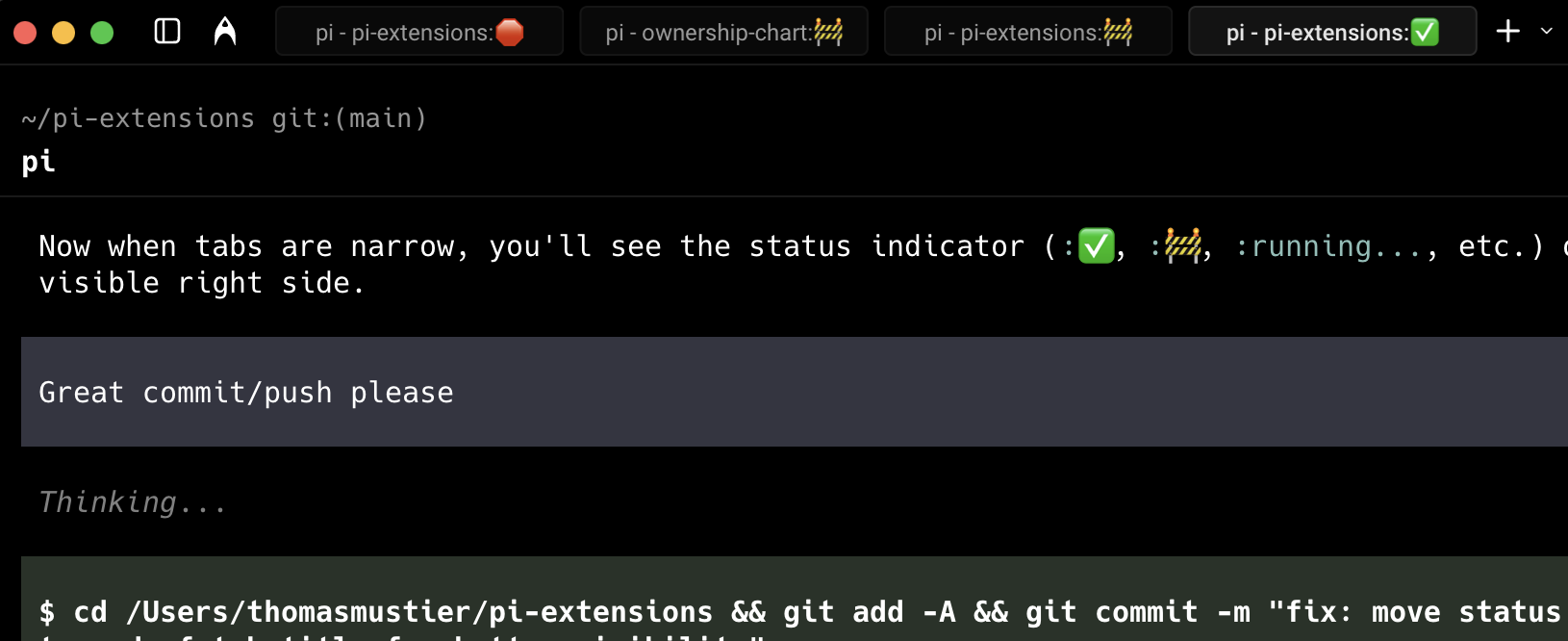
Adds a compact status to tab titles:
- The optional
ridgelinestyle usespi · project · working|done|review|blocked. - The default
legacystyle keeps the original emoji indicators: ✅ committed, 🚧 review needed, 🛑 blocked/error, andrunning...while active. blockedmeans no messages or tool calls for 180s while running, or an agent error. A tool that is still executing keeps the tab inrunning...even when it emits no intermediate events, so a long command is never reported as blocked.
The more tabs you have open, the better it is. Currently tracks one active session per tab.
Install
Pi package manager
pi install npm:@signalridge/pi-tab-statuspi install npm:@signalridge/pi-tab-statusThen filter to just this extension in ~/.pi/agent/settings.json:
{
  "packages": [
    {
      "source": "npm:@signalridge/pi-tab-status",
      "extensions": ["tab-status.ts"]
    }
  ]
}
Local clone
ln -s "$(pwd)/packages/pi-tab-status/tab-status.ts" ~/.pi/agent/extensions/Or add to ~/.pi/agent/settings.json:
{
  "extensions": ["./packages/pi-tab-status/tab-status.ts"]
}
Set the original Signalridge style with:
PI_TAB_STATUS_STYLE=ridgelineThe environment variable is user-overridable; the package still defaults to the legacy style when it is unset.
Todo
- Status indicators in terminal tabs
- Central location to view and navigate to specific tabs across terminal windows
Changelog
See CHANGELOG.md.