@singh-gur/pi-usage
Pi extension: /usage command and indicator for provider subscription quota and OpenRouter key allowance.
Package details
Install @singh-gur/pi-usage from npm and Pi will load the resources declared by the package manifest.
$ pi install npm:@singh-gur/pi-usage- Package
@singh-gur/pi-usage- Version
1.4.1- Published
- Sep 10, 2026
- Downloads
- 274/mo · 274/wk
- Author
- singh-gur
- License
- MIT
- Types
- extension
- Size
- 110 KB
- Dependencies
- 0 dependencies · 2 peers
Pi manifest JSON
{
  "image": "https://raw.githubusercontent.com/singh-gur/pi-usage/main/assets/screenshots/dashboard.png",
  "extensions": [
    "./src/index.ts"
  ]
}Security note
Pi packages can execute code and influence agent behavior. Review the source before installing third-party packages.
README
pi-usage
Know what’s left. Know when it resets. Keep coding.
Your provider allowances, inside Pi. Check subscription windows and OpenRouter key spending with /usage, or keep your active provider’s remaining allowance in the footer. No dashboard hopping. No separate login to manage.
Install · Providers · Settings · npm
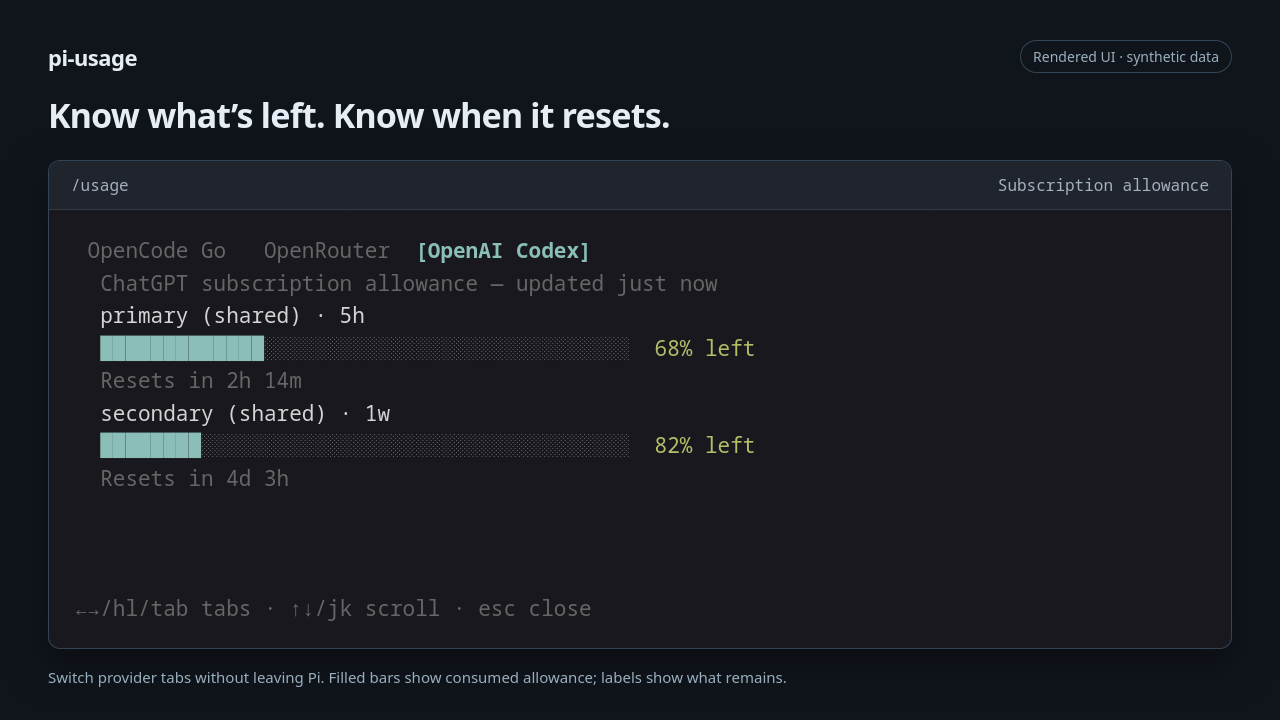
Demo screenshots render the extension’s actual UI output with synthetic data. They are not live account results; colors and spacing depend on your terminal and Pi theme.
Get started
pi install npm:@singh-gur/pi-usage
Start Pi, or run /reload in an existing session. If your supported providers are already configured in Pi, you’re ready:
/usage
Otherwise, run /login in Pi to configure a supported provider first. Codex, Grok, and GitHub Copilot require subscription OAuth credentials, not plain API keys. The extension uses the credentials Pi resolves—there is no second credential setup.
Requires Node.js ≥ 24.16. Built against the Pi 0.85.1 public API; compatibility with other versions has not been independently verified.
Try for the current run:
pi -e npm:@singh-gur/pi-usage
Install from Git:
pi install git:github.com/singh-gur/pi-usage
Update your installed Pi packages:
pi update --extensions
To pin a release, append @<version> to the npm package spec. Pinned versions are skipped by package updates.
One command. A clearer picture.
- See your headroom. Remaining percentages or amounts, quota bars, and reset timing where the provider reports them.
- Check multiple providers. A tab for each configured supported provider; shared and model-specific windows stay separate.
- Stay in flow. An automatic, active-provider footer indicator adds to Pi’s existing status area instead of replacing it.
- Know when data needs attention. Partial results, stale data, and errors are labelled—not disguised as a healthy balance. One provider’s failure does not hide the others.
- No model calls to check usage. Quota lookups are read-only requests to provider endpoints, not prompts or inference requests.
Subscription windows and key spending—not the same thing
Each provider keeps its own units and quota scope. For OpenRouter, that means dollars against the current key’s spending cap, not an estimate of account-wide credit:
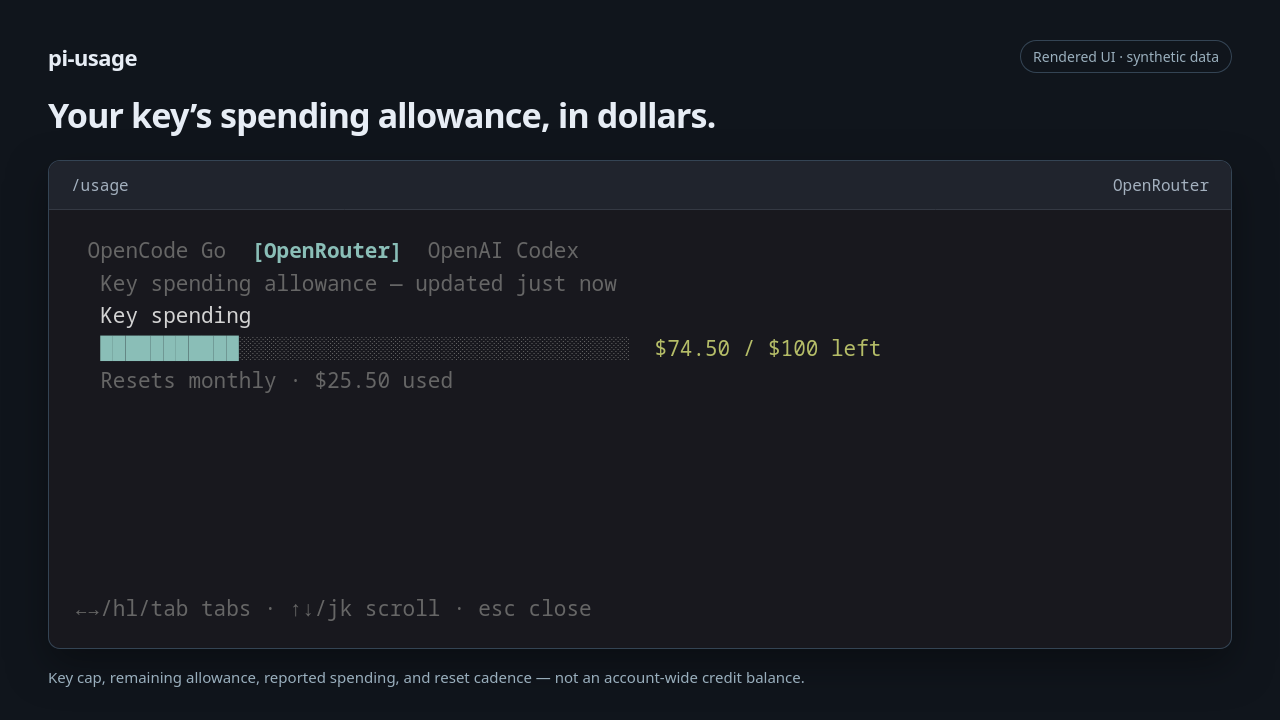
Filled bars show consumed allowance; the label beside each bar shows what remains. Unknown ratios stay text-only rather than getting a misleading bar.
In /usage |
Keys |
|---|---|
| Switch provider | ← / →, h / l, Tab / Shift+Tab |
| Scroll | ↑ / ↓, j / k, Page Up / Page Down, Home / End |
| Close | Esc, Enter, or q |
A glance instead of another command
The footer follows your active provider and shows its primary quota window. Choose full detail, a compact remaining value, or turn it off.
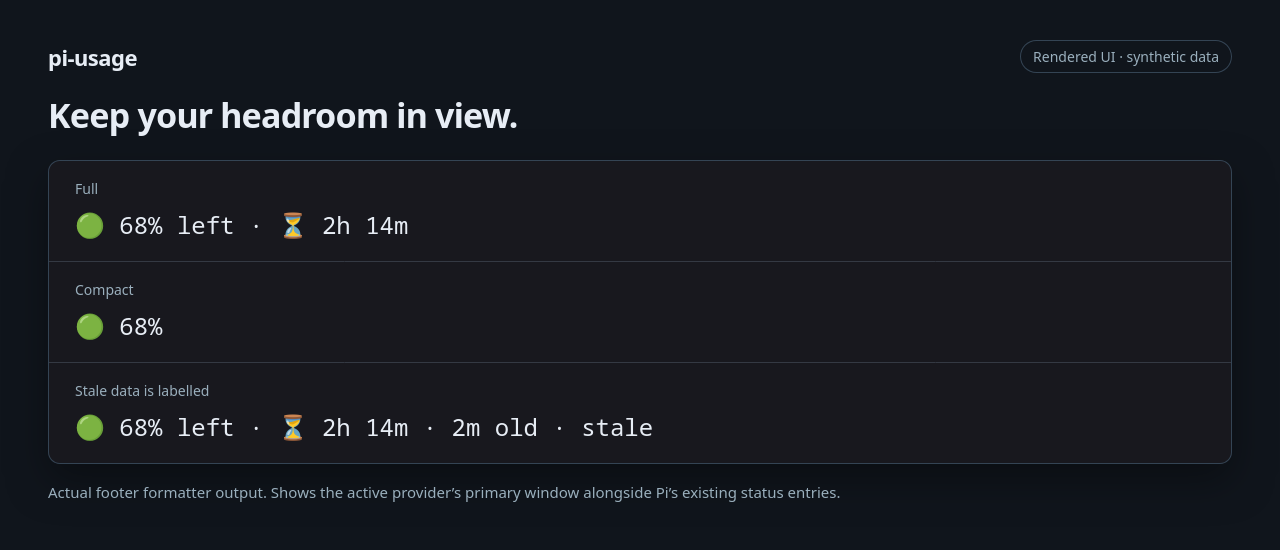
The status light reflects remaining headroom: green above 40%, yellow at 40% or less, red at 15% or less, and neutral when no ratio is available. Open /usage for secondary windows and the full picture.
Supported providers
| Provider | What you can check |
|---|---|
OpenAI Codex · openai-codex |
ChatGPT subscription rate-limit windows, including shared and separate model-specific groups. |
OpenCode Go · opencode-go |
Rolling, weekly, and monthly allowance. |
Z.ai Coding Plan · zai |
Five-hour and weekly coding allowance; monthly MCP/tool allowance shown separately. |
Kimi Coding · kimi-coding |
Main allowance and rolling windows in provider allowance units—not model tokens. |
Grok / xAI · xai |
Coding-credit allowance for the current weekly or monthly period—not all Grok chat quotas. |
GitHub Copilot · github-copilot |
Main allowance percentage for AI-credit or legacy premium-request billing. See the account-support caveat below. |
OpenRouter · openrouter |
Current key spending cap, remaining dollars, and reported spending—not account-wide credit. |
Only configured supported providers appear. One account per provider.
Provider caveats worth knowing
- GitHub Copilot: uses the undocumented
api.github.com/copilot_internal/userendpoint with Pi’s resolved OAuth session token. Token acceptance and account-class support are not live-verified; a rejected token shows an auth error, with no credential fallback. Unlimited personal plans showUnlimited; organization-provided and unclassifiable accounts showOrganization-managed, without an inferred balance. No request counts, currency totals, or organization-wide budgets are inferred. Pi’s official account-specific Copilot OAuth origins are accepted; custom enterprise hosts are not. - Grok free plans: the billing response can look like a paid account with unused coding credits. The view may show a fully remaining weekly allowance even when model calls fail for lack of credits. It is not proof of a paid entitlement.
- OpenRouter: an uncapped key does not mean unlimited account credit.
- All providers: reset times are informational. A passed reset triggers a need for fresh data, not an assumption that quota has replenished. Missing or malformed values stay unknown; legitimate zeros stay zero.
Make it yours
Run /usage-settings to choose Global or Project settings. Changes apply immediately and are saved; project overrides are available only for trusted projects.
| Setting | Options | Default |
|---|---|---|
| Footer format | full, compact, off |
full |
| Poll interval | Off, 1, 5, 15, or 30 minutes | 5 minutes |
| Refresh after turn | On / off | On |
Prefer manual checks only? Set the footer to off. This removes the indicator and disables automatic quota networking; /usage still works. Setting only the poll interval to off stops the timer, not session, provider-switch, or enabled after-turn refreshes.
Settings live in ~/.pi/agent/pi-usage.json globally and <cwd>/.pi/pi-usage.json for trusted project overrides. Project values take precedence; unspecified values inherit. If you edit a file directly, run /reload. Unknown or invalid values are ignored with a warning.
{
  "footerFormat": "full",
  "pollIntervalMinutes": 5,
  "refreshAfterTurn": true
}
With the footer enabled:
- Session start and a switch to a different provider refresh the active provider. Switching models within the same provider does not re-fetch.
- After a settled turn, enabled refreshes run only when cached data is at least 60 seconds old or a reset time has passed.
- Periodic polling refreshes only the active provider at the configured interval.
- Overlapping requests are deduplicated. Failures back off from 30 seconds to a five-minute cap, with valid server
Retry-Afterguidance honored. /usagerefreshes all configured supported providers, bypassing cache age but respecting backoff.
Print, JSON, and RPC modes remain silent. PI_OFFLINE suppresses quota networking, including manual requests.
Read-only by design
Quota requests are GET-only, to fixed official provider endpoints. No billing changes, inference requests, or model-context injection. Custom provider base URLs and proxies are refused before credentials are sent, apart from the explicitly allowed official Copilot OAuth routing.
The extension resolves credentials through Pi’s public APIs. It does not read credential stores, .env files, or browsers itself. Quota results stay in memory, isolated by credential fingerprint so switching accounts cannot show a previous account’s data. Errors use sanitized categories; raw response bodies, tokens, and account identifiers are not displayed.
Like any Pi extension, this package runs with full system access. Review the source before installing. Independently implemented; not affiliated with the providers listed above.
Development
From a checkout, after installing dependencies:
pi -e ./src/index.ts
pnpm install --frozen-lockfile
pnpm test
pnpm run typecheck
pnpm run pack:check
Tests use synthetic payloads and mocked Pi/fetch APIs—no live authenticated quota calls or paid model requests.
Found a mismatch? Open an issue with the provider, package/Pi versions, and a sanitized description. Never include credentials, tokens, or raw account payloads.