@slix/pi-file-tracker
Widget that tracks files edited by the agent and shows per-file diff stats above the input
Package details
Install @slix/pi-file-tracker from npm and Pi will load the resources declared by the package manifest.
$ pi install npm:@slix/pi-file-tracker- Package
@slix/pi-file-tracker- Version
0.1.2- Published
- May 30, 2026
- Downloads
- 445/mo · 13/wk
- Author
- slix
- License
- MIT
- Types
- extension
- Size
- 145.5 KB
- Dependencies
- 0 dependencies · 2 peers
Pi manifest JSON
{
  "extensions": [
    "./index.ts"
  ],
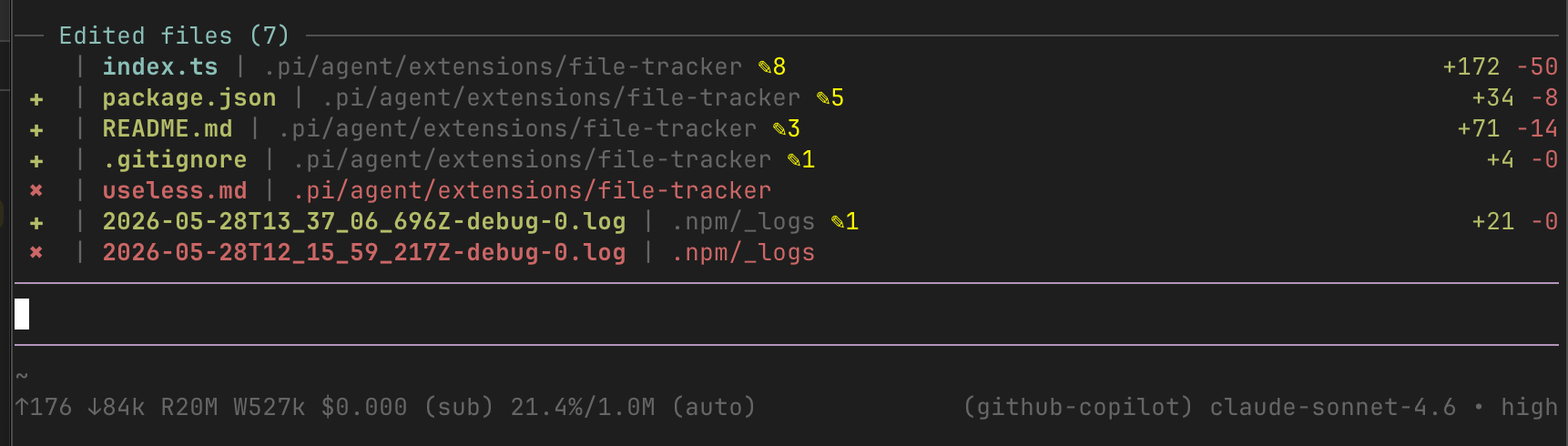
  "image": "https://raw.githubusercontent.com/Slix-M-Lestragg/pi-file-tracker/main/screenshot.png"
}
Security note
Pi packages can execute code and influence agent behavior. Review the source before installing third-party packages.
README
@slix/pi-file-tracker
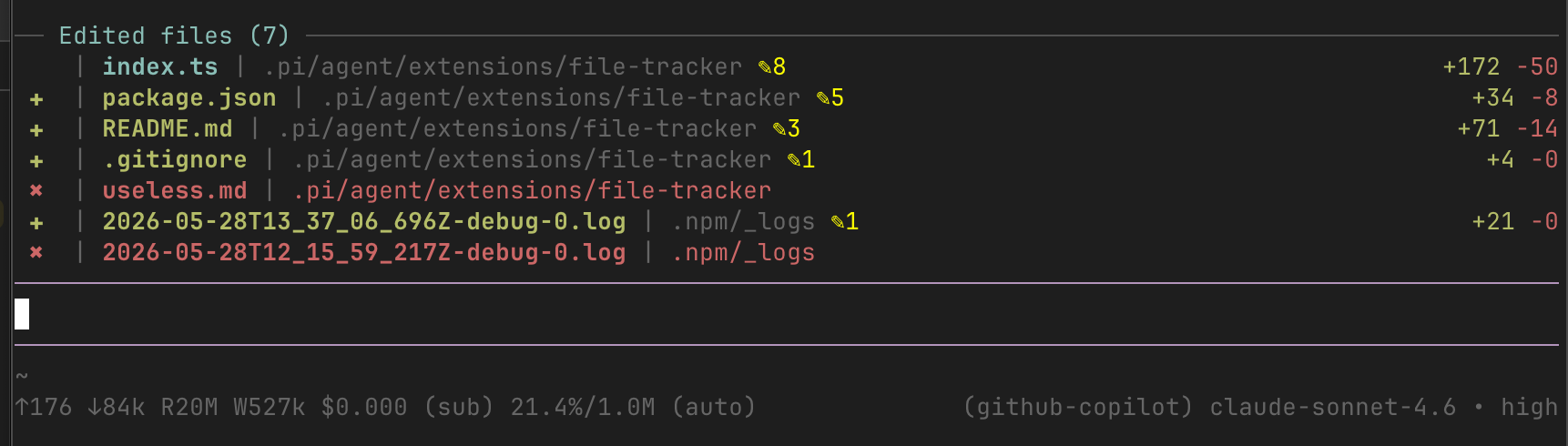
A persistent widget for the pi coding agent that sits above the text input and lists every file the agent has touched during the session — created, edited, or deleted — updated in real time.
Install
pi install npm:@slix/pi-file-tracker
Activates automatically — no configuration needed. Run /reload if pi is already open.
What it shows
── Edited files (3/9) ────────────────────────────────────────────
   | app.ts | src ✎3                                    +42 -7
 ✚ | new.json | config ✎1                               +12 -0
 ✖ | old-utils.ts | src
  … 6 older files hidden  ·  /file-tracker all
Files are listed newest-first (most recently touched at the top). When the count exceeds the configured limit a dim footer shows how many older files are hidden.
| Element | Meaning |
|---|---|
(3/9) |
3 shown out of 9 total tracked this session |
+N (green) |
Lines added across all edits to that file |
-N (red) |
Lines removed (always shown, 0 if none) |
✎N (yellow) |
Number of separate edit/write operations |
✚ (green) |
File was created new during this session |
✖ (red) |
File was deleted during this session |
Stats are right-aligned to the terminal edge. Filenames are shown bold, followed by the parent directory path.
What gets tracked
Every file change the agent makes is captured, regardless of how it happens:
| Source | What's detected |
|---|---|
edit tool |
Exact diff via pi's EditToolDetails |
write tool |
LCS diff against the previous file content |
bash tool |
Full filesystem snapshot diff — catches sed -i, cp, mv, touch, output redirections, rm, and anything else |
The bash tracking takes a directory snapshot before and after every shell command, so no file operation is missed.
Commands
| Command | Effect |
|---|---|
/file-tracker |
Toggle the widget on/off |
/file-tracker chars |
Switch between line-count and character-count display |
/file-tracker clear |
Reset the tracked files list |
/file-tracker all |
Toggle show-all mode — reveal every tracked file regardless of the limit |
/file-tracker limit <N> |
Set a custom visible-file limit (default: 8); also exits show-all mode |
File limit
By default only the 8 most recently touched files are shown. This keeps the widget compact during long sessions without losing history.
- Use
/file-tracker allto temporarily expand to the full list (the header will drop the/counter, e.g.Edited files (9)). - Use
/file-tracker limit 20to raise the cap permanently for the session. - When the limit is active and there are hidden files, the footer shows
… N older files hidden · /file-tracker all.
The limit and show-all state are both persisted to the session file, so they survive restarts.
Session persistence
State is saved to the session file after every change via pi.appendEntry, so the file list survives restarts and session resumes. It is also branch-aware: navigating the session tree with /tree rebuilds the list from the active branch, so the widget always reflects only the files touched on the current conversation path.