@snehalyelmati/pi-tmux-sidechat
Pi extension for read-only tmux side-chat sessions.
Package details
Install @snehalyelmati/pi-tmux-sidechat from npm and Pi will load the resources declared by the package manifest.
$ pi install npm:@snehalyelmati/pi-tmux-sidechat- Package
@snehalyelmati/pi-tmux-sidechat- Version
0.1.3- Published
- Jul 5, 2026
- Downloads
- 179/mo · 46/wk
- Author
- snehalyelmati
- License
- MIT
- Types
- extension
- Size
- 1.3 MB
- Dependencies
- 0 dependencies · 1 peer
Pi manifest JSON
{
  "extensions": [
    "./index.ts"
  ],
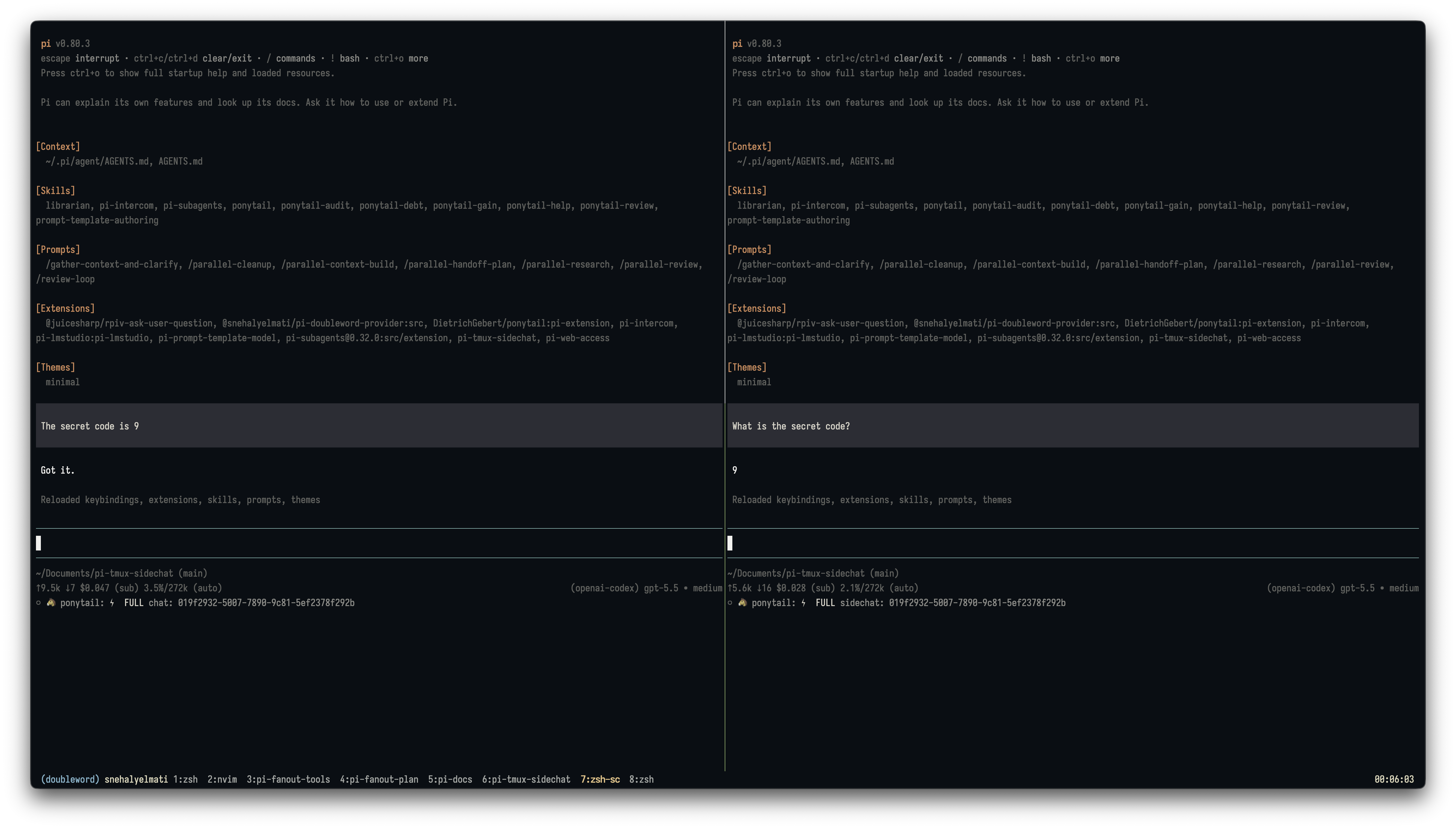
  "image": "https://unpkg.com/@snehalyelmati/pi-tmux-sidechat/assets/screenshot.png"
}
Security note
Pi packages can execute code and influence agent behavior. Review the source before installing third-party packages.
README
pi-tmux-sidechat
Pi extension for /scc — side-chat connect.

Open a read-only side-chat over another Pi pane in the same tmux window. /scc reads the main Pi session from disk once, stores a bounded snapshot in the side-chat session, then answers from that cached context.
Install
pi install npm:@snehalyelmati/pi-tmux-sidechat
For local development from this checkout:
pi -e .
Quick start
- In tmux, open your main Pi pane with this extension loaded.
- Make sure the main pane shows a status like
chat: <session-name-or-id>. - Open a second tmux pane in the same tmux window.
- Start Pi with this extension loaded.
- Run:
/scc
Best practice: run /scc from a fresh side-chat session. If the side-chat already has conversation history, /scc will ask you to use /scc --force so old context is not mixed in by accident.
Commands
/scc— connect from a fresh side-chat session, or reuse the existing connection./scc --force— connect even if this chat already has history./scc --pick— forget current target and reselect/resync./scc --off— disconnect and make this pane writable again./scc --status— show connected target.
Troubleshooting
“No matching saved session file yet”
If /scc finds a Pi pane but no matching saved session, the target chat may be too fresh. Send one message in the main chat, wait for the assistant response, then try /scc again.
No Pi pane found
/scc only looks in the current tmux window. Move the side-chat pane into the same tmux window as the main Pi pane.
No visible chat: label
The main Pi pane must load this extension too. /scc reads the visible chat: <session-name-or-id> status label to match the pane to a saved session file.
Read-only behavior
After connect:
edit,write, andbashare removed from active tools,- a
tool_callguard blocks non-allowlisted tools, - user
!bash is blocked, read, available web read tools, andask_user_questionremain allowed.
Run /scc --off to disconnect and restore the tools that were active before /scc connected.
Snapshot sync
/scc syncs once. If the main session changes later, open a new side-chat or run /scc --pick to capture a fresh snapshot.
Status examples
chat: fanout-mvp— normal named Pi pane.chat: 019f2916-...— normal unnamed Pi pane with full session id.sidechat: fanout-mvp— side-chat connected read-only.sidechat: picking targetsidechat: target missingsidechat: blocked edit
How it works
/scc:
- detects the current tmux pane/window,
- lists Pi panes in this tmux window only,
- reads each candidate pane’s visible
chat: <name-or-full-id>status label with read-onlytmux capture-pane, - matches that label to a saved Pi session file for that pane cwd,
- reads the selected JSONL once,
- reconstructs the latest persisted branch via
parentId, - stores a bounded snapshot in side-chat state,
- enables read-only mode.
No intercom. No messages or keys are sent to the main Pi session.
Limitations
- Candidate panes are scoped to the current tmux window, never cwd alone.
- The main pane must load the extension for active-session matching.
- The target chat needs a saved session file, which may not exist until after the first assistant response.
- The snapshot is not live; run
/scc --pickto refresh.
Tracking issues
Use GitHub Issues for bugs and feature requests.
Suggested labels: bug, enhancement, docs, question.
Notes
Full objective and acceptance checks: docs/scc-objective.md.