@spinejit/pi-compact-tree
Compact process tree for Pi's terminal UI: tool calls fold into one-line summaries and thinking into titles, with a borderless input and a one-line footer.
Package details
Install @spinejit/pi-compact-tree from npm and Pi will load the resources declared by the package manifest.
$ pi install npm:@spinejit/pi-compact-tree- Package
@spinejit/pi-compact-tree- Version
0.1.0- Published
- Oct 23, 2026
- Downloads
- 240/mo · 19/wk
- Author
- ghabix
- License
- Apache-2.0
- Types
- extension, theme
- Size
- 240 KB
- Dependencies
- 0 dependencies · 2 peers
Pi manifest JSON
{
  "image": "https://raw.githubusercontent.com/GhabiX/pi-compact-tree/main/media/compact-tree.gif",
  "themes": [
    "./themes"
  ],
  "extensions": [
    "./extensions/compact-ui2tree.ts"
  ]
}Security note
Pi packages can execute code and influence agent behavior. Review the source before installing third-party packages.
README
pi-compact-tree
English | 简体中文
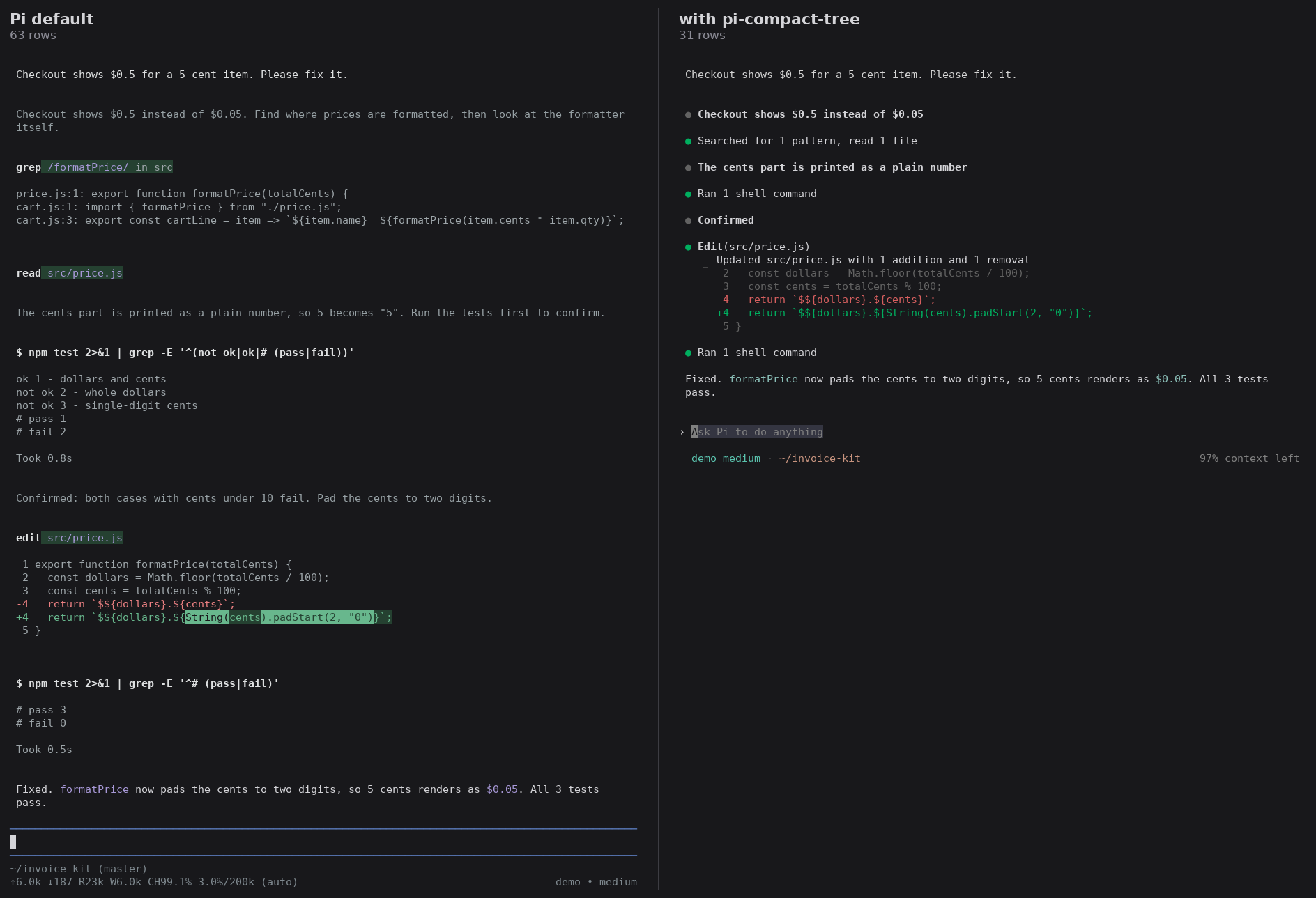
A compact process view for Pi's terminal UI. Each step of the agent collapses into a single line: tool calls fold into a group summary such as Read 2 files, ran 1 shell command, thinking folds into its title, and edits keep their diff. Your scrollback records what happened, not every byte of raw output.

The same session, with and without the extension:
Why it is built this way
- Display only. The extension projects Pi's existing components into a shorter view without modifying the transcript, session history, or tool execution. Disable it to return to Pi's default view; RPC, JSON, and print modes stay native.
- One step, one line. The process renders as a flat list of entries in source order: thinking, edits and writes, notices such as provider errors, and groups of consecutive tool calls. Each group shows one summary sentence plus one line per failed call, so twenty reads collapse into a single line.
- Never far behind the agent. All motion follows a single clock set to a musical meter (♩ = 100, one row per sixteenth note). Live text streams at its arrival rate plus any accumulated backlog. Entries that have not started playing when newer entries arrive enter directly in their final, folded form. Once the model stops, the display needs at most the remainder of the current entry, one rest, and one bar to catch up, however long the backlog was.
- Pi still draws the text. Pi itself renders assistant replies, user messages, and diagnostics while the extension controls only how much of them is shown, keeping terminal links, mouse regions, and line wrapping native.
Features
- Process entries modeled on Claude Code: a
●marker that pulses while running and turns green on completion or red on failure, a summary sentence per group of tool calls, and failed calls listed underneath. - Thinking streams inside an eight-line window, then folds into its first clause as a title.
/thoughtsopens a read-only overlay with the full saved thinking of the session. - Edits and writes keep their own entries: an edit shows a short diff (
Updated src/price.js with 1 addition and 1 removal), a write one line (Wrote 12 lines to src/price.js). - Ctrl+O keeps Pi's shortcut. Expanded, each tool block and each thinking body shows at most eight rows; an edit's diff keeps up to 20.
- A borderless input panel and a single-line footer:
model thinking · directoryon the left,72% context lefton the right. - Two bundled themes:
spine-darkandspine-light.
Install
pi install npm:@spinejit/pi-compact-treeThe extension is built for Pi's regular terminal mode. Because Pi defaults to fullscreen mode, set this in /settings or in ~/.pi/agent/settings.json:
{ "tuiMode": "regular" }Optionally select a bundled theme in /settings, or set "theme": "spine-dark". Themes are registered only when the package is installed, not when the entry file is loaded directly with -e.
Do not combine this package with other extensions that redraw the chat (pi-quiet, pi-compact-display, pi-compact-ui). When using @each1024/pi-mini-mode, let only one of the two extensions provide the footer.
How it works
Entries enter one at a time in source order. Once a playing entry finishes, the display rests until the next beat before the next entry enters, so only the newest entry moves at any moment. Each row of motion takes one sixteenth note (150 ms), and transitions taller than sixteen rows compress into a single bar. Growing, folding, and Ctrl+O toggles all share the same motion model, and each step is verified against what Pi actually drew on screen before the next step starts.
Because terminal scrollback above the viewport cannot be rewritten, the extension keeps those bytes as drawn and seals finished sections of history so they are never projected again. Row concatenation and Pi's line diff still scale with total history length: on a restored 2000-turn history (about 22 000 rows), an idle frame took about 14 ms and an animated frame about 20 ms, within the 25 ms frame clock (measured in October 2026 with Pi 1.1).
The input panel reuses Pi's own editor object, so paste markers, undo, history, completion, and shortcuts keep working. Pressing Esc or submitting a message preserves Pi's native interrupt and steer behavior while immediately skipping any unplayed display backlog from the previous answer.
Limits
- Regular mode only; fullscreen mode is not supported.
- Parts of an entry that have already scrolled into terminal scrollback remain as drawn and may not fold into a single line.
- In a terminal around eight rows tall, the eight-row thinking window cannot fit in the viewport and playback pauses until the terminal height increases.
- Not covered by tests: Termux, manual mouse use, images, very large dynamic overlays, and alternate screen.
Compatibility
Tested with Pi 1.3.0 and 1.4.0 on Node 22.23. Requires Node >= 22.19. Because the extension adapts to the component structure of Pi's regular-mode UI, a new Pi version may require an updated version of this package. Pi's packages are "*" peer dependencies.
Development
npm test          # unit tests and frame-by-frame scenes on Pi's real InteractiveMode with a virtual clock
npm run test:e2e  # tmux sessions with a scripted model
End-to-end tests need tmux and pi on PATH. They launch Pi inside tmux with a separate PI_CODING_AGENT_DIR, leaving your user Pi settings untouched. The user_stack scenario runs only when named (node test/e2e/run.mjs user_stack): it loads the local packages from your own Pi settings, and needs the st CLI when SpineTree is among them.
More from @spinejit
- pi-btw-cached:
/btwside questions on the main session's own request. - pi-background-job: background jobs and output monitors that wake the agent when events occur.
- pi-timeout-policy: one timeout policy for bash, grep, and find.
License
Apache-2.0. See LICENSE.