@sumhou/pi-kimi-usage
Pi footer extension showing Kimi Coding quota progress, reset countdowns, and Moonshot PAYG balance
Package details
Install @sumhou/pi-kimi-usage from npm and Pi will load the resources declared by the package manifest.
$ pi install npm:@sumhou/pi-kimi-usage- Package
@sumhou/pi-kimi-usage- Version
1.1.0- Published
- Aug 29, 2026
- Downloads
- 316/mo · 22/wk
- Author
- sumhou
- License
- MIT
- Types
- extension
- Size
- 56.6 KB
- Dependencies
- 0 dependencies · 1 peer
Pi manifest JSON
{
  "extensions": [
    "./extensions/pi-kimi-usage/index.ts"
  ],
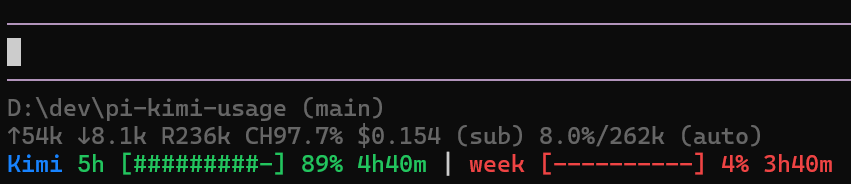
  "image": "https://raw.githubusercontent.com/ShumaoHou/pi-kimi-usage/main/assets/preview.png"
}
Security note
Pi packages can execute code and influence agent behavior. Review the source before installing third-party packages.
README
pi-kimi-usage
A Pi extension that shows Kimi Coding quota progress and reset countdowns in the Pi footer, with the Kimi label always shown in blue and quota bars colored by remaining percentage.
Features
- Displays per-quota ASCII progress bars for the 5-hour and weekly Kimi Coding limits.
- Shows reset countdowns like
1h42mor2d6hnext to each quota. - Shows optional Moonshot PAYG balance.
- Only activates while a
kimi-codingmodel is selected. - Refreshes quota data every 5 minutes; countdowns repaint every minute locally.
Install
pi install npm:@sumhou/pi-kimi-usageOr install from git:
pi install git:github.com/ShumaoHou/pi-kimi-usageUsage
Select any kimi-coding model and the footer will update automatically. Run /kimi-usage for a detailed notification.
Appearance
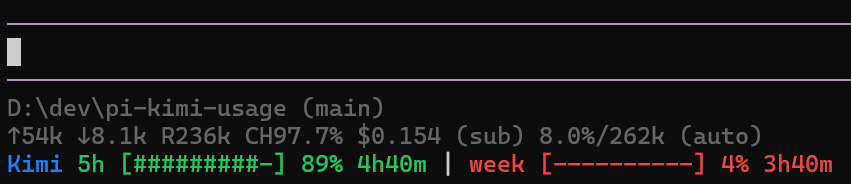
The status bar renders the Kimi label in fixed blue (rgb(23, 131, 255)). Each remaining quota bar is colored on a green-to-red gradient:
- ≥ 80% remaining: green
- ≤ 20% remaining: red
- 20%–80%: linear transition between red and green
No color configuration is currently exposed.
Credentials
- Kimi Coding: resolved from Pi's
kimi-codingprovider auth, thenKIMI_API_KEY, then a stored OAuth token. - Moonshot PAYG:
MOONSHOT_API_KEY.