@surprisal/pi-hyperchart
Pi extension and React inspector for Hyperchart workflows
Package details
Install @surprisal/pi-hyperchart from npm and Pi will load the resources declared by the package manifest.
$ pi install npm:@surprisal/pi-hyperchart- Package
@surprisal/pi-hyperchart- Version
0.4.0- Published
- Jul 23, 2026
- Downloads
- 445/mo · 202/wk
- Author
- termina1
- License
- MIT
- Types
- extension, skill
- Size
- 653.1 KB
- Dependencies
- 4 dependencies · 8 peers
Pi manifest JSON
{
  "extensions": [
    "./extensions/hyperchart.ts"
  ],
  "skills": [
    "./skills/hyperchart"
  ],
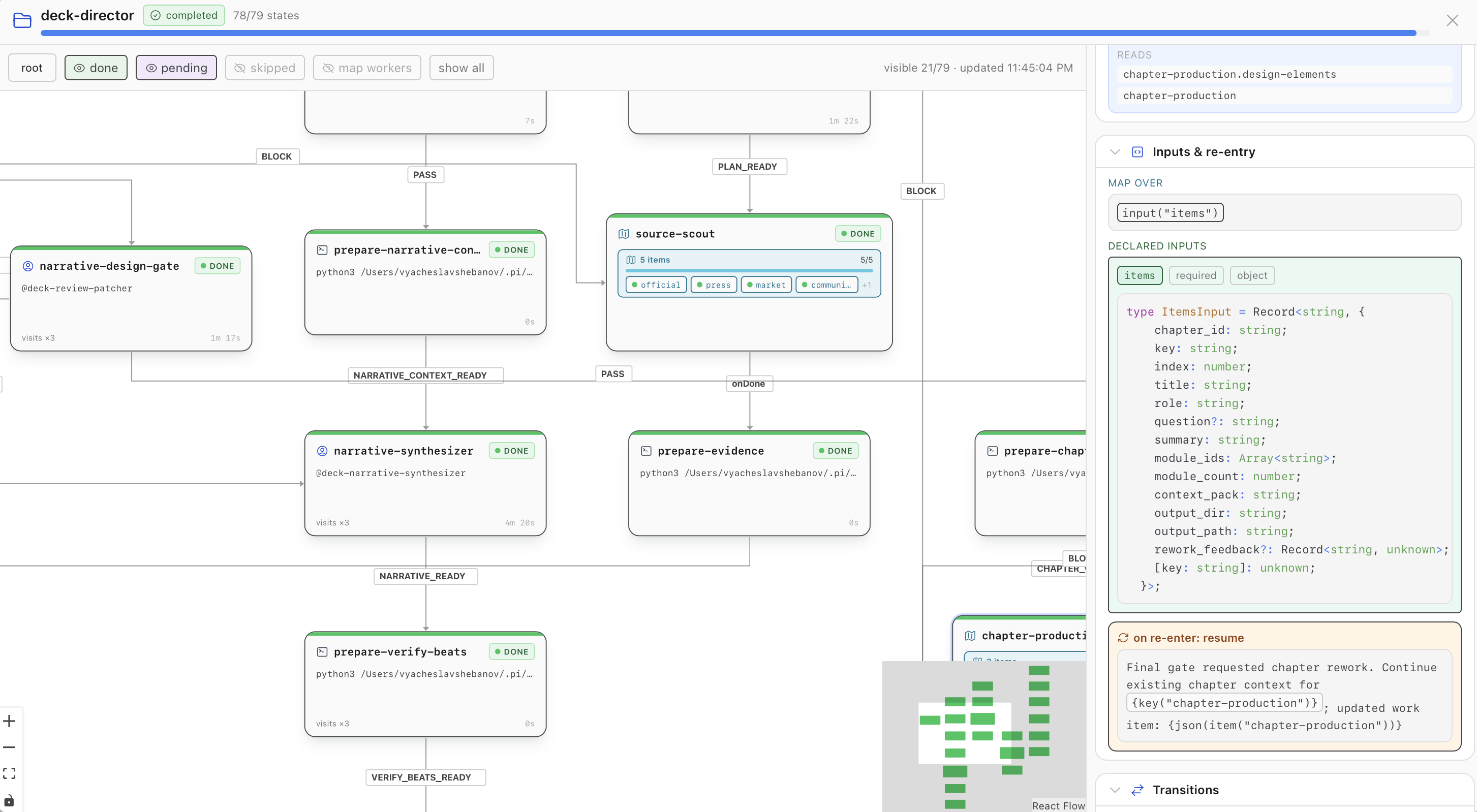
  "image": "https://raw.githubusercontent.com/surprisal-io/hyperchart/main/assets/readme/inspector.png"
}
Security note
Pi packages can execute code and influence agent behavior. Review the source before installing third-party packages.
README
@surprisal/pi-hyperchart
Pi extension, run manager, agent executor, terminal UI, React inspector, and bundled Hyperchart skill.
Install in Pi
Run from your shell:
pi install npm:@surprisal/pi-hyperchart
Start Pi after the install, or restart an existing Pi process. The package declares:
extensions/hyperchart.ts;skills/hyperchart/.
It requires Node.js 22.19 or newer and the exact matching version of @surprisal/hyperchart.
Start a chart
Place a chart in .pi/hypercharts/name.chart.ts, then run:
/hyperchart run name          # asynchronous
/hyperchart run name --wait   # synchronous
The TUI stays compact: it shows active states and path-aware percentage progress. Run /hyperchart to select recent runs; Enter opens the selected run in the full localhost browser inspector. Map actions held behind a concurrency limit appear as waiting; only admitted work appears as running and can expose an active session. Agent cards show declared role/toolset names and their resolved model/tool allowlists; the selected state's run-specific Runtime section shows the actual launch plan plus transcript/current-tool polling and steering.
Asynchronous runs inject terminal prompt into exact originating Pi session/workDir.
--wait/wait: true waits for terminal status, acquires same per-session recoverable delivery lease, and returns prompt directly.
Delivery uses at-least-once semantics.
Durable request IDs and recoverable claims prevent permanent suppression after crash.
Host may redeliver same request after crash between delivery and confirmation.
Treat each requestId idempotently.
Pi agent tool
The consolidated hyperchart tool supports:
action: "list"action: "inspect"action: "run"action: "run_inspect"action: "view"— open the localhost inspector and return its URL; passopen: falseto return the URL onlyaction: "stop"action: "rewind"
Application entry points
| Import | Purpose |
|---|---|
@surprisal/pi-hyperchart |
same in-process command API as /command |
@surprisal/pi-hyperchart/command |
in-process /hyperchart request event |
@surprisal/pi-hyperchart/pi-host |
Pi chart/run host adapter; exposes originating Pi session for new runs |
@surprisal/pi-hyperchart/react |
inspector, graph, run strip, launch dialog, UI providers |
@surprisal/pi-hyperchart/react/styles.css |
required React stylesheet |
@surprisal/pi-hyperchart/package.json |
package metadata and Pi manifest |
Bundled documentation
The published package includes docs/, runnable examples/, and the architecture diagram. The bundled skill links to these local, version-matched files so an agent does not need network access for authoring, tool schemas, or recovery guidance.
Documentation
- Pi extension
- Pi API and agent tools
- React API
- Run your first chart
- Recovery and safety
- React and host integration
MIT · experimental 0.4.0