@taterdoge/pi-status
Configurable status bar with border decorations around the Editor for Pi.
Package details
Install @taterdoge/pi-status from npm and Pi will load the resources declared by the package manifest.
$ pi install npm:@taterdoge/pi-status- Package
@taterdoge/pi-status- Version
2.0.2- Published
- Oct 29, 2026
- Downloads
- 210/mo · 182/wk
- Author
- taterdoge
- License
- MIT
- Types
- extension
- Size
- 683.8 KB
- Dependencies
- 0 dependencies · 2 peers
Pi manifest JSON
{
  "image": "https://raw.githubusercontent.com/TaterDoge/pi-packages/main/apps/pi-status/assets/preview.png",
  "extensions": [
    "./src/index.ts"
  ]
}Security note
Pi packages can execute code and influence agent behavior. Review the source before installing third-party packages.
README
@taterdoge/pi-status


Configurable Pi extension that wraps the Editor with a live status bar using border decorations.

Features
- Status bar drawn as border decorations around the Editor, so the footer line stays free for extension statuses
- Four attachment zones: top-left, top-right, bottom-left, bottom-right
- Fourteen modules with live data: activity state, cwd, git, runtime, cost, model, thinking, context, tokens, turn, current tool, tokens per second, prompt-cache hit rate, session elapsed time —
elapsedis off until you switch it on - Browser layout editor for all settings: drag modules between zones, reorder them, edit the separator, pick the context bar preset
/pi-statusopens that editor directly — there is no TUI submenu to learn- Settings in Pi's extension config directory, with an optional per-project override
- Detect what to show, not just where: git status, project runtime, model, and thinking level are refreshed without a restart
Requirements
- Pi
@earendil-works/pi-coding-agent≥ 0.76, running with a UI - Node-compatible runtime for the extension and the settings server (ships with Pi)
- A built
web/distfor the browser layout editor — included in the published package; only local checkouts needbuild:web
Install
pi install npm:@taterdoge/pi-statusOr try without installing:
pi -e npm:@taterdoge/pi-statusCommands
| Command | Action |
|---|---|
/pi-status |
Open the browser layout editor |
/pi-status settings |
Same as above (the explicit form) |
/pi-status reset |
Restore the default config |
/pi-status help |
List the available subcommands |
Everything else moved to the browser page. The old /pi-status components, /pi-status separator, and /pi-status context-style subcommands are gone: each was a keystroke-and-arrow dialogue for something the page does in one drag or one field, and keeping both meant two places to fix every time a module changed. Layout, ordering, separator, and context bar style are all edited there and applied with Save & apply.
All subcommands appear in the /pi-status completion menu, so typing /pi-status and pressing Tab lists them with descriptions. A bare /pi-status is the fast path and opens the editor.
Browser layout editor
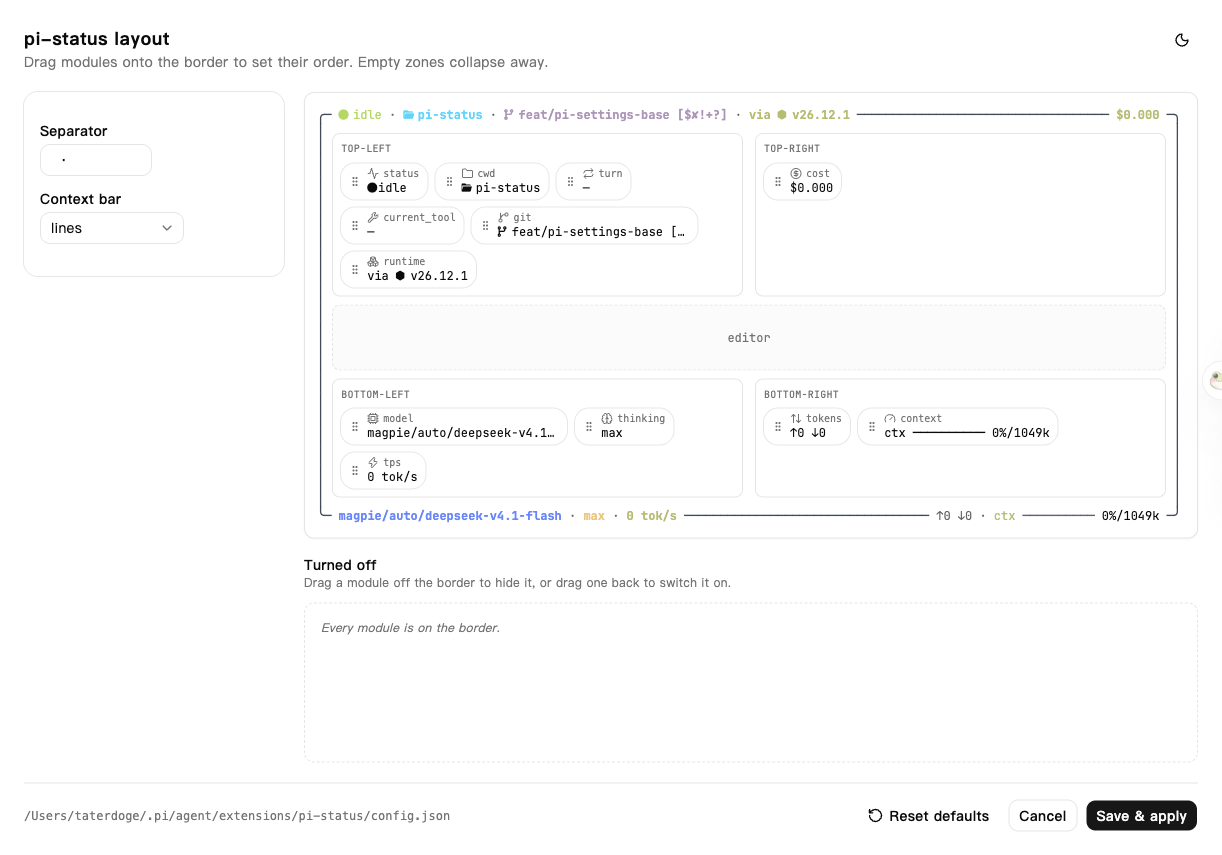
/pi-status settings starts a temporary server on 127.0.0.1 and opens a page where the twelve modules can be dragged between the four border zones.
- The preview is the real renderer. Both border rows are produced by the extension itself through the same
fitBorder+renderZoneContentpath as the terminal, so what the page shows is exactly what the Editor will draw — including where an over-long right zone gets truncated. - Fixed 120-column demo width. The page deliberately does not track the browser window: matching it only bought pixel fidelity and cost font measuring on every resize. Narrow-terminal truncation is still visible in the real terminal, and the server renders the same truncation at request time.
- Drag inside a zone to reorder, drag to another zone to move, and drag onto Turned off to hide a module. Dropping onto another module takes its slot. Pressing a card starts the drag immediately, which is also what keeps the press from selecting the label text; arrow keys reorder the focused card.
- The left panel edits the separator (8 display cells — over-wide input blocks Save, and the config validator clamps it anyway) and picks the context bar preset; Reset defaults and the theme toggle sit with it. These are the same settings the removed TUI subcommands used to change.
- Save & apply writes the config, reloads it, and reinstalls the Editor in the running session. No restart, no
/reload. - Empty payloads are rejected. The server refuses a config that is not a plain object before validation, because validation fills in missing modules and
{}would silently wipe your layout.
The page is guarded by a one-time token exchanged for an HttpOnly; SameSite=Strict cookie, listens only on loopback, and shuts itself down when you save, cancel, or after 10 idle minutes. Static assets are served with a restrictive CSP.
Layout model
The editor works on four ordered lists, not free coordinates. A terminal border only has four attachment points, so arbitrary positions cannot be rendered; a module is "turned off" when it appears in none of the lists. Order inside a list is render order.
Modules
| Component ID | Description | Default zone |
|---|---|---|
status |
Activity state: idle, running, tool, error, or stale | top-left |
cwd |
Working directory basename | top-left |
turn |
Current turn number | top-left |
current_tool |
Currently executing tool name | top-left |
git |
Git branch plus dirty/ahead-behind summary | top-left |
runtime |
Detected project runtime and version | top-left |
cost |
Session cost from provider-reported usage | top-right |
model |
Current provider + model | bottom-left |
thinking |
Thinking level | bottom-left |
tps |
Tokens per second | bottom-left |
tokens |
Session input/output token totals | bottom-right |
context |
Context window usage | bottom-right |
cache |
Prompt-cache hit rate for the session, as a share of every prompt token (cache writes count as misses). Shows 0% before any cache hit is reported. |
bottom-right |
elapsed |
Wall clock since the session started, floored to minutes | off by default |
A tool that runs longer than 30 seconds switches status to stale until it reports back, so a hung tool is visible instead of looking busy forever.
Configuration
Settings are stored in the Pi extension config directory, not merged from Pi settings.json:
~/.pi/agent/extensions/pi-status/config.jsonfor global settings.pi/pi-status.jsonfor project-local settings
Project settings take precedence whenever .pi/pi-status.json exists. Writes follow the same rule: an existing project file is updated, otherwise the global file is written.
separator may be at most 8 display cells wide (CJK and emoji count as two). A longer separator is clamped when the config is loaded or saved, so a hand-edited file cannot break the border. contextBarStyle supports two presets:
blocks:◼◼◼◻◻◻◻◻◻◻lines:━━━───────
Default config:
{
  "separator": " · ",
  "contextBarStyle": "blocks",
  "components": [
    { "id": "status", "enabled": true, "zone": "top-left" },
    { "id": "cwd", "enabled": true, "zone": "top-left" },
    { "id": "turn", "enabled": true, "zone": "top-left" },
    { "id": "current_tool", "enabled": true, "zone": "top-left" },
    { "id": "git", "enabled": true, "zone": "top-left" },
    { "id": "runtime", "enabled": true, "zone": "top-left" },
    { "id": "cost", "enabled": true, "zone": "top-right" },
    { "id": "model", "enabled": true, "zone": "bottom-left" },
    { "id": "thinking", "enabled": true, "zone": "bottom-left" },
    { "id": "tps", "enabled": true, "zone": "bottom-left" },
    { "id": "tokens", "enabled": true, "zone": "bottom-right" },
    { "id": "context", "enabled": true, "zone": "bottom-right" },
    { "id": "cache", "enabled": true, "zone": "bottom-right" },
    { "id": "elapsed", "enabled": false, "zone": "top-left" }
  ]
}
Modules missing from a file are appended with their defaults, unknown IDs are dropped, and an unrecognised zone falls back to top-left. An unreadable or invalid file falls back to the defaults rather than failing the session.
Environment
Disable the extension by default:
PI_STATUS_DISABLED=1 piAccepted truthy values are 1, true, yes, and on.
Local Development
From the repository root:
bun install
bun run --cwd apps/pi-status build:web   # the browser editor is served from web/dist
pi -e ./apps/pi-status
Or install it from the local path:
pi install ./apps/pi-statusThe layout editor 404s on start until web/dist exists — bun run check builds it as part of the repository check. Tests and type checks:
bun test apps/pi-status/test
bun run --cwd apps/pi-status check
Uninstall
pi remove npm:@taterdoge/pi-statusCredits
Status-bar content and layout were adapted from a custom implementation, then moved to Pi's border decoration system for this package.