@timiliang/pi-quotas
Compact provider quota transcript and active-provider footer for Pi, with Grok, GLM China, and guided OpenCode Go setup.
Package details
Install @timiliang/pi-quotas from npm and Pi will load the resources declared by the package manifest.
$ pi install npm:@timiliang/pi-quotas- Package
@timiliang/pi-quotas- Version
0.5.2- Published
- Aug 27, 2026
- Downloads
- 455/mo · 16/wk
- Author
- timiliang
- License
- MIT
- Types
- extension
- Size
- 280.1 KB
- Dependencies
- 0 dependencies · 2 peers
Pi manifest JSON
{
  "extensions": [
    "./src/extensions/core/index.ts",
    "./src/extensions/command-quotas/index.ts",
    "./src/extensions/command-tokens/index.ts",
    "./src/extensions/usage-status/index.ts",
    "./src/extensions/token-status/index.ts",
    "./src/extensions/quota-warnings/index.ts"
  ],
  "image": "https://raw.githubusercontent.com/LJC-god/pi-quotas/main/docs/quotas-dashboard.png"
}
Security note
Pi packages can execute code and influence agent behavior. Review the source before installing third-party packages.
README
@timiliang/pi-quotas
Public feature fork of latentminds-ai/pi-quotas, preserving the original MIT license and author attribution.
Includes first-class support for the China-region GLM Coding Plan (zai-coding-cn).
Quota monitoring for Pi. Shows remaining usage and rate limits for Anthropic, OpenAI Codex, GitHub Copilot, OpenRouter, Synthetic, Grok, Z.ai, OpenCode Go, and Kimi Code directly in your Pi session.
Interface
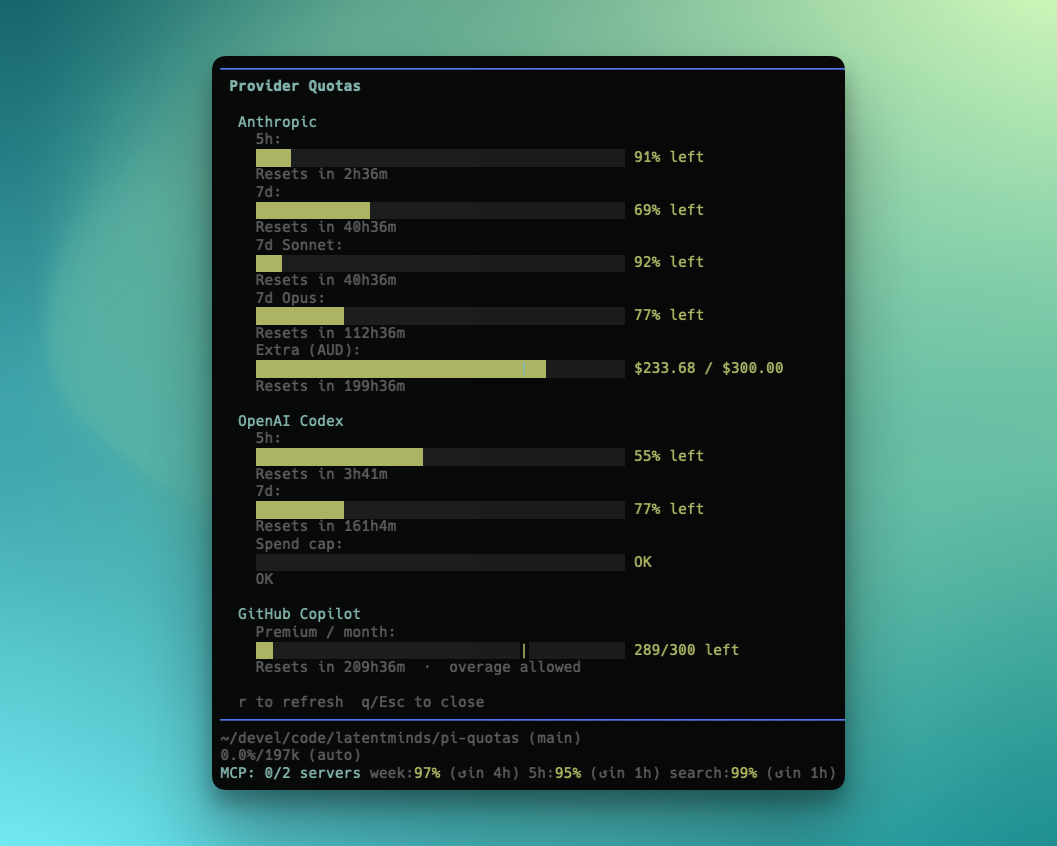
/usage writes one compact quota block into the transcript. Every provider uses its own bright colour across the heading, progress bars, values, and reset times; each quota window stays on one line and the entry never enters LLM context. The footer separately shows only the provider used by the active model.
Install
From npm (recommended):
pi install npm:@timiliang/pi-quotas
From source:
git clone https://github.com/LJC-god/pi-quotas.git
pi install ./pi-quotas
Try without installing:
pi -e npm:@timiliang/pi-quotas
Commands
| Command | Description |
|---|---|
/usage |
Compact quota entry for connected providers |
/usage --refresh |
Bypass the quota cache and append a new entry |
/quotas |
Compatibility alias for /usage |
/anthropic:quotas |
Anthropic quotas only |
/codex:quotas |
OpenAI Codex quotas only |
/github:quotas |
GitHub Copilot quotas only |
/openrouter:quotas |
OpenRouter quotas only |
/synthetic:quotas |
Synthetic quotas only |
/grok:quotas |
Grok quotas only |
/zai:quotas |
Z.ai quotas only |
/zai-cn:quotas |
GLM China quotas only |
/opencode-go:quotas |
OpenCode Go quotas only |
/opencode-go:setup |
Configure OpenCode Go dashboard quota access |
/opencode-go:clear |
Clear saved OpenCode Go dashboard quota access |
/kimi:quotas |
Kimi Code quotas only |
/tokens |
Cross-session token/cost usage |
/quotas:settings |
Toggle individual features on or off |
Features
Static usage transcript
Run /usage to append a compact static quota entry to the transcript. Provider headings are colour-coded and every quota window uses one aligned row containing its progress bar, usage, counts or currency, and reset time. There is no modal, border, close key, or unused vertical padding. Use /usage --refresh to bypass the normal provider cache.
The combined entry hides providers with no configured subscription, credentials that cannot report subscription usage, and successful responses with no quota windows. Provider-specific commands use the same static renderer and remain available for detailed authentication or API diagnostics. /quotas remains as a compatibility alias.
Footer status widget
When your active model is from a supported provider, the Pi footer shows only that provider's quota, balance, or budget. It never lists every configured provider and does not pin OpenCode Go when another model is selected. The compact provider label changes immediately after model selection, and data refreshes every 60 seconds and on each turn. Colours shift from green → amber → red as usage climbs. A dim ~ marks last-known data retained through a temporary network failure.
The footer uses ASCII structural markers so Windows terminals do not need to render decorative separator or reset glyphs:
Codex | 7d: 87% left (reset in 5d23h24m) | cap: OK
Quota warnings
Automatic notifications when projected usage is on track to exceed limits before the window resets. Warnings escalate from warning → high → critical based on your consumption pace.
Per-feature toggles
Use /quotas:settings to enable or disable:
- Combined
/usagecommand and/quotascompatibility alias - Per-provider commands (
/anthropic:quotas,/codex:quotas,/github:quotas,/openrouter:quotas,/synthetic:quotas,/grok:quotas,/zai:quotas,/zai-cn:quotas,/opencode-go:quotas,/kimi:quotas) - Current-provider footer quota status
- Quota warning notifications
- Defer to Synthetic — when both pi-quotas and pi-synthetic are loaded, pi-quotas hides its own Synthetic footer to avoid showing duplicate quota information. Enabled by default; disable if you prefer to see both footers.
Settings can be saved globally (~/.pi/agent/extensions/quotas.json) or per-project (.pi/quotas.json). Run /reload after changing command visibility.
Supported providers
| Provider | Windows | Details |
|---|---|---|
| Anthropic | 5h, 7d, per-model 7d, extra usage | Utilization percentages; optional overage budget in local currency |
| OpenAI Codex | 5h, 7d, credits, spend cap | Rate-limit percentages; credit balance; spend-cap reached/OK |
| GitHub Copilot | Premium/chat/completions per month | Remaining/entitlement counts with overage indicators |
| OpenRouter | Monthly budget, daily/weekly/monthly usage | USD spending tracking with cents precision; optional per-key budget limits; UTC-based period resets |
| Synthetic | Subscription, search/hour, free tools, weekly tokens, 5h limit | Request counts and token budgets; rolling five-hour rate limit; weekly token regen |
| Grok | Weekly credits, per-product usage, on-demand spend | SuperGrok credit usage from the xAI CLI billing endpoint |
| Z.ai | 5h, 7d, monthly web searches | Token utilisation percentages (rolling 5h/7d windows); monthly web-search count limit |
| GLM China | Session/month coding credits, token windows, monthly tools | China Coding Plan usage from the BigModel monitor endpoint; absolute credit counts when available |
| OpenCode Go | Rolling 5h, weekly, monthly USD | USD spend tracking against tier limits; cross-session token/cost aggregation via the /tokens command |
| Kimi Code | Rolling 5h, weekly | Coding Plan request allowances with reset times |
Credentials
pi-quotas reads existing Pi auth entries from ~/.pi/agent/auth.json:
zai-coding-cn- Z.ai/GLM China Coding Plan API key (ZAI_CODING_CN_API_KEY)anthropic— Anthropic OAuth tokenopenai-codex— Codex access token (also reads~/.codex/auth.jsonfor the account ID)github-copilot— GitHub Copilot OAuth token (falls back togh auth tokenif needed)openrouter— OpenRouter API key (Bearer token)synthetic— Synthetic API key (set theSYNTHETIC_API_KEYenvironment variable)xai— Grok/xAI OAuth access tokenzai— Z.ai (Zhipu AI / GLM Coding Plan) API keyopencode-go— the model API key remains managed by Pi through/login opencode-go; dashboard quota access is configured separately with/opencode-go:setupkimi-coding— Kimi Code OAuth access token
For OpenCode Go, run /opencode-go:setup. It uses exactly two guided input screens. Step 1 shows the clickable https://opencode.ai/auth entry point and the expected https://opencode.ai/workspace/<id>/go page format directly above the workspace URL/ID input. Step 2 shows F12 > Application > Storage > Cookies > opencode.ai > auth > Value directly above the masked cookie input and asks for only the auth value. The command does not open a browser. It validates both values before saving them to ~/.config/opencode/opencode-quota/opencode-go.json. /opencode-go:clear removes only this dashboard credential; it does not remove Pi's model API key. OPENCODE_GO_WORKSPACE_ID and OPENCODE_GO_AUTH_COOKIE remain supported and take precedence over the managed file.
No additional setup is required for most other providers if Pi can already use them. Global Z.ai and GLM China are independent providers and both appear when both are configured. The global key is sent only to api.z.ai with Bearer authentication; the China key is sent only to open.bigmodel.cn using that endpoint's raw Authorization format. For Synthetic, export SYNTHETIC_API_KEY in your shell or Pi environment.
Requirements
- Pi >= 0.61.0
Changelog
See CHANGELOG.md for release notes and recent changes.
License
MIT © Latent Minds Pty Ltd
Acknowledgements
This project was inspired by @aliou/pi-synthetic.