@tinysquid/pi-opencode-go-usage
OpenCode Go plan usage in pi: footer status line (5h/weekly/monthly) + /opencode-go usage table, via the opencode.ai console API
Package details
Install @tinysquid/pi-opencode-go-usage from npm and Pi will load the resources declared by the package manifest.
$ pi install npm:@tinysquid/pi-opencode-go-usage- Package
@tinysquid/pi-opencode-go-usage- Version
0.2.2- Published
- Sep 22, 2026
- Downloads
- 872/mo · 694/wk
- Author
- tinysquid
- License
- MIT
- Types
- extension
- Size
- 188.1 KB
- Dependencies
- 0 dependencies · 1 peer
Pi manifest JSON
{
  "extensions": [
    "./opencode-go-usage.ts"
  ]
}
Security note
Pi packages can execute code and influence agent behavior. Review the source before installing third-party packages.
README
@tinysquid/pi-opencode-go-usage


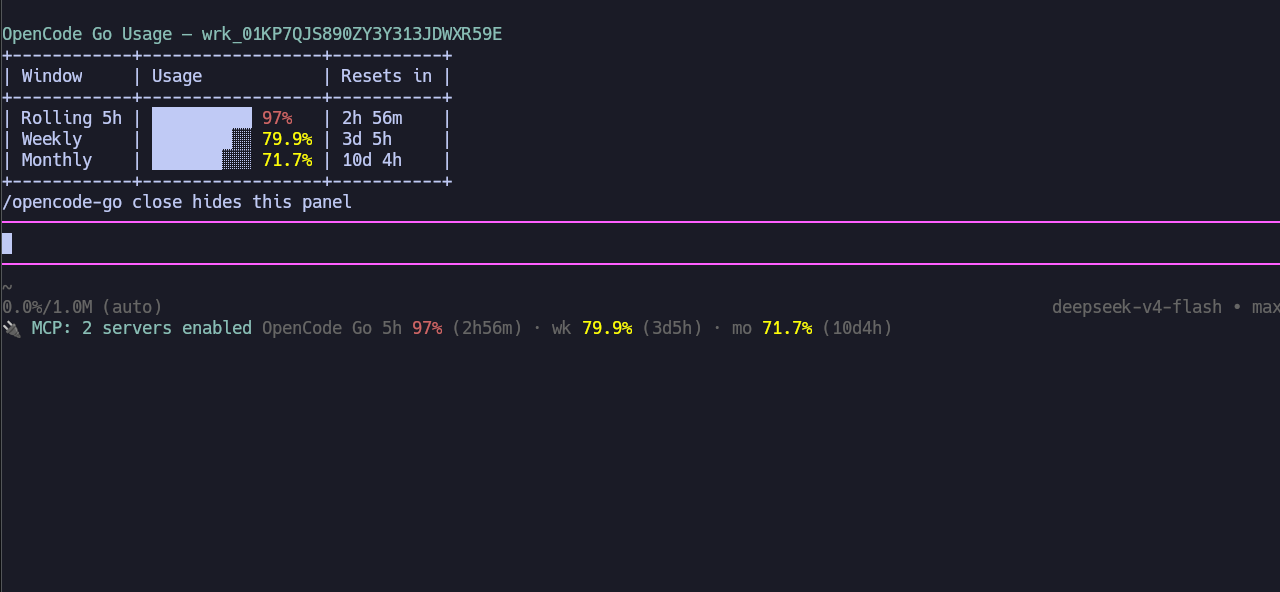
Track your OpenCode Go plan usage without leaving pi. The extension appends a status line to the built-in footer — rolling 5-hour, weekly, and monthly usage with optional reset countdowns — and provides an /opencode-go command that shows a full usage table on demand. Data comes from opencode.ai's console API, authenticated with your browser's __Host-console_session cookie and your workspace id.
Install
pi install npm:@tinysquid/pi-opencode-go-usageFor local development, symlink the extension directory (multi-file extensions must be loaded as a directory, not a single file):
ln -sfn $(pwd)/opencode-go-usage ~/.pi/agent/extensions/opencode-go-usageGetting started
Set your workspace id. Copy it from the OpenCode Go dashboard URL (
https://opencode.ai/workspace/wrk_…/go), then:/opencode-go workspace-id <id|url>A bare
wrk_…id or the full URL both work — the id is extracted and validated.Set your session cookie. In a browser logged in to opencode.ai, open DevTools → Application → Cookies and copy the value of the
__Host-console_sessioncookie (anst_…string), then:/opencode-go session-cookieWith no argument this opens an input dialog — the recommended path, since inline slash-command text is persisted to session history while dialog input is not. You can also pass the value as an argument; a bare
st_…value, a__Host-console_session=…pair, or a fullCookie:header line are all accepted and normalized.
That's it — the footer appears immediately and refreshes in the background.
[!IMPORTANT] The session cookie is a browser credential that grants access to your opencode.ai account. It is stored with
0600permissions in pi's agent directory and should never be shared or committed. If it expires (or opencode.ai rotates the session), the footer tells you — just set a fresh one.
[!NOTE] Upgrading from 0.1.x? opencode.ai replaced the dashboard page with an API, and the old
authcookie no longer works. Re-authenticate with/opencode-go session-cookieusing the new__Host-console_sessioncookie value. The oldauth-cookiesubcommand name is kept as an alias, and existing configs are migrated in place.
Commands
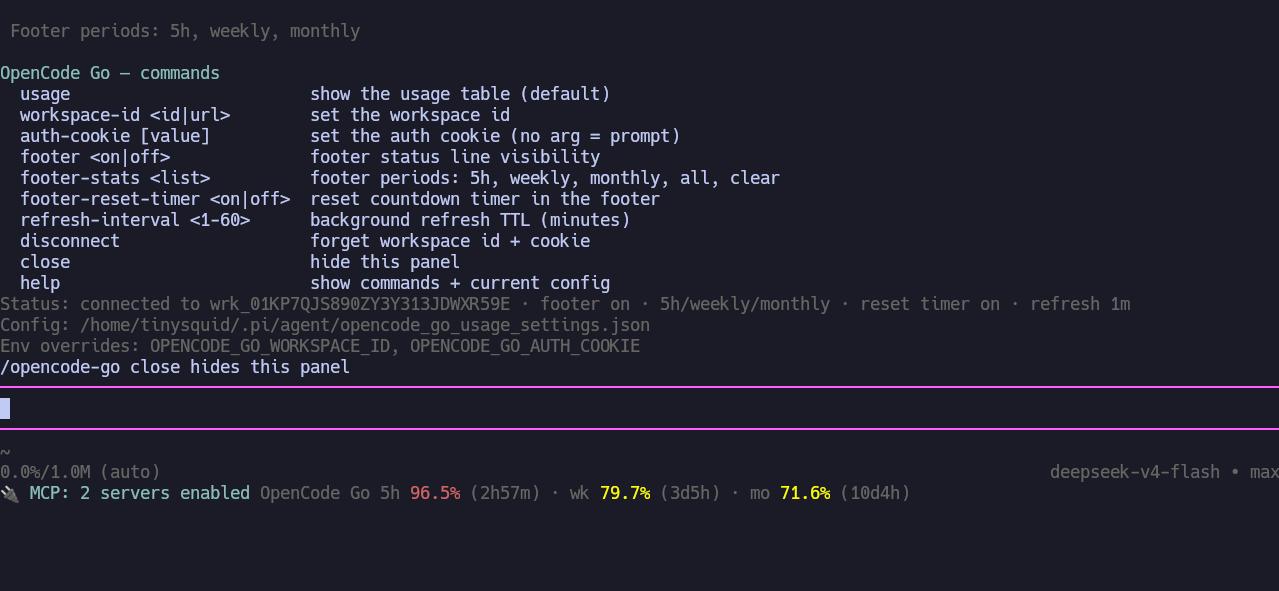
All commands live under /opencode-go; subcommands and values autocomplete as you type.
| Command | Description |
|---|---|
/opencode-go (usage) |
Force-fetch and show the usage table widget |
/opencode-go close |
Hide the usage/help panel |
/opencode-go workspace-id <id|url> |
Set the workspace (org) id |
/opencode-go session-cookie [value] |
Set the session cookie (no arg = prompt) |
/opencode-go footer <on|off> |
Toggle footer status visibility |
/opencode-go footer-stats <list> |
Footer periods: 5h, weekly, monthly, a comma list, all, clear |
/opencode-go footer-reset-timer <on|off> |
Toggle reset countdown timers in the footer (default off) |
/opencode-go refresh-interval <1-60> |
Background refresh TTL in minutes (default 3) |
/opencode-go disconnect |
Forget workspace id + cookie (display settings kept) |
/opencode-go help |
Command list + current config as a widget |
The footer status line joins onto the built-in footer's extension-status line (the footer itself is never replaced):
OpenCode Go 5h 62% · wk 31% · mo 44%
OpenCode Go 5h 62% (1h12m) · wk 31% (3d4h) · mo 44% (12d0h)   ← with reset timers on
Percentages are colored by threshold: dim below 70%, warning at 70%+, error at 90%+.
Configuration
Settings live in ~/.pi/agent/opencode_go_usage_settings.json, created with defaults (mode 0600) on first load. Every write is atomic (tmp + rename) at 0600:
{
  "workspaceId": "",
  "sessionCookie": "",
  "footerEnabled": true,
  "footerPeriods": ["5h", "weekly", "monthly"],
  "footerCountdowns": false,
  "refreshMinutes": 3
}- Env var overrides:
OPENCODE_GO_WORKSPACE_IDandOPENCODE_GO_SESSION_COOKIEtake precedence over the file. Commands that save a field warn when a matching env var shadows it. - Invalid values fall back to that field's default (never crash).
footerPeriodsaccepts alias tokens (5hr,wk,mo, …) in any order and is stored canonically; an empty array is valid and hides all periods.refreshMinutesis clamped to 1–60. - The file is the escape hatch — every setting is also managed by the commands above.
Behavior notes
- Background refresh: a 30s timer fetches only when the cached data is older than the TTL; each
turn_endalways refreshes (usage just changed), and/opencode-go usagealways fetches. Concurrent triggers share a single in-flight request. Session start renders the footer instantly from last known state and fetches without blocking startup. - Failures: on fetch failure the footer keeps the last data with a
· stalemarker; if nothing was ever fetched it shows the error (e.g.session expired — set a fresh one with /opencode-go session-cookie). A 401/403, or a 200 response without meters, is reported as an expired/invalid session cookie. - Partial data: a response missing a window (e.g. no
monthmeter) simply omits that row. The API reports usage in microcents; the extension converts to percentages and never displays dollar amounts. - Print mode (
pi -p):usageandhelpprint to stdout; UI-dependent features (footer, widgets, the cookie prompt) are inactive — pass the cookie as an argument instead. - API endpoint: requests go to
https://opencode.ai/console/api/go/statuswith the session cookie, anx-org-idheader, and a 20s timeout.