@toddzheng024/code-eye
GitHub-style code review panel with agent-guided walkthroughs: per-commit diffs and line-comment feedback, for pi, Claude Code, and Codex
Package details
Install @toddzheng024/code-eye from npm and Pi will load the resources declared by the package manifest.
$ pi install npm:@toddzheng024/code-eye- Package
@toddzheng024/code-eye- Version
0.4.0- Published
- Jul 22, 2026
- Downloads
- 215/mo · 215/wk
- Author
- toddzheng024
- License
- Apache-2.0
- Types
- extension
- Size
- 1.6 MB
- Dependencies
- 2 dependencies · 2 peers
Pi manifest JSON
{
  "extensions": [
    "./index.ts"
  ]
}
Security note
Pi packages can execute code and influence agent behavior. Review the source before installing third-party packages.
README
code-eye
A GitHub-style code review experience for CLI coding agents — pi, Claude Code, and Codex.
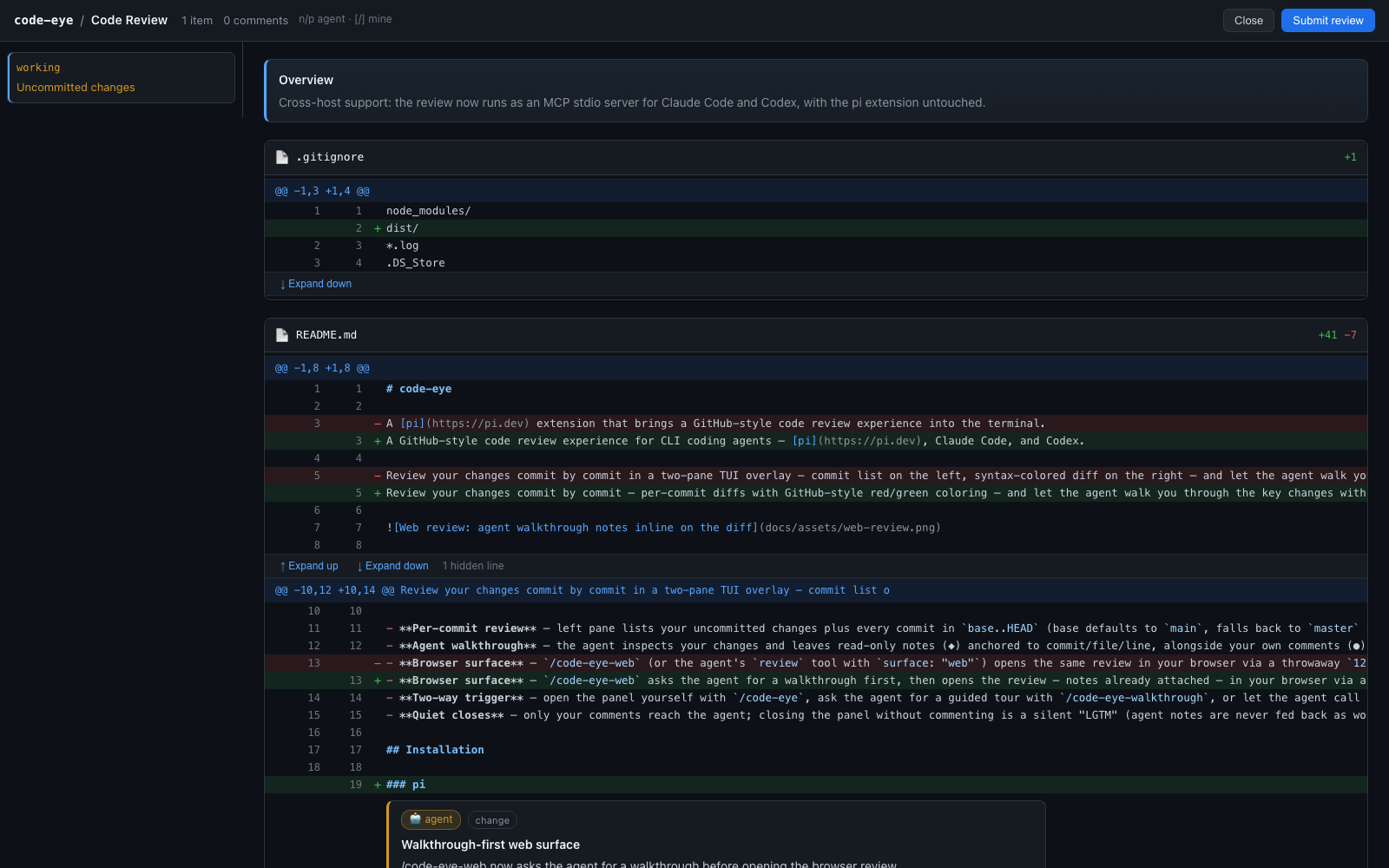
Review your changes commit by commit — per-commit diffs with GitHub-style red/green coloring — and let the agent walk you through the key changes with context, right where they happen. On pi the review runs in a two-pane TUI overlay; everywhere it can also run in your browser. Prefer the browser? /code-eye-web (pi) or the bundled review skills (Claude Code / Codex) open the same review in a local web UI:
Features
- Per-commit review — left pane lists your uncommitted changes plus every commit in
base..HEAD(base defaults tomain, falls back tomasteror the origin default branch); the right pane shows the selected commit's diff with GitHub-style red/green coloring and line numbers. - Agent walkthrough — the agent inspects your changes and leaves read-only notes (◆) anchored to commit/file/line, alongside your own comments (●). Jump between notes with
n/p. - Browser surface —
/code-eye-webasks the agent for a walkthrough first, then opens the review — notes already attached — in your browser via a throwaway127.0.0.1server: real scrolling, multi-line comment editing, GitHub-like chrome. It shuts down when you submit or close. - Two-way trigger — open the panel yourself with
/code-eye, ask the agent for a guided tour with/code-eye-walkthrough, or let the agent call itsreviewtool after making changes ("walk me through what you changed"). - Quiet closes — only your comments reach the agent; closing the panel without commenting is a silent "LGTM" (agent notes are never fed back as work items).
Installation
pi
pi install npm:@toddzheng024/code-eye
Or from the git repo:
pi install git:github.com/qiz029/code-eye
Or add it to ~/.pi/agent/settings.json:
{
	"packages": ["npm:@toddzheng024/code-eye"]
}
To try it without installing:
pi -e git:github.com/qiz029/code-eye
Reload a running pi session with /reload.
Claude Code
This repo is a plugin marketplace:
/plugin marketplace add qiz029/code-eye
/plugin install code-eye@code-eye
The plugin bundles an MCP server (code-eye-mcp, run via npx) and two skills: walkthrough (default) and plain review. Reviews can stay open as long as you like — the server sends progress heartbeats — but if you want to be safe against idle timeouts, set CLAUDE_CODE_MCP_TOOL_IDLE_TIMEOUT=0; and if you don't want long review calls auto-backgrounded after 2 minutes, set CLAUDE_CODE_MCP_AUTO_BACKGROUND_MS=0.
Codex
This repo is a plugin marketplace:
codex plugin marketplace add qiz029/code-eye
then install via /plugins. The plugin bundles an MCP server and a code-eye skill ($code-eye, or just ask to "walk me through the changes"). One required config tweak in ~/.codex/config.toml — the default 60s MCP tool timeout would kill an open review:
[mcp_servers.code-eye]
tool_timeout_sec = 3600
default_tools_approval_mode = "auto"
On both hosts the review runs in your browser (their TUIs have no custom component API — see docs/adr/0004-cross-host-mcp-server.md).
Usage
| Command | Description |
|---|---|
/code-eye |
Open the review panel (TUI) |
/code-eye-web |
Ask the agent for a walkthrough, then open the review panel in the browser with it |
/code-eye-walkthrough |
Ask the agent to generate a walkthrough and open the panel with it |
Inside the panel:
| Key | Action |
|---|---|
↑/↓ |
Select commit (left pane) / scroll diff (right pane) |
Tab / Enter / ← |
Switch between panes |
PgUp/PgDn |
Page through the diff |
n / p |
Next / previous agent note (when a walkthrough is active) |
c / Enter |
Add or edit a comment on the current diff line (add/del/context only) |
d |
Delete your comment on the current line (agent notes are read-only) |
[ / ] |
Jump to previous / next comment |
w |
Ask the agent for a walkthrough (when none is active) |
Esc |
Close the panel (and submit any comments) |
Line comments. Move to a changed line, press c (or Enter on a commentable line), type your note, and press Enter to save. Lines with your comments are marked ●, agent walkthrough notes are marked ◆ and peek under the cursor. Your comments stay in the session if you reopen the panel; agent notes are regenerated each time.
When you close the panel:
- If you left no comments, nothing is sent anywhere — a silent "LGTM".
- If the agent opened it via the
reviewtool, your comments come back in the tool result for the agent to address. - If you opened it with
/code-eye, your comments are sent to the agent as a follow-up message.
The agent can also open the panel itself via the review tool, optionally passing a summary, walkthrough stops, and surface: "web" to use the browser. The tool blocks until you close the panel, so the conversation picks up right after your review.
Web surface
/code-eye-web asks the agent for a walkthrough first, then serves the review — with the agent's notes already attached — from an ephemeral 127.0.0.1 server and opens your browser; the server shuts down when you submit or close the tab. (The agent can also open it directly via review with surface: "web".)
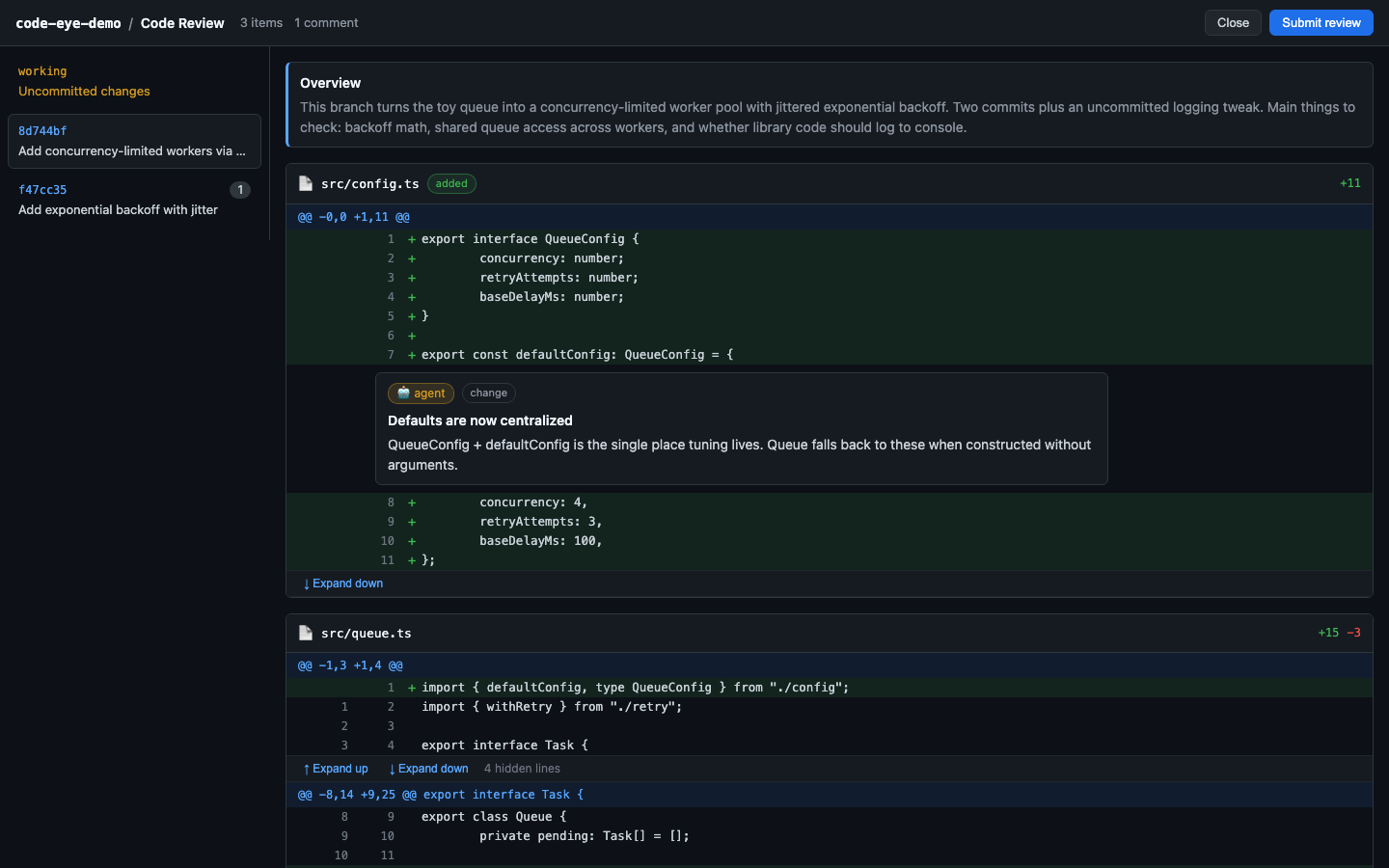
- Click items in the sidebar to switch between uncommitted changes and commits;
#i=Nin the URL deep-links to an item. - Hover a diff line and click the blue + to write a multi-line comment (
Cmd/Ctrl+Entersaves,Esccancels); your comments show up as editable "you" cards. - Agent walkthrough notes render as read-only 🤖 cards with kind chips;
n/pjumps between them,]/[between your own comments. - Hidden context between hunks expands in place via ↑ Expand up / ↓ Expand down.
Development
git clone https://github.com/qiz029/code-eye.git
cd code-eye
npm install
npx tsc --noEmit   # type check
npm run build      # bundle the MCP server to dist/code-eye-mcp.mjs
Run it from the working copy:
pi -e ./index.ts
Or symlink it for auto-discovery and hot reload:
ln -s "$PWD" ~/.pi/agent/extensions/code-eye
# then /reload inside pi
How it works
git.ts— detects the base branch, listsbase..HEADcommits plus uncommitted changes, and loads per-commit patches viagit show/git diff.parse-unidiff.ts— parses unified diffs into structured lines (file, old/new line numbers) so walkthrough stops can anchor to exact lines.comments.ts— the sharedReviewCommentmodel: user comments (editable, persisted, sent to the agent) and agent walkthrough notes (read-only, regenerated per session) share one anchor format.walkthrough.ts— converts agent walkthrough stops into agent comments (ADR-0001).review-view.ts— the two-pane TUI overlay component, built on pi'sctx.ui.custom()overlay API.web-review.ts— the browser surface: an ephemeral127.0.0.1server serving a GitHub-style review page (ADR-0003).mcp-server.ts— the cross-host entry point: an MCP stdio server exposing thereviewtool, backed by the web surface (ADR-0004). Bundled todist/code-eye-mcp.mjswithnpm run build.plugins/— the Claude Code (plugins/claude-code/) and Codex (plugins/codex/) plugin wrappers: MCP server config + skills. The repo root doubles as a plugin marketplace for both hosts (.claude-plugin/marketplace.json,.agents/plugins/marketplace.json).index.ts— registers the/code-eye,/code-eye-weband/code-eye-walkthroughcommands and thereviewtool the agent can call.