@underactive/pi-topping-statusline
oh-my-pi's powerline statusline as a pi extension with some customizations
Package details
Install @underactive/pi-topping-statusline from npm and Pi will load the resources declared by the package manifest.
$ pi install npm:@underactive/pi-topping-statusline- Package
@underactive/pi-topping-statusline- Version
0.2.0- Published
- Sep 5, 2026
- Downloads
- 652/mo · 43/wk
- Author
- underactive
- License
- MIT
- Types
- extension
- Size
- 218.6 KB
- Dependencies
- 0 dependencies · 3 peers
Pi manifest JSON
{
  "extensions": [
    "./index.ts"
  ],
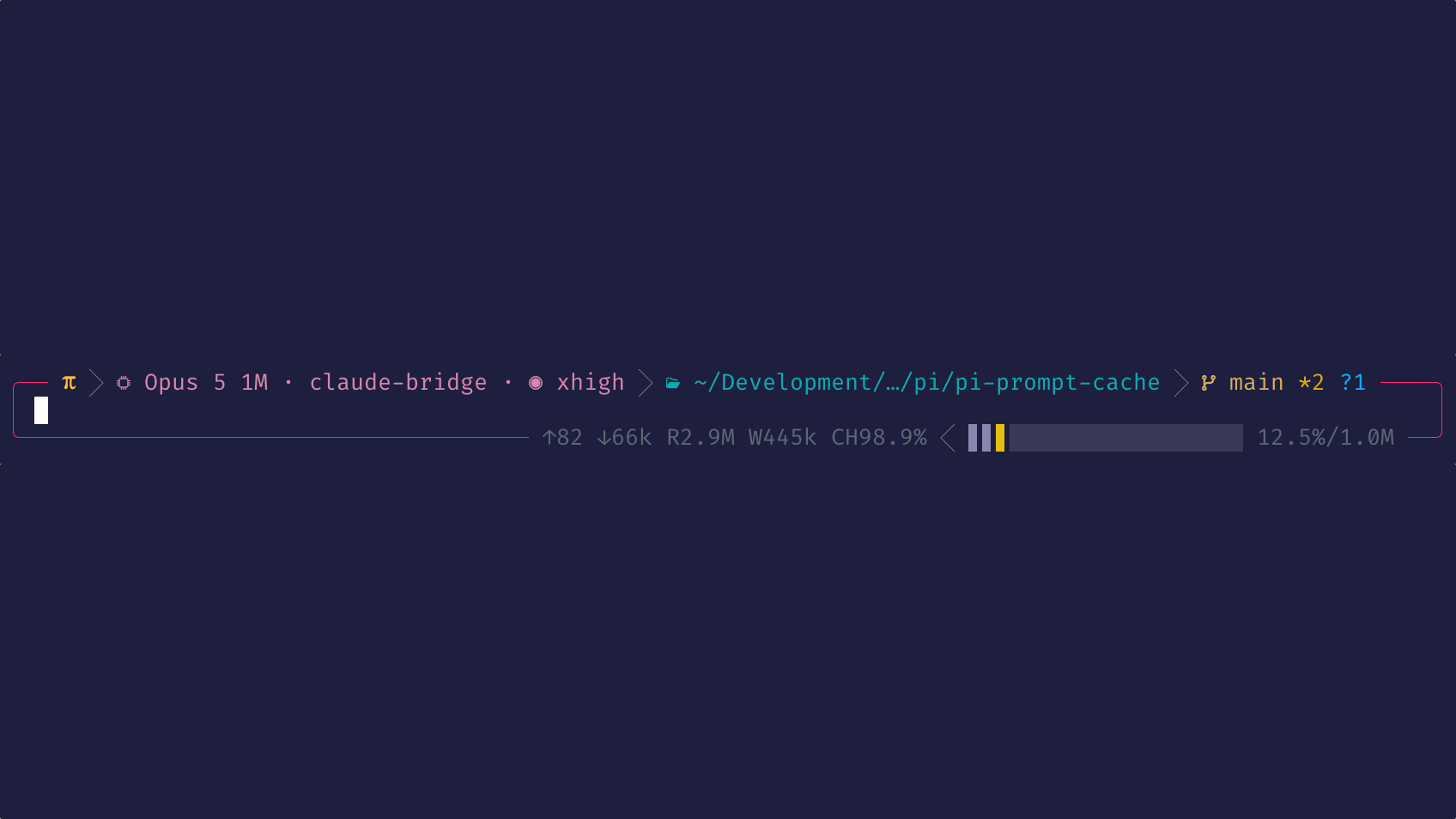
  "image": "https://raw.githubusercontent.com/underactive/pi-topping-statusline/main/media/poster.png"
}
Security note
Pi packages can execute code and influence agent behavior. Review the source before installing third-party packages.
README
pi-topping-statusline
OMP's powerline statusline, ported as a Pi extension with modifications.

The bar renders into the editor's
top border: π > model · thinking level > path > git > PR (with the default
powerline-thin separator), with the session name (hue hashed from the name) right-aligned
over a border-colored fill. The box's bottom border carries configurable left/right
segment groups — by default a scroll hint on the left, and pi's footer stats plus a context
usage graph on the right.
Install
pi install npm:@underactive/pi-topping-statusline
Then /reload (or restart pi). Requirements: a Nerd Font and a
truecolor terminal for the default look — the Symbols setting in
/topping-statusline-settings (unicode or ascii) drops the font requirement.
Configuration — /topping-statusline-settings
/topping-statusline-settings opens a settings TUI with a live preview of the box's top and
bottom bars. Requires TUI mode. Settings persist to ~/.pi/agent/pi-topping-statusline/settings.json
and apply live.
╔═[ Pi Topping Statusline: Settings ]════════════════════════════╗
╟─ Preview ──────────────────────────────────────────────────────╢
║                                                                ║
║ ╭── π > ⬢ Sonnet · ◉ max > pi/pi-topping > main ── session ──╮ ║
║ │                                                            │ ║
║ ╰── ↑ 3 more ── ↑ 12.4K ↓ 3.1K R 148K W 12K 92.3% $0.42 42%──╯ ║
║                                                                ║
╟─ Global ───────────────────────────────────────────────────────╢
║  ▸ [■] Transparent Segments                                ON  ║
║    Separator                               ‹ powerline-thin ›  ║
║    Symbols                                       ‹ nerdfont ›  ║
║    Border style                                   ‹ rounded ›  ║
║    [■] Rainbow border on max thinking                      ON  ║
║    [■] Animate rainbow border                              ON  ║
║    [ ] Embed 'Working' indicator                           OFF ║
║                                                                ║
╟─ Top Left Segment Group ───────────────────────────────────────╢
║    [■] Pi symbol                                           ON  ║
║    [■] Model                                               ON  ║
║    [ ] Provider                                            OFF ║
║    [■] Thinking level                                      ON  ║
║    [■] Path                                                ON  ║
║    [■] Git                                                 ON  ║
║    [■] PR                                                  ON  ║
║                                                                ║
╟─ Top Right Segment Group ──────────────────────────────────────╢
║    [ ] Token rate                                          OFF ║
║    [■] Session name                                        ON  ║
║  … Bottom Right / Bottom Left groups — 8 more toggles          ║
║                                                                ║
╟─ Feeds ────────────────────────────────────────────────────────╢
║    1. type         pi-prompt-cache/savings                     ║
║    1. field        savedUsd                                    ║
║    1. prefix       CS                                          ║
║    1. format                                     ‹ currency ›  ║
║    1. remove this feed                                         ║
║    + add feed                                                  ║
║                                                                ║
║  ↑↓ move  ←→ cycle  ␣ toggle  ⏎ apply/edit  esc cancel         ║
╚════════════════════════════════════════════════════════[ 1/30 ]╝
| Section | Settings |
|---|---|
| Global | Transparent Segments · Separator (powerline powerline-thin slash pipe ascii) · Symbols (nerdfont unicode ascii — stored in settings.json as nerd/unicode/ascii) · Border style (rounded heavy double single) · Rainbow border on max thinking · Animate rainbow border · Embed 'Working' indicator |
| Top Left Segment Group | Pi symbol · Model · Provider · Thinking level · Path · Git · PR |
| Top Right Segment Group | Token rate · Session name |
| Bottom Right Segment Group | Feeds · Token rate · Pi stats · Context bar · Context stats |
| Bottom Left Segment Group | Scroll hint · Feeds · Token rate |
| Feeds | One subscription per row: type · field · prefix · format, plus add/remove |
| Defaults | Transparent on · Separator powerline-thin · Symbols nerdfont · Border style rounded · Rainbow border on · Animate rainbow border on · Embed 'Working' indicator off |
With Rainbow border on max thinking on (the default), cycling the thinking level to max
replaces the border's fixed theme color with a rainbow: a full hue cycle distributed around the
box perimeter. Animate rainbow border is also on by default, so the hues flow around the
border (~14s per rotation), like Apple Intelligence's screen border. Turn animation off to keep
the rainbow at a fixed color phase without its repaint timer; the settings preview uses a stable
phase too. Any other thinking level keeps the normal theme border color. Disable animation over
slow SSH links or in terminals with expensive redraws while retaining the rainbow border.
Embed 'Working' indicator (off by default) moves pi's streaming status — spinner, message, and any loader text a topping such as pi-topping supplies — out of its own row and into the top-left group, right after the Pi symbol and its chevron. The remaining left segments (model, path, git, PR) step aside while a response streams and return when it ends; the Pi symbol never moves. The status appears instantly when a stream starts; when it ends, the swap back cross-fades over 750ms (the status sinks into the bar background, then the user's segments rise out of it) rather than cutting. A status too long for the bar is truncated without an ellipsis, as pi's own border does. Requires pi 0.85 or later. Toggling the setting reinstalls the editor through pi, so it applies immediately, even mid-response. Only the statusline's own editor opts in: when another extension owns the editor slot and is wrapped, pi keeps its standalone working row.
Segments
Ported with pi data: pi, model (model · provider · thinking level), path
(worktree/scratch-dir aware; always strips ~/Projects and /work prefixes — not exposed in
the settings TUI), git (branch + *unstaged +staged ?untracked, HEAD
fs-watch), pr (via gh, hidden if missing), session_name, token_rate (live tok/s —
accent while active, held 1.5s, faded 0.5s, then a dim --- tok/s placeholder; estimate
pipelined from pi-topping's word-count EMA; available in the top-right, bottom-left, and
bottom-right groups), pi_stats, context_graph (bar + stats), scroll_hint, plus feeds
(documented below).
When the terminal narrows: right segments drop first, then the path shrinks (to ~8 cells), then left segments drop end-first — the path is always the last to go.
Feeds
feeds surfaces values other extensions publish as custom session entries, so the bar can
carry figures this extension knows nothing about. There is one subscription list, shared by
the Bottom Right and Bottom Left Feeds toggles — enabling both shows the same values twice.
Each subscription is four fields, all configurable in the settings TUI:
| Field | Meaning | Example |
|---|---|---|
| type | the publisher's customType |
pi-prompt-cache/savings |
| field | property of the entry's data to read |
savedUsd |
| prefix | literal label drawn before the value | CS |
| format | currency, number, or text |
currency |
In settings.json the first column is persisted as customType; the settings TUI labels it
type. That example renders CS$1.44. The prefix is glued directly to the value, so write
it as TOK when you want TOK 42; leading and trailing spaces survive, while escape
sequences and control characters are stripped.
The list ships seeded with the savings feed published by
pi-prompt-cache, which is where the
currency rules come from: figures under half a cent are hidden, matching that extension's
own footer cutoff so the two never disagree. That floor hides the negative values published
early in a session, before the cache-write premium is amortized by reads. Above the floor,
currency shows two decimals below $100 and whole dollars above.
A feed contributes nothing when its publisher is absent, has published nothing this run, or
reports a value its format suppresses; the segment disappears entirely once every feed is
quiet, so it costs nothing to leave switched on. Feed values are shown in dim text; a value
that remains unchanged for five minutes fades into the statusline background over 500ms and
then hides. It reappears in dim text only when that configured field's value changes.
Publishers typically reset per process run,
so entries predating the current session start (--resume, /reload, /new, fork) are
ignored rather than shown as a stale total. During steady-state rendering, the session is
re-read at most once every two seconds, because pi copies the whole entry list on each read
while the bar re-renders on every keystroke; changing subscriptions or starting a new
session forces an immediate scan.
Publishing a feed
Any extension can expose a value to this bar with one call and no dependency on this package — the contract is a pi custom session entry, not an API of ours:
import type { ExtensionAPI } from "@earendil-works/pi-coding-agent";

export default function (pi: ExtensionAPI) {
	let published = 0;
	pi.on("turn_end", () => {
		const savedUsd = currentSavings();
		// Publish only when the figure actually moves: consumers read the newest
		// entry, never the history.
		if (Math.abs(savedUsd - published) < 0.01) return;
		published = savedUsd;
		pi.appendEntry("my-extension/savings", { savedUsd });
	});
}
A user then subscribes with type my-extension/savings, field savedUsd, and whatever
prefix and format they like.
Use appendEntry. It writes a type: "custom" entry, which is what the bar looks for.
It checks the entry kind before the customType, because custom message entries carry a
customType field too — so a value pushed through sendMessage is never read.
Make data an object. The subscription names a field, and the bar reads data[field].
A bare number or string published as the whole payload cannot be addressed. Several fields
in one entry are fine; each can be subscribed to separately, and one entry can feed several
segments.
Match the value to the format. currency and number need a finite number and ignore
anything else, so a pre-formatted "$1.44" string only works under text. Publish the raw
number and let the user pick the presentation.
Publish at turn boundaries, not per token. A high emission rate buys no extra freshness, and every append writes to the session file.
Re-publish after a session start if your figure carries over. As noted above, entries
written before the consumer's session_start are ignored, so after --resume the segment
stays empty until you publish again. Per-run counters get this for free; a lifetime counter
should emit once on the first turn of each run to become visible again.
Nothing appears in the transcript. Custom entries are excluded from LLM context, and pi
renders nothing for a customType with no registered entry renderer — a feed costs a line
in the session file and no screen space.
Name the type after your extension (your-extension/metric) to avoid collisions, and
document the field names and units — those are the strings your users type into the
settings TUI.
Caveats
- Other editor-replacing extensions are wrapped rather than raced — their editor renders inside this box — but ones that draw their own bar or chrome will clash visually.
- The palette is OMP's dark theme; light terminal themes will look off.
Development
Requires Node >= 22.19 (the test runner uses --import with TypeScript resolution).
ln -s "$(pwd)" ~/.pi/agent/extensions/pi-topping-statusline
npm install && npm run typecheck && npm test
Attribution
The statusline design and most of the rendering code come from oh-my-pi (MIT, © 2025 Mario Zechner, © 2025–2026 Can Bölük), itself a fork of Mario Zechner's pi. This port is MIT as well.