@underactive/pi-topping
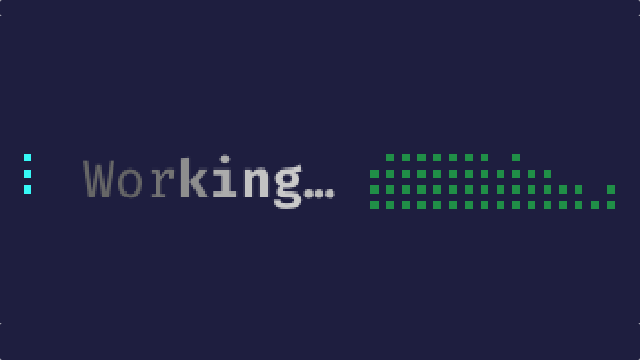
A Pi extension that adds quality of life improvements to Pi's UX: a high-vis user prompt, a shimmering working loader with token activity meter and elapsed timer, and an end-of-turn completion marker
Package details
Install @underactive/pi-topping from npm and Pi will load the resources declared by the package manifest.
$ pi install npm:@underactive/pi-topping- Package
@underactive/pi-topping- Version
0.7.1- Published
- Sep 12, 2026
- Downloads
- 1,688/mo · 145/wk
- Author
- underactive
- License
- MIT
- Types
- extension
- Size
- 216.2 KB
- Dependencies
- 0 dependencies · 2 peers
Pi manifest JSON
{
  "image": "https://raw.githubusercontent.com/underactive/pi-topping/main/media/working.png",
  "extensions": [
    "./index.ts"
  ]
}
Security note
Pi packages can execute code and influence agent behavior. Review the source before installing third-party packages.
README
pi-topping
We garnish our pies. It seemed rude not to extend Pi the same courtesy. This is a Pi extension that adds some quality of life improvements to Pi's UX, while looking good in the process:
User Prompt — high-vis bordered prompt box with configurable border color and style, pi icon toggle, timestamp, and provider/model label. Prompts submitted while Pi is working (steer / Alt+Enter follow-up) are left undecorated so Pi's native Steering: / Follow-up: queue rows still render.

“Working” Loader — animated spinner (with color choice), randomized activity word, optional word packs, shimmer, token activity monitor, elapsed timer, output token display, live output-token rate, and the response model when it meaningfully differs from the selected model — all arrangeable left to right. During a blocking extension prompt, the loader switches to a stable dim waiting line with a pulsing indicator, then resumes afterward.

Completion Marker — end-of-turn marker with icon, randomized verb (or Worked; matching past tense when Randomize "Worked" text is on), token consumption display, and optional marker-style, border-style, and border-color decorations spanning the full terminal width. The default elite style trails the summary with tapering dashes; bookend fills the remaining width to a closing corner glyph. Hooks into Pi's agent_settled event.

Install
pi install npm:@underactive/pi-topping
Restart Pi (or run /reload) to pick it up.
Settings
Run /topping-settings (TUI only) to customize your toppings. Settings persist to
~/.pi/agent/pi-topping/settings.json; hand edits are tolerated on load.
╔═[ Pi Topping: Settings ]══════════════════════════════════════╗
╟─ Preview ─────────────────────────────────────────────────────╢
║                                                               ║
║ ⠋ Crafting ⣠⣤⣶⣶⣤⣠⣀⢀ 28 tps · 3s · ↓ 84 tokens · test-model   ║
║                                                               ║
╟─ User Prompt ─────────────────────────────────────────────────╢
║    [■] High-vis prompt                                ON      ║
║    [■] Border style                             ‹ double ›    ║
║    [■] Border color                      ‹ thinkingLevel ›    ║
║    [■] Pi icon                                        ON      ║
║    [■] Timestamp                                      ON      ║
║    [■] Provider                                       ON      ║
║    [■] Model                                          ON      ║
║                                                               ║
╟─ “Working” Loader ────────────────────────────────────────────╢
║    [■] Animated spinner                               ON      ║
║  ❯ [■] Animated spinner color            ‹ thinkingLevel ›    ║
║    [■] Randomize “Working” text                       ON      ║
║    [■] Text shimmer                                   ON      ║
║    [■] Invert shimmer                                OFF      ║
║    [■] Text shimmer direction            ‹ Left to Right ›    ║
║    [■] Text shimmer speed                       ‹ Normal ›    ║
║    [■] Token activity monitor                         ON      ║
║    [■] Token activity monitor color             ‹ accent ›    ║
║    [■] Token activity monitor direction  ‹ Right to Left ›    ║
║    [■] Token activity monitor dimmed                 OFF      ║
║    [■] Elapsed time since prompt                      ON      ║
║    [■] Show output tokens                             ON      ║
║    [■] Token rate                                     ON      ║
║    [■] Token rate color                        ‹ warning ›    ║
║    [■] Token rate dimmed                             OFF      ║
║    [■] Response model                                 ON      ║
║    [■] Response model color                     ‹ accent ›    ║
║    [■] Response model dimmed                        OFF       ║
║                                                               ║
╟─ Elements Order ──────────────────────────────────────────────╢
║    [ ] Animated spinner                                       ║
║    [ ] “Working” text                                         ║
║    [ ] Token activity monitor                                 ║
║    [ ] Token rate                                             ║
║    [ ] Elapsed time                                           ║
║    [ ] Output tokens                                          ║
║    [ ] Response model                                         ║
║                                                               ║
╟─ Completion Marker ───────────────────────────────────────────╢
║    [■] Show completion marker                         ON      ║
║    [■] Marker style                              ‹ elite ›    ║
║    [■] Border style                               ‹ none ›    ║
║    [■] Border color                      ‹ thinkingLevel ›    ║
║    [■] Pi icon                                        ON      ║
║    [■] Randomize “Worked” text                        ON      ║
║    [■] Tokens spent                                   ON      ║
║    [■] Mid-turn inputs                                ON      ║
║                                                               ║
╟─ Word Packs ──────────────────────────────────────────────────╢
║    [ ] Doctor Who                                    OFF      ║
║    [ ] Firefly                                       OFF      ║
║    [ ] Hitchhiker's Guide                            OFF      ║
║    [ ] The Lord of the Rings                         OFF      ║
║    [ ] The Matrix                                    OFF      ║
║    [ ] Portal                                        OFF      ║
║    [ ] SimCity                                       OFF      ║
║    [ ] Star Trek                                     OFF      ║
║    [ ] Star Wars                                     OFF      ║
║                                                               ║
╟─ Options ─────────────────────────────────────────────────────╢
║    [■] Use NerdFont icons                             ON      ║
╟───────────────────────────────────────────────────────────────╢
║  ↑↓ move  PgUp/PgDn page  ←→ select                           ║
║  ␣ toggle  ⏎ apply  esc cancel                                ║
╚═══════════════════════════════════════════════════════[ 9/50 ]╝
Word packs
Base activity words are always available. All word packs, including the shipped Doctor Who, Firefly, Hitchhiker's Guide, The Lord of the Rings, The Matrix, Portal, SimCity, Star Trek, and Star Wars packs and custom packs, are disabled by default. Enable packs in /topping-settings to add their entries to the same uniformly selected pool. When Randomize “Worked” text is on, the completion marker uses the selected entry’s matching past tense; otherwise it uses Worked.
Bundled packs live in wordpacks/. Copy wordpacks/doctor-who.json, wordpacks/firefly.json, wordpacks/hitchhikers-guide.json, wordpacks/lord-of-the-rings.json, wordpacks/matrix.json, wordpacks/portal.json, wordpacks/simcity.json, wordpacks/star-trek.json, or wordpacks/star-wars.json to ~/.pi/agent/pi-topping/word-packs.json, then change the pack id (the bundled doctor-who, firefly, hitchhikers-guide, lord-of-the-rings, matrix, portal, simcity, star-trek, and star-wars IDs are reserved), name, and words:
{
  "packs": [{
    "id": "cooking",
    "name": "Cooking",
    "description": "Kitchen operations.",
    "words": [{ "present_tense": "Sautéing onions", "past_tense": "Sautéed" }]
  }]
}
Pack IDs must start with a lowercase letter, contain only lowercase letters, digits, and -, and be at most 64 characters. Each pack needs a non-empty name and at least one word with non-empty present_tense and past_tense strings. An optional description appears in the settings preview when the pack row is selected, and an optional attribution records the source. Invalid entries are ignored. Packs reload when a session starts and whenever /topping-settings opens, not while a turn is running. Preferences for missing packs are retained so they apply when the pack returns.
Every color setting offers thinking-level (shown as thinkingLevel in /topping-settings); it is the default for the animated spinner, the prompt border, and the completion marker border. The spinner, token activity monitor, token rate, and response model follow Pi's current thinking level. The prompt border uses the level captured when the prompt was submitted, and the completion marker uses the level captured when the turn settled, so earlier entries keep their color after you change level. When hand-editing settings.json, write thinking-level; the legacy default spelling is only recognised for spinnerColor and doneMarkerBorderColor.
Under Elements Order, press ␣ to grab a row, then ↑/↓ to slide that element
left or right within the loader. Elapsed time, output tokens, token rate, and response model are joined with
· separators whenever adjacent. When reordering separates them, each adjacent run is rendered
without a separator before or after it.
The N tps token rate uses the selected theme color and
remains reorderable. Active rates below 1,000 are padded to three characters so updates do not shift the other
segments; larger rates may shift later segments. When inactive, it remains as the dim --- tps placeholder. After its last update it holds
full brightness for 1.5 seconds, then fades through five theme-aware shades to the dim text color over
the next 0.25 seconds before returning to the placeholder; a new count restores full brightness and
restarts the cycle.
The response model is captured from assistant responses, displayed as its sanitized value with no label only when it meaningfully differs from the selected model, and defaults to the final loader detail after output tokens. Equivalent local paths and decorated filenames are suppressed. It can be hidden, recolored, permanently dimmed, or reordered. After the agent settles, its final value remains visible for 3 seconds, fades through five theme-aware shades over 0.5 seconds, then clears; new work cancels the pending fade.
Requirements
- Pi. Pi ≥0.84.4 is required for the waiting-for-input loader state; older Pi versions keep the animated loader.
- On Pi ≥0.85.0, the working indicator is embedded in the default editor border and long loaders are truncated to the border width instead of wrapping; custom editors that do not opt in keep the standalone wrapping indicator.
- Node.js ≥22.19.0
Development
npm install
npm test
npm run typecheck
Tests cover the word/shimmer rendering, prompt box and completion marker rendering, activity meter behavior, timer resets, settings persistence and schema migrations, word-pack parsing and loading, the menu.ts component, the settings menu wiring end to end, and the flag-gated /topping-setup command's install and uninstall flows.
Limitations
- Token counts are a streaming word-count estimate, not an exact tokenizer count — they self-correct when each message finishes, so you'll see a small jump at that point.
- Elapsed time normally starts when you submit a prompt; for auto-continuations without that event, it starts slightly later instead.
- If another extension also customizes the working message, whichever one runs last wins.
Author
Eric Sison