@vanillagreen/pi-caveman
Native Pi caveman communication mode with session persistence, slash command control, status badge, and settings-manager integration.
Package details
Install @vanillagreen/pi-caveman from npm and Pi will load the resources declared by the package manifest.
$ pi install npm:@vanillagreen/pi-caveman- Package
@vanillagreen/pi-caveman- Version
1.2.4- Published
- Jun 12, 2026
- Downloads
- 681/mo · 243/wk
- Author
- vanillagreencom
- License
- MIT
- Types
- extension
- Size
- 132.8 KB
- Dependencies
- 0 dependencies · 1 peer
Pi manifest JSON
{
  "extensions": [
    "./extensions/caveman.ts"
  ],
  "image": "https://raw.githubusercontent.com/vanillagreencom/vstack/main/pi-extensions/pi-caveman/assets/command-autocomplete.png"
}Security note
Pi packages can execute code and influence agent behavior. Review the source before installing third-party packages.
README
pi-caveman
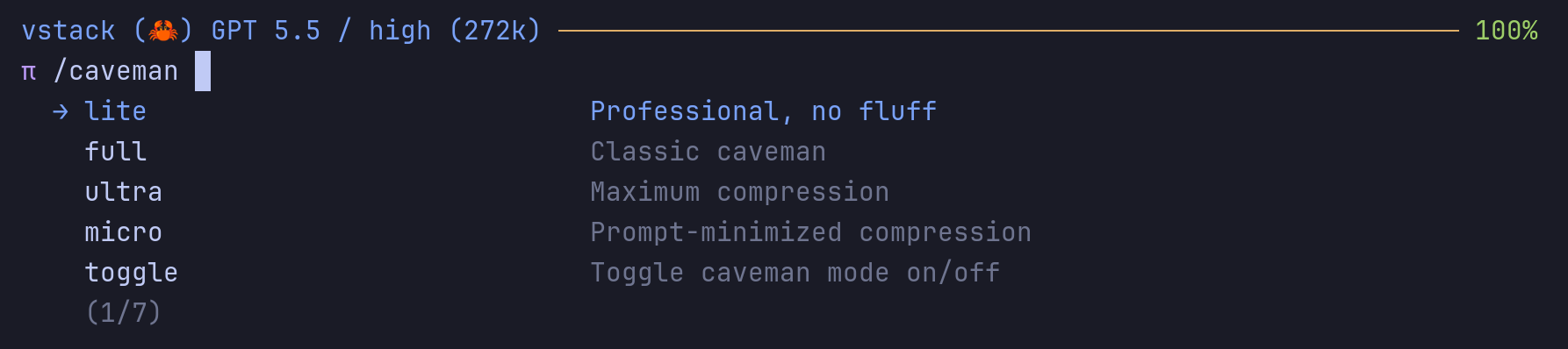
Native Pi caveman communication mode: fewer output tokens, same technical accuracy.
Highlights
- Each mode has a clear personality the model actually picks up and holds across multiple turns.
- Lite gives you tight professional sentences instead of telegraph-style fragments.
- Replies stay as flowing chat — no markdown headers turning every answer into a doc page.
- Plain-English safety mode triggers only for genuinely destructive commands, not whenever you say "I'm confused" or ask about security.
- No leftover marker lines or odd
Caveman ask:prefixes showing up in your answers. - Commit messages, PR descriptions, reviews, and anything you're sending to others stay normal English.
- Warns you when your Claude-bridge setup would silently drop caveman before it reaches the model.
- Per-session sidecar state preserves session overrides across
pi -r, including slash-command changes made before the next model turn. - Tested across multiple providers and real back-and-forth conversations, not just one-shot prompts.
Install
Via npm:
pi install npm:@vanillagreen/pi-caveman
Via vstack:
cargo install --git https://github.com/vanillagreencom/vstack.git vstack
vstack add vanillagreencom/vstack --pi-extension pi-caveman --harness pi -y
Restart Pi after installation.
Commands
| Command | Action |
|---|---|
/caveman |
Toggle the current session between off and the last active mode. |
/caveman:lite|full|ultra|micro |
Set a session override mode. |
/caveman:toggle |
Toggle the session override between off and the last active mode. |
/caveman off |
Disable caveman mode for the current session. |
/caveman status |
Show current mode and whether it comes from settings or a session override. |
/caveman debug |
Show resolved mode, settings paths, legacy-key conflicts, and the rendered prompt block. |
Arguments support autocomplete.
Modes
| Mode | Style |
|---|---|
lite |
Professional full sentences, but no filler or hedging. |
full |
Classic terse caveman; fragments are OK. |
ultra |
Maximum English compression with abbreviations and arrows. |
micro |
Shortest prompt injection for token-sensitive sessions. |
Behavior
- Mode is stored in your Pi settings and applied at the start of every model turn. The extension steers style; it doesn't rewrite the model's output.
/cavemanslash commands set a per-session override. Active non-off defaults are snapshotted into new sessions, so resuming withpi -rkeeps the mode that session started with even if your global default changes later. Changing the default in the extension manager replaces any active override in the current session.- When you type a destructive command (force-push, hard reset, drop table, rm -rf, etc.), caveman steps aside for that one reply and the model writes plain English. Caveman resumes automatically on the next turn.
- Caveman applies to chat replies only. Commit messages, PR descriptions, formal reviews, and anything you send to other systems (issue bodies, PR comments, chat, email) stay normal English.
- pi-qol uses this extension to show a Caveman badge in the status line and bind a configurable shortcut to cycle modes.
Settings
All settings are toggled in the extension manager (or written directly to Pi/vstack settings.json).
Project settings in .pi/settings.json apply only after Pi marks the workspace trusted; before trust, vstack Pi extensions read user/global settings only.
| Setting | Default | What it does |
|---|---|---|
mode |
off |
Default caveman mode for new sessions. |
showStatusBadge |
true |
Show the caveman badge in the status line while active. |
sessionOverrideAllowed |
true |
Allow /caveman commands to override the default within a session. |
autoClarityEscape |
true |
Switch to plain English for one reply when the user prompt names a destructive operation. |
resumeAfterClarityEscape |
true |
Resume caveman automatically on the next turn after a safety override. |
boundaryNormalForCode |
true |
Keep code blocks and quoted errors normal English. |
boundaryNormalForCommits |
true |
Keep commit messages and PR descriptions normal English. |
boundaryNormalForReviews |
true |
Keep formal reviews normal English. |
boundaryNormalForExternalWrites |
true |
Keep issue bodies, PR comments, code review messages, and chat/email normal English. |
customPromptSuffix |
"" |
Extra project-specific guidance appended to the caveman directive. |
Claude-bridge users
pi-caveman injects its directive into Pi's systemPrompt. When you use claude-bridge as your provider, claude-bridge builds its own systemPrompt from Claude Code's preset and only forwards pi-side hooks that you explicitly enable. The caveman directive is one of those hooks.
- Set
@vanillagreen/pi-claude-bridge→includeCavemanHook: truein the extension manager. The default is off. - If caveman is active and the bridge is installed with this flag off, pi-caveman warns once at session start. Run
/caveman debugto confirm the resolved bridge setting. - Non-bridge providers (native Pi providers) receive the caveman block as part of Pi's regular
systemPromptand do not need this flag.