@vanillagreen/pi-claude-bridge
Pi provider bridge that runs Claude Code through the Claude Agent SDK, with opt-in forwarding for Pi prompt context.
Package details
Install @vanillagreen/pi-claude-bridge from npm and Pi will load the resources declared by the package manifest.
$ pi install npm:@vanillagreen/pi-claude-bridge- Package
@vanillagreen/pi-claude-bridge- Version
4.0.1- Published
- Sep 6, 2026
- Downloads
- 5,171/mo · 355/wk
- Author
- vanillagreencom
- License
- MIT
- Types
- extension
- Size
- 3.1 MB
- Dependencies
- 4 dependencies · 2 peers
Pi manifest JSON
{
  "extensions": [
    "./bundle/index.js"
  ],
  "image": "https://raw.githubusercontent.com/vanillagreencom/kendex/main/pi-extensions/pi-claude-bridge/assets/bridge-demo.png"
}Security note
Pi packages can execute code and influence agent behavior. Review the source before installing third-party packages.
README
@vanillagreen/pi-claude-bridge
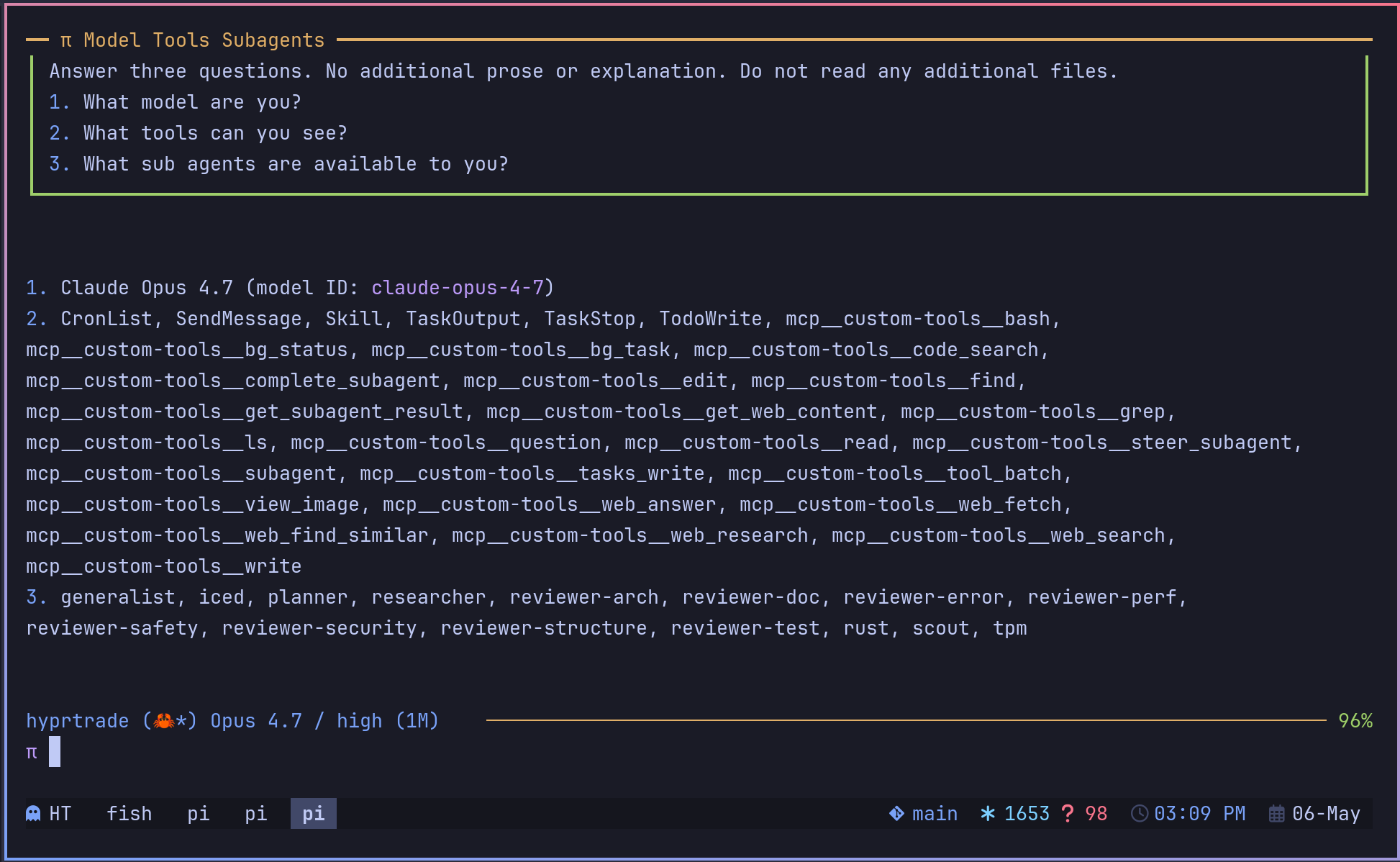
A Pi provider that uses a logged-in Claude Code account through the Claude Agent SDK. You keep Pi's terminal interface and tools while Claude Code handles model requests.
Install
- npm:
pi install npm:@vanillagreen/pi-claude-bridge. - kendex: add the declaration below to the project's
kendex.toml, or to~/.config/kendex/kendex.tomlfor user scope. Runkendex update-pi.
[pi-extensions."@vanillagreen/pi-claude-bridge"]
source = "kendex"
Restart Pi after installation. Use kendex update-pi --check to preview the installation. A Claude Code login is required. Make claude available on PATH or set its executable path below.
Fable 5.1 requires Claude Code 2.1.255 or later. This includes any executable chosen through pathToClaudeCodeExecutable or found on PATH, which takes precedence over the SDK's bundled CLI. Account access and usage-credit requirements still apply.
Features
- Select Claude models from Pi's model menu.
- Run Pi tool calls during Claude conversations.
- Resume the Claude conversation across Pi turns.
- Configure model effort and forwarded prompt context.
- Optionally use the Claude account's connectors.
How it works
You select a pi-claude model in Pi. Select Claude Fable 5.1 (pi-claude/claude-fable-5-1) for Fable. The bridge starts or resumes Claude Code through the Agent SDK. It sends the prompt and makes Pi's tools available to Claude Code. Tool calls return to Pi for execution, then their results return to Claude Code. Pi displays the response and saves the Claude session identifier.
Settings
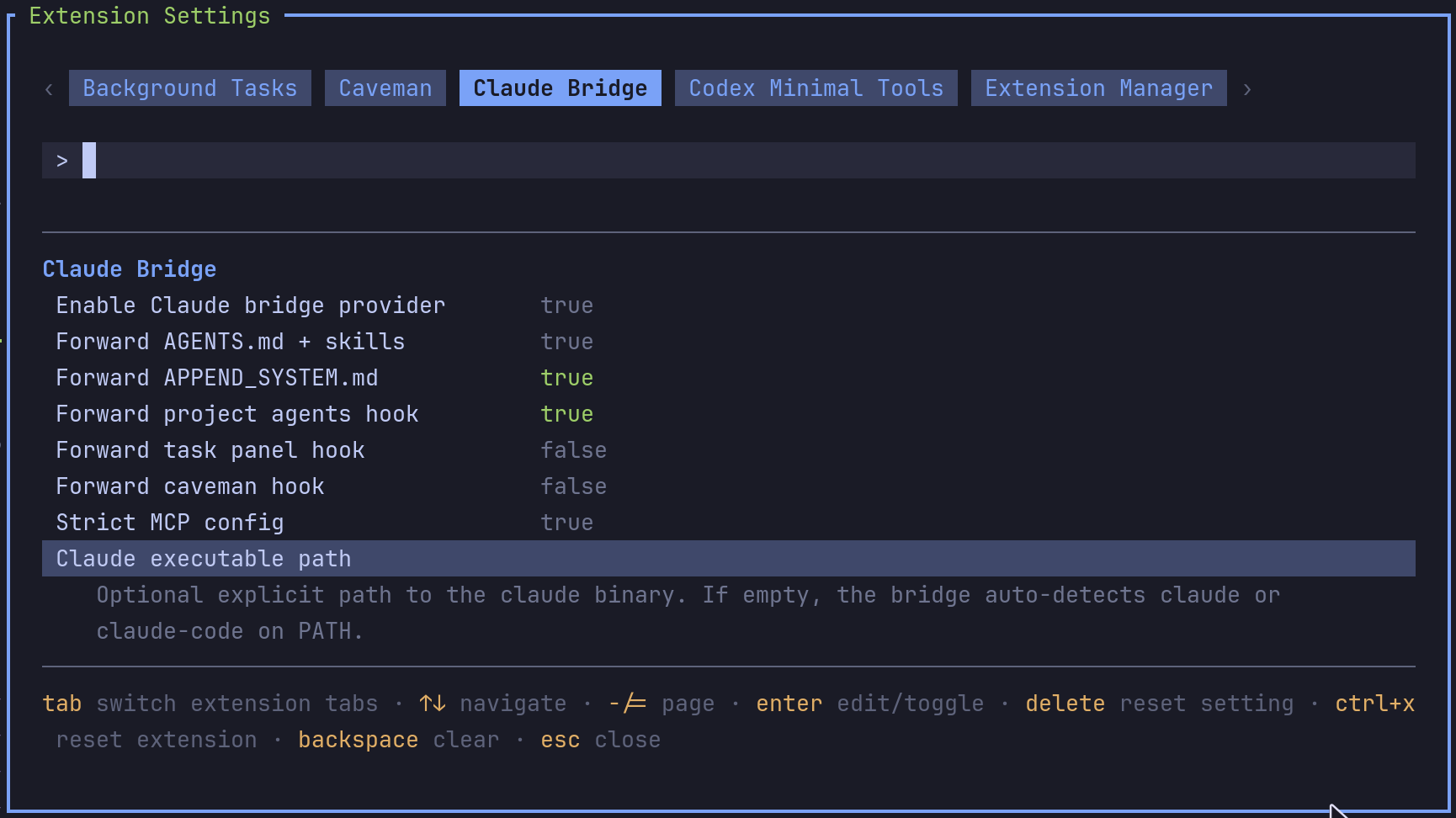
The settings editor writes project values to .pi/settings.json. The default user file is ~/.pi/agent/settings.json. PI_CODING_AGENT_DIR changes the user directory. Package values are stored under kendex.extensionManager.config["@vanillagreen/pi-claude-bridge"].
Open /extensions:settings; settings appear under the Pi Claude tab, and /pi-claude opens the same tab. Project settings in .pi/settings.json apply only after Pi marks the workspace trusted. The bridge also reads claude-bridge.json in ~/.pi/agent and in a trusted project's .pi/; a value taken from one of those files is shown with the file that supplies it, and editing it in the panel writes Pi settings, which win.
enabled: register thepi-claude/*models; reload required.appendSystemPrompt: the context file and skills block described above.includeAppendSystemPromptMd,includeProjectAgentsHook,includeTaskPanelHook,includeCavemanHook: forwardAPPEND_SYSTEM.mdand the prompt blocks ofpi-agents-tmux,pi-task-panelandpi-caveman.strictMcpConfig,fastMode,pathToClaudeCodeExecutable: how the Claude Code subprocess is launched.forceEffort,modelEffortOverrides: pin a Claude effort for every request or per model. Override keys are bare ids (claude-opus-4-8),pi-claude/<id>or*; values arelow,medium,high,xhighormax; a per-model entry beats the global force.
Environment variables:
CLAUDE_BRIDGE_STREAM_IDLE_TIMEOUT: how long a turn may stay silent before its first output; bare numbers are seconds,ms,sandmsuffixes are accepted,0disables.CLAUDE_BRIDGE_DEBUG=1: write the bridge log, the integrity diagnostics and per-query Claude Code CLI logs under the Pi agent directory;CLAUDE_BRIDGE_DEBUG_PATHandCLAUDE_BRIDGE_DIAG_PATHmove the two log files. Nothing is written to disk without it.CLAUDE_BRIDGE_ISOLATED=1: for embedding hosts that own every config directory; the bridge then reads nothing from the working directory or home. Details in DEVELOPMENT.md.
Tool-result integrity problems always surface as a Pi error notification plus a metadata-only claude-bridge-integrity entry in the Pi session file, so a lost tool result can be analysed from the session alone.
Maintainer notes, the embedding and account-router contracts, and the test suites are in DEVELOPMENT.md.
Prompt context
The bridge sends the nearest context file and Pi's skills list with the prompt. It checks AGENTS.override.md, AGENTS.md and AGENTS.MD while walking up from the working directory. Claude Code loads its own CLAUDE.md files. Use the prompt settings above to forward other Pi extension instructions.
Connectors
Connectors are disabled by default. Set enableConnectors in user settings, user claude-bridge.json, or the CLAUDE_BRIDGE_ENABLE_CONNECTORS environment variable. Project settings cannot enable them.
Connector access is read-only unless connectorWriteMode is exactly allow. Set CLAUDE_BRIDGE_CONNECTOR_WRITE=allow only for a dedicated process running an approved write. Keep it out of persistent settings. Use /pi-claude:connectors to list the account's connectors.
With connectors enabled, Claude Code loads user settings. An explicit provider.settingSources list in claude-bridge.json changes that selection. Including project or local settings lets those files affect the subprocess.