@vanillagreen/pi-extension-manager
Pi package manager with update/uninstall actions plus a separate schema-driven settings editor for vstack packages.
Package details
Install @vanillagreen/pi-extension-manager from npm and Pi will load the resources declared by the package manifest.
$ pi install npm:@vanillagreen/pi-extension-manager- Package
@vanillagreen/pi-extension-manager- Version
1.3.2- Published
- Jun 12, 2026
- Downloads
- 875/mo · 297/wk
- Author
- vanillagreencom
- License
- MIT
- Types
- extension
- Size
- 299.9 KB
- Dependencies
- 0 dependencies · 2 peers
Pi manifest JSON
{
  "extensions": [
    "./extensions/extension-manager.ts"
  ],
  "image": "https://raw.githubusercontent.com/vanillagreencom/vstack/main/pi-extensions/pi-extension-manager/assets/extension-manager-popup.png"
}
Security note
Pi packages can execute code and influence agent behavior. Review the source before installing third-party packages.
README
pi-extension-manager
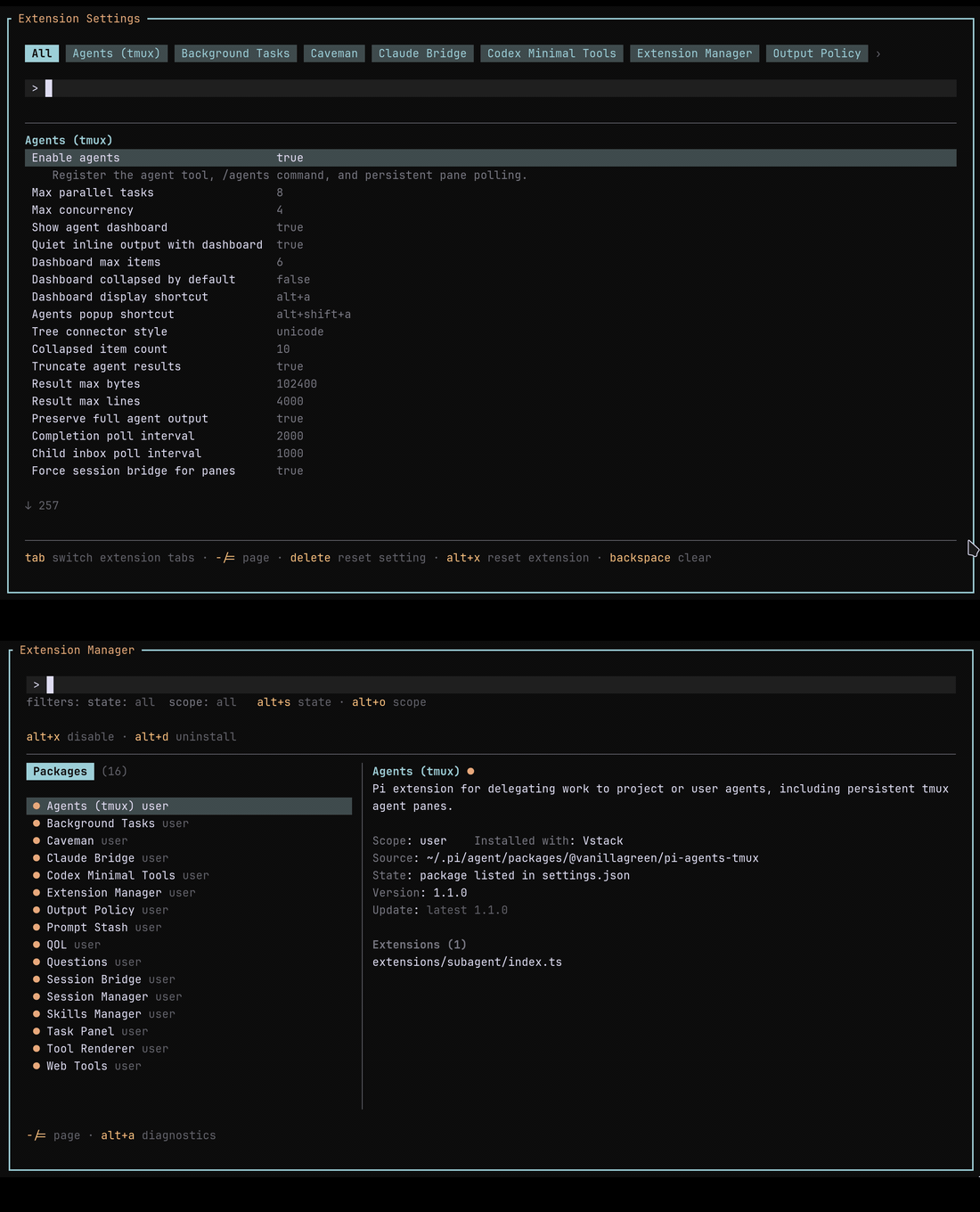
Package manager and settings editor for Pi packages installed by vstack, npm, git, or local path.
Highlights
- Browse, enable, disable, update, and uninstall packages from one popup.
- Separate settings editor with one tab per package that exposes vstack settings from user/global and project scopes.
- Diagnostics view shows status, source, install method, versions, and update state.
- Optional notification at session start when newer versions are available.
Install
Via npm:
pi install npm:@vanillagreen/pi-extension-manager
Via vstack:
cargo install --git https://github.com/vanillagreencom/vstack.git vstack
vstack add vanillagreencom/vstack --pi-extension pi-extension-manager --harness pi -y
Restart Pi after installation.
Commands
| Command | Action |
|---|---|
/extensions |
Open the package manager. |
/extensions:settings |
Open the settings editor. |
/extensions:enable |
Recovery command when the manager is disabled. |
Each popup documents its own keys in the footer.
Status icons: ● active, ○ inactive, × broken. Packages with newer versions show Update Needed.
Settings
Open /extensions:settings; settings appear under the Extension Manager tab.
Project settings in .pi/settings.json apply only after Pi marks the workspace trusted; before trust, vstack Pi extensions read user/global settings only.
| Setting | What it does |
|---|---|
| Enable manager UI | Expose /extensions and the manager UI. /extensions:enable is always available as recovery. |
| Default save scope | Where setting edits are written when scope is ambiguous (project or user). |
| Notify on extension updates | Post a one-line notification at session start listing extensions with newer versions. |
Glyph style: each package exposes glyphStyle (unicode default, ascii for terminal-safe chrome). @vanillagreen/pi-tool-renderer.globalGlyphStyleOverride=ascii forces ASCII chrome across vstack Pi extensions while leaving tool/model/user content unchanged.
Notes
Package enable/disable and updates take effect after /reload or restart — Pi doesn't currently support unloading already-loaded extensions. Project-scope settings and packages are shown only when Pi reports the current project as trusted; untrusted projects use user/global settings only. npm update/uninstall actions run inside Pi's scope-local npm directory (<scope>/npm), matching Pi 0.75+ user package installs under ~/.pi/agent/npm/. Command execution resolves Windows npm-family shims without requiring external runtime dependencies.
Git package entries are inspected only under Pi's managed clone root (<scope>/git/<host>/<repo>). Entries with unsafe host or path components are shown as broken instead of reading package metadata from outside that root.