@vanillagreen/pi-extension-manager
Pi package manager and settings editor with native oh-my-pi plugin inventory and enable controls.
Package details
Install @vanillagreen/pi-extension-manager from npm and Pi will load the resources declared by the package manifest.
$ pi install npm:@vanillagreen/pi-extension-manager- Package
@vanillagreen/pi-extension-manager- Version
3.0.5- Published
- Oct 4, 2026
- Downloads
- 1,324/mo · 92/wk
- Author
- vanillagreencom
- License
- MIT
- Types
- extension
- Size
- 370.6 KB
- Dependencies
- 0 dependencies · 4 peers
Pi manifest JSON
{
  "image": "https://raw.githubusercontent.com/vanillagreencom/kendex/main/pi-extensions/pi-extension-manager/assets/extension-manager-popup.png",
  "extensions": [
    "./extensions/extension-manager.ts"
  ]
}
Security note
Pi packages can execute code and influence agent behavior. Review the source before installing third-party packages.
README
@vanillagreen/pi-extension-manager
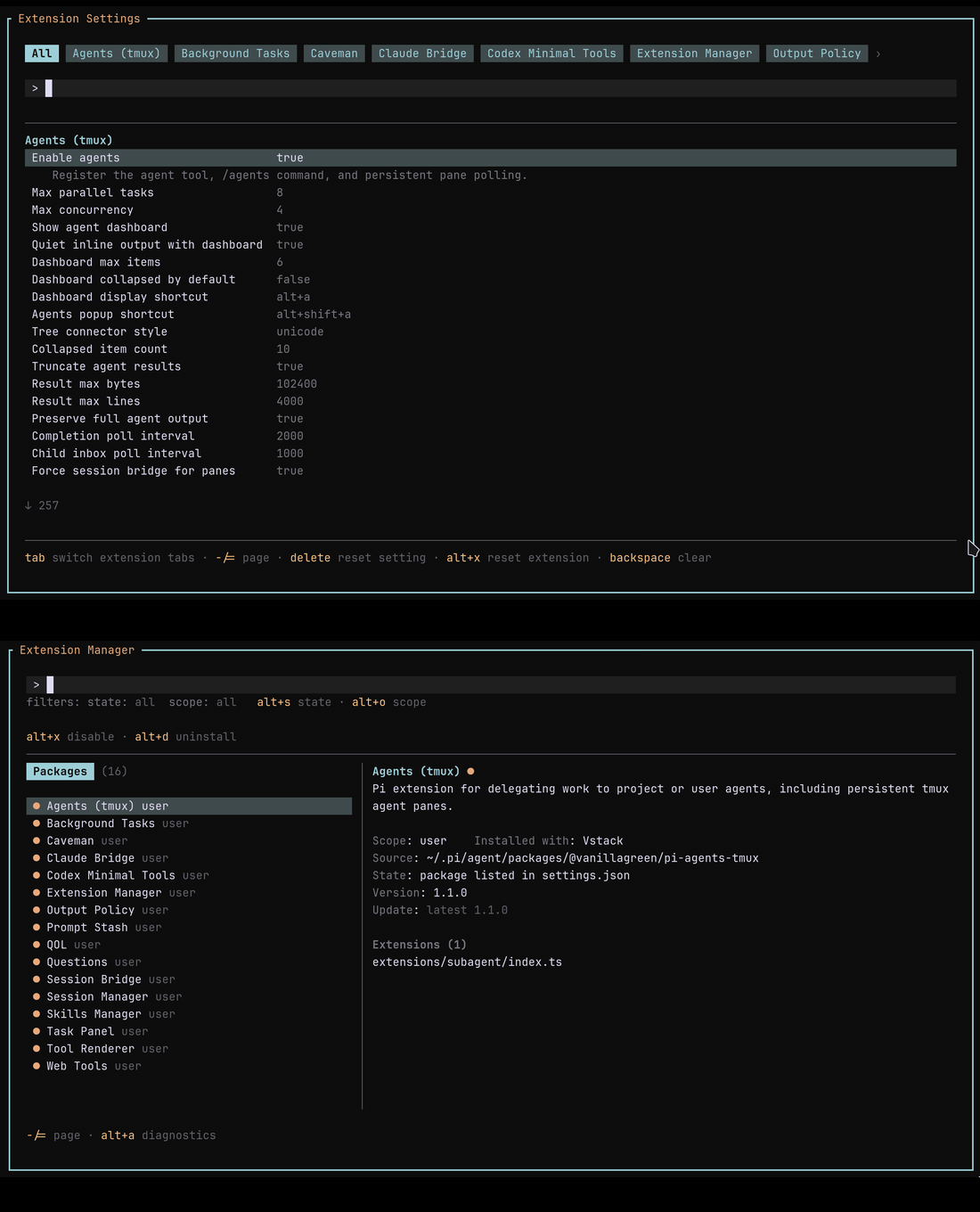
A package browser for Pi and oh-my-pi (OMP). It includes a settings editor for kendex Pi packages and for the manager itself on OMP.
Install
- Pi:
pi install npm:@vanillagreen/pi-extension-manager. - OMP 18.1.11 or later:
omp plugin install @vanillagreen/pi-extension-manager. - kendex, for Pi only: add the declaration below to the project's
kendex.toml, or to~/.config/kendex/kendex.tomlfor user scope. Runkendex update-pi.
[pi-extensions."@vanillagreen/pi-extension-manager"]
source = "kendex"
Restart the host after installation.
Features
- Browse installed Pi packages or native OMP plugins, including disabled plugins.
- Enable or disable packages. On OMP this controls the whole plugin, including its non-extension contributions.
- Update or uninstall Pi packages and notify you about available updates.
- Edit kendex package settings on Pi, or the manager's own settings on OMP.
How it works
- Open
/extensionson Pi, or/kendex:extensionson OMP, which keeps its own built-in/extensionscommand. - The manager reads Pi's package settings, or OMP's record of the plugins it has installed.
- It lists each package together with the extension files that package declares.
- On OMP it keeps packages installed for your user apart from packages installed for the project, and offers its own settings only for the copy that is running.
- Restart Pi or OMP after you turn a package on or off.
On OMP the manager cannot toggle a plugin's modules, update or uninstall a plugin, or edit another extension's settings. Use OMP's own controls for those actions, for a plugin's optional features, and for a project override that stops a plugin being enabled. The manager also does not run a Pi package's commands or its append-system scripts on OMP.
Resource limits
- A confirmed update or uninstall runs under a progress window, and the terminal stays responsive. Press Escape to cancel it; the manager stops the command and every process it started, and the notice says when a process could not be reached. A command still running after 10 minutes is stopped the same way. Uninstall removes the package from your settings only when the command exits with code 0, and puts back the package instructions it removed when it does not.
- Package instruction scripts stop after 10 seconds and npm directory lookups after 15 seconds. Ending the session, quitting Pi included, stops any command still running and waits up to 18 seconds for the session's commands to end: up to 4 seconds for a stopped command, then the instruction script that puts back a package's instructions after a failed uninstall, which is not stopped and runs to its own 10-second limit, plus up to 4 seconds to stop it at that limit.
- Each command keeps at most the last 256 KiB of its output and of its error output.
- Each npm version request has a total 4-second deadline and a 256 KiB response limit. Closing the package browser cancels requests it started. Session shutdown cancels startup requests.
- The session keeps one inventory with at most 10,000 package and extension rows. Opening a popup or completing a package action refreshes it. Completion labels, package children and scoped setting values reuse that snapshot. Shutdown releases it. Reopen settings to read a change made outside the manager.
Settings
Open /extensions:settings on Pi or /kendex:extensions:settings on OMP. Values are stored under kendex.extensionManager.config["@vanillagreen/pi-extension-manager"].
Pi uses user and project settings.json files. OMP uses the active agent directory's config.yml, retaining config.yaml when that is the existing file. OMP project settings come from the current directory's .omp/settings.json and .omp/config.yml; YAML overrides JSON when both exist. The first project-scoped edit creates .omp/config.yml in a trusted OMP project when neither file exists. Host directory resolvers determine the active user paths, including OMP profiles and XDG storage. Settings writes preserve unknown fields, but YAML formatting and comments are not retained.
enabled: a global-only setting, even for a project-installed manager. Display, edits and resets use the global value; project values are ignored. If disabled, the host-specific manager command's:enableaction restores it; restart or reload afterward.defaultSaveScope: where an edit is written when the scope is ambiguous. It staysprojectto keep edits local when project settings are writable. When project settings are not writable, the edit falls back to user scope and affects every project that reads the user settings.notifyOnUpdates: Pi's session-start update notification; unavailable on OMP.glyphStyle: Unicode or ASCII symbols. On Pi, the Tool Renderer tab'sglobalGlyphStyleOverridecan override this setting.
On Pi, editing a value supplied by a package's own config file writes a manager override. Resetting that value names its source file instead, because no manager override exists to delete. See DEVELOPMENT.md for the external config resolver contract and host integration boundaries.