@vanillagreen/pi-flightdeck
Optional Pi status shell for the flightdeck skill: owner-scoped mini-dashboard, pause banner, notifications, and /flightdeck focus/open integration for the Rust app.
Package details
Install @vanillagreen/pi-flightdeck from npm and Pi will load the resources declared by the package manifest.
$ pi install npm:@vanillagreen/pi-flightdeck- Package
@vanillagreen/pi-flightdeck- Version
0.1.3- Published
- Jun 1, 2026
- Downloads
- 248/mo · 172/wk
- Author
- vanillagreencom
- License
- MIT
- Types
- extension
- Size
- 417.4 KB
- Dependencies
- 0 dependencies · 4 peers
Pi manifest JSON
{
  "extensions": [
    "./extensions/flightdeck.ts"
  ]
}
Security note
Pi packages can execute code and influence agent behavior. Review the source before installing third-party packages.
README
pi-flightdeck

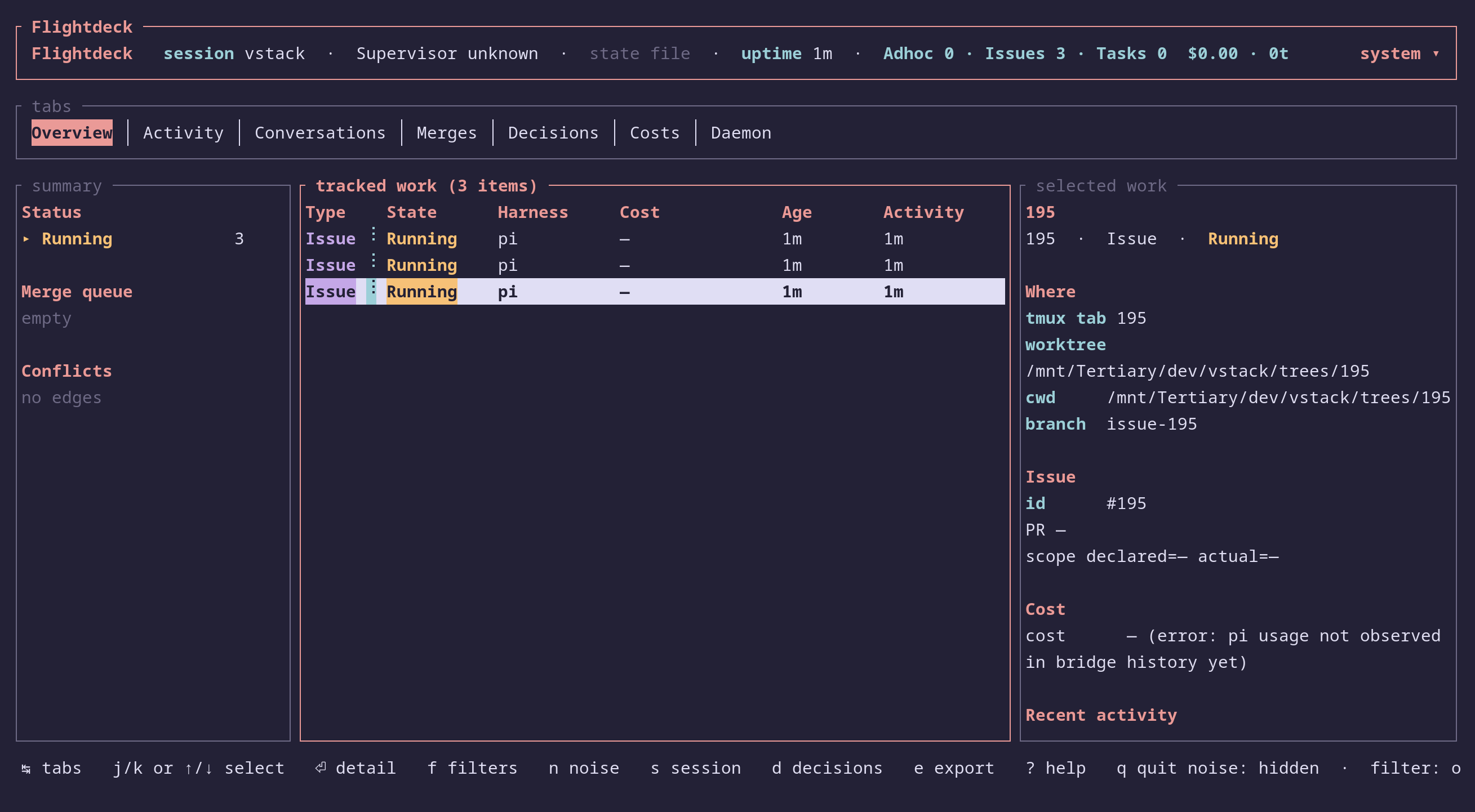
Optional Pi UI support for the flightdeck skill. The Rust app (flightdeck-dashboard) is the canonical full Flightdeck UI; this Pi extension adds inline status near chat and a /flightdeck command that focuses the Rust app or launches it when missing.
The Flightdeck skill and Rust dashboard work without this extension.
Highlights
- Pause banner — yellow frame above the editor when Flightdeck master pauses for the user. Clears on resume, and respects user-hidden widget state.
- Persistent mini-dashboard widget — compact tree of tracked sessions from the current durable active run, with state, kind, harness, last decision, age, and per-pane cost/turns/tokens. Once hidden by the user, state-file ticks and settings events do not reopen it until explicit toggle-in.
/flightdeckapp focus/open — delegates toflightdeck-dashboard focus-or-launch --json, focusing an existing app window or launching it in tmux.- Owner-scoped by default — dashboard renders only in the Flightdeck owner pane. Child panes remain suppressed. Visibility is configurable. State/archive read errors still render a diagnostic banner so corrupted state is visible even when owner metadata cannot be read.
- Stale-pane guard — rows whose tmux pane id no longer exists render as dim stale rows (no active status/spinner), and standby/watch hints ignore state files whose tracked entries only point at missing panes.
- Optional terminal bell when master pauses.
- Participates in vstack's stable mini-dashboard stack order: Flightdeck → Tasks → Agents → BG tasks.
Read-only by design
The Flightdeck skill owns state mutation; the daemon owns wake delivery; pane-respond owns sending input to inner panes. pi-flightdeck only renders active status from on-disk state and delegates full inspection/control to the Rust app. It reads the durable run-store active pointer first, honoring FLIGHTDECK_RUN_STORE_ROOT from the project .env.local/.env via non-executing parsing of that variable and its referenced variables. Quoted literal values may contain shell-looking punctuation such as command arguments with parentheses; command substitution, unsupported shell directives, non-single-assignment forms, shell escapes, tilde shorthand, or env-mutating constructs fail closed rather than falling back to stale legacy state. It falls back to legacy project-local state/archive files only when no active run exists.
Terminated archives are not shown as active mini-dashboard state. Use the Rust app for active dashboard context and supported archive/session inspection commands; a dedicated History UI is not part of this status-shell extension.
Install
Via vstack:
vstack add vanillagreencom/vstack --pi-extension pi-flightdeck --harness pi -y
Or globally:
vstack add vanillagreencom/vstack --global --pi-extension pi-flightdeck --harness pi -y
Restart Pi after installation.
Commands
| Command | Action |
|---|---|
/flightdeck |
Focus the Rust Flightdeck app, or launch it if missing. Outside tmux, reports a clear blocked error. |
/flightdeck:toggle |
Cycle the persistent Flightdeck mini-dashboard widget; toggling in restores the last visible mode. |
Settings
Open /extensions:settings; settings appear under the Flightdeck Status tab.
Glyph style: each package exposes glyphStyle (unicode default, ascii for terminal-safe chrome). @vanillagreen/pi-tool-renderer.globalGlyphStyleOverride=ascii forces ASCII chrome across vstack Pi extensions while leaving tool/model/user content unchanged.
Dashboard
| Setting | What it does |
|---|---|
| Show dashboard widget | Render the persistent mini-dashboard above the editor. User-hidden state suppresses the whole inline widget until explicit toggle-in. |
| Dashboard visibility | Where the persistent mini-dashboard may render: owner (default), tmux-session (any pane in the same tmux session), or always. Child panes remain suppressed in all modes. |
| Dashboard default state | Initial state at session start: hidden, compact, or expanded; settings changes do not reopen a user-hidden widget mid-session. |
| Dashboard max sessions | Max tracked-session rows shown. |
| Dashboard stale-after (min) | Suppress the session tree with a one-line hint when the daemon is dead and the last poll is older than N minutes. 0 disables. |
| Tree connector style | unicode or ascii. |
Pause banner
| Setting | What it does |
|---|---|
| Show pause banner | Render the pause-for-user banner unless the inline widget is user-hidden. |
| Terminal bell on pause | Ring the bell when master first pauses. |
Keyboard
| Setting | What it does |
|---|---|
| Dashboard cycle shortcut | Configurable; defaults to f6. Restores the last visible mode when toggled back in. Use none to disable. |
Refresh
| Setting | What it does |
|---|---|
| Refresh interval | Poll rate for state files (ms). |
| Daemon state dir override | Override FD_STATE_DIR resolution. Leave empty for the default. |
| Master state dir (project-relative) | Legacy fallback directory inside the project root for master state/archive files. Matches FLIGHTDECK_STATE_DIR (default tmp) when no durable active-run pointer exists. |
If your project uses a non-default FLIGHTDECK_STATE_DIR or FD_STATE_DIR, set the matching extension setting so the mini-dashboard reads the right files. Daemon tuning env vars are owned by the Flightdeck skill — see its README.
Out of scope
- No full-screen Pi Flightdeck dashboard; use the Rust app.
- No write actions.
- No daemon control.
- No multi-tmux-session aggregation.