@vanillagreen/pi-questions
Pi extension for structured multi-tab inline questions and bridge-driven replies.
Package details
Install @vanillagreen/pi-questions from npm and Pi will load the resources declared by the package manifest.
$ pi install npm:@vanillagreen/pi-questions- Package
@vanillagreen/pi-questions- Version
1.4.1- Published
- Jun 12, 2026
- Downloads
- 883/mo · 241/wk
- Author
- vanillagreencom
- License
- MIT
- Types
- extension
- Size
- 133.4 KB
- Dependencies
- 0 dependencies · 2 peers
Pi manifest JSON
{
  "extensions": [
    "./extensions/questions.ts"
  ],
  "image": "https://raw.githubusercontent.com/vanillagreencom/vstack/main/pi-extensions/pi-questions/assets/questions-workflow.gif",
  "appendSystem": "./instructions.md"
}Security note
Pi packages can execute code and influence agent behavior. Review the source before installing third-party packages.
README
pi-questions
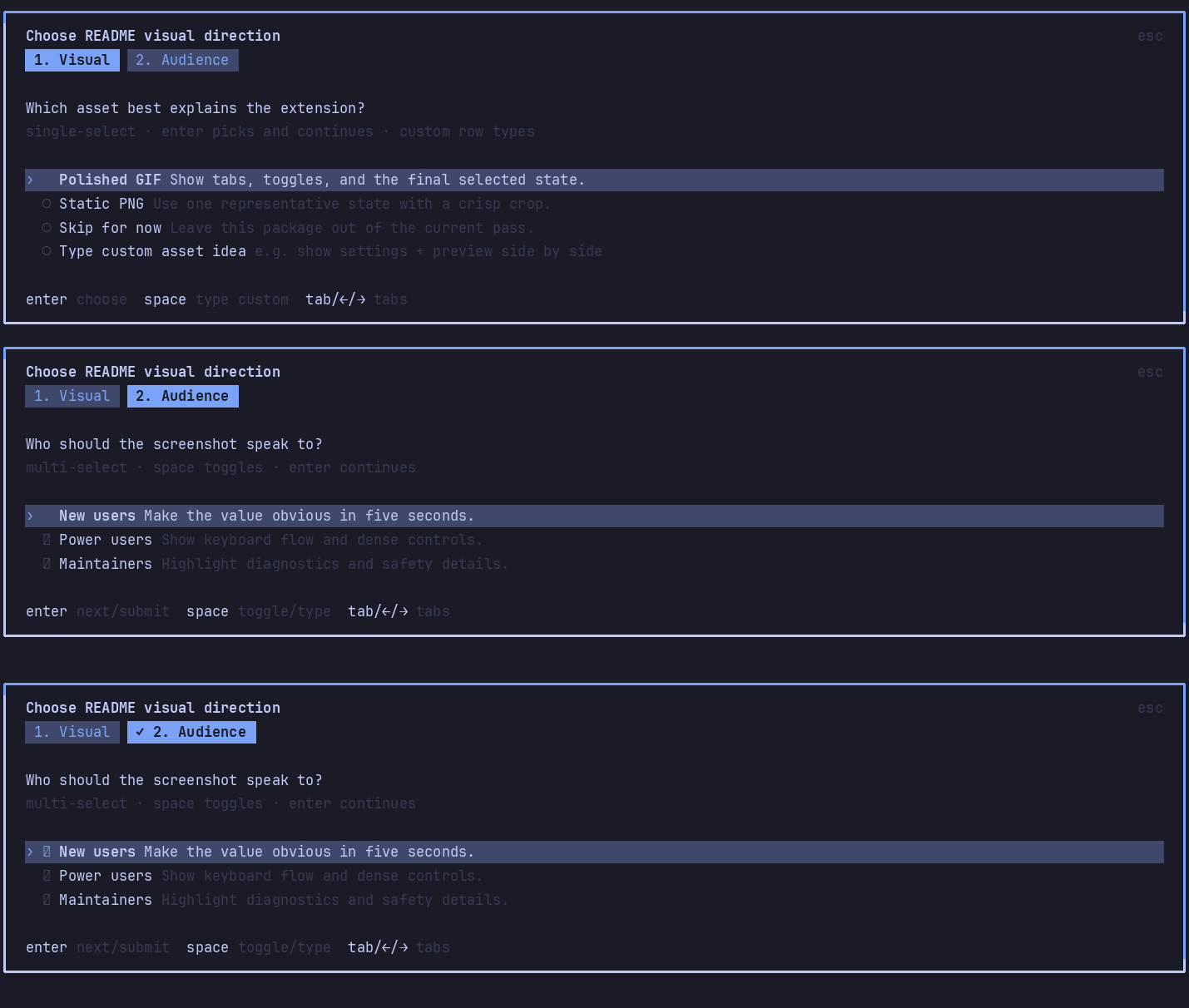
Structured inline questions for Pi. Multi-tab categories, built-in free-text fallback answers, and bridge-driven replies.
Highlights
questiontool for multiple-choice question tabs with a bottomSomething elsefree-text fallback row by default.- Editor-area UI by default; optional floating overlay.
- OpenCode-style question UI: tab hints and highlighted active rows.
- Compact answered tool output lists every category answer and expands inline to show each question with the selected choice marked.
- Wrapped option labels stay readable in narrow panes.
pi-session-bridgeintegration lets external clients list, answer, and reject pending questions.- When the bridge is loaded, question opened/answered/rejected lifecycle points publish structured
question.*activity broker events without adding chat messages. pi-qolnotification hook fires before prompts open.
Install
Via npm:
pi install npm:@vanillagreen/pi-questions
Via vstack:
cargo install --git https://github.com/vanillagreencom/vstack.git vstack
vstack add vanillagreencom/vstack --pi-extension pi-questions --harness pi -y
Restart Pi after installation.
Payload
{
  "id": "que_example",
  "header": "Choose next action",
  "questions": [
    {
      "header": "Issue Missing",
      "question": "How should I proceed?",
      "options": [
        { "label": "Use current branch", "description": "Continue without a tracker issue." },
        { "label": "Stop here", "description": "Wait for operator guidance." }
      ],
      "multiple": false,
      "customLabel": "Something else"
    }
  ]
}
Result:
{ "requestId": "que_example", "answers": [["Stop here"]] }
Cancelled:
{ "requestId": "que_example", "cancelled": true }
Every tab includes a bottom free-text fallback row by default, labelled Something else unless customLabel overrides it. Agents no longer need to set allowCustom for a basic escape hatch; the legacy flag is still accepted for compatibility, and allowCustom: false does not disable the fallback. customPlaceholder customizes the input hint.
When the user types fallback text, the result uses the same answer shape as fixed options:
{ "requestId": "que_example", "answers": [["Use issue ABC-123 instead"]] }
Do not include a final Confirm, Submit, Review, or Done question tab in the payload; the UI adds its own submit tab when needed.
Settings
Open /extensions:settings; settings appear under the Questions tab.
Project settings in .pi/settings.json apply only after Pi marks the workspace trusted; before trust, vstack Pi extensions read user/global settings only.
| Setting | What it does |
|---|---|
| Question UI mode | editor replaces the input area; overlay uses a floating popup. |
| Overlay popup width | Overlay mode only. |
| Overlay popup max height | Overlay mode only. Number or percentage string. |
| Visible option rows | Rows shown before scrolling. |
| Default question header | Fallback title when a request has no header. |
| Bridge replies enabled | Allow pi-session-bridge to answer/reject pending questions. |
Glyph style: each package exposes glyphStyle (unicode default, ascii for terminal-safe chrome). @vanillagreen/pi-tool-renderer.globalGlyphStyleOverride=ascii forces ASCII chrome across vstack Pi extensions while leaving tool/model/user content unchanged.
Bridge control
Requires pi-session-bridge. From any shell:
pi-bridge questions
pi-bridge answer --request-id que_example --answers '[["Stop here"]]'
pi-bridge reject --request-id que_example