@vanillagreen/pi-questions
Pi extension for structured multi-tab inline questions and bridge-driven replies.
Package details
Install @vanillagreen/pi-questions from npm and Pi will load the resources declared by the package manifest.
$ pi install npm:@vanillagreen/pi-questions- Package
@vanillagreen/pi-questions- Version
2.0.0- Published
- Aug 24, 2026
- Downloads
- 610/mo · 223/wk
- Author
- vanillagreencom
- License
- MIT
- Types
- extension
- Size
- 169.6 KB
- Dependencies
- 0 dependencies · 2 peers
Pi manifest JSON
{
  "extensions": [
    "./extensions/questions.ts"
  ],
  "image": "https://raw.githubusercontent.com/vanillagreencom/kendex/main/pi-extensions/pi-questions/assets/questions-workflow.gif",
  "appendSystem": "./instructions.md"
}Security note
Pi packages can execute code and influence agent behavior. Review the source before installing third-party packages.
README
pi-questions
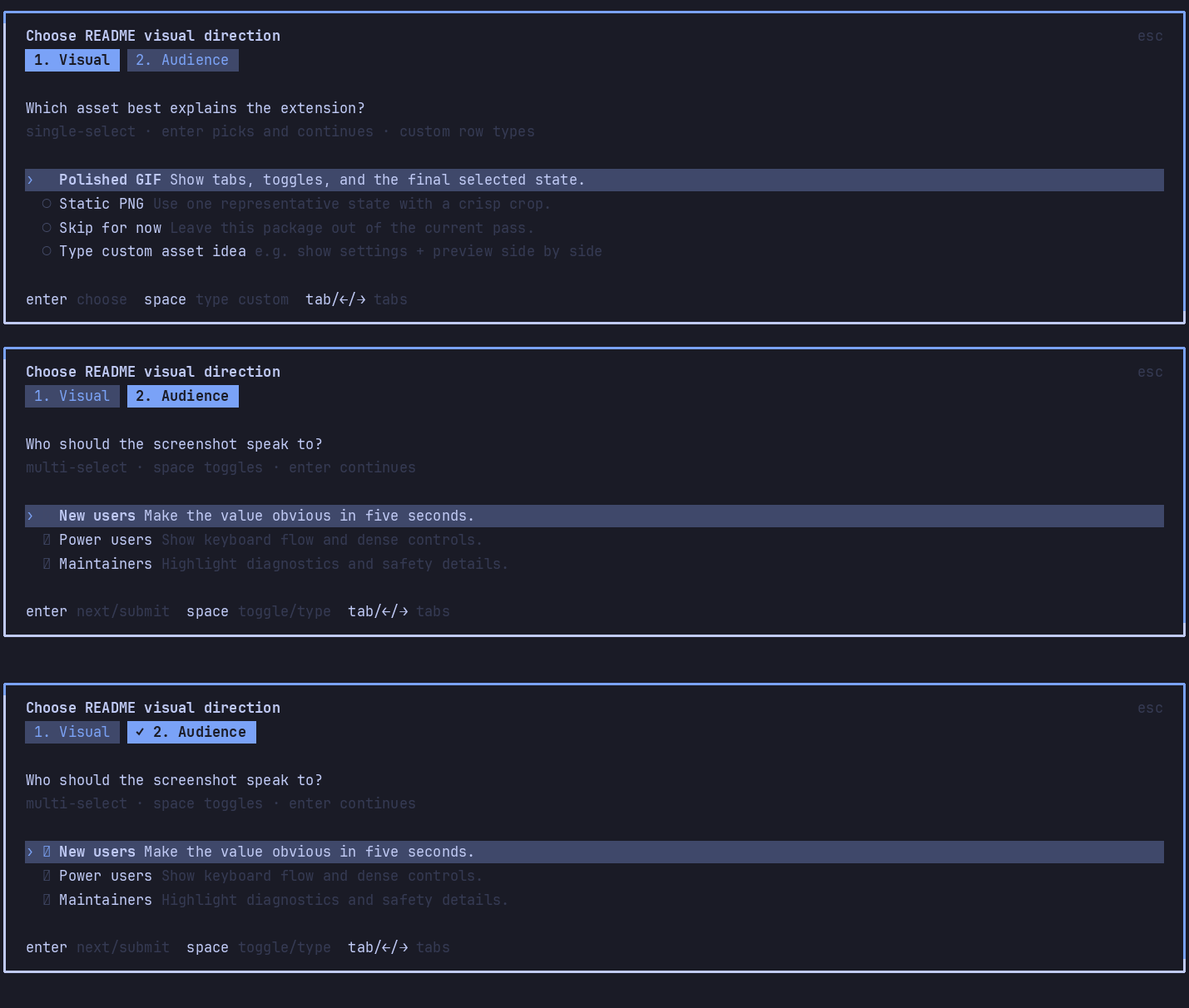
Structured inline questions for Pi. Multi-tab categories, built-in free-text fallback answers, and bridge-driven replies.
Highlights
questiontool for multiple-choice question tabs with a bottomSomething elsefree-text fallback row by default.- Editor-area UI by default; optional floating overlay.
- OpenCode-style question UI: tab hints and highlighted active rows.
- Compact answered tool output lists every category answer and expands inline to show each question with the selected choice marked.
- Wrapped option labels stay readable in narrow panes.
pi-session-bridgeintegration lets external clients list, answer, and reject pending questions.- When the bridge is loaded, question opened/answered/rejected lifecycle points publish structured
question.*activity broker events without adding chat messages. - Optional Answers as user message setting (off by default) mirrors each answered question into the conversation as a steer-delivered user message for observer extensions such as pi-automode.
pi-qolnotification hook fires before prompts open.- RPC hosts without custom TUI support (Paseo, pi-web, VS Code bridges) get a sequential native-dialog fallback. See RPC hosts.
Install
Via npm:
pi install npm:@vanillagreen/pi-questions
Via kendex:
cargo install --git https://github.com/vanillagreencom/kendex.git kendex
kendex add vanillagreencom/kendex --pi-extension pi-questions --harness pi -y
Restart Pi after installation.
RPC hosts
Interactive Pi sessions render the questionnaire with the custom TUI described above. RPC hosts (Paseo, pi-web, VS Code-based bridges) cannot render custom TUI components, so when ctx.mode === "rpc" — or when ctx.ui.custom() resolves without producing a result — the extension walks the questions one at a time through the host's native dialogs instead:
- Single-select questions open a native select dialog listing the numbered options plus the free-text fallback row; picking the fallback row opens a text input for the custom answer.
- Multi-select questions open a text input with the numbered option list folded into the prompt. Answer with comma-separated option numbers (e.g.
1,3). Including the fallback row's number opens a follow-up input for the custom text; any non-numeric answer is taken whole as a custom answer. Out-of-range numbers re-prompt with an error note, and the option list (including the fallback row) is always shown in full. - Blank custom answers re-show the question rather than submitting an empty answer; repeated invalid input cancels after a few attempts.
- Requests with several questions (or any multi-select) add a
Skip (no selection)row to single-select dialogs and accept empty multi-select input — the same tabs the TUI lets you leave unanswered via its confirm tab. A lone single-select question cannot be skipped, matching the TUI. - Dismissing any dialog cancels the whole questionnaire, matching Escape in the TUI. Answers keep the same
QuestionResultshape in both modes.
If the host supports neither custom TUI components nor native select/input dialogs, the question tool returns a clear error instead of hanging. Headless non-RPC contexts (e.g. bridge-driven sessions) still leave requests pending for pi-bridge replies.
Settings
Open /extensions:settings; settings appear under the Questions tab.
Project settings in .pi/settings.json apply only after Pi marks the workspace trusted; before trust, kendex Pi extensions read user/global settings only.
| Setting | What it does |
|---|---|
| Question UI mode | editor replaces the input area; overlay uses a floating popup. |
| Overlay popup width | Overlay mode only. |
| Overlay popup max height | Overlay mode only. Number or percentage string. |
| Visible option rows | Rows shown before scrolling. |
| Default question header | Fallback title when a request has no header. |
| Bridge replies enabled | Allow pi-session-bridge to answer/reject pending questions. |
| Answers as user message | Off by default. Mirror each answered question into the conversation as a steer-delivered user message. See Answers as user messages. |
Glyph style: each package exposes glyphStyle (unicode default, ascii for terminal-safe chrome). @vanillagreen/pi-tool-renderer.globalGlyphStyleOverride=ascii forces ASCII chrome across kendex Pi extensions while leaving tool/model/user content unchanged.
Answers as user messages
Off by default. Enable Answers as user message in /extensions:settings to have every answered question also delivered to the agent as one steer user message, with the question quoted and the chosen answers below:
> Which path?

Use current branch
Multi-question requests emit one block per tab, prefixed with the tab header (> Path: Which path?); a tab with nothing selected shows (no selection); cancelled or dismissed questions send nothing. Enable this when observer extensions such as pi-automode need to read decisions from the conversation stream — they classify user messages but ignore tool output for security reasons. On Pi cores without sendUserMessage steer delivery, the setting silently falls back to tool output only.
Bridge control
Requires pi-session-bridge. From any shell:
pi-bridge questions
pi-bridge answer --request-id que_example --answers '[["Stop here"]]'
pi-bridge reject --request-id que_example
See DEVELOPMENT.md for the question tool payload, result shapes, and free-text fallback semantics.