@vanillagreen/pi-session-bridge
Pi extension and CLI for controlling visible interactive Pi sessions over a structured Unix-socket side channel.
Package details
Install @vanillagreen/pi-session-bridge from npm and Pi will load the resources declared by the package manifest.
$ pi install npm:@vanillagreen/pi-session-bridge- Package
@vanillagreen/pi-session-bridge- Version
2.1.0- Published
- Sep 20, 2026
- Downloads
- 466/mo · 25/wk
- Author
- vanillagreencom
- License
- MIT
- Types
- extension
- Size
- 250 KB
- Dependencies
- 0 dependencies · 1 peer
Pi manifest JSON
{
  "image": "https://raw.githubusercontent.com/vanillagreencom/kendex/main/pi-extensions/pi-session-bridge/assets/session-bridge-cli.png",
  "extensions": [
    "./extensions/session-bridge.ts"
  ],
  "appendSystem": "./instructions.md"
}Security note
Pi packages can execute code and influence agent behavior. Review the source before installing third-party packages.
README
@vanillagreen/pi-session-bridge
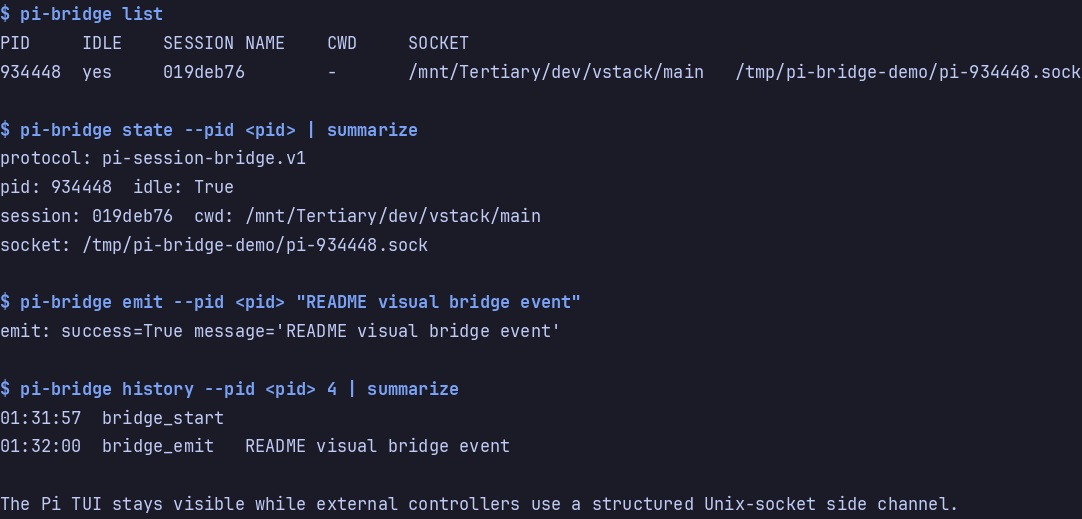
A local connection to a running Pi session. The pi-bridge CLI lets another terminal send prompts and inspect session activity.
Install
- npm:
pi install npm:@vanillagreen/pi-session-bridge. - kendex: add the declaration below to the project's
kendex.toml, or to~/.config/kendex/kendex.tomlfor user scope. Runkendex update-pi.
[pi-extensions."@vanillagreen/pi-session-bridge"]
source = "kendex"
Restart Pi after installation. Use kendex update-pi --check to preview the installation. kendex links the CLI at .pi/bin/pi-bridge for a project or ~/.pi/agent/bin/pi-bridge for user scope. Add that directory to PATH or run the CLI by path.
Features
- Find running Pi sessions and select a target.
- Send prompts, corrections and follow-up messages.
- Read recent events or subscribe to live activity.
- Answer pending questions when pi-questions is installed.
How it works
- Each Pi session opens a connection on your own machine and writes a small file saying where that connection is.
- The CLI reads those files to find the session you asked for.
- It sends your request down that channel, and the session sends the result back.
- A session you subscribed to keeps sending you what it does next.
pi-bridge history --rawreads a saved event in full when it was too large to return inline. Streaming events are the exception:message_updatearrives once per token andtool_execution_updateonce per partial tool result, and both are kept in reduced form only, so the finished value comes frommessage_endortool_execution_end.
Settings
The settings editor writes project values to .pi/settings.json. The default user file is ~/.pi/agent/settings.json. PI_CODING_AGENT_DIR changes the user directory. Package values are stored under kendex.extensionManager.config["@vanillagreen/pi-session-bridge"].
Open /extensions:settings; settings appear under the Session Bridge tab. Project settings in .pi/settings.json apply only after Pi marks the workspace trusted.
enabled: package toggle for the socket, the registry entry and the status badge.bridgeDir: where sockets and registry files live; thePI_BRIDGE_DIRenvironment variable overrides it.- History and payload bounds:
historyLimit,maxEventBytes,maxHistoryBytes,maxHistoryResponseBytes,eventPreviewBytes,spillRawEvents,maxRawSpillBytes,maxLineBytes. heartbeatMs,notifyOnStart,showStatus.
The socket triggers real agent work in the owning Pi process. Keep PI_BRIDGE_DIR private to your user, and never expose it to other users or untrusted containers.
Protocol and broker details for client authors and maintainers are in DEVELOPMENT.md.