@vanillagreen/pi-session-bridge
Pi extension and CLI for controlling visible interactive Pi sessions over a structured Unix-socket side channel.
Package details
Install @vanillagreen/pi-session-bridge from npm and Pi will load the resources declared by the package manifest.
$ pi install npm:@vanillagreen/pi-session-bridge- Package
@vanillagreen/pi-session-bridge- Version
2.0.1- Published
- Sep 6, 2026
- Downloads
- 456/mo · 198/wk
- Author
- vanillagreencom
- License
- MIT
- Types
- extension
- Size
- 220.6 KB
- Dependencies
- 0 dependencies · 1 peer
Pi manifest JSON
{
  "extensions": [
    "./extensions/session-bridge.ts"
  ],
  "appendSystem": "./instructions.md",
  "image": "https://raw.githubusercontent.com/vanillagreencom/kendex/main/pi-extensions/pi-session-bridge/assets/session-bridge-cli.png"
}Security note
Pi packages can execute code and influence agent behavior. Review the source before installing third-party packages.
README
@vanillagreen/pi-session-bridge
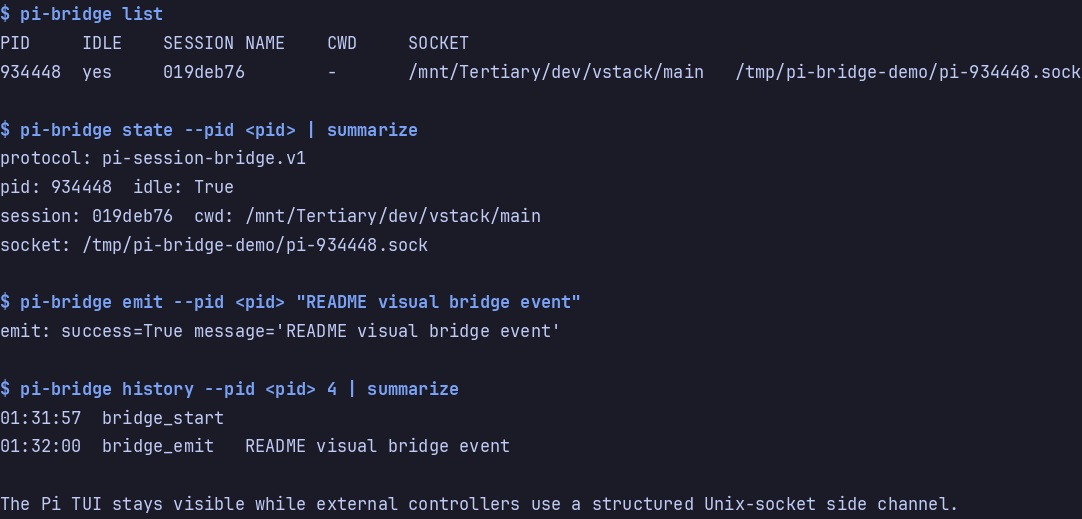
A local connection to a running Pi session. The pi-bridge CLI lets another terminal send prompts and inspect session activity.
Install
- npm:
pi install npm:@vanillagreen/pi-session-bridge. - kendex: add the declaration below to the project's
kendex.toml, or to~/.config/kendex/kendex.tomlfor user scope. Runkendex update-pi.
[pi-extensions."@vanillagreen/pi-session-bridge"]
source = "kendex"
Restart Pi after installation. Use kendex update-pi --check to preview the installation. kendex links the CLI at .pi/bin/pi-bridge for a project or ~/.pi/agent/bin/pi-bridge for user scope. Add that directory to PATH or run the CLI by path.
Features
- Find running Pi sessions and select a target.
- Send prompts, corrections and follow-up messages.
- Read recent events or subscribe to live activity.
- Answer pending questions when pi-questions is installed.
How it works
Each Pi session opens a local socket and writes a discovery record. The CLI uses those records to select the requested session. It sends a request through the socket. The session returns the result and sends subscribed activity updates. Large saved events can be read in full through the history command.
Settings
The settings editor writes project values to .pi/settings.json. The default user file is ~/.pi/agent/settings.json. PI_CODING_AGENT_DIR changes the user directory. Package values are stored under kendex.extensionManager.config["@vanillagreen/pi-session-bridge"].
Open /extensions:settings; settings appear under the Session Bridge tab. Project settings in .pi/settings.json apply only after Pi marks the workspace trusted.
enabled: package toggle for the socket, the registry entry and the status badge.bridgeDir: where sockets and registry files live; thePI_BRIDGE_DIRenvironment variable overrides it.- History and payload bounds:
historyLimit,maxEventBytes,maxHistoryBytes,maxHistoryResponseBytes,eventPreviewBytes,spillRawEvents,maxRawSpillBytes,maxLineBytes. heartbeatMs,notifyOnStart,showStatus.
The socket triggers real agent work in the owning Pi process. Keep PI_BRIDGE_DIR private to your user, and never expose it to other users or untrusted containers.
Protocol and broker details for client authors and maintainers are in DEVELOPMENT.md.