@vanillagreen/pi-task-panel
Persistent Claude-style tasks panel for Pi with slash commands and a structured tasks_write tool.
Package details
Install @vanillagreen/pi-task-panel from npm and Pi will load the resources declared by the package manifest.
$ pi install npm:@vanillagreen/pi-task-panel- Package
@vanillagreen/pi-task-panel- Version
1.2.2- Published
- May 15, 2026
- Downloads
- 977/mo · 977/wk
- Author
- vanillagreencom
- License
- MIT
- Types
- extension
- Size
- 198.3 KB
- Dependencies
- 0 dependencies · 4 peers
Pi manifest JSON
{
  "extensions": [
    "./extensions/task-panel.ts"
  ],
  "image": "https://raw.githubusercontent.com/vanillagreencom/vstack/main/pi-extensions/pi-task-panel/assets/panel-expanded.png",
  "appendSystem": "./instructions.md"
}Security note
Pi packages can execute code and influence agent behavior. Review the source before installing third-party packages.
README
pi-task-panel
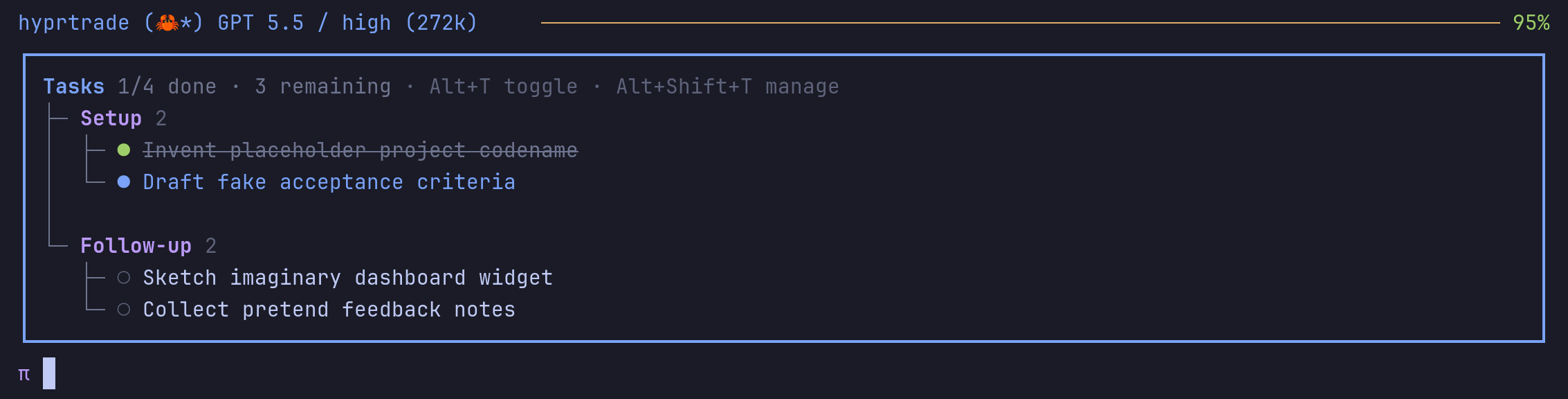
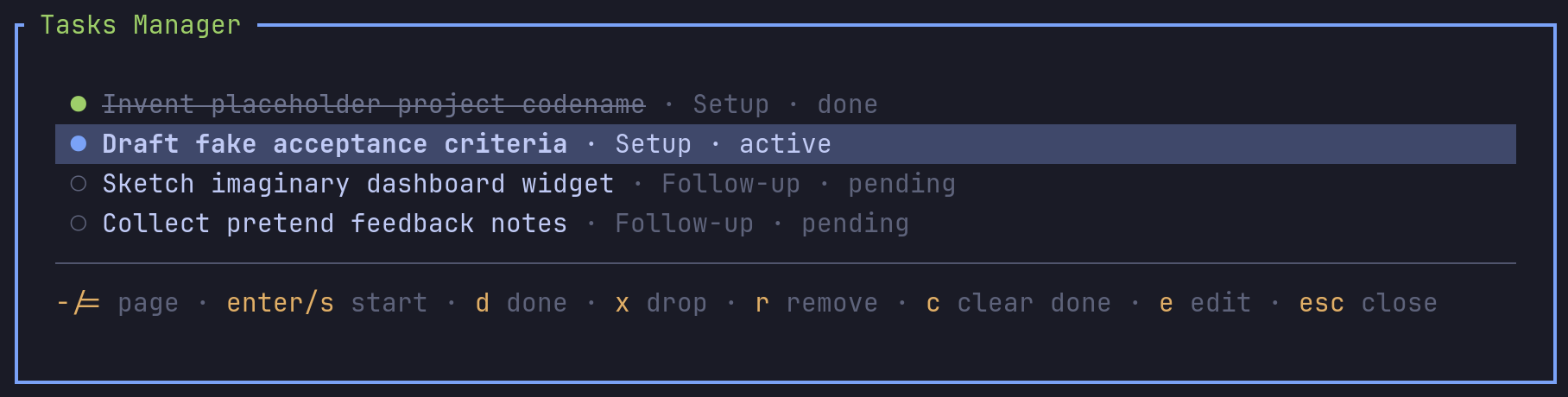
Persistent task panel above the Pi status line. Tasks are managed by the agent through the tasks_write tool or by you through /tasks.
Highlights
- Compact panel above the editor shows active and pending tasks at a glance.
- Expanded mode groups by phase and shows notes for the active task.
- Auto-advance moves to the next pending task when the active one is completed or dropped.
- Auto-hide when all tasks are done; reappears when pending work is added.
- Bulk-edit, import, and export tasks as plain markdown.
- Workflow reminders nudge the agent to keep the panel in sync.
- Participates in vstack's stable mini-dashboard stack order: Flightdeck → Tasks → Agents → BG tasks.
- Per-session sidecar state keeps slash-command edits and pending tasks resumable before the next model turn writes tool-result history.
Install
Via npm:
pi install npm:@vanillagreen/pi-task-panel
Via vstack:
cargo install --git https://github.com/vanillagreencom/vstack.git vstack
vstack add vanillagreencom/vstack --pi-extension pi-task-panel --harness pi -y
Restart Pi after installation.
Commands
| Command | Action |
|---|---|
/tasks or /tasks:manage |
Open the interactive manager. |
/tasks:add <task> |
Add a task. Use Phase :: task to assign a phase. |
/tasks:edit |
Bulk-edit tasks as plain text. |
/tasks:start <task> |
Set a task active. |
/tasks:done <task> |
Mark a task completed. |
/tasks drop <task> |
Mark a task abandoned. |
/tasks:remove <task> |
Remove a task. |
/tasks hide |
Hide the panel. |
/tasks show |
Show the compact panel. |
/tasks show-all |
Show the expanded panel. |
/tasks:clear-completed |
Remove completed tasks. |
/tasks:export <path> |
Write tasks to a markdown file. |
/tasks:import <path> |
Load tasks from a markdown file. |
Arguments support autocomplete, including task names.
Manager keys
↑/↓ selects. enter/s starts, d marks done, x drops, r removes, c clears completed, e opens bulk edit.
Bulk edit format:
- Phase A :: First task (active)
- Phase A :: Second task (done)
- Phase B :: Third task
Status suffixes: (active), (done), (dropped).
Visibility cycle
The panel toggle cycles hidden → show 4 → show all. The manager popup opens with its own shortcut and documents its keys in the footer. All bindings are configurable via /extensions:settings; Pi's thinking-visibility binding is preserved unless you opt in to taking it over.
Settings
Open /extensions:settings; settings appear under the Task Panel tab.
Panel
| Setting | What it does |
|---|---|
| Enable task panel | Master toggle for tasks_write, panel rendering, shortcuts, and reminders. |
| Default panel state | hidden, compact, or expanded when tasks first appear. |
| Compact task count | Max tasks shown in compact mode. |
| Show active notes | Show notes for the active task in expanded mode. |
| Auto-show on first task | Reveal the panel automatically when the first task is added. |
Keyboard
| Setting | What it does |
|---|---|
| Take over thinking-visibility binding | Repurpose Pi's thinking-visibility binding for the task-panel toggle. |
| Alternate shortcut | Always-available toggle. Configurable. |
| Manager popup shortcut | Configurable. |
Tool output
| Setting | What it does |
|---|---|
| Compact tasks_write output | Render tasks_write results as a single inline status row. |
Reminders
| Setting | What it does |
|---|---|
| Task workflow reminders | Inject hidden task context so the agent reconciles state before replying. |
| Incomplete-task reminders | Subtle reminder when a turn ends with incomplete tasks. |