@vanillagreen/pi-task-panel
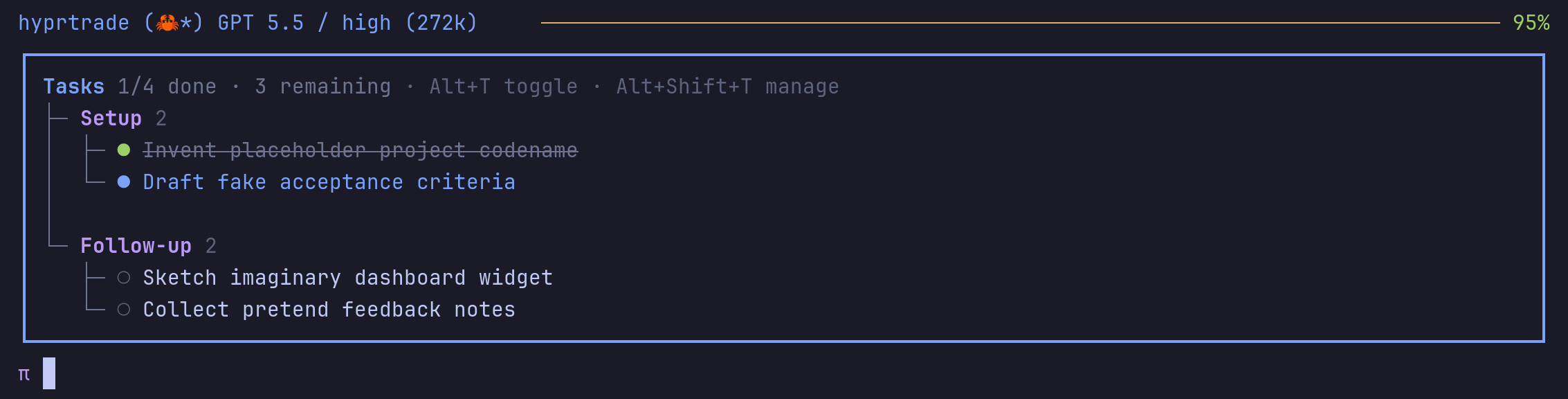
Persistent Claude-style tasks panel for Pi with slash commands and a structured tasks_write tool.
Package details
Install @vanillagreen/pi-task-panel from npm and Pi will load the resources declared by the package manifest.
$ pi install npm:@vanillagreen/pi-task-panel- Package
@vanillagreen/pi-task-panel- Version
3.0.1- Published
- Sep 6, 2026
- Downloads
- 762/mo · 213/wk
- Author
- vanillagreencom
- License
- MIT
- Types
- extension
- Size
- 218.1 KB
- Dependencies
- 0 dependencies · 4 peers
Pi manifest JSON
{
  "extensions": [
    "./extensions/task-panel.ts"
  ],
  "image": "https://raw.githubusercontent.com/vanillagreencom/kendex/main/pi-extensions/pi-task-panel/assets/panel-expanded.png",
  "appendSystem": "./instructions.md"
}
Security note
Pi packages can execute code and influence agent behavior. Review the source before installing third-party packages.
README
@vanillagreen/pi-task-panel
A task list above the Pi editor. The agent updates it through a tool, and you can edit it through the tasks command.
Install
- npm:
pi install npm:@vanillagreen/pi-task-panel. - kendex: add the declaration below to the project's
kendex.toml, or to~/.config/kendex/kendex.tomlfor user scope. Runkendex update-pi.
[pi-extensions."@vanillagreen/pi-task-panel"]
source = "kendex"
Restart Pi after installation. Use kendex update-pi --check to preview the installation.
Features
- Show active, pending and completed tasks.
- Group tasks by phase and show task notes.
- Edit, import and export the task list.
- Restore tasks when the session resumes.
How it works
The agent sends tasks to the tasks_write tool. The extension saves the list with the session and displays it above the editor. Tool calls or your edits update task status and notes. Resuming the session restores the saved list.
Settings
The settings editor writes project values to .pi/settings.json. The default user file is ~/.pi/agent/settings.json. PI_CODING_AGENT_DIR changes the user directory. Package values are stored under kendex.extensionManager.config["@vanillagreen/pi-task-panel"].
Open /extensions:settings; settings appear under the Task Panel tab. Project settings in .pi/settings.json apply only after Pi marks the workspace trusted.
enabled: package toggle.panelDefaultState,maxCompactTasks,showNotesInExpanded,autoShowOnFirstTask,glyphStyle: what the panel shows and when it appears.alternateShortcut,managerShortcut,toggleBehavior,takeoverCtrlT: the shortcuts and what the toggle does; Pi's own thinking-visibility binding is left alone unless you opt in.compactToolOutput: whethertasks_writeresults render as one line.showWorkflowReminder,showIncompleteReminder: the hidden reminders to the agent.
Maintainer notes are in DEVELOPMENT.md.