@vanillagreen/pi-tool-renderer
Compact Claude/opencode-style renderers for Pi tools with rich diffs, apply_patch, generic/MCP rendering, and optional global chrome.
Package details
Install @vanillagreen/pi-tool-renderer from npm and Pi will load the resources declared by the package manifest.
$ pi install npm:@vanillagreen/pi-tool-renderer- Package
@vanillagreen/pi-tool-renderer- Version
1.6.1- Published
- Jun 12, 2026
- Downloads
- 1,095/mo · 243/wk
- Author
- vanillagreencom
- License
- MIT
- Types
- extension
- Size
- 481.5 KB
- Dependencies
- 0 dependencies · 2 peers
Pi manifest JSON
{
  "extensions": [
    "./extensions/tool-renderer.ts"
  ],
  "image": "https://raw.githubusercontent.com/vanillagreencom/vstack/main/pi-extensions/pi-tool-renderer/assets/tool-batch.png"
}Security note
Pi packages can execute code and influence agent behavior. Review the source before installing third-party packages.
README
pi-tool-renderer
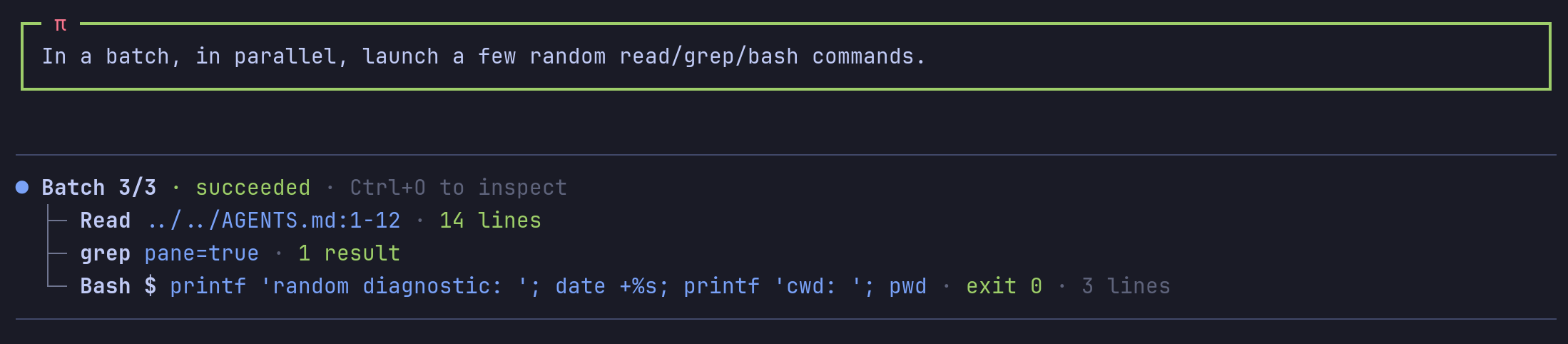
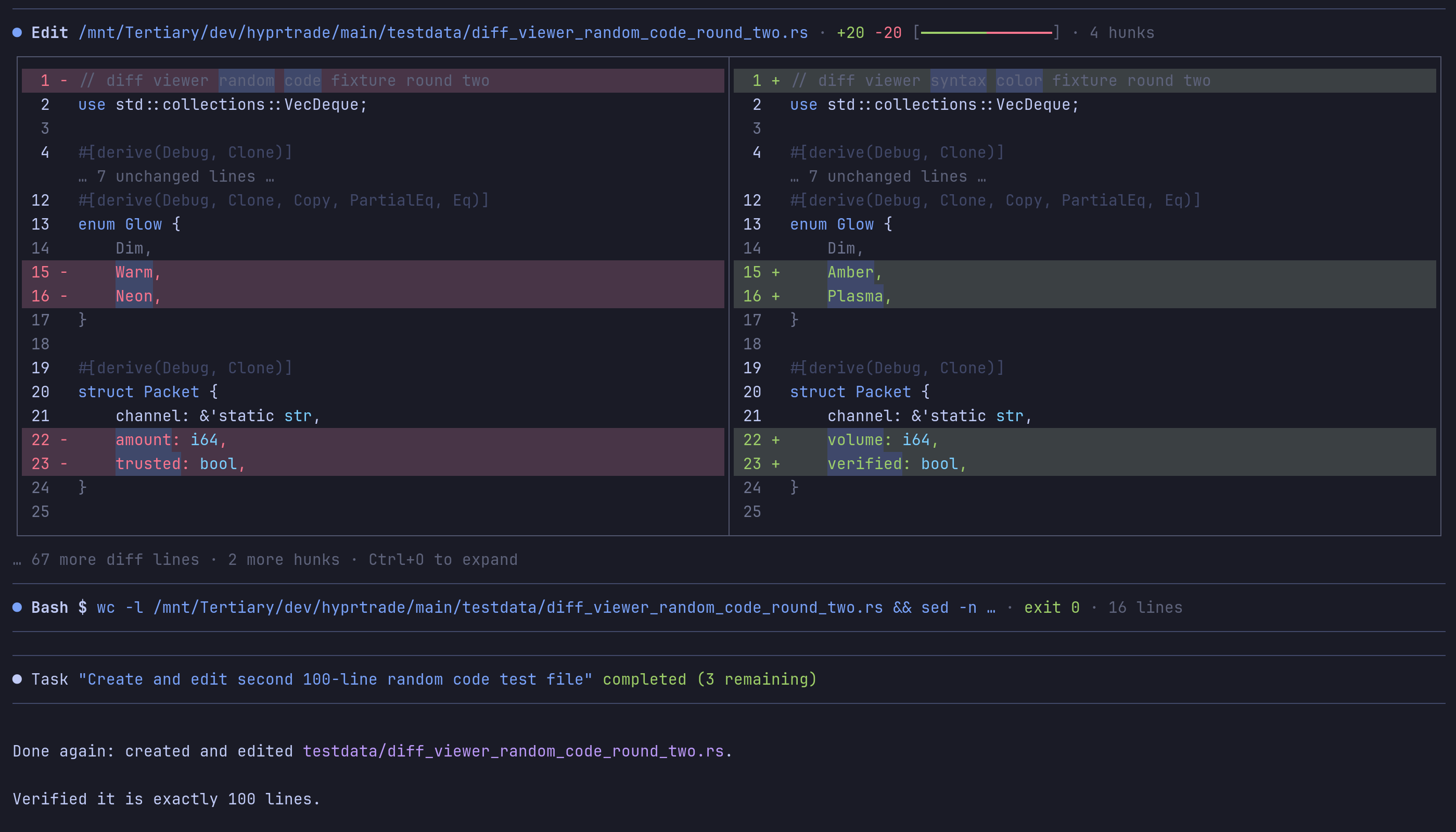
Compact renderers for Pi tools. Optional tool_batch composite tool. Optional rich diff UI for edits, writes, and bash patches.
Highlights
- Compact one-line tool rows for
read,bash,grep,find,ls; file paths in compact rows use OSC 8file://hyperlinks when the terminal supports them. - Delayed live bash tails avoid fast-command output flashes; long-running commands show/preserve the last few lines flush-left so copied output has no gutter characters.
tool_batchruns multiple independent read/search/list/diagnostic bash calls and renders one combined result.- Optional rich Shiki diffs for
edit/writewith side-by-side previews, hunk counts, and inline word highlights. - Compact user-message cards with a green border and red π marker.
- Compaction summaries and skill invocations render with the same compact chrome.
- Generic renderers for OpenAI-style tools (
web_search,webfetch,Agent,Task*) and MCP tools. apply_patchcall/result preview when the tool is present.
Defaults leave edit/write on Pi's built-in renderers. Enable Render edits/writes compactly to opt in.
Install
Via npm:
pi install npm:@vanillagreen/pi-tool-renderer
Via vstack:
cargo install --git https://github.com/vanillagreencom/vstack.git vstack
vstack add vanillagreencom/vstack --pi-extension pi-tool-renderer --harness pi -y
Restart Pi after installation.
tool_batch
{
  "calls": [
    { "tool": "read", "path": "README.md" },
    { "tool": "grep", "pattern": "registerCommand", "path": "pi-extensions" }
  ]
}
Accepts read, grep, find, ls, and diagnostic bash. Per-call arguments can be flat or wrapped in args.
Prefer it for independent inspection calls. Don't use it for mutating commands, order-dependent commands, streaming output, or anything you want to inspect separately.
If the combined output would exceed Pi's normal tool-result budget, child outputs are capped to fit (head + tail preserved). Use separate calls or read offset/limit for the full budget per call.
Settings
Open /extensions:settings; settings appear under the Tool Renderer tab.
Project settings in .pi/settings.json apply only after Pi marks the workspace trusted; before trust, vstack Pi extensions read user/global settings only.
Glyph style: each package exposes glyphStyle (unicode default, ascii for terminal-safe chrome). @vanillagreen/pi-tool-renderer.globalGlyphStyleOverride=ascii forces ASCII chrome across vstack Pi extensions while leaving tool/model/user content unchanged.
General
| Setting | What it does |
|---|---|
| Enable compact renderers | Override built-in read/bash/search renderers. |
| Tree connector style | unicode or ascii. |
| Stack separate native tool calls | Legacy renderer for consecutive native tool calls. Prefer tool_batch. |
| Stack child display | rows, headline, or anchor-list when stacking is on. |
Batch tool
| Setting | What it does |
|---|---|
| Register tool_batch | Add the composite tool. |
| Batch max calls | Max calls per tool_batch invocation. |
| Batch per-call timeout (ms) | Max time any one child call may run before tool_batch reports that child as timed out. |
Messages
| Setting | What it does |
|---|---|
| Compact user messages | Green border + red π marker instead of filled background; preserves Pi's prompt-zone markers around the full framed card. |
| User message trailing blank line | Extra blank line after user messages. |
| Compact compaction summaries | Compact bullet style instead of Pi's padded box. |
| Compact skill invocation messages | Compact /skill:name rows. |
| Align assistant messages | Remove Pi's one-column left padding from assistant text. |
| Styled markdown code blocks | Render fenced code blocks with syntax highlighting and background, flush-left with no copy gutter/prefix. |
Read / Search / Bash output
| Setting | What it does |
|---|---|
| Read output mode | preview, summary, or hidden. |
| Search output mode | preview, count, or hidden. |
| Bash output mode | opencode, preview, summary, or hidden. |
| Live bash output delay (ms) | Wait this long before showing a running bash output tail. |
| Live bash tail lines | Tail lines shown for long-running bash output and kept after completion. |
| Expanded read/search/bash preview lines | Per-tool expand-time line caps. |
| Command preview characters | Max command chars in collapsed bash rows. |
| Collapsed bash preview lines | Tail lines shown when bashOutputMode=preview. |
Bash diffs
| Setting | What it does |
|---|---|
| Render bash diffs | Detect diff output from read-only bash and render rich diff UI. Off by default. |
| Render git diff command diffs | Show rich diff UI for explicit git diff commands. Off by default. |
Mutation (edit/write)
| Setting | What it does |
|---|---|
| Render edits/writes compactly | Override Pi's built-in edit/write renderers. Off by default. |
| Split diff view | Side-by-side rich diffs on wide terminals. |
| Collapsed / expanded diff preview lines | Line budgets for collapsed and expanded rows. |
| Edit/write call preview | Show safe call-phase diff previews before execution completes. |
| Edit/write call preview lines | Line budget for call-phase previews. |
| Syntax-highlight diffs | Use Shiki when a language can be detected. |
| Inline word diff highlights | Highlight changed words in paired removed/added lines. |
| Diff line backgrounds | Fill added/removed lines with success/error backgrounds. |
| Show diff hunk metadata | Include hunk counts and truncation hints. |
Generic tools
| Setting | What it does |
|---|---|
| Generic external tool renderers | Render web_search, webfetch, Agent, Task* and similar. |
| Render apply_patch | Install apply_patch call/result renderers without changing execution. |
| apply_patch call preview | Parse arguments and render diff previews during the call phase. |
| apply_patch preview lines | Line budget for collapsed apply_patch diffs. |
| MCP output mode | preview, summary, or hidden. |
| MCP preview lines | Line budget for MCP/generic tool previews. |
Chrome
| Setting | What it does |
|---|---|
| Global tool chrome | off, transparent, or outlines (muted horizontal rules above/below), including tools that render their own shell. |
| Guard terminal right margin | Render one column short to avoid auto-wrap flashes in tmux. |
| Animate pending tool status | Blink pending bullets. Off for stable streaming. |
| Working indicator | default, pulse, or hidden. |
Safety
| Setting | What it does |
|---|---|
| Max renderer line width | Hard cap for single rendered lines. |
Notes
This package mostly changes rendering, not tool execution. tool_batch is one tool result, so it caps combined child output if needed; individual built-in tools still apply their own truncation first.