@vkundapur/context-inspector
Pi coding agent extension: session context map and inspector. See a visual breakdown of context usage — prompts, tools, messages, token estimates — via the /context command.
Package details
Install @vkundapur/context-inspector from npm and Pi will load the resources declared by the package manifest.
$ pi install npm:@vkundapur/context-inspector- Package
@vkundapur/context-inspector- Version
0.1.1- Published
- May 30, 2026
- Downloads
- 131/mo · 22/wk
- Author
- vkundapur
- License
- MIT
- Types
- extension
- Size
- 782.6 KB
- Dependencies
- 0 dependencies · 2 peers
Pi manifest JSON
{
  "extensions": [
    "./index.ts"
  ]
}
Security note
Pi packages can execute code and influence agent behavior. Review the source before installing third-party packages.
README
Context Inspector
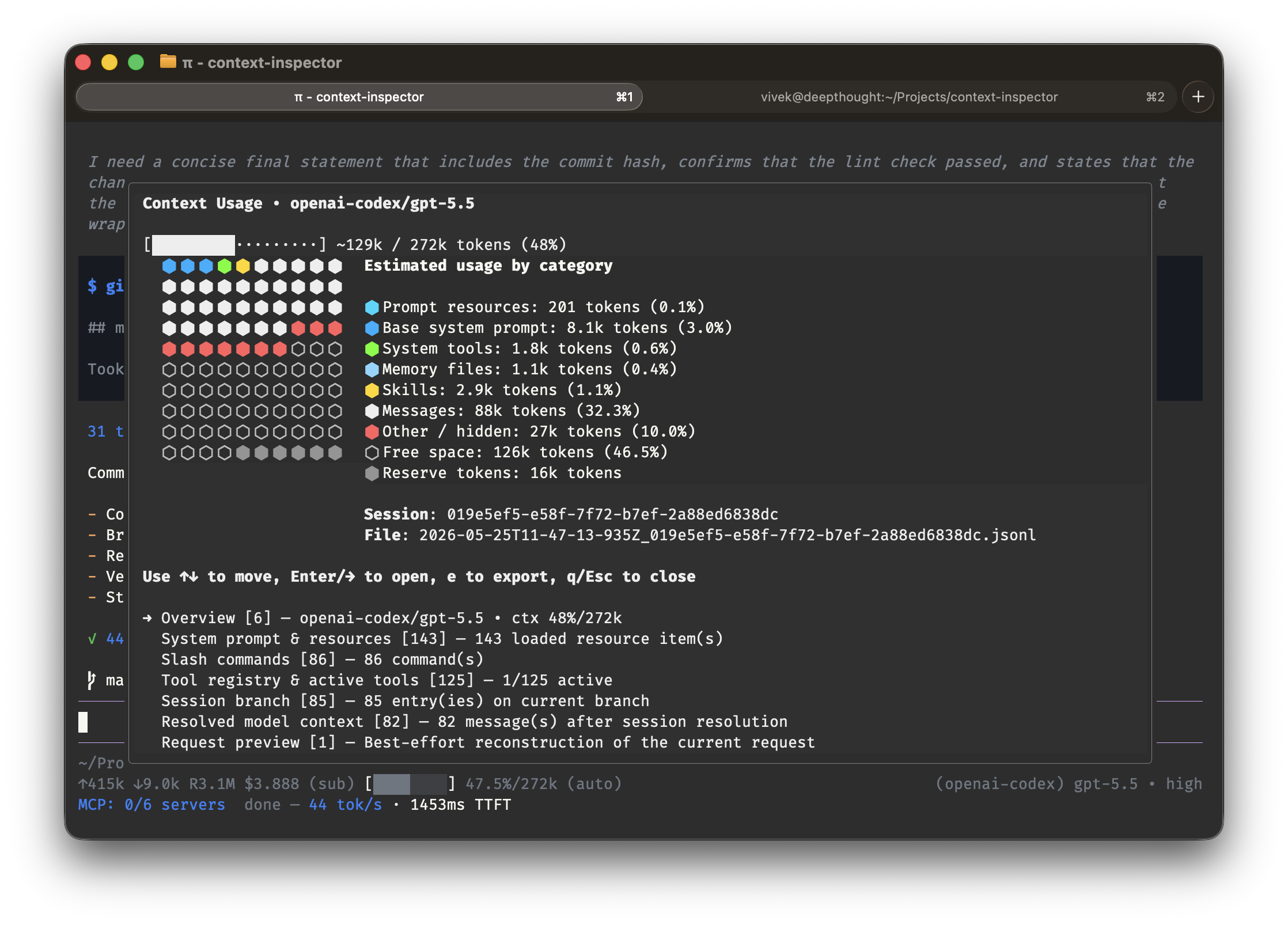
A context map and session inspector for the Pi coding agent. Adds the /context command — a TUI dashboard that shows a visual breakdown of what's consuming your session context.
What it shows
The inspector is a read-only context usage snapshot of the current Pi session. It groups the current state into sections:
- Overview — cwd, session file, session id, model, thinking level, context usage estimates
- System prompt & resources — custom prompt, appended prompt, context files, skills, tool snippets, fallback prompt
- Slash commands — registered commands
- Tool registry & active tools — all tools and which ones are active
- Session branch (raw entries) — the session branch history
- Resolved model context — the final message list after session resolution
- Request preview — a compact summary of the request that would be sent
Usage view
At the top, the inspector shows estimated context usage:
- a usage bar
- a colored 10×10 usage grid
- a category legend
Reserved blocksat the end when compaction reserves tokens
The category colors are just visual helpers. They do not change behavior.
Installation
Install globally (available in all Pi sessions):
npm install -g @vkundapur/context-inspector
Or project-local (available only in the current project):
npm install @vkundapur/context-inspector
Then run /reload in Pi or restart Pi to load the extension.
How it works
Cache prompt info
- On
before_agent_start, the extension stores the latest system prompt and prompt options.
- On
Build a snapshot
buildSnapshot()gathers everything into one immutable object.- This keeps the UI stable while you move around inside it.
Estimate usage
estimateUsageCategories()approximates token usage from prompt resources, resolved messages, and compaction settings.- These numbers are estimates, not exact accounting.
Render lines
buildInspectorLines()turns the snapshot into plain text lines.styleInspectorLines()adds the border and colors.
Interact
- Arrow keys move between sections/items.
- Enter or → expands a section.
- ← or Esc collapses.
eexports the snapshot to.pi/context-snapshot.json.qcloses the inspector.
Linting
npm run lint
npm run lint:watch
npm run check
Notes
- The inspector only opens in an interactive UI session.
- It refuses to open while the current turn is still running.
- Export is also only available from an idle interactive session.