@wannfq/pi-meter
Provider allowance windows for Pi — displayed in a compact /meter overlay.
Package details
Install @wannfq/pi-meter from npm and Pi will load the resources declared by the package manifest.
$ pi install npm:@wannfq/pi-meter- Package
@wannfq/pi-meter- Version
0.3.1- Published
- Aug 12, 2026
- Downloads
- 149/mo · 9/wk
- Author
- wannfq
- License
- MIT
- Types
- extension
- Size
- 369.2 KB
- Dependencies
- 0 dependencies · 2 peers
Pi manifest JSON
{
  "extensions": [
    "./src/index.ts"
  ]
}
Security note
Pi packages can execute code and influence agent behavior. Review the source before installing third-party packages.
README
pi-meter
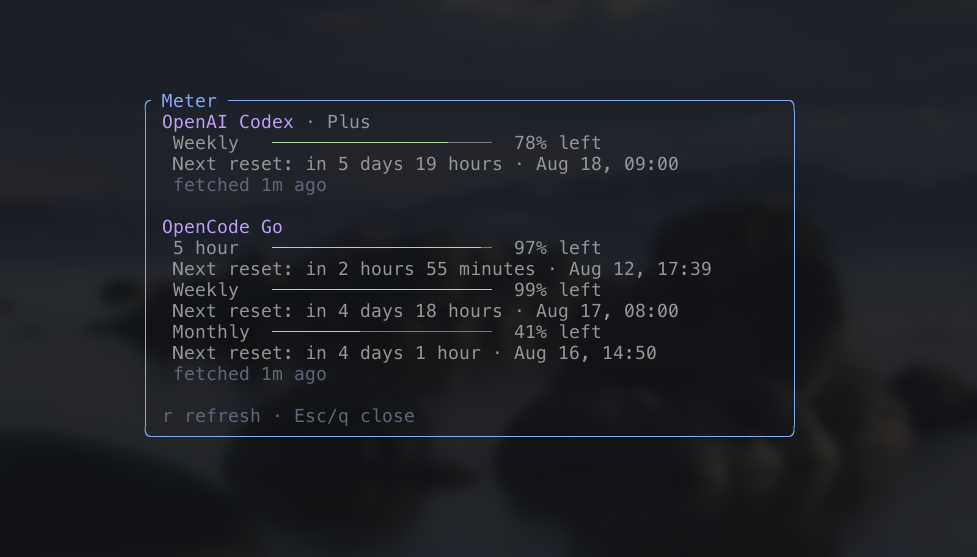
pi-meter is a Pi extension that
shows provider allowance windows in a compact /meter overlay.
Features
- Shows OpenAI Codex subscription allowance and reset times through Pi's
existing
openai-codexlogin. - Shows OpenCode Go rolling, weekly, and monthly allowance usage from the source-reviewed usage route, authenticated with the OpenCode Zen/Go API key resolved from Pi's auth store at read time.
- Shows xAI SuperGrok's shared weekly usage through Pi's SuperGrok / X Premium OAuth login.
- Keeps successful provider readings visible when another provider fails.
- Omits a live provider's row when it settles with no usable reading and a
suppressed failure (
not-configured,unauthorized,network, orinvalid-response); those typed failures keep their internal facts but never produce a failure-derived display, and a usable cached reading stays visible. - Keeps
timeoutandrate-limitedfailures visible as failure rows. - Does not list Claude: it has no provider definition, auth resolution, source adapter, or network I/O until a qualifying first-party allowance contract and permitted credential-use policy exist.
- Fetches only when
/meteropens or you request a refresh. It performs no startup requests, credential resolution, or background polling.
Install
Pi packages run with full system access. Review the source before installing.
pi install npm:@wannfq/pi-meter
You can also install directly from GitHub:
pi install git:github.com/wannfq/pi-meter
To try the extension without installing it:
pi -e npm:@wannfq/pi-meter
Use
Run Pi in interactive mode, then enter:
/meter
Use r to request a refresh and Esc or q to close the overlay. You can also
open the overlay with a forced refresh:
/meter refresh
A forced refresh bypasses cached freshness, but it still respects provider rate
protection. OpenAI Codex requires an openai-codex account in Pi. OpenCode Go
requires the OpenCode Zen/Go API key stored in Pi's auth store. SuperGrok
requires Pi's xAI OAuth login; an XAI_API_KEY alone does not grant access to
consumer subscription usage.
Develop
This project requires Node.js and the pnpm version declared in package.json.
pnpm install
pnpm check
pnpm test
pnpm dev
pnpm dev starts Pi with only this extension loaded. See
docs/providers.md before adding or changing a provider.
Project conventions and validation requirements are in
AGENTS.md.