@wierdbytes/pi-facelift
Cosmetic facelift for built-in pi tool output — open-right rounded frames, syntax-highlighted reads, status-aware bash summaries, find/grep.
Package details
Install @wierdbytes/pi-facelift from npm and Pi will load the resources declared by the package manifest.
$ pi install npm:@wierdbytes/pi-facelift- Package
@wierdbytes/pi-facelift- Version
0.6.3- Published
- Jul 21, 2026
- Downloads
- 363/mo · 21/wk
- Author
- wierdbytes
- License
- MIT
- Types
- extension
- Size
- 846.2 KB
- Dependencies
- 2 dependencies · 3 peers
Pi manifest JSON
{
  "extensions": [
    "./index.ts"
  ]
}
Security note
Pi packages can execute code and influence agent behavior. Review the source before installing third-party packages.
README
@wierdbytes/pi-facelift
Cosmetic facelift for built-in pi coding agent tool output.
inspired by
pi-pretty
What you get
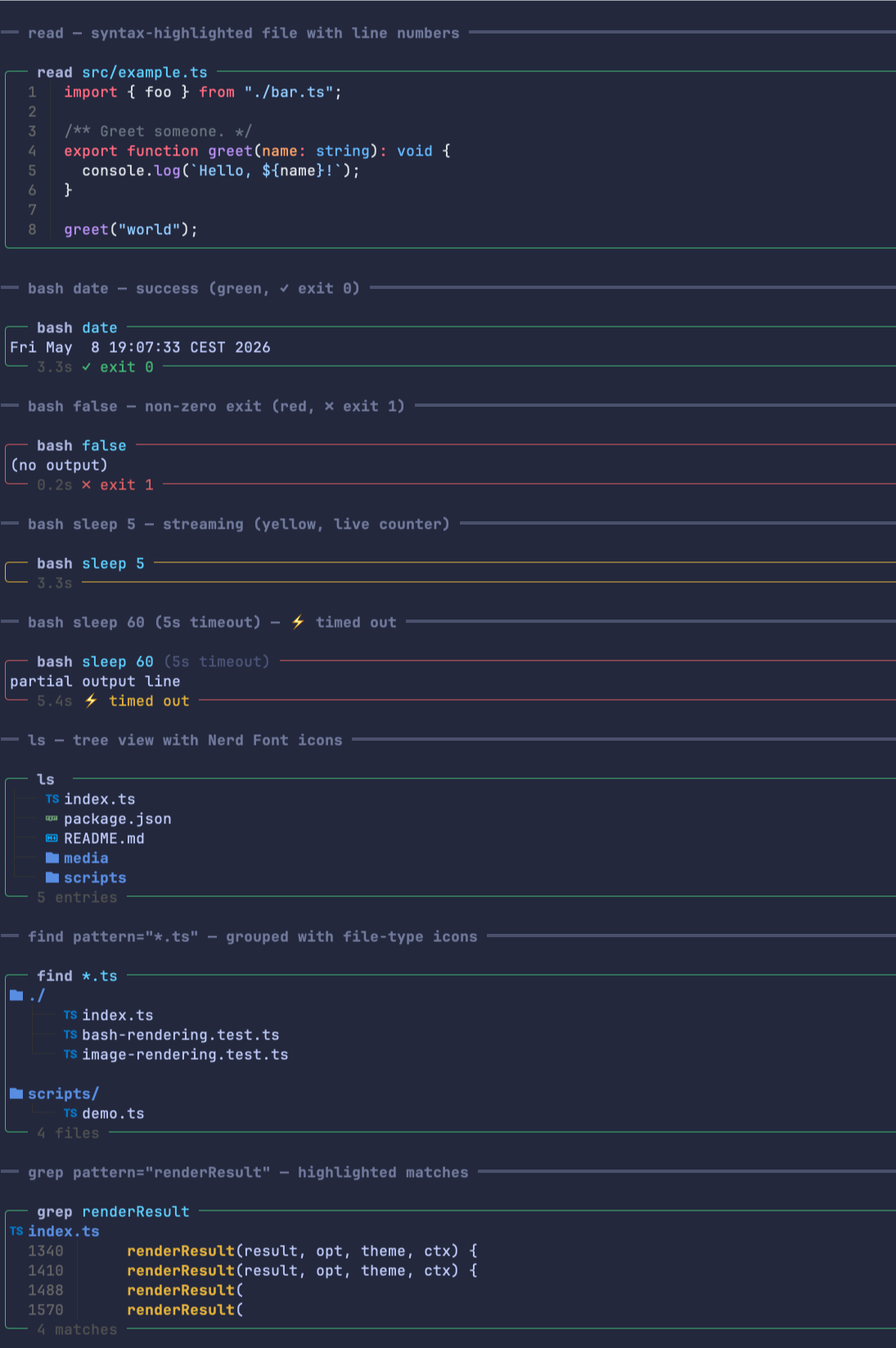
read— syntax-highlighted file content with line numbers, plus inline image rendering (Kitty / iTerm2 protocols, with tmux passthrough).bash— open-right frame with the duration + status pinned to the bottom borderStatus colour follows the host theme tokens (
successwhile finished,warningwhile running,erroron non-zero / timeout / abort) so the chrome blends with whatever palette the user is running. The exit summary is consistent across statuses (✓ exit 0,✗ exit N,⚡ timed out,⚡ aborted). Duration is shown as3.3s/1m3s/2h5m.Frame primitives (top/bottom borders, rail, multi-line title sub-tree) live in
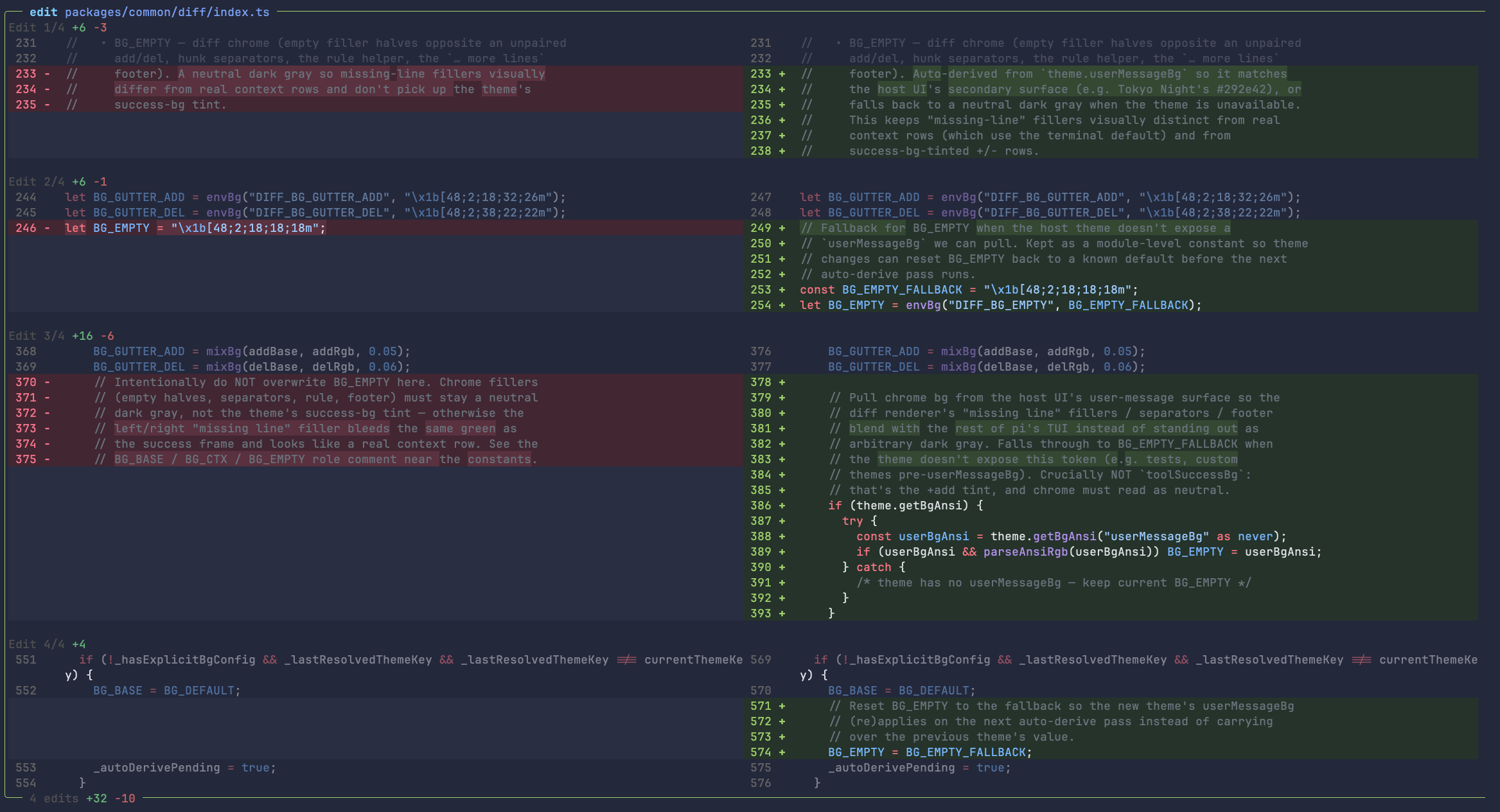
@wierdbytes/pi-common/tool-frameand are shared with@wierdbytes/pi-webso every tool that opts intorenderShell: "self"looks the same.ls— Nerd Font file icons + tree-oriented rendering.find/grep— grouped / highlighted rendering on top of pi's built-in tool implementations (no extra search backend, no extra dependencies).write/edit— GitHub-style side-by-side diff with syntax highlighting and word-level emphasis (powered by@wierdbytes/pi-common/diff). All edits in one tool call share a single layout by default (split when every diff fits, unified when any would wrap) soEdit 1 split, Edit 2 unifiedmixed renders don't happen — configurable viadiffLayout(see below).working timer — while the model streams, the
Working...spinner line gains a live ticking timer and a token-rate estimate (Working... 12s · tps: ~756). When the run settles, a muted line is left behind in chat history (a durable custom entry, not sent to the LLM):⏱ worked 45.2s (total: 1m15s) · tps: 756worked— model-only time (request dispatch → response end, so time-to-first-token counts; tool execution is excluded).total— wall-clock time from your prompt to the final response, including retries, tool calls, and all other overhead.tps— output tokens per second over theworkedtime. The live value is an estimate from streamed deltas (~4 chars ≈ 1 token) and is prefixed with~; the final value is exact, from the provider's reportedusage.output.
Durations auto-format as
1h12m36s— leading zero parts are dropped (0h12m0s→12m0s); sub-minute values keep one decimal (45.2s).Toggle via
showWorkingTimein/facelift.
Install
pi install npm:@wierdbytes/pi-facelift
Terminal support for inline images
Inline image previews work in Ghostty, Kitty, iTerm2, and
WezTerm. Inside tmux, pi-facelift uses passthrough escape
sequences:
set -g allow-passthrough on
(or run once in a session: tmux set -g allow-passthrough on)
Configuration
/facelift slash command
Run /facelift to open the settings overlay. Bare invocation opens the
modal; subcommands print or reset state:
| Command | Effect |
|---|---|
/facelift |
Open the settings overlay. |
/facelift status |
Print current config + the config-file path. |
/facelift reset |
Reset every knob to defaults and persist. |
The overlay matches the look of /voice, /web, /statusline from the
same monorepo. Changes are persisted to disk immediately on each tweak.
Config file
Per-package state lives at:
~/.pi/agent/wierd-facelift/config.json
(or ${PI_AGENT_DIR}/wierd-facelift/config.json if PI_AGENT_DIR is
set). The file is seeded on first run and re-sanitised on every load,
so hand-edits with typos won't crash the extension — unknown fields
fall back to defaults.
Current schema:
{
  // "consistent" (default): one layout per tool call. If every diff
  //   in the call fits without excessive line wrapping → split; else
  //   → unified for all. Avoids `Edit 1 split, Edit 2 unified` mixed
  //   renders in a single edit call.
  // "split"     : always side-by-side, even when long lines wrap.
  // "unified"   : always stacked single-column.
  // "per-edit"  : each diff picks independently (original pi-diff
  //               behaviour; can produce mixed layouts).
  "diffLayout": "consistent",

  // Show a ticking timer in the streaming "Working..." line and persist
  // each run's model time (`worked`, tools excluded) and wall-clock time
  // (`total`, retries + tools + overhead) as a muted line in chat
  // history. Default true.
  "showWorkingTime": true
}
Environment variables (cosmetic knobs)
These stay env-only because they're either rendering tunables (Shiki, icons, image protocols) or boot-time toggles:
| Variable | Default | Notes |
|---|---|---|
FACELIFT_THEME |
github-dark |
Shiki theme. Falls back to ~/.pi/agent/settings.json theme if unset. |
FACELIFT_MAX_HL_CHARS |
80000 |
Files larger than this skip syntax highlighting (still get line numbers). |
FACELIFT_MAX_PREVIEW_LINES |
80 |
Body preview length for collapsed renderers. |
FACELIFT_CACHE_LIMIT |
128 |
Max number of highlighted blocks held in memory. |
FACELIFT_ICONS |
nerd |
Set to none / off to disable Nerd Font icons in ls/find/grep. |
FACELIFT_IMAGE_PROTOCOL |
auto | Force kitty / iterm2 / none. Auto-detected from $TERM_PROGRAM etc. |
DIFF_LAYOUT |
(none) | One-shot override for diffLayout on first-run seeding. |
FACELIFT_SHOW_WORKING_TIME |
true |
One-shot override for showWorkingTime on first-run seeding (0/off ⇒ off). |
Development
This package lives in the pi-wierd-stuff monorepo.
bun install                        # from the repo root
cd packages/facelift
bun run test                       # 80 tests
bun run test:watch                 # vitest watch mode
bun run demo                       # render every tool block to your terminal
The demo script (scripts/demo.ts) is a visual harness — it boots the
extension with mocked SDK tools and prints every renderer (read with
live shiki highlighting, bash in success / non-zero / streaming /
timeout states, ls tree, find groups, grep matches) so you can eyeball
the open-right rounded frame, status-aware coloring, and the duration /
exit summary in the bottom border.
Typecheck (uses the global tsc):
bunx tsc --noEmit --target esnext --module nodenext \
  --moduleResolution nodenext --strict --skipLibCheck \
  --allowImportingTsExtensions \
  index.ts
License
MIT — see LICENSE.