@xl0/pi-lovely-web
Pi extension package for direct HTTP GET plus web_search, web_fetch, and web_image via Firecrawl, Exa, Tavily, and Brave.
Package details
Install @xl0/pi-lovely-web from npm and Pi will load the resources declared by the package manifest.
$ pi install npm:@xl0/pi-lovely-web- Package
@xl0/pi-lovely-web- Version
0.3.0- Published
- Jul 17, 2026
- Downloads
- 466/mo · 52/wk
- Author
- xl0
- License
- MIT
- Types
- extension
- Size
- 109.1 KB
- Dependencies
- 1 dependency · 4 peers
Pi manifest JSON
{
  "extensions": [
    "./extensions"
  ],
  "image": "https://raw.githubusercontent.com/xl0/pi-lovely-web/master/assets/web_image.png"
}Security note
Pi packages can execute code and influence agent behavior. Review the source before installing third-party packages.
README
pi-lovely-web
Lovely Pi extension for accessing the web.
Supply chain
This extension uses plain REST API - not the provider-specific packages. We add zero dependencies, minimizing the supply chain attack surface.
Install
pi install npm:@xl0/pi-lovely-web
Tools
web_search- Compact search results. SetfetchResult:trueto include markdown from the first result whenweb_fetchis configured.
The plain-text tool output looks like this:
web_search "pi coding agent harness earendil" (web, limit 5)
1.
   title: GitHub - earendil-works/pi: AI agent toolkit
   url: https://github.com/earendil-works/pi
   desc: Pi is an AI agent toolkit for coding: CLI, unified LLM API, TUI/Web UI libraries, Slack bot, and vLLM pods.

2.
   title: packages/coding-agent/README.md at main · earendil-works/pi
   url: https://github.com/earendil-works/pi/blob/main/packages/coding-agent/README.md
   desc: The page describes the pi project from earendil-works, a minimal, extensible terminal coding harness designed to adapt to your workflow.

3.
   title: Pi Coding Agent
   url: https://pi.dev/
   desc: Pi Coding Agent is a minimal, highly customizable terminal coding harness.
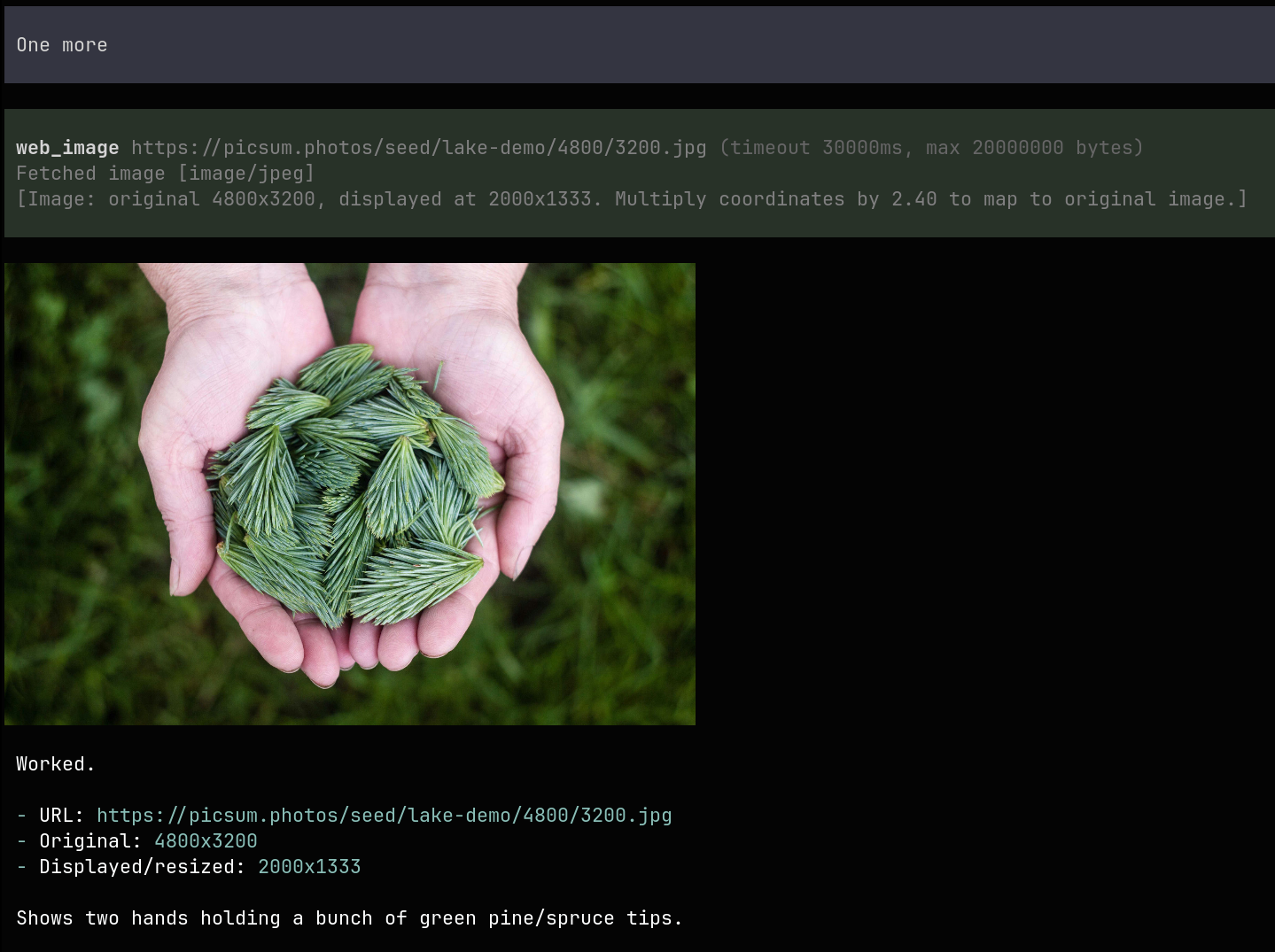
web_fetch- An HTML page or PDF as provider-pre-processed markdown. Raw output defaults to 50 KB; complete content is saved privately under/tmp. SetfindTextto search the complete fetched markdown, orsmartQueryto process it with a Pi text model.web_get- Direct HTTP GET for text response bodies (HTML, JSON, XML, CSS/JS, or plain text), with the same raw/find/smart-query behavior. Non-text bodies are never placed in model context and are saved privately under/tmp. HTML script/style blocks are removed by default; setstripScriptsAndStyles:falsefor exact source.web_image- The single image, returned as media content. Respects the Pi image resizing settings:
Configuration
Run /lovely-web in Pi to configure providers interactively:
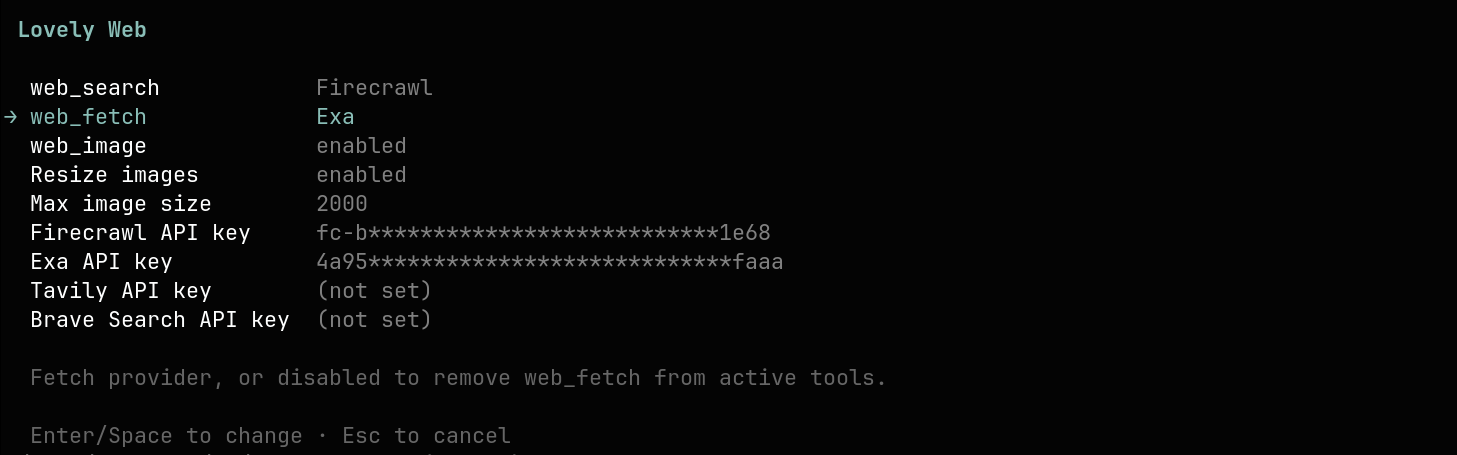
The settings are stored in ~/.pi/agent/xl0-pi-lovely-web.json (global) or .pi/xl0-pi-lovely-web.json (project):
{
  "webSearchProvider": "firecrawl",
  "webFetchProvider": "firecrawl",
  "webImageEnabled": true,
  "rawOutputMaxBytes": 50000,
  "smartQueryEnabled": false,
  "smartQueryModel": "anthropic/claude-sonnet-4-5",
  "smartQueryMaxTokens": 2000,
  "smartQueryInputPercent": 75,
  "smartQuerySystemPrompt": "Process one web_fetch result for a coding agent.\nUse only facts explicitly stated in the provided page text.\n...",
  "firecrawlApiKey": "fc-...",
  "exaApiKey": "...",
  "tavilyApiKey": "...",
  "braveApiKey": "..."
}
API keys can also be set via environment variables: FIRECRAWL_API_KEY, EXA_API_KEY, TAVILY_API_KEY, BRAVE_API_KEY.
Search defaults to Firecrawl. Fetch defaults to disabled; configure webFetchProvider to enable web_fetch and fetchResult:true first-result fetches from web_search. Set webSearchProvider or webFetchProvider to disabled to remove that tool from Pi's active tool list. Set webImageEnabled:false to disable web_image.
Raw web_fetch and web_get output is limited by rawOutputMaxBytes (50,000 by default); set it to 0 for unlimited output. Truncation happens at a UTF-8 boundary and prefers a complete line, and reports shown/total bytes and lines. Complete fetched content is always saved: web_fetch saves provider-produced markdown; textual web_get responses are saved decoded and with the requested HTML script/style stripping applied. Non-text responses and original web_image downloads are saved unprocessed. Private files use mode 0600; saved paths are included in tool output.
Both tools support findText, an array of strings searched over the complete fetched text up to hard download/provider limits—not the raw output prefix. It returns deduped plain-text snippets with 500 characters of context; overlapping contexts are merged, each snippet lists matching queries and counts, UI rendering highlights hits, and returned snippets are capped to about 20k raw characters total. findMode defaults to fuzzy; exact preserves case, lower is case-insensitive literal, and fuzzy splits text on blank lines, normalizes accents/case/punctuation, scores chunks by query-token coverage plus typo-tolerant token matches, and highlights matched source tokens in the UI. Complete fetched content is saved so the main agent can inspect it.
web_get makes a provider-free direct GET request with a minimal browser-compatible pi-lovely-web user agent and follows redirects. Downloads above 100 MB are rejected. Declared textual MIME types are decoded using their declared charset; otherwise UTF-8 is used, with browser-compatible Windows-1252 fallback for legacy HTML. Missing or non-text MIME types are never decoded into model context; their bytes are saved unprocessed and the tool returns status, MIME, size, and path. HTML <script> and <style> blocks are removed by default; set stripScriptsAndStyles:false for exact source. Saved textual responses contain the same decoded, stripped text used for raw/find/smart processing. HTTP non-2xx responses are returned as data: textual bodies remain available under raw/find/smart-query rules with a prominent status notice, while non-text bodies are path-only. Network, decoding, and hard-size failures remain tool errors.
When smartQueryEnabled is true, smartQuery post-processes web_fetch or web_get output with a Pi text model. It supports grounded summaries, extraction, comparisons, troubleshooting, limits/config/API details, security/migration notes, and verbatim code/command/schema examples. The prompt adapts output to the query, uses only explicitly stated page facts, preserves exact concrete fields, and says Not found on page. for absent requested info. /lovely-web populates smartQueryModel from authenticated Pi text models and defaults to the current model when unset. smartQuerySystemPrompt defaults to the built-in prompt and can be edited. findText and smartQuery are independent and both receive complete fetched text before their own output/input limits. Smart query remains a single non-agentic model call.
Fetched smart-query content defaults to at most 75% of selected model context. The actual budget is further clamped to reserve configured output tokens, prompt overhead, and a 4K-token safety margin. Unknown model context uses an 80K-token fallback context. If input is trimmed, the result reports kept/original character counts. Complete fetched content is independently saved under /tmp.
Old xl0-web-tools.json configs are migrated to xl0-pi-lovely-web.json on load, then deleted. Persisted smartSearch* settings are renamed to smartQuery* on load.
web_search and web_fetch parameters are provider-specific and update dynamically when you change providers. Changing providers changes the tool schema and potentially may confuse the model if you change the schema mid-session, but unlikely with modern LLMs.
Search params:
| Provider | Extra web_search params |
|---|---|
| Firecrawl | source selects web/news/images; category filters to github/research/pdf; location/country localize; tbs applies Google-style time filters. |
| Exa | category narrows Exa's result type; country localizes. |
| Tavily | topic selects general/news/finance; includeImages returns image URLs; country localizes; timeRange limits recency. |
| Brave Search | source selects web/news/images; country localizes; searchLang sets language; freshness limits recency. |
Fetch params:
| Provider | Extra web_fetch params |
|---|---|
| Firecrawl | waitFor waits before scraping, in ms. |
| Exa | maxAgeHours allows cached page content up to that age. |
| Tavily | extractDepth selects basic or advanced extraction. |
web_image fetches a direct image URL without provider config/API keys and returns a short text note plus image content to vision-capable models, matching Pi's read image behavior. Supported MIME types: PNG, JPEG, WebP, GIF. Defaults to a 5 MB download cap and resizes through Pi's inline image helper before returning content.
Providers
| Provider | Search | Fetch | Auth |
|---|---|---|---|
| Firecrawl | ✓ | ✓ | Authorization: Bearer |
| Exa | ✓ | ✓ | x-api-key |
| Tavily | ✓ | ✓ | Authorization: Bearer |
| Brave Search | ✓ | - | X-Subscription-Token |
Related projects
| Pi Lovely Dev Tools | interactive debugging helpers /tool /show-sysprompt |
| Pi Lovely Codex | GPT fast mode and Codex-style apply_patch |
| Pi Lovely IDE | IDE integration |
| Pi Lovely Config | scoped config helpers for Pi extensions |
| Pi Lovely Comment | open the last assistant message in your editor and sync edits back into the prompt |
| Pi Lovely Rename | automatic and manual session naming |
Like this work? Hire me