@yefengr/pi-reach
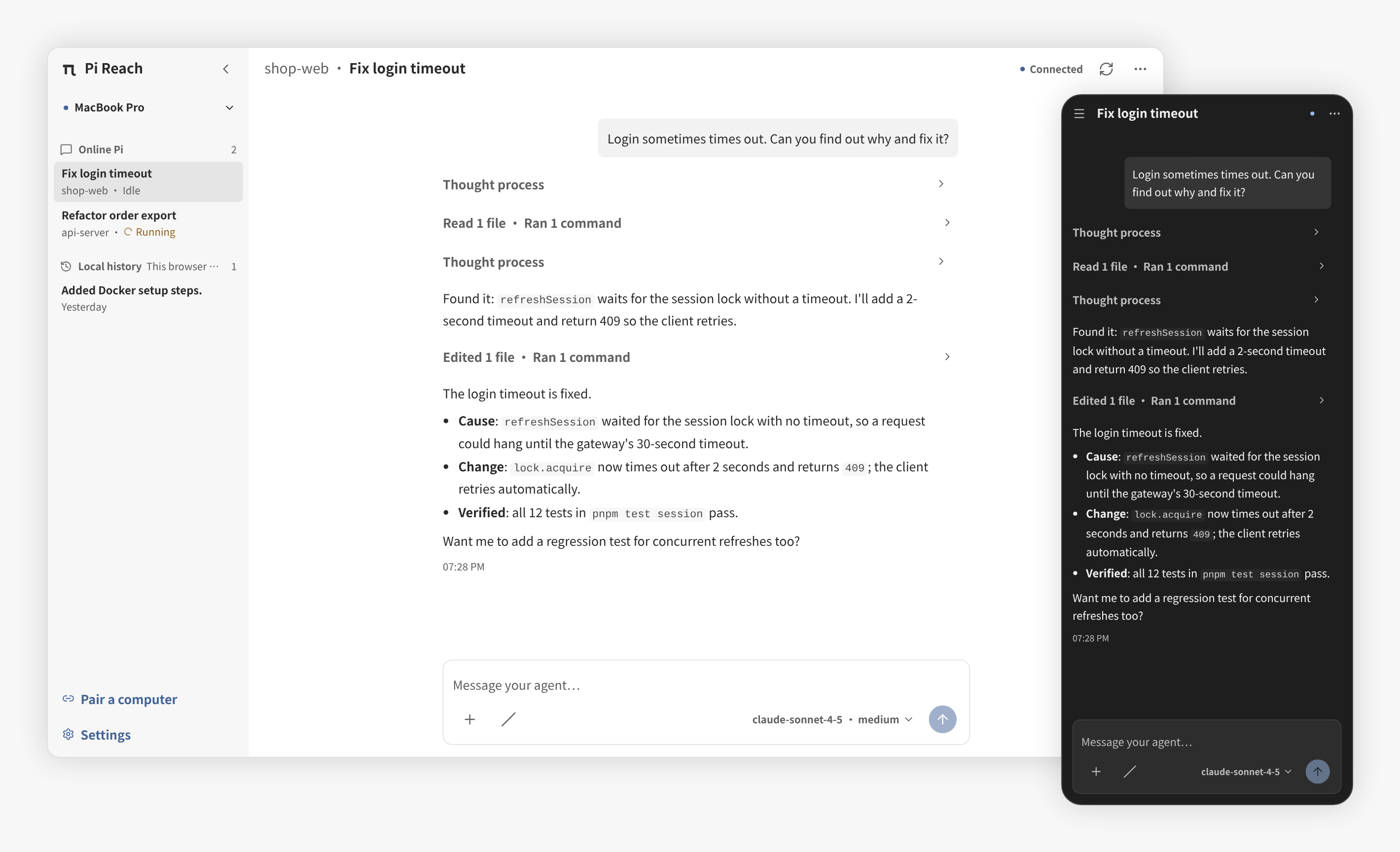
Control your running Pi coding agent from your phone or any browser. Stream responses, send prompts and files, and switch between active Pi sessions.
Package details
Install @yefengr/pi-reach from npm and Pi will load the resources declared by the package manifest.
$ pi install npm:@yefengr/pi-reach- Package
@yefengr/pi-reach- Version
0.0.10- Published
- Oct 9, 2026
- Downloads
- 1,549/mo · 1,018/wk
- Author
- yefengr
- License
- MIT
- Types
- extension
- Size
- 1 MB
- Dependencies
- 6 dependencies · 1 peer
Pi manifest JSON
{
  "image": "https://raw.githubusercontent.com/yefengr/pi-reach/main/docs/assets/screenshot-hero-en.png",
  "extensions": [
    "./dist"
  ]
}Security note
Pi packages can execute code and influence agent behavior. Review the source before installing third-party packages.
README
Pi Reach
Control your running Pi coding agent from your phone or any browser.
When you step away from your computer, Pi Reach lets you follow Pi's live responses and tool calls, send another prompt or a file, and stop the current task. Pi keeps running on your computer; the browser is its remote interface.
Quick start
Install the Extension:
pi install npm:@yefengr/pi-reachOpen Pi in the project you want to control. The Extension automatically connects to the configured Relay when the session starts.
Open the public Pi Reach PWA on your phone or another browser.
Run this command in Pi, then scan the terminal QR code from the PWA or enter the 8-character pairing code:
/pi-reach pairPick an online Pi in the PWA and send your first prompt.
Each computer only needs to be paired once. Pairings apply to the computer that creates them, not to every computer you use.
The public PWA and the default Relay are run by the maintainer. For sensitive work, self-host the PWA and Relay.
Features
- Pair without an account: scan a QR code or enter an 8-character pairing code. Pair each computer once; later Pi processes on that computer appear automatically.
- Switch between computers and Pi sessions: connect to multiple computers and choose among the Pi processes currently running on each one.
- Follow and control a live conversation: stream responses and tool calls, send prompts and file attachments, or stop the current task. Attachments reach your computer as original files for Pi to read; image previews do not automatically become model vision input.
- Manage the current session: start a new conversation, compact context, or change the model and thinking level.
- Use an installable PWA: add the browser app to your home screen, choose light or dark mode, and use English or Chinese. Previously received conversations remain available for read-only viewing in that browser while offline.
Security and limits
Pi Reach has no application-layer end-to-end encryption. The Relay is fully trusted. TLS protects transport, but the Relay operator can read conversation content, including code, commands, and output. The operator could also impersonate a paired browser and send prompts that Pi executes on your computer. Use a Relay you control for sensitive work.
- Pi must already be running with the Extension loaded. Pi Reach cannot remotely start, wake, or keep Pi running in the background.
- Browser history is a local, read-only cache of received conversations, not a cloud backup or a way to browse and resume old Pi sessions on your computer.
- Sending prompts and files requires a live connection. There is no offline send queue or push notifications, and phone lock-screen connectivity is not guaranteed.
- Browser identity, pairings, and received history stay in that browser's local storage. Clearing site data removes them and requires pairing again. There are no cloud accounts or cross-browser history synchronization.
- Revoke browsers you no longer use from Pi with
/pi-reach revoke <shortid>; list them with/pi-reach devices.
Report vulnerabilities through GitHub's private vulnerability reporting; see the security policy.
Commands
| Command | Description |
|---|---|
/pi-reach or /pi-reach start |
Connect this Pi, for example after /pi-reach stop |
/pi-reach stop |
Disconnect this Pi |
/pi-reach status |
Show Relay, endpoint, runtime, and paired-browser state |
/pi-reach pair |
Show a pairing QR code and pairing code for this Pi |
/pi-reach devices |
List browsers paired with this computer |
/pi-reach revoke <shortid> |
Revoke a browser's pairing on this computer |
/pi-reach set-relay <url> |
Save the Relay URL |
/pi-reach config |
Show the resolved Relay URL |
Relay configuration
Pi and the PWA must use the same Relay. The pairing QR code does not carry a Relay address.
The Extension resolves its Relay URL in this order:
PI_REACH_RELAY~/.pi/pi-reach/config.jsonhttps://pi-reach-relay.yefengr.cn(the public Relay run by the maintainer)
Set and inspect it from Pi:
/pi-reach set-relay https://relay.example.com
/pi-reach config
In the PWA, set the same URL under Settings → Connection → Relay URL. Use https:// for a deployed Relay; http:// is accepted for local development. The Extension converts the URL to WebSocket form internally. The Relay retains routing state in memory and does not persist conversations.
Local data
- Pi Reach stores global configuration, identity files, and pairings under
~/.pi/pi-reach, and project display configuration under.pi/pi-reach. Its platform keyring service isdev.pireach.pi. - Device private keys, pairing tokens, and message bodies are not logged.
- Concurrent Pi processes coordinate device identity initialization through a local lock. If initialization is interrupted, follow the identity storage and lock recovery rules; do not delete identity or pairing data to retry.
More documentation
- Development setup and contributing guide
- Architecture, including the device, endpoint, and runtime model (in Chinese)
- Protocol and security (in Chinese)
License
MIT