@zackify/pi-port-forward
A pi extension that adds an interactive SSH local port forwarding command.
Package details
Install @zackify/pi-port-forward from npm and Pi will load the resources declared by the package manifest.
$ pi install npm:@zackify/pi-port-forward- Package
@zackify/pi-port-forward- Version
1.0.3- Published
- Apr 30, 2026
- Downloads
- not available
- Author
- zackify
- License
- MIT
- Types
- extension
- Size
- 113.9 KB
- Dependencies
- 0 dependencies · 2 peers
Pi manifest JSON
{
  "extensions": [
    "./index.ts"
  ],
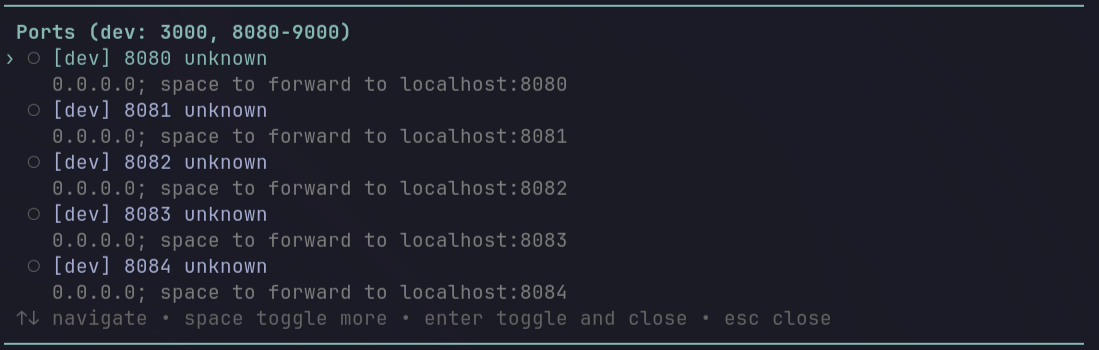
  "image": "https://raw.githubusercontent.com/zackify/pi-port-forward/master/assets/pi-port-forward.png"
}
Security note
Pi packages can execute code and influence agent behavior. Review the source before installing third-party packages.
README
pi-port-forward
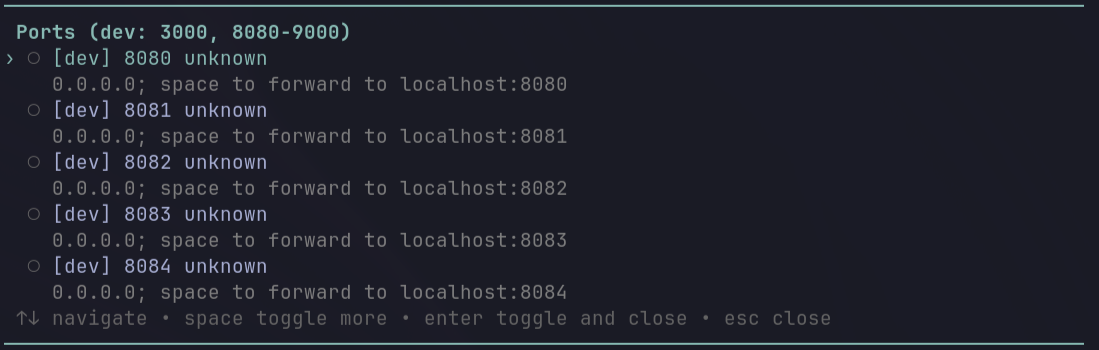
A reusable pi package that adds a /port slash command for SSH local port forwarding.
It lists listening TCP ports on configured SSH remotes, shows the process name / PID when available, and lets you toggle forwards from inside pi.
Features
- Configurable slash command name, default
/port - Multiple SSH remotes via
settings.json - Configurable allowed ports and port ranges
- Configurable local bind host, remote target host, SSH options, and local port offsets
- Interactive picker:
Spacetoggles the highlighted port and keeps the picker openEntertoggles the highlighted port and closesEsccloses
- Persistent
Forwarded portswidget above the input editor - Forwards are stopped when untoggled, when pi reloads/shuts down, or when the parent pi process disappears
Requirements
- pi with extension/package support
- SSH access to each configured remote
- Key-based or otherwise non-interactive SSH auth; the extension uses
BatchMode=yes ssornetstaton the remote host- Free local ports for the forwards you start
Install
From npm
After this package is published:
pi install npm:@zackify/pi-port-forward
Then reload pi:
/reload
Manual install
Copy the extension into your global pi extensions directory:
mkdir -p ~/.pi/agent/extensions
cp index.ts ~/.pi/agent/extensions/pi-port-forward.ts
Or install it only for one project:
mkdir -p .pi/extensions
cp index.ts .pi/extensions/pi-port-forward.ts
Then add config to ~/.pi/agent/settings.json and reload pi.
Config
The extension reads portForward from ~/.pi/agent/settings.json.
Minimal example using an SSH config alias named dev:
{
  "portForward": {
    "providers": [
      {
        "id": "dev",
        "remote": "dev",
        "label": "dev",
        "allowedPorts": [3000, 5173, { "from": 8000, "to": 8999 }]
      }
    ]
  }
}
Multiple remotes are supported:
{
  "portForward": {
    "command": "port",
    "providers": [
      {
        "id": "dev",
        "remote": "me@dev.example.com",
        "label": "dev",
        "allowedPorts": [3000, { "from": 8080, "to": 9000 }]
      },
      {
        "id": "staging",
        "remote": "staging",
        "label": "staging",
        "allowedPorts": [5173, { "from": 8000, "to": 8999 }]
      }
    ]
  }
}
Avoid local port collisions with localPortOffset:
{
  "portForward": {
    "providers": [
      {
        "id": "dev",
        "remote": "dev",
        "allowedPorts": [3000]
      },
      {
        "id": "staging",
        "remote": "staging",
        "allowedPorts": [3000],
        "localPortOffset": 10000
      }
    ]
  }
}
This maps dev:3000 to 127.0.0.1:3000 and staging:3000 to 127.0.0.1:13000.
Config reference
| Field | Type | Default | Description |
|---|---|---|---|
command |
string | "port" |
Slash command name, with or without leading /. |
maxVisible |
number | 15 |
Maximum visible picker rows before scrolling. |
providers |
array | [] |
SSH remotes to scan. No personal default remote is configured. |
providers[].id |
string | derived from label | Stable unique provider ID used for forward state. |
providers[].remote |
string | required | SSH target, e.g. user@host or an SSH config alias. ssh is also accepted as an alias. |
providers[].label |
string | host part of remote | Display label. hostLabel is also accepted as an alias. |
providers[].allowedPorts |
array | [3000, {"from":8080,"to":9000}] |
Ports shown in the picker. Entries may be numbers or { "from": number, "to": number } ranges. |
providers[].localHost |
string | "127.0.0.1" |
Local bind address for ssh -L. |
providers[].remoteHost |
string | "127.0.0.1" |
Target host as seen from the remote SSH server. |
providers[].localPortOffset |
number | 0 |
Added to the remote port to choose the local port. Useful when two remotes expose the same port. |
providers[].sshOptions |
string[] | [] |
Extra arguments passed to ssh, for example ["-J", "jump-host"]. |
Usage
Reload pi after installing/configuring:
/reload
Then run:
/port
Use arrow keys to select a port. Press Space to toggle and keep the picker open, or Enter to toggle and close.
Security notes
Only configure remotes you trust. The extension runs ssh <remote> "ss ... || netstat ..." to list listening ports and opens local SSH forwards. Use allowedPorts to limit what appears in the picker.
Forwards bind to 127.0.0.1 by default so they are only reachable from your local machine unless you explicitly change localHost.
Troubleshooting
No listening TCP ports found
- Check that the service is running on the remote.
- Check that its port is included in
allowedPorts. - Run
ssh <remote> 'ss -H -ltnp || netstat -ltnp'manually to verify output.
Could not list ports
- Check SSH connectivity:
ssh <remote>. - Ensure non-interactive auth works. Password prompts fail because
BatchMode=yesis used. - Check SSH aliases in
~/.ssh/config.
localhost port is already in use
- Stop the local process using that port, or configure
localPortOffsetfor that provider.
Process name is unknown
- Some systems hide process info from
ss/netstatunless run with elevated permissions. - The forward can still work even if the process name is unknown.
Releasing
This repository includes a GitHub Actions workflow that publishes to npm when a GitHub release is created.
- Add an
NPM_TOKENrepository secret. - Create a GitHub release named like
v1.2.3or1.2.3. - The workflow sets
package.jsonto that version and runsnpm publish --provenance --access public.
Files
index.ts— extension sourcepackage.json— pi package metadata for@zackify/pi-port-forward, including thepi-packagekeyword.github/workflows/publish.yml— npm publish workflow