@zhcsyncer/pi-glance
A polished input surface for the Pi coding agent with composable statuses, context progress, and highlighted auto-compaction.
Package details
Install @zhcsyncer/pi-glance from npm and Pi will load the resources declared by the package manifest.
$ pi install npm:@zhcsyncer/pi-glance- Package
@zhcsyncer/pi-glance- Version
0.3.0- Published
- Jul 28, 2026
- Downloads
- 82/mo · 82/wk
- Author
- zhcsyncer
- License
- MIT
- Types
- extension
- Size
- 256.3 KB
- Dependencies
- 0 dependencies · 3 peers
Pi manifest JSON
{
  "extensions": [
    "./index.ts"
  ]
}
Security note
Pi packages can execute code and influence agent behavior. Review the source before installing third-party packages.
README
◌ @zhcsyncer/pi-glance
A calm, composable input surface for Pi
Replace the default prompt with a rounded multiline editor and an inline glance at Git, cost, Reply speed, context, optional tokens, and model—without hiding statuses published by other extensions.
This package is a maintained fork of pi-glance 0.5.3. It preserves upstream behavior while adding a status-only footer, a bottom-right context progress mode, and a highlighted auto-compaction indicator.


Install
From npm:
pi install npm:@zhcsyncer/pi-glance
For local development from this monorepo:
pi --no-extensions -e ./packages/pi-glance
Then restart Pi or run /reload after installing or changing the extension.
To update installed packages/extensions, use pi update --extensions or pi update --all. pi update updates Pi itself by default.
Compatibility: current @zhcsyncer/pi-glance releases target Pi packages under @earendil-works/*, Pi 0.80 or newer, and Node 20 or newer.
For development/testing:
pi -e /path/to/pi-glance
Local checks and Git diagnostics:
pnpm test
pnpm test:git
pnpm debug:git
Use
/glance
That's the only command — opens a calm settings pane with a real input-surface preview and a compact three-column settings grid.
What you see
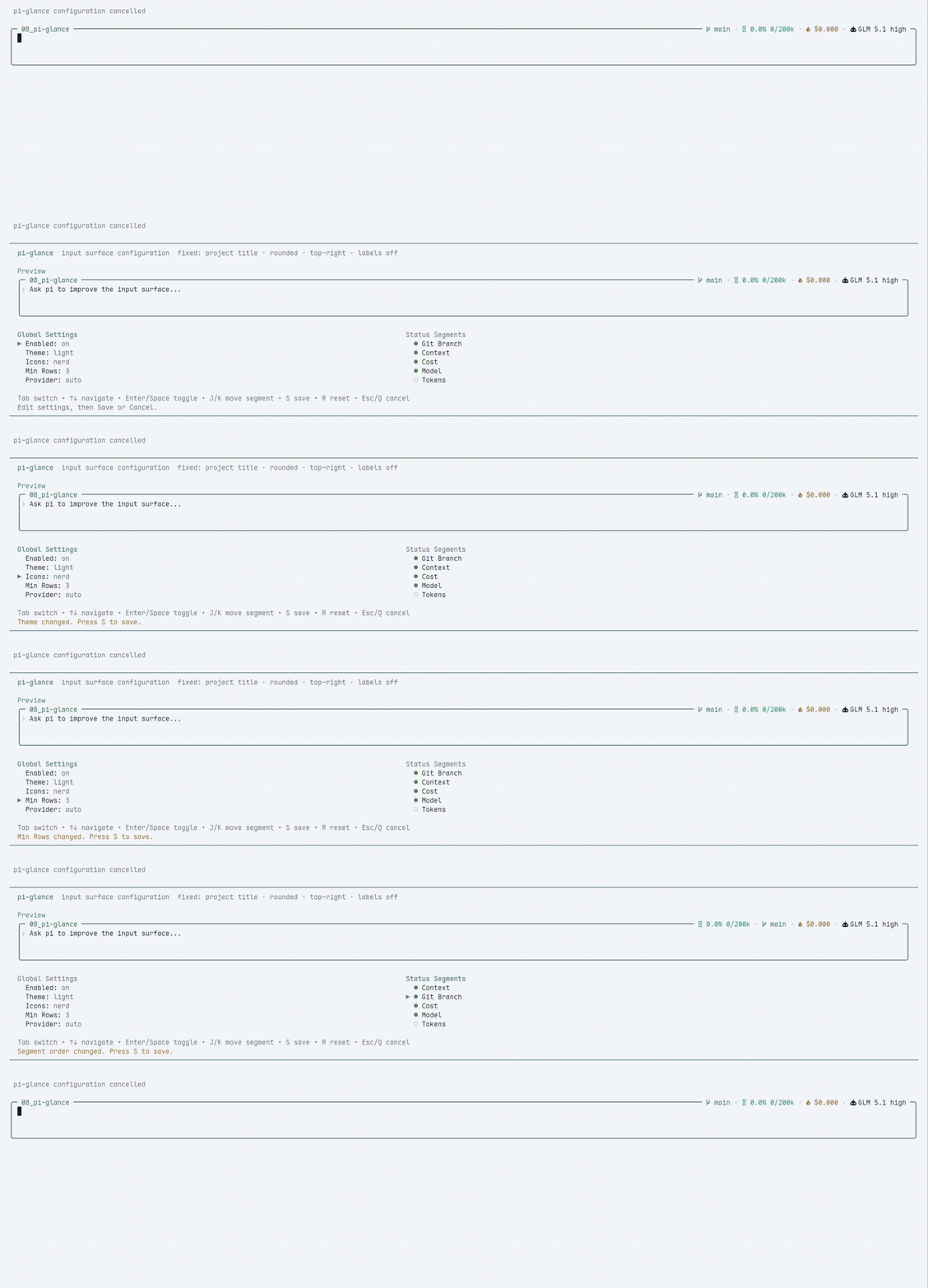
| 🖊️ | Rounded editor | Configurable 2 / 3 / 4 min rows and 0 / 1 / 2 top spacing rows, preserving Pi autocomplete, paste, and scrolling |
| 🏷️ | Project title | Current folder name, or a safe ~/... path when enabled |
| 📊 | Inline status | Git · cost · Reply speed · context · optional tokens · model — top-right |
| ⚙️ | /glance pane |
General settings, segment order, and per-segment detail settings in a calm grid |
| 💤 | Dim unfocused | Surface quiets down when you scroll the chat |
| 🎨 | Themes | Follows Pi theme tokens by default, with 22 built-in Glance palettes available as an alternative/fallback |
Notes
- New installs use
/glance→ General →Color source→Follow Pi. ChooseGlance paletteto use the built-in palettes directly.Light paletteandDark palettealso remain the safe fallback when the current Pi theme is unavailable. Both browsers contain all 22 palettes, with the matching tone listed first. - Icons default to
plainso pi-glance works with normal terminal fonts. - Editor top spacing is configurable: open
/glance→ General →Top spacingand choosenone,1 row, or2 rows. - The focused frame uses the selected Color source border and does not change with thinking level. Bash is the only dynamic exception:
!uses the source-aware Bash color and showsBash;!!showsBash · no context. - Long input height, internal scrolling,
↑/↓ N more, autocomplete, and large-paste markers remain Pi-native behavior. nerdicons are opt-in: open/glance→ General →Iconsand choosenerdfor richer symbols.- Nerd icons need a Nerd Font or Symbols Nerd Font fallback. If icons look like boxes, choose
plain. - pi-glance does not auto-detect, install, or bundle terminal fonts.
- Other extensions'
ctx.ui.setStatus()values remain visible below the editor. Glance permanently omits Pi's two informational footer rows because the input surface already shows those primary facts; there is no setting to restore them. - Bottom-right details are always active and have no master switch. Choose
/glance→ Context →Display→progress barto move context there, then choose a standalonetrackor a progress-awareborderplusone thirdorremainingwidth. Auto-compaction is shown when enabled and can be hidden under Bottom details. - Reply speed is enabled by default and appears between cost and context. It shows output tokens per wall time:
?means no trusted measurement yet,~42 tok/sis a provisional current-run checkpoint from completed turns, and42 tok/sis the finalized agent-end measurement. - Configure
/glance→ Reply speed →Precision:auto,1 digit, or0 digits. Wall time includes tools, waiting, network, and thinking, so it is not a benchmark. Reply speed uses no notifications, no timers/tickers, no token estimation from text/deltas, and adds no command, footer, dashboard, history, or average view.
Themes and config
pi-glance is not a Pi theme manager: it never enumerates, switches, or installs Pi themes. It only reads the current public Pi theme when colorSource is pi.
New installs default to:
{
  "colorSource": "pi",
  "theme": {
    "light": "light",
    "dark": "dark"
  }
}
Follow Pi maps the frame, text, status, warning, error, title, and detail roles to Pi semantic theme tokens and updates during runtime theme switches. The normal frame uses Pi's border token rather than the thinking-level border; Bash alone uses Pi's bashMode token.
Glance palette uses the selected light/dark built-in pair for the frame, segments, and context progress. Bash uses that palette's warning color. The same pair is the fallback if no current Pi theme is available. The 22 built-ins include Light/Dark, Catppuccin, Nord, Tokyo Night, Gruvbox, Solarized, Rosé Pine, One, Kanagawa, Everforest, and High Contrast variants.
Migration is conservative: schema 10 and older configs without colorSource use colorSource: "glance", preserving their previous appearance. Explicit values are retained. Old string themes still migrate to matching light/dark slots.
Segment details
/glance keeps segment settings small and display-focused:
- Git — dirty marker, upstream counts, SHA, and polling.
- Cost — hide zero cost.
- Reply speed — enabled by default; shows unknown
?, provisional~, or finalized output tokens per wall time in the status line. Precision can beauto,1 digit, or0 digits. It sends no notifications, uses no timers, and does not estimate tokens from text or deltas. - Context — percent / tokens, a bottom-right progress bar, standalone track or border style, one-third or remaining width, and hide/show unknown usage.
- Tokens — input / output, total, or cache details. Tokens stay off by default.
- Model — provider and thinking labels. Model stays last by default.
Footer composition and bottom details
The custom footer always renders only statuses published by extensions, sorted by status key. Pi's two informational footer rows are not reconstructed and cannot be enabled, avoiding duplicate workspace, usage, context, and model facts.
The input box's bottom-right detail area is always active and has no master switch. It contains only:
- Context progress — choose
/glance→ Context →Display→progress bar.Progress style: trackpreserves the standalone╶───────────╴ 23%renderer.Progress style: borderuses the input border itself: unused cells stay light─, used cells become heavy━, and╼joins them.Progress widthchooses whether progress plus labels useone thirdof the inner width or allremainingbottom-border space. The percentage keeps normal text color and bottom progress omits the context icon; Nerd Font text modes still use. - Context risk — below 70% the used section has the context color, from 70% to below 85% it uses warning, and at 85% or higher it uses error. The same fixed thresholds style top-line context text and both bottom progress styles. Filled and unused border colors come from the selected Color source; unknown progress is dim.
- Auto compact — appears only while Pi auto-compaction is enabled. Plain mode shows highlighted
auto; Nerd Font mode shows the highlighted automarker. It reflects Pi's merged global/project setting, reading project settings only for trusted projects.
On narrow terminals the progress visualization shrinks first; context takes priority over the auto-compaction marker at the smallest widths. The relevant config is:
{
  "context": {
    "display": "progress",
    "unknown": "show",
    "progressStyle": "border",
    "progressWidth": "third"
  },
  "bottomDetails": {
    "showAutoCompact": true
  }
}
Workspace title
Open /glance, select General, and set Workspace label:
name— show only the current directory name. This is the default.smart— show more path context on wider terminals.path— show a safe~/...path when possible.
pi-glance never renders full absolute paths in the title: home paths are shortened to ~/..., and non-home paths use an ellipsis tail such as …/work/project.
Git status
The Git segment is intentionally quiet:
- Clean repositories show only the branch name.
- Dirty repositories add
*in plain mode or●in Nerd Font mode. - Conflicts add
!in plain mode or⚠in Nerd Font mode. - Ahead/behind counts appear when Git reports an upstream, for example
↑2 ↓1. - Non-Git directories hide the Git segment.
Open /glance, select Git, move to a value with the arrow keys, and press Enter to configure:
Dirty marker— hide/show normal dirty markers; conflict markers stay visible.Ahead / behind— hide/show upstream counts.SHA—off,detached, oralways.Polling—2s,5s,10s, or30s.
Git is collected asynchronously and cached. External file changes usually appear within a few seconds. For local development/debugging you can compare pi-glance with Git directly:
git status --short --branch
pnpm debug:git
Design
- No Pi core patches — public extension APIs only
- No render-time IO — Git is collected asynchronously and cached; Pi settings are sampled during lifecycle refreshes
- pi-glance never replaces Pi's native Header or resource area. Context/Skills/Prompts/Extensions keep Pi's native compact/expanded hierarchy; expanded Extensions stay grouped by project/user/path, with
npm:/git:package sources and local file paths shown by Pi - Global config at
$PI_CODING_AGENT_DIR/extension-data/pi-glance/config.json(schema version 11). The previous path is migrated and upgraded automatically; unmappable fields are dropped with a warning, while malformed files are preserved
License and attribution
MIT. Original pi-glance copyright © 2026 linys77. See UPSTREAM_SOURCE.md, UPSTREAM_LICENSE, and UPSTREAM_README.md for the exact fork source and preserved upstream materials.