@zihanw/pi-forge
Pi extension for editable context presets, one-shot agent profiles, tool policy, and request debugging.
Package details
Install @zihanw/pi-forge from npm and Pi will load the resources declared by the package manifest.
$ pi install npm:@zihanw/pi-forge- Package
@zihanw/pi-forge- Version
0.5.9- Published
- Oct 21, 2026
- Downloads
- 1,051/mo · 34/wk
- Author
- zihanw
- License
- MIT
- Types
- extension
- Size
- 3.3 MB
- Dependencies
- 0 dependencies · 5 peers
Pi manifest JSON
{
  "extensions": [
    "./dist/index.js"
  ]
}
Security note
Pi packages can execute code and influence agent behavior. Review the source before installing third-party packages.
README
pi-forge
English | 简体中文 · Documentation · Quick start

A context editor and inspection workbench for Pi.
pi-forge provides visual context composition, tool selection, reusable configurations, and request inspection for Pi.
Inspired by SillyTavern’s presets, I built pi-forge to customize both what goes into an agent’s context and how it is assembled—and inspect what actually reaches the model.
Context composition · Tool selection · Regex transformations · Capabilities · Request inspection
Optional subagents: pi-forge-subagents — Delegate tasks to agents with their own model and preset.
Install and first run
Requires Node.js 22.19 or newer. Forge 0.5.9 supports Pi 0.87.x, 0.99.0–0.99.2 and 1.0–1.3; see compatibility and migration.
Forge requires upstream Pi. Forks such as oh-my-pi without systemPromptOptions / context_with_system remain unsupported. On detecting missing required prompt inputs, Forge warns once per session, declines new preset/profile application, and skips preset compilation and preview (#2). Forge continues applying its tool policy independently; detection does not abort provider dispatch or roll back earlier selections/settings.
Fresh-session auto-profile settings and preset/tool selection may apply before first-turn prompt compatibility is observed. Detection is not a universal startup check: valid prompt options or successful hook registration cannot prove that context_with_system will run. Use /preset use none to explicitly disable the preset; a new session resets the detection latch. See unsupported-host boundaries.
Version note: This README describes Forge 0.5.9, a Pi host-compatibility and unsupported-host handling patch (Pi 1.1–1.3 support, #2, #3). Older installed packages do not gain the expanded peer metadata automatically; tool-policy and Capability execution semantics are unchanged. Capabilities and configurable default tools require 0.5.5; optional subagents have a separate compatibility requirement.
pi install npm:@zihanw/pi-forgeRestart Pi after installing or updating. In a trusted project:
- Run
/forge uito open the local editor. - Choose New preset to start from the default Pi-mirror layout.
- Edit a block or policy and check Preview.
- Save your changes, then Activate the Preset for the current session.
Prefer the terminal? Select a Preset with /preset use <id> and enable a Capability with /capability enable <capability>. Try the Read-first Worker example yourself.
Features
Context composition
Build your agent’s context from editable text blocks and slots for tools, skills, project files, and conversation history. Reorder or toggle them and see the result in Preview.
- Use case: Give a code-review agent your project guidelines and selected context, instead of keeping one oversized prompt for every task.
- Try it: In Stack, toggle a User message block, then drag it after the chat-history slot. Watch the roles and order update in Preview.
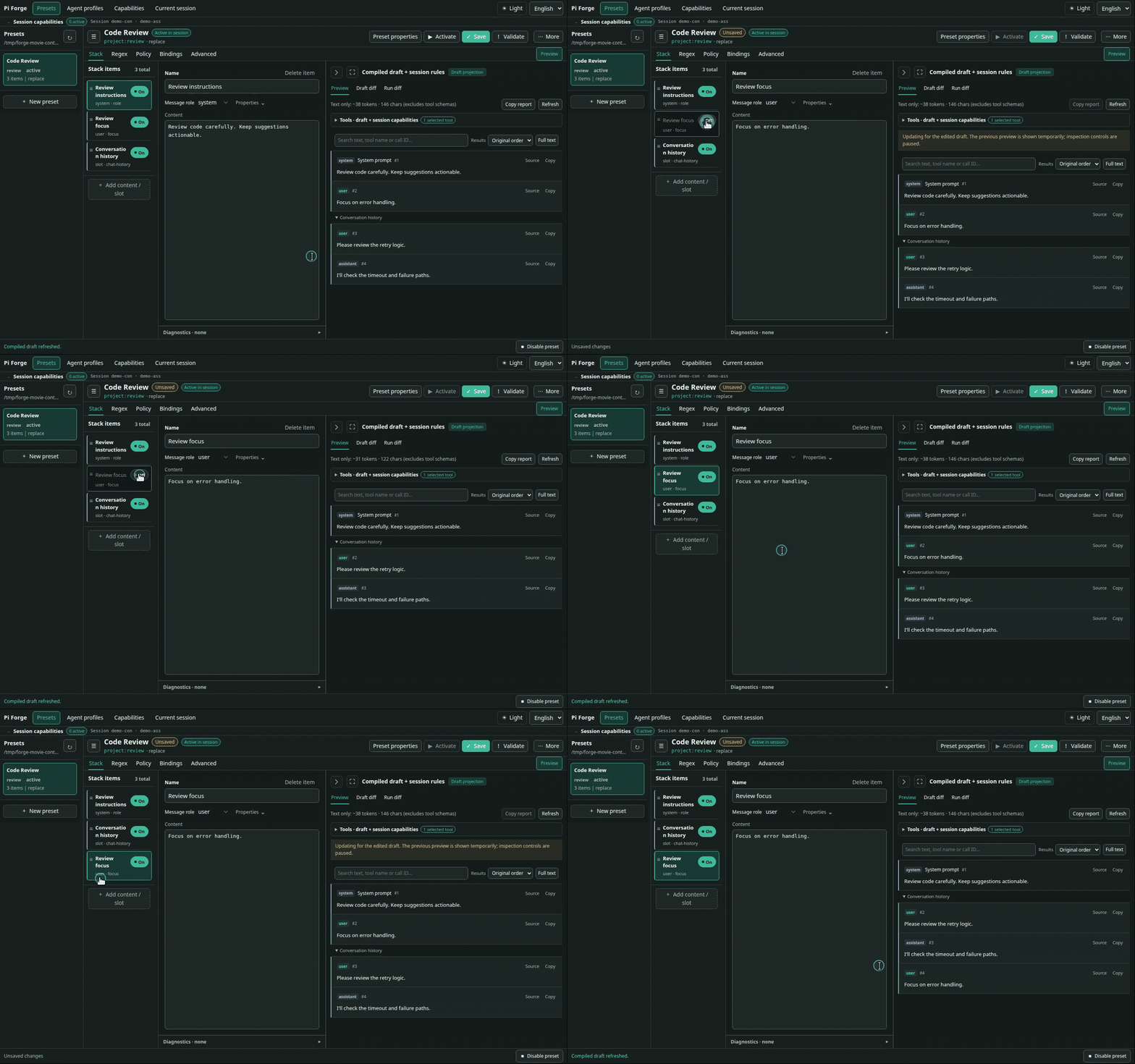
See Web editor guide and Stack schema.
Tool selection
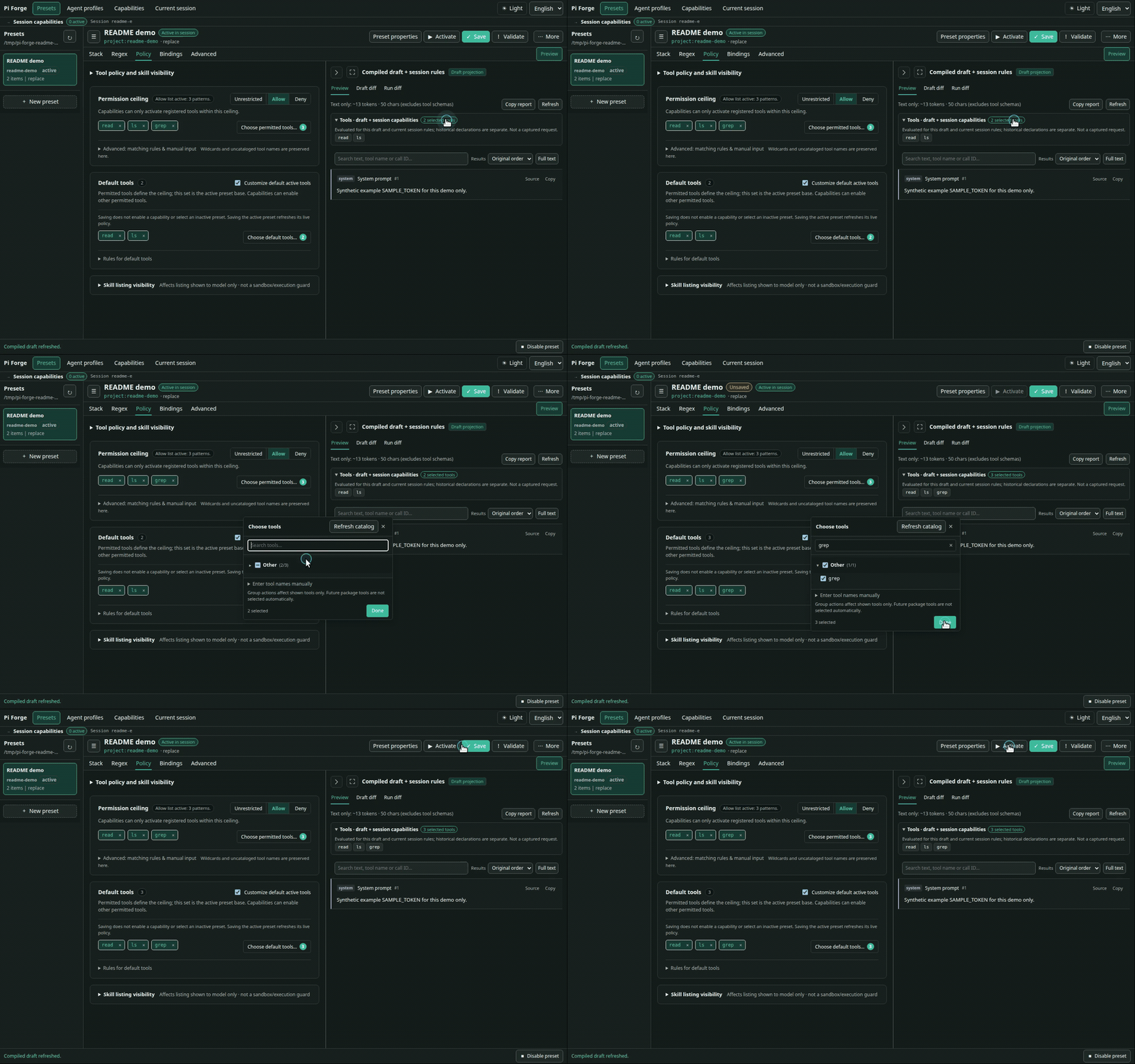
Choose which tools an agent may use and which are available by default. An allowlist or denylist sets the permission limit; a smaller default set keeps other permitted tools available for Capabilities to enable later.
- Use case: Keep a review agent focused on reading and searching, without giving it editing or shell tools.
- Try it: In Policy, choose the permitted tools and a default set such as
readandls. Add the already-permittedgrepto the defaults and check the tool list in Preview; save and activate to apply the policy.
Regex transformations
Find and replace text in model input or completed assistant/tool output using reusable regex rules.
- Use case: Replace a known sensitive marker in selected prompt text before sending it, or clean repetitive boilerplate from responses.
- Try it: In Regex, set up an outgoing rule matching the synthetic
SAMPLE_TOKEN, replacing it with[REDACTED], and targeting system text. The demo toggles this preconfigured rule and compares Preview.
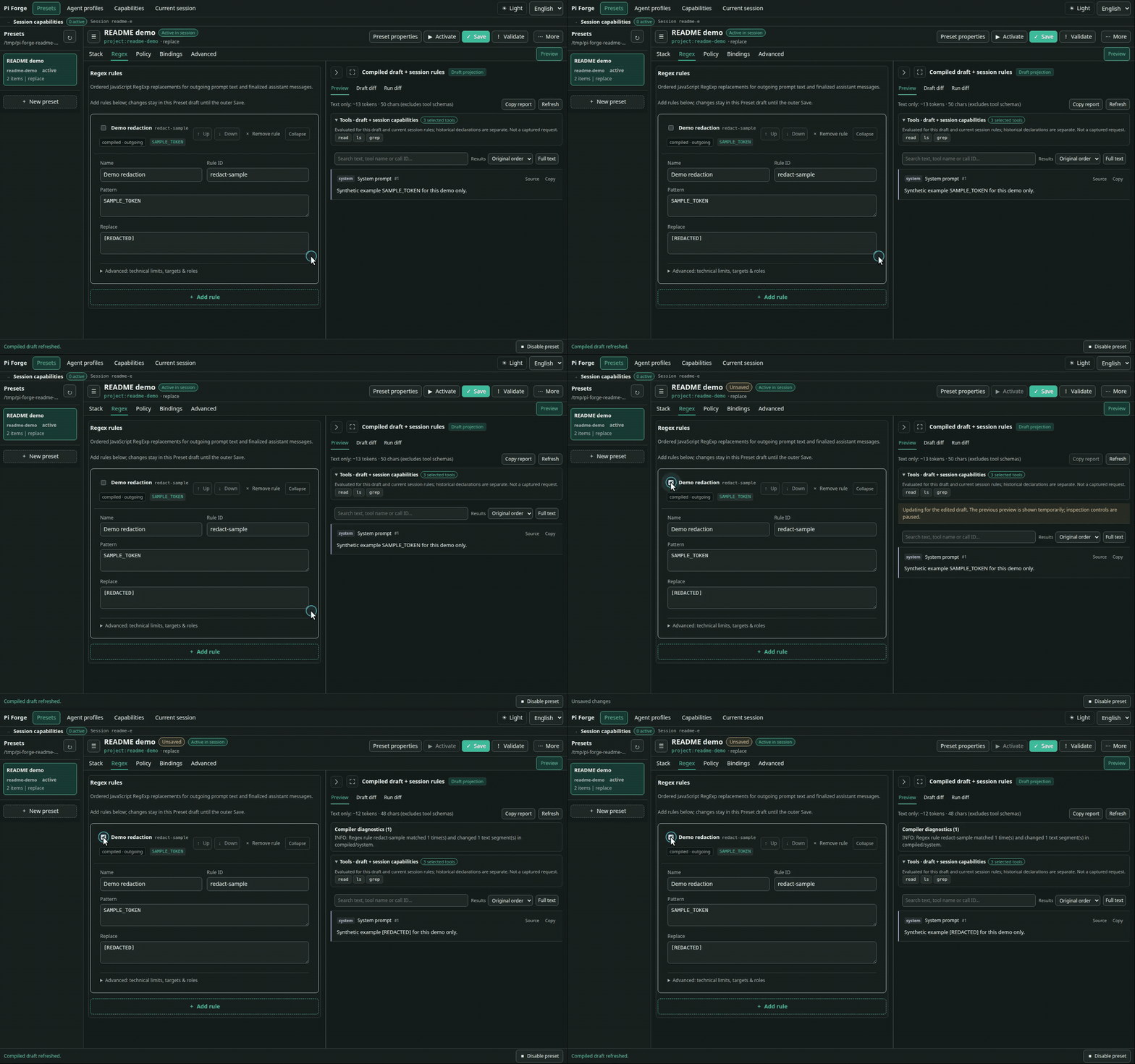
See Regex transformation reference.
Dynamic system prompts and tools
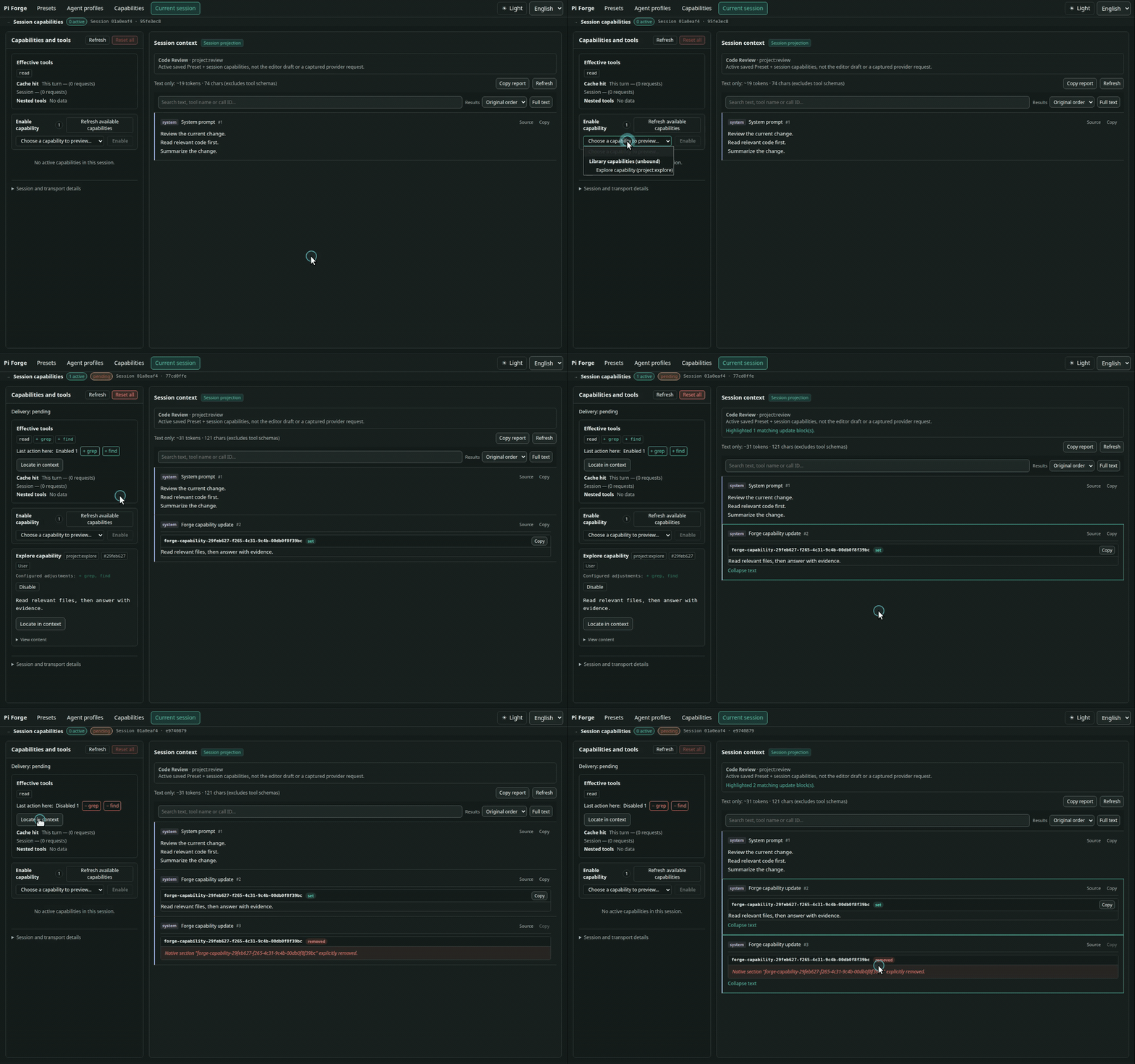
Capabilities update system instructions and available tools mid-conversation. Start an agent with minimal tools, then let it load task-specific instructions and tools when needed—without restarting the session or switching Presets.
- Use case: Let an agent explore code with
readandls, then enable an authorized editing Capability when it is ready to apply a fix. - Try it: Create a Capability in Capabilities and authorize agent access in the Preset’s Bindings tab. You can also enable it yourself in Current session or with
/capability enable <capability>, and inspect the resulting instructions and tools.
Updates reach the model as native mid-conversation system updates on supported models, with a labeled user-message fallback otherwise (see delivery details).
On supported provider/model combinations, adding or removing tools can preserve the cached prompt prefix. Support differs for additions and removals, and cache hits are not guaranteed; see provider support and cache observations.
Preview and request inspection
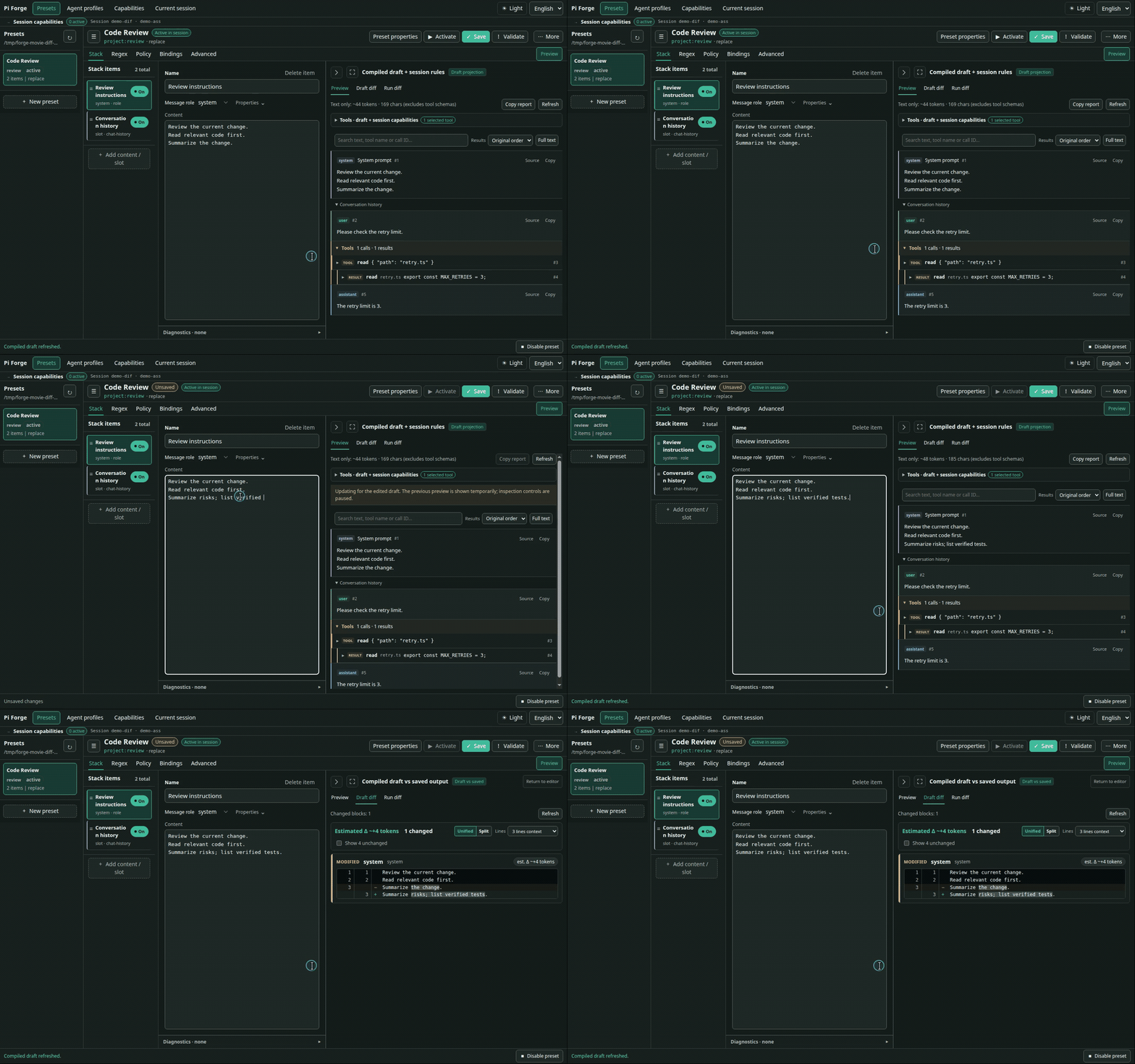
See what your edits change before calling a model, then inspect captured requests and reported usage when debugging a run.
- Use case: Check whether a prompt edit adds the intended instructions, or compare successive requests when a run behaves differently than expected.
- Try it: In
/forge ui, switch to Preview to view compiled messages, open Draft diff to see unsaved changes, or run/forge payload nextin the terminal to inspect the next outgoing request.
Current session also shows turn and branch cache-hit rates, with main-model and reported nested-tool usage kept separate. These are recorded usage metrics, not a complete bill. See cache usage, debugging, and commands.
Examples
- Default Pi mirror — A Pi-style starting point, split into editable blocks and runtime slots.
- Minimal worker — One line of instructions, chat history, and only
bashplusedit. - Read-first Worker + Write tools capability — Start with
read,ls, and the capability control tool; let the model enablebash/editon demand. Setup and limits. - Regex examples — Outgoing redaction paired with stored-transcript cleanup for two sample token patterns.
Save your current model, thinking level, and Preset as an Agent Profile with /profile save reviewer; restore it with /profile use reviewer. See patterns and use cases for more ideas.
Optional subagents
The optional companion pi-forge-subagents package lets your agent delegate focused tasks—such as a code review or parallel investigation—to subagents configured with authorized Profiles. The agent uses forge_subagent to delegate; Forge itself does not require this package.
Use matching local development sources pending coordinated release. Subagents operate with backend-dependent write permissions and isolation (tool restrictions alone are not an OS sandbox). See the delegation guide before enabling delegation.
Notes and documentation
- This is a 0.x project; releases may introduce breaking changes.
replacemode replaces Pi's base system prompt. Include any tool guidance, skills, or project context you still want.- Skill filtering only changes Forge's rendered listing; it does not disable explicit skill invocation. Tool policy is not filesystem or process isolation.
- Regex only handles the text and patterns you select.
finalizeoverwrites stored assistant/tool-result text and does not preserve the original. Payload captures are redacted and may be truncated; they can still contain private conversation content. - For stack structure, resource schemas, and command details, see the documentation links below.
Getting started · Web editor · Commands · Schema and policy · Debugging · All documentation