avtc-pi-session-owl
Background-maintained append-only knowledge graph; roots become the compaction summary; the agent traverses and regex-searches it to recall messages, tool calls, own thinking.
Package details
Install avtc-pi-session-owl from npm and Pi will load the resources declared by the package manifest.
$ pi install npm:avtc-pi-session-owl- Package
avtc-pi-session-owl- Version
1.3.8- Published
- Nov 3, 2026
- Downloads
- 782/mo · 246/wk
- Author
- avtc
- License
- MIT
- Types
- extension
- Size
- 783.5 KB
- Dependencies
- 2 dependencies · 0 peers
Pi manifest JSON
{
  "image": "https://raw.githubusercontent.com/avtc/avtc-pi-session-owl/main/assets/images/cover.png",
  "extensions": [
    "./index.ts"
  ],
  "allowedCodeDeps": [
    "avtc-pi-logger",
    "avtc-pi-settings-ui"
  ]
}
Security note
Pi packages can execute code and influence agent behavior. Review the source before installing third-party packages.
README
avtc-pi-session-owl
Session memory as a background-maintained append-only knowledge graph; its roots become the compaction summary; the agent traverses and regex-searches it to recall verbatim messages, tool calls and results.

Features
- Persistent memory — observations (immutable, source-backed) are captured continuously and organized into a semantic node graph that lasts across every compaction.
- Compaction summary — at compaction, the graph's root level is refined toward a token budget and rendered into the summary pi injects; the full detail remains available to the agent via recall.
- Task-relative — a Selector picks the nodes that matter to the current work and the planned next tasks; superseded and stale context drops out.
- Browse session memory —
/owl:ls,/owl:cat,/owl:findlet you list, inspect, and search your memory graph; theowl_recalltool lets the agent recall on demand. - Live status widget — a footer line shows the active maintenance stage, its progress, and its token cost.
Installation
pi install npm:avtc-pi-session-owlClaude Code port
A full port to Claude Code's plugin (mods) system lives in claude/README.md.
How it works
session-owl runs three maintenance stages:
- Observer — watches the session turn-by-turn and captures observations: condensed, source-backed facts. Each captured fact becomes a node in the graph.
- Builder — maintains the graph: groups, merges, supersedes, and re-rates nodes so the structure stays coherent and bounded.
- Selector — curates a task-relative view (the active set) from the maintained graph.
At compaction, the active set is rendered into the compaction summary that pi injects afterward — the agent's post-compaction memory:
# Memory
Your session memory — the top level of a tree; each id opens deeper detail via owl_recall.
Legend: 📁 n.. node · 📄 o.. observation (obs) · importance crit high med low (how much it matters if lost) · 🆕new (not yet processed) 📦archived 🪦obsolete · 2nodes 3obs (direct children) · 34lines 412tokens (direct children observations full details size)

## Memory use
The root view is a navigation index into retained session memory: the lines name what exists; the detail, evidence, rationale, and results live in the tree behind them, across the whole session (see the totals). Recall before relying on session-derived understanding: search memory, or expand a visible related id — a complete-looking label still summarizes only the surface, and relevant context often sits deeper than the root. Use {"ids":["n23"]} to expand, {"query":"…"} to search, and add "fullDetails":true when exact messages, tool output, or rationale matter.

## Initial prompt
Redesign the auth flow: move JWT validation to middleware and drop the legacy login form.

## Active set
📁 nGoal · crit · Redesign auth flow (JWT middleware, drop legacy login) · 3nodes 1obs · 2lines 45tokens · Jul 28 14:30 — Jul 29 09:15
📁 n12 · high · Auth flow redesign · 1obs · 2lines 15tokens · Jul 28 14:30 — Jul 29 09:15
📁 n8 · high · Decisions · 5obs · 214lines 5100tokens · Jul 28 14:30 — Jul 29 09:15
📁 n6 · 📦low · Old login form · 2obs · 96lines 2300tokens · Jul 27 09:00 — Jul 27 18:00
📁 nIrrelevant · med · Irrelevant · 4obs · 12lines 260tokens · Jul 28 14:30 — Jul 29 09:15
---
Source tree total: 237 nodes (4 levels) · 273 observations · 10k lines 576k tokens of details · 3 compactions

## Recently touched
Jul 29 09:10 read src/auth/middleware.ts:1-40,120-180
Jul 29 09:12 edit src/auth/jwt.ts
Jul 29 09:15 write src/auth/index.ts
After compaction the agent continues with this summary alongside pi's own recent-context tail.
Benchmarks
Self-run benchmarks (one authored scenario, N=3 continuations per arm, LLM-judge scored) against bare pi and pi-observational-memory, driven by our compaction benchmark harness. Agent glm-5.3; session-owl-builder is the default configuration:
| Recall accuracy | bare pi | om-default | session-owl-builder | session-owl-selector | om-full |
|---|---|---|---|---|---|
| Facts the user asked to remember (direct probes) | 100% | 87% | 100% | 100% | 90% |
| Topics cued from summary, agent has to call tools to recall details | 21% | 23% | 78% | 77% | 43% |
| No trace in the summary or kept tail, agent has to search through session memory or deduct | 11% | 22% | 100% | 56% | 22% |
Arms: bare pi — native compaction summary, no memory extension; om-default — pi-observational-memory (v2 fork) at the default threshold, observations fit — Reflector/Pruner stay idle; om-full — observations exceed the threshold, Reflector + Pruner run.
Full reports: agent glm-5.3 · background qwen3.8-27B · agent qwen3.8-27B fp16 · xhigh
The memory graph
The graph is a containment tree of nodes (folders) holding observations (leaves). It renders the same way everywhere — the agent's owl_recall, the Builder and Selector tools, and the /owl:ls//owl:cat//owl:find commands:
📁 nGoal · crit · The session goal · 4nodes 1obs · 2lines 45tokens · Jul 28 14:30
  📁 n12 · high · Auth flow redesign · 1obs · 2lines 15tokens · Jul 28 14:30 — Jul 29 09:15
    📄 o31 · med · JWT validation moved to middleware · 2lines 15tokens · Jul 28 14:30
  📁 n8 · high · Decisions · 5obs · 214lines 5100tokens · Jul 28 14:30 — Jul 29 09:15
  📁 n6 · 📦low · Old login form · 2obs · 96lines 2300tokens · Jul 27 09:00 — Jul 27 18:00
  📁 n3 · 🪦med · YAML config · → n8 · 1obs · 1line 12tokens · Jul 27 09:00
📁 n5 · med · Scratch · 2obs · 38lines 900tokens · Jul 28 14:30 — Jul 29 09:15(📁 n.. node · 📄 o.. observation (obs); importance crit/high/med/low (how much it matters if lost); state glyphs 🆕 new (not yet processed) · 📦 archived · 🪦 obsolete; 2nodes 3obs (direct children) · 34lines 412tokens (direct children observations full details size).)
How the agent operates it. The Builder and Selector navigate and edit the graph with filesystem-style tools — ls, cat, find to read; mkdir, mv, merge, supersede (Builder-only), set_meta to reorganize; try_finish to converge the root view on its budget. The Builder maintains the source graph; the Selector builds a curated copy (the active set) for the summary. The agent itself uses the read-only owl_recall to fetch and search on demand.
Status widget
While session-owl works, a footer line shows the active stage, its progress, and its token cost:
🦉 1005(+11) obs 150/371 → 95 roots 35k/40k · 8.0k/262k · 3.4k tok · +3 obs(observation/node counts with deltas since the stage started · chunk batch N/M during an observe run · root-view tokens vs budget · context-window usage · streamed output tokens · observations accepted in the current chunk but not yet persisted — appears only while a chunk is actively recording).
Tools
| Tool | Description |
|---|---|
owl_recall |
Recall from memory — fetch by id, filter by time range, or regex search. Targets the rendered tree (selected-root or observations-root). |
Commands
| Command | Description |
|---|---|
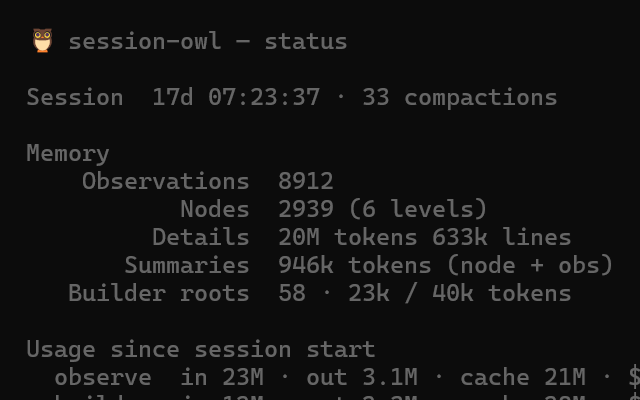
/owl:status |
Show memory stats and per-phase token/cost usage (since last compaction and since session start) |
/owl:ls [nodeId] |
List root nodes, or a node's children |
/owl:cat <id> |
Show a node (with its observations) or a single observation in full |
/owl:find <query> |
Search memory (regex; current items) |
/owl:find-all <query> |
Search memory (regex; everything, including superseded) |
/owl:rescan |
Discard the current memory graph and re-observe the entire session from the start (asks confirmation). With --reuse-observations: rebuild the graph structure from the collected observations without re-observing |
/owl:reobserve-0-obs-chunks |
Re-observe session ranges that were skipped with zero observations (repair after a degraded model run) |
/owl:settings |
Open the settings UI |
/owl:status output:

Configuration
Five independent mode axes, all live-toggleable mid-session:
| Setting | Options | Default |
|---|---|---|
observerMode |
on-threshold · on-compaction |
on-threshold |
builderMode |
on-compaction · each-N-observations · on-session-context-threshold · on-root-view-threshold |
each-N-observations |
selectorMode |
on-compaction · on-session-context-threshold |
on-compaction |
renderMode |
selected-root (Selector curates) · observations-root (the Builder's root view) |
observations-root |
subagentMode |
inherited (same as the main conversation) · on-compaction (captured only when the subagent itself compacts) · disabled |
on-compaction |
The defaults keep the observations graph in shape, so when a compaction is triggered the summary is immediately provided — tune the modes and thresholds to your model and workload. Two shape knobs — rootViewTargetNodes (how many roots to aim for; no target = the agent shapes the root view on its own) and rootViewStrategy (task · category · recency · importance · topic) — advise the Builder and Selector on the root view's organization. See CONFIGURATION.md for the full schema reference (every knob, defaults, per-component model presets).
Conflicts with other extensions
Pi's compaction hook is last-registration-wins: when two extensions customize compaction, only the last one registered has an effect — the other silently does nothing. Pi has no mechanism for extensions to veto each other.
Session Owl handles this by checking, at every start, whether another compaction-handling extension is installed (from ~/.pi/agent/settings.json, <project>/.pi/settings.json, and the pi extension dirs). When it finds one, it stays dormant — it collects no observations, compaction falls through to pi's native summary or the other extension's, and the widget shows a paused line:
🦉 ⚠ paused — pi-blackhole also handles compaction (/owl:status)The pause is runtime-only (nothing is written to your settings): remove the other extension and restart pi, or toggle ignoreConflicts in /owl:settings — session-owl resumes immediately, even mid-session.
Unknown or future packages are caught by a source scan for the override-shaped compaction-hook registration in installed package dirs (best effort — passive listeners that only observe compaction events never trigger it). Known compaction-handling packages are also checked by name — a curated list maintained in session-owl's source — so forks and renamed copies are caught even when their code shape changes.
Forcing session-owl on
If you deliberately run session-owl alongside another compaction handler (e.g. for benchmarking), set ignoreConflicts: true in the session-owl settings (/owl:settings). The last-registered extension wins — with this enabled you are choosing that fight knowingly.
Full suite
Check out the full suite of related extensions, avtc-pi — deterministic feature development, subagent delegation, working-memory, behavioral learning, parallel-work guardrails, durable decisions, notifications, and more.
Developed with Z.ai — get 10% off your subscription via this referral link.
License
MIT