avtc-pi-ui-components
A dialog coordinator for pi extensions that prevents dialogs from rendering over each other, plus a select-with-note component that wires subagent routing and notification.
Package details
Install avtc-pi-ui-components from npm and Pi will load the resources declared by the package manifest.
$ pi install npm:avtc-pi-ui-components- Package
avtc-pi-ui-components- Version
1.0.3- Published
- Jul 13, 2026
- Downloads
- 858/mo · 329/wk
- Author
- avtc
- License
- MIT
- Types
- extension
- Size
- 71.8 KB
- Dependencies
- 0 dependencies · 0 peers
Pi manifest JSON
{
  "extensions": [
    "./index.ts"
  ]
}
Security note
Pi packages can execute code and influence agent behavior. Review the source before installing third-party packages.
README
avtc-pi-ui-components
A dialog coordinator for pi extensions that prevents dialogs from rendering over each other, plus a select-with-note component that wires subagent routing and notification.
Features
Two things:
The dialog coordinator — serializes dialogs so only one shows at a time; when multiple extensions or async processes fire dialogs simultaneously, they never render over each other and bury the one beneath. Exported (and emitted via
dialog-coordinator:ready) so any extension's custom dialogs (ctx.ui.custom(...)) queue against the same shared queue.showSelectWithNote(...)— a ready-made selection dialog with an explanatory note above the options that uses the coordinator and additionally wires subagent routing (renders in the root UI when forwarded from a subagent, ifavtc-pi-subagent-ui-bridgeis installed) and attention notification (fires ifavtc-pi-notificationis installed, no-op otherwise). Call one function, get coordination + routing + notification for free.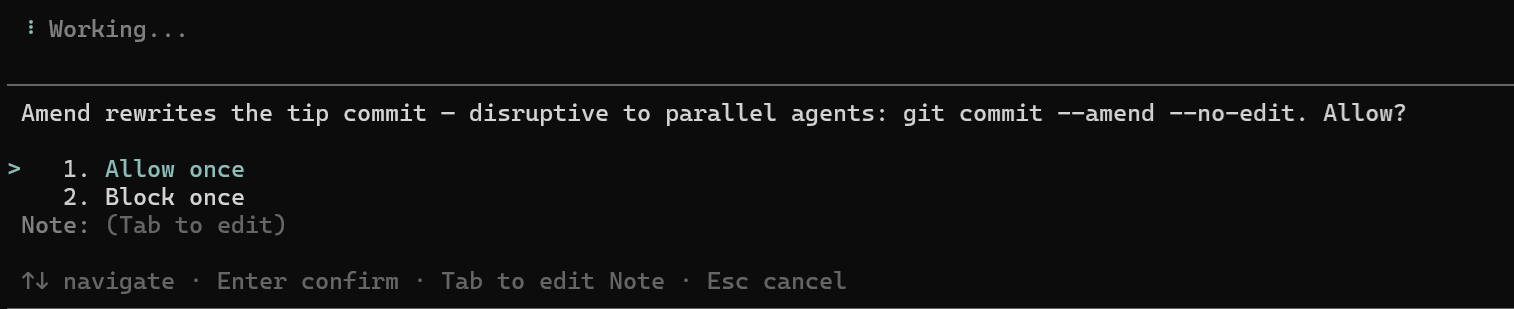
Installation
pi install npm:avtc-pi-ui-components
When to load this extension
Load ui-components as a companion extension only if your extension shows dialogs that can be triggered asynchronously — from an agent tool call, a background timer/pipeline, or any path that isn't a direct user command. Those dialogs can fire while another dialog is already open, so they need the coordinator to prevent them from rendering over each other.
If your extension's dialogs are all user-command-only (e.g. a /settings
modal opened on demand), you don't need to load it: while such a modal is open
the agent isn't running and nothing interrupts it, so coordination is
unnecessary.
To load it as a companion:
{
  "dependencies": { "avtc-pi-ui-components": "^1.0.0" },
  "pi": {
    "extensions": ["./index.ts", "node_modules/avtc-pi-ui-components/index.ts"]
  }
}
The coordinator is a shared singleton guarded against double-registration, so it's safe for several extensions to load it — whichever loads first wires it, the rest no-op.
Usage
showSelectWithNote
import { showSelectWithNote, type SelectWithNoteOption } from "avtc-pi-ui-components";

const options: SelectWithNoteOption[] = [
  { label: "Allow once", value: "allow" },
  { label: "Block once", value: "block" },
];

// On timeout the dialog auto-resolves to defaultOption (options[1] here).
// Pass `undefined` to wait for the human indefinitely.
const result = await showSelectWithNote(
  ctx, // the ExtensionContext / ctx passed to your handler
  "git checkout would disrupt parallel work. Allow?",
  options,
  options[1], // defaultOption — highlighted + used on timeout
  "my-extension", // source — labels the notification if one fires
  15 * 60_000, // timeoutMs — auto-resolve after 15 min
);

// result is { value, note } on a choice (or the default on timeout), or null if dismissed
if (result?.value === "allow") {
  /* ... */
}
The dialog coordinator for custom dialogs
Extensions with their own dialogs queue them against the same shared coordinator. Vendor the shipped snippet, register it, then wrap any blocking ctx.ui.* call:
// 1. Vendor src/snippets/canonical/subscribe-to-dialog-coordinator.ts into your extension
import {
  subscribeToDialogCoordinator,
  withCoordinator,
} from "./snippets/vendored/subscribe-to-dialog-coordinator.js";

export default function (pi: ExtensionAPI) {
  subscribeToDialogCoordinator(pi);
}

// 2. Wrap a custom dialog — queued if another dialog is open, shown immediately otherwise
const choice = await withCoordinator(() => ctx.ui.custom(myDialogComponent));
If avtc-pi-ui-components isn't installed, withCoordinator is a transparent pass-through.
Public API
| Export | Purpose |
|---|---|
showSelectWithNote(ctx, title, options, defaultOption?, source?, timeoutMs?) |
The selection-with-note dialog (auto-coordinated + auto-attention). Returns { value, note } or null if dismissed. |
SelectWithNoteOption, SelectWithNoteResult |
Types: { label, value } options; { value, note } result. |
DialogCoordinator, dialogCoordinator |
The shared queue + a singleton, for extensions building their own dialogs (enqueueOrShow). |
How It Works
On session_start, the extension emits dialog-coordinator:ready and registers its subagent-bridge content type, so forwarded select-with-note requests render in the root UI. Consumer extensions just call showSelectWithNote(...) — no event subscription or wiring needed.
Full suite
Check out the full suite of related extensions, avtc-pi — deterministic feature development, subagent delegation, working-memory, behavioral learning, parallel-work guardrails, durable decisions, notifications, and more.
Developed with Z.ai — get 10% off your subscription via this referral link.
License
MIT