end-pi
Use Pi providers in Codex Desktop with seamless history switching, image input, and a local OpenAI-compatible proxy.
Package details
Security note
Pi packages can execute code and influence agent behavior. Review the source before installing third-party packages.
README
end-pi
Use Pi providers inside Codex Desktop.
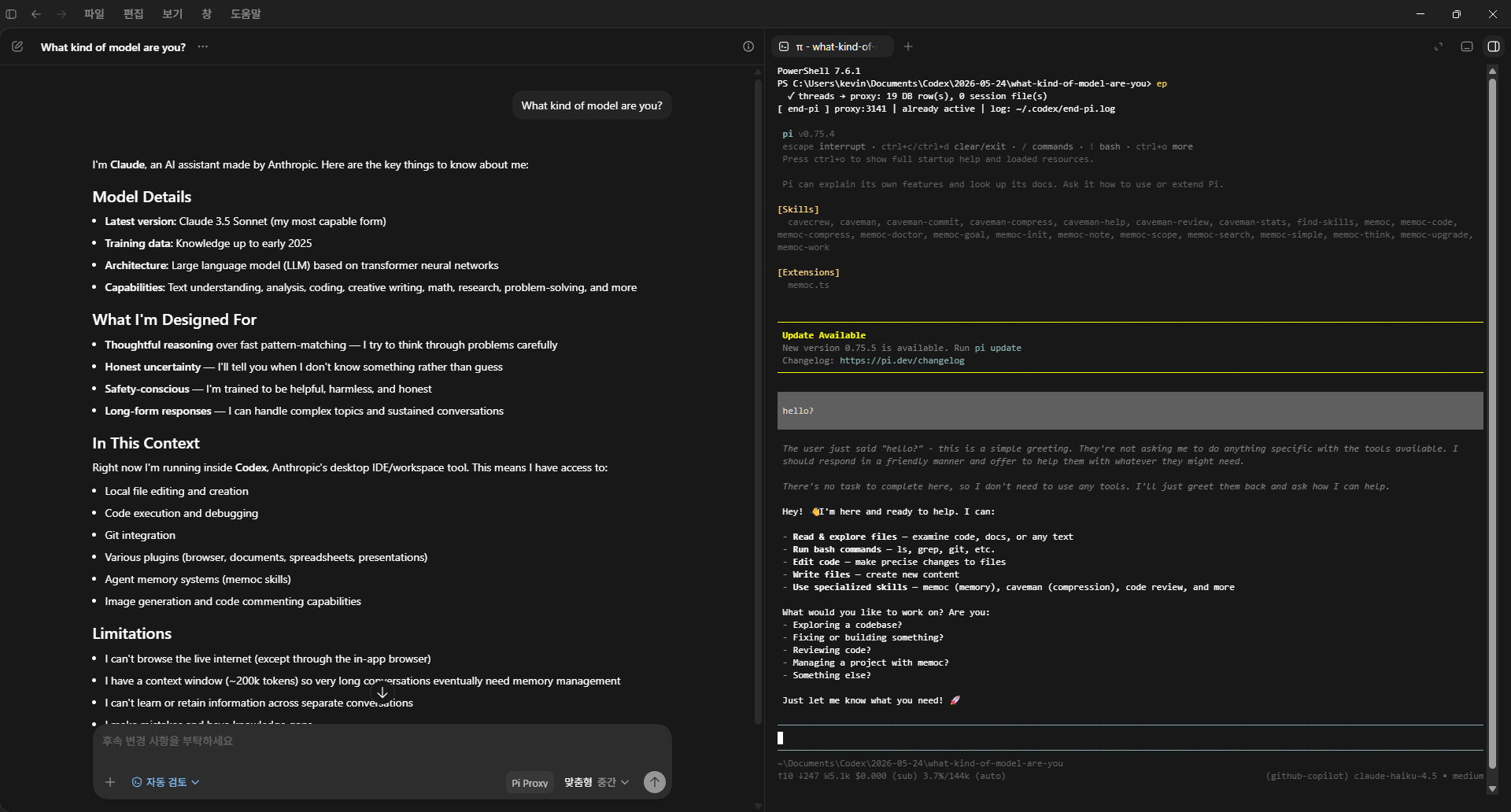
end-pi (ep) runs a local OpenAI-compatible proxy that lets Codex Desktop talk through your existing Pi setup. Keep using Pi normally, switch models in the Pi TUI, and Codex will route the next request through the currently selected Pi provider/model.
Screenshot
Why
Codex Desktop understands OpenAI-compatible providers. Pi already knows how to authenticate and call many providers. end-pi connects them:
- Codex Desktop sends OpenAI Responses requests to the local
end-piproxy. end-piconverts them into Pi context.- Pi calls the provider/model selected in the Pi TUI.
- Responses stream back to Codex Desktop.
Features
- Use Pi-authenticated providers from Codex Desktop.
- Switch models in Pi with
/model; Codex uses the new model on the next request. - Supports Codex image input by converting
input_imageinto Pi image content. - Automatically refreshes Pi OAuth tokens when possible.
- Moves Codex conversation history between native Codex and
end-pimode. - Runs the proxy in the background so the integrated terminal can be closed.
- Keeps Pi TUI available from the Codex Desktop integrated terminal.
Install
From Pi:
pi install npm:end-pi
Or install the CLI globally with npm:
npm install -g end-pi
Requirements:
- Node.js 22.19 or newer
- Pi installed and authenticated
- Codex Desktop installed
Usage
Optional: install the multi-subscription companion extension:
ep setup
This installs end-pi-multi-pass through Pi when it is missing. After that, opening Pi with ep gives you the multi-pass commands:
/subs
/pool
/mp-preset
By default, the companion is installed from npm. If you need a custom git source, set END_PI_MULTIPASS_GIT before running setup.
When end-pi-multi-pass is already installed from npm, ep checks for a newer npm version and updates it before opening Pi. Set EP_SKIP_MULTIPASS_UPDATE=1 to skip this companion update check.
Start or switch Codex Desktop into Pi-backed mode:
ep
If Codex is not already in end-pi mode, this will:
- Start the local proxy in the background.
- Close Codex Desktop.
- Register the
end-piprovider in Codex config. - Move native Codex conversation history to
end-pi. - Reopen Codex Desktop.
If Codex is already in end-pi mode, ep opens the Pi TUI without restarting Codex.
Restore native Codex mode:
ep --restore
If Codex is in end-pi mode, this will:
- Close Codex Desktop.
- Restore native Codex config.
- Move
end-piconversation history back to native Codex. - Stop the background proxy.
- Reopen Codex Desktop.
If Codex is already restored, ep --restore simply opens the Pi TUI.
Check status:
ep --status
end-pi uses port 3141 by default. If that port is busy, it automatically selects a nearby free port and patches Codex with the selected endpoint. To force a port, set END_PI_PORT.
Run diagnostics:
ep doctor
ep doctor --fix
ep doctor --json
ep smoke
ep smoke --matrix
ep doctor checks Node, Pi, Codex config, provider auth, active model, daemon health, endpoint health, multi-pass, and recent request logs. --fix only repairs the active end-pi proxy/endpoint; it does not switch native Codex into end-pi mode by itself.
Inspect logs:
ep logs
ep logs --last-request
ep logs --requests
ep logs --lines=200
ep logs --clean
ep logs --clean --keep=100
end-pi automatically rotates request snapshots and keeps the newest 200 by default. Set END_PI_REQUEST_LOG_KEEP to change that limit.
Install or verify the multi-pass companion extension:
ep --install-multipass
Model Switching
Run:
ep
Then use the Pi TUI as usual. When you change the model/provider in Pi, Codex Desktop will use that current Pi selection for the next request.
Running pi directly also opens the same Pi TUI, but it does not start the end-pi proxy, patch Codex config, or migrate conversation history. Use ep when you want Codex Desktop integration.
Image Input
Codex Desktop sends images as OpenAI Responses input_image parts. Pi expects image content as:
{ "type": "image", "data": "...base64...", "mimeType": "image/png" }
end-pi performs that conversion automatically. The selected Pi model still needs to support image input.
Conversation History
Codex Desktop stores conversation metadata in SQLite and rollout .jsonl session files. end-pi migrates both:
epmoves native Codex conversations to theend-piprovider.ep --restoremovesend-piconversations back to native Codex.
This keeps conversations available when switching between native Codex and Pi-backed mode.
Logs
Proxy logs are written to:
~/.codex/end-pi.log
Request snapshots are written to:
~/.codex/end-pi-requests/
Request snapshots are sanitized before writing. Large base64 image payloads are replaced with [image-data:...], and token-like fields are redacted.
For smoke tests and troubleshooting, see:
Notes
- If the selected Pi provider token is expired,
end-pitries to refresh it automatically. - If refresh fails, re-authenticate that provider in Pi or switch to another provider/model.
- The proxy ignores Codex's placeholder model id and always uses Pi's current model selection.
Known Limitations
- Provider behavior varies. Some Pi models follow tool calls well; others may answer directly or need a different model.
- Vision only works when the selected Pi provider/model accepts image input.
end-pitranslates Codex tool requests, but Codex Desktop still owns actual tool execution.- Codex Desktop and Responses request shapes can change, so run
ep doctor,ep smoke, andnpm testafter upgrading. - macOS and Linux launch detection should be verified with
ep doctoron each target environment.