grok-pi
Bridge Grok CLI session models (Composer 2.5, Grok Build) into Pi via cli-chat-proxy
Package details
Install grok-pi from npm and Pi will load the resources declared by the package manifest.
$ pi install npm:grok-pi- Package
grok-pi- Version
1.0.2- Published
- Jun 19, 2026
- Downloads
- not available
- Author
- luong.nguyen
- License
- MIT
- Types
- extension
- Size
- 17.4 KB
- Dependencies
- 0 dependencies · 1 peer
Pi manifest JSON
{
  "extensions": [
    "./src/index.ts"
  ],
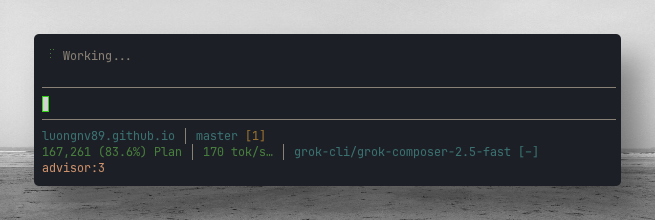
  "image": "https://raw.githubusercontent.com/luongnv89/pi-extensions/main/assets/composer-2.5-170-tok-s.png"
}
Security note
Pi packages can execute code and influence agent behavior. Review the source before installing third-party packages.
README
grok-pi
Use Grok CLI session models inside Pi Coding Agent — including Composer 2.5 (grok-composer-2.5-fast) and Grok Build (grok-build).


This extension registers a Pi provider named grok-cli that talks to the same backend the Grok CLI uses (cli-chat-proxy.grok.com), reusing your existing ~/.grok/auth.json login. It is not the official xAI API-key provider (xai / XAI_API_KEY).
What you get
| Pi provider | Pi model id | Grok name (typical) |
|---|---|---|
grok-cli |
grok-composer-2.5-fast |
Composer 2.5 |
grok-cli |
grok-build |
Grok Build |
Models are read from ~/.grok/models_cache.json when present; otherwise the extension ships safe defaults matching a standard Grok CLI install.
Prerequisites
- Pi Coding Agent installed (
pion yourPATH). - Grok CLI installed and on your
PATH(grok --version). - Network access to
https://cli-chat-proxy.grok.comandhttps://auth.x.ai.
Install
Published on npm: grok-pi. Use Pi's package manager (pi install), not npm install alone.
pi install npm:grok-pi
pi install npm:grok-pi@1.0.0   # pin version
pi install -l npm:grok-pi      # project-local (.pi/settings.json)
pi -e npm:grok-pi              # one session, no install
Then run /reload in Pi (or restart).
pi list
pi update npm:grok-pi
pi remove npm:grok-pi
From pi-extensions (git):
git clone https://github.com/luongnv89/pi-extensions.git ~/.pi/pi-extensions
cp -r ~/.pi/pi-extensions/extensions/grok-pi ~/.pi/agent/extensions/
chmod 700 ~/.pi/agent/extensions/grok-pi/bin/*
Full collection:
curl -fsSL https://raw.githubusercontent.com/luongnv89/pi-extensions/main/install.sh | bash -s -- --auto
After install
- Run
/reload(or restart Pi). - Confirm models:
pi --list-models | rg grok-cli
You should see at least:
grok-cli        grok-composer-2.5-fast
grok-cli        grok-build
Step-by-step: authenticate
Authentication is Grok CLI’s session, not a separate Pi API key.
1. Log in with Grok CLI (first time or expired token)
grok login
This opens the browser (or your configured auth flow) and writes credentials to:
~/.grok/auth.json
Tokens are refreshed automatically by the extension’s bin/grok-api-key helper when Pi needs them.
2. Verify Grok CLI works
grok -m grok-composer-2.5-fast -p 'Reply with exactly: OK' --max-turns 1
Expected: OK
3. Verify auth file exists
test -f ~/.grok/auth.json && echo "auth ok"
4. Start Pi and check extension notice
pi
On session start you should see an info notification that grok-cli was registered. If auth is missing, you get a warning to run grok login.
Troubleshooting auth
| Symptom | What to do |
|---|---|
grok-pi: no ~/.grok/auth.json |
Run grok login, then /reload |
| Proxy says CLI version outdated | Update Grok: grok update or reinstall Grok CLI |
grok-api-key: ... run grok login |
Re-authenticate with grok login |
| Models missing in Pi | /reload, then pi --list-models grok |
Inside Pi:
/grok-pi status
/grok-pi help
Step-by-step: use Grok models in Pi
Interactive Pi (TUI)
Start Pi in your project:
cd /path/to/your/repo
pi
Open the model picker:
Ctrl+Lor type/model.Choose provider
grok-cliand modelgrok-composer-2.5-fast(Composer 2.5).Chat as usual; Pi tools (
read,bash,edit,write, etc.) work with the selected model.
Non-interactive one-shot
pi -p --provider grok-cli --model grok-composer-2.5-fast "Summarize this repo in 3 bullets"
CLI flags on startup
pi --provider grok-cli --model grok-composer-2.5-fast
Provider-prefixed model shorthand also works:
pi --model grok-cli/grok-composer-2.5-fast
Switch to Grok Build
pi --provider grok-cli --model grok-build
Or select grok-build in /model.
Quick smoke test (minimal tools)
pi -p --no-session \
  --provider grok-cli \
  --model grok-composer-2.5-fast \
  "Reply with exactly OK"
How it works (technical)
The extension calls pi.registerProvider("grok-cli", …) with:
- API:
openai-responses(matches Grok’sapi_backend: responsesfor these models) - Base URL:
https://cli-chat-proxy.grok.com/v1 - API key: shell command
!…/grok-api-key(reads/refreshes~/.grok/auth.json) - Required proxy headers (same family as Grok CLI):
Authorization: Bearer <token>X-XAI-Token-Auth: xai-grok-clix-grok-client-version: <from ~/.grok/version.json>User-Agent: xai-grok-workspace/<version>- Per model:
x-grok-model-override: <model-id>
Composer 2.5 in Grok config is the model id grok-composer-2.5-fast, not composer-2.5 alone.
Files in this extension
extensions/grok-pi/
├── bin/
│   ├── grok-api-key          # token + refresh for Pi apiKey command
│   ├── grok-client-version   # x-grok-client-version header value
│   └── grok-user-agent       # User-Agent header value
├── src/index.ts              # registers grok-cli provider + /grok-pi command
├── package.json
└── README.md
Commands
| Command | Description |
|---|---|
/grok-pi or /grok-pi status |
Provider URL, auth presence, model list |
/grok-pi models |
List models registered from cache/defaults |
/grok-pi test |
Print a one-line smoke-test command |
/grok-pi help |
Short usage |
Official xAI API vs this bridge
| Approach | Provider in Pi | Auth |
|---|---|---|
| grok-pi (this extension) | grok-cli |
grok login → ~/.grok/auth.json |
| Built-in xAI | xai |
XAI_API_KEY or Pi /login for xAI |
Use grok-pi when you want the same Composer 2.5 / Grok Build models your Grok CLI already uses. Use xAI when you have a console API key and want Pi’s stock grok-* catalog from api.x.ai.
License
MIT — same as pi-extensions.