open-zk-kb
Persistent memory for agents. Corrections stick, context compounds, every session starts smarter.
Package details
Install open-zk-kb from npm and Pi will load the resources declared by the package manifest.
$ pi install npm:open-zk-kb- Package
open-zk-kb- Version
1.4.4- Published
- Aug 19, 2026
- Downloads
- 6,550/mo · 275/wk
- Author
- tyudjk65y
- License
- MIT
- Types
- extension, skill
- Size
- 3.5 MB
- Dependencies
- 12 dependencies · 4 peers
Pi manifest JSON
{
  "image": "https://raw.githubusercontent.com/mrosnerr/open-zk-kb/main/assets/pi-demo.png",
  "video": "https://raw.githubusercontent.com/mrosnerr/open-zk-kb/main/assets/pi-demo.mp4",
  "skills": [
    "./skills"
  ],
  "extensions": [
    "./dist/pi/extension.js"
  ]
}
Security note
Pi packages can execute code and influence agent behavior. Review the source before installing third-party packages.
README
open-zk-kb




You open a new session and your agent has no idea who you are. Again. You re-explain your stack, your conventions, that one edge case you've corrected five times.
open-zk-kb gives your agent a memory — so corrections stick, context compounds, and every session starts smarter than the last.
Quick start
Requires Bun — install with
curl -fsSL https://bun.sh/install | bash
bunx open-zk-kb@latest
The installer configures your selected clients, installs agent instructions, and creates a local vault. Supported clients: OpenCode, Claude Code, Cursor, Windsurf, Zed, Pi, and OMP.
See the Setup Guide for manual installation and troubleshooting.
Why open-zk-kb?
Your agent starts from zero every session. No memory, no learning curve. You correct the same mistakes, re-explain the same conventions, re-teach the same context. Switch tools and it's even worse — your Cursor agent doesn't know what your Claude agent learned.
open-zk-kb fixes that.
- Correct it once, it sticks — your agent stores corrections, preferences, and decisions. Next session, it already knows.
- Works across every tool — one knowledge base shared by Claude Code, Cursor, Windsurf, OpenCode, Zed, Pi, and OMP
- Finds what's relevant — hybrid search matches meaning, not just keywords, so only useful context surfaces
- Runs locally — no API keys, no cloud, works offline. Your data stays on your machine.
- Human-readable — plain Markdown files you can browse, edit, and version control
- Open source — MIT licensed
Pi: native knowledge tools
Install the Pi package, then restart Pi:
pi install npm:open-zk-kb
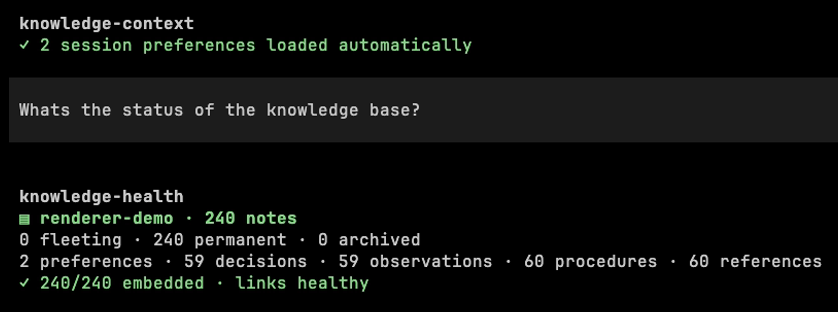
The extension exposes all ten knowledge-* tools directly in Pi. Results use Pi-native compact rendering: search, store, context, and health have focused summaries and expandable detail, while the other tools show concise status output. The MCP server and local SQLite/embedding work still run with Bun >= 1.0; Pi itself runs under its supported Node.js runtime. Installing Bun is therefore required even when using the Pi package.
Pi also loads active project preferences automatically when a session starts and injects them into model context without requiring a model-initiated search. The visible knowledge-context entry reports what happened without fabricating a tool call.
See the Pi experience guide for the complete preference workflow and renderer examples. For installer-managed instructions, verification, and troubleshooting, see Pi installation.
Configuration
Zero configuration required. Local embeddings work out of the box with no API key.
See the Configuration Guide for embeddings, vault path, lifecycle tuning, and server settings.
Under the hood
Built on the Zettelkasten method — atomic, linked notes with structured kinds. Each note captures one concept (a decision, a preference, a gotcha) and links to related notes, building an interconnected knowledge graph.
Search combines SQLite FTS5 full-text indexing with local vector embeddings (MiniLM-L6-v2) for semantic matching. Markdown files are the source of truth; the database is a rebuildable index.
Telemetry
When enabled (telemetry.enabled: true and telemetry.share: true), open-zk-kb sends one anonymous event for each completed session to PostHog (EU Cloud) on a later startup. It includes a canonical client, bounded model IDs, vault size, and counts for all ten tools—not note content, queries, paths, names, or email addresses. Runtime defaults are disabled; the interactive installer enables sharing only after affirmative consent, while unattended and direct package installs remain disabled unless configured separately. Set DO_NOT_TRACK=1 to unconditionally block sharing (local SQLite counters are unaffected), or keep both flags false. See Telemetry for the full event schema and details.
Documentation
- Setup Guide — installation, client-specific setup, troubleshooting
- Pi Experience — native tools, automatic preferences, and renderer gallery
- Tools Reference — all 10 MCP tools with parameters and examples
- Note Lifecycle — note kinds, statuses, review system
- Configuration — embeddings, vault, lifecycle, and server settings
- Architecture — dual storage, ownership model, design decisions
- Development — local dev, testing, debugging
- Contributing — guidelines for contributors