pbl-skills
Product Backlog management for pi and Claude Code — skills, extensions, and tools to manage a product backlog inside your repo
Package details
Install pbl-skills from npm and Pi will load the resources declared by the package manifest.
$ pi install npm:pbl-skills- Package
pbl-skills- Version
1.3.0- Published
- Jun 1, 2026
- Downloads
- 300/mo · 17/wk
- Author
- melomario
- License
- MIT
- Types
- extension, skill
- Size
- 103.2 KB
- Dependencies
- 0 dependencies · 2 peers
Pi manifest JSON
{
  "extensions": [
    "./index.ts"
  ],
  "skills": [
    "./skills"
  ],
  "image": "https://f004.backblazeb2.com/file/npm-stuff/pi-pbl-skills/screenshot.png",
  "video": "https://f004.backblazeb2.com/file/npm-stuff/pi-pbl-skills/pbi-skills.mp4"
}
Security note
Pi packages can execute code and influence agent behavior. Review the source before installing third-party packages.
README
pbl-skills
Product Backlog management for pi — commands, tools, and skills to manage your product backlog inside your repo.
pbl-skills turns your repo into a lightweight product management workspace. It structures your backlog as plain markdown folders, gives you interactive TUI widgets for visualization and reordering, and bundles a suite of AI-assisted skills for creating, refining, splitting, and completing backlog items.
Read The Product Backlog Should Live in Your Repo for the theory behind this approach.
Why?
| Problem | How pbl-skills solves it |
|---|---|
| Backlog lives in Jira/Notion, far from the code | Backlog lives in product-backlog/ — same repo, same branch |
| Prioritization gets stale | Interactive reorder via /pbl-view --order (or press o in the view) makes it effortless |
| Stories aren't ready to code | Structured 3 C's pipeline: Card → Conversation → Confirmation |
| No visibility into backlog health | Anti-pattern scanner detects bottlenecks, stale items, over-refinement |
| Too much manual bash | Tools like create_backlog_item replace mkdir + write calls |
Installation
pi install -l npm:pbl-skills
What you get
4 Commands (TUI widgets)
| Command | What it does |
|---|---|
/pbl-view |
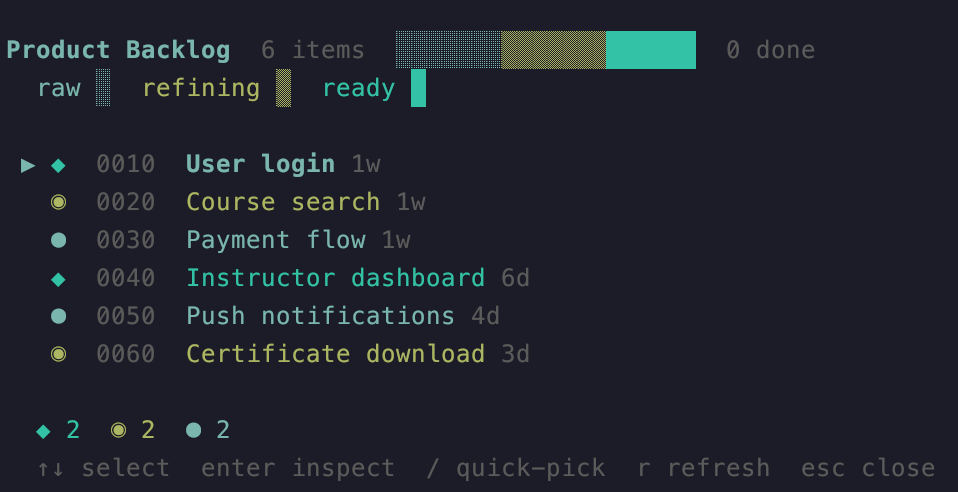
Segmented progress bar + color-coded item list. Supports --order for interactive reorder, --widget for static widget. |
/pbl-metrics |
Backlog health check + velocity sparkline — scans for 5 anti-patterns and shows a health widget + status bar indicator |
/pbl-done |
Interactive "mark as done" selector (with keyboard search/filter) |
/pbl-timeline |
Chronological event history (created, refined, confirmed, done, split) |
3 Tools (LLM-callable)
| Tool | What it does |
|---|---|
create_backlog_item |
Creates a new PBI folder with Card.md and history entry — no bash needed |
split_backlog_item |
Splits an item using Hamburger Method results — updates original + creates new |
show_backlog_widget |
Toggles the visualization widget programmatically |
7 Skills (AI-assisted workflows)
| Skill | What it does |
|---|---|
pbl-kickoff |
Bootstrap a full product idea into backlog items (structured interview) |
pbl-add |
Add a new item with a short 3-question interview (creates CONNEXTRA Card) |
pbl-refine |
Refine a raw item through a structured 3 C's interview |
pbl-split |
Split a large item into two independent items (Hamburger Method) |
pbl-implement |
Bridge from a refined item to coding — generates test skeleton + identifies design files |
pbl-diagnose |
Deep analysis of backlog health — identifies anti-patterns, explains root causes, and offers to act on flagged items |
pbl-done |
Mark an item as done with Definition of Done gate |
Scripts
| Script | What it does |
|---|---|
scripts/pbl-index.js |
Regenerates product-backlog/.index.md (item counts, status summaries, recent history) |
How it works
The 3 C's pipeline
Every backlog item progresses through three states, tracked by which files exist:
raw        refined       ready
  ● ──────→ ◉ ────────→ ◆
Card.md    +Conversation.md   +Confirmation.md
- raw — just a
Card.mdwith a CONNEXTRA story (As a… I want… So that…) - refined —
Card.md+Conversation.md(structured refinement decisions) - ready — all three files present, ready for
/pbl-implementto bridge into code
Folder structure
product-backlog/
├── CLAUDE.md              ← auto-generated guide for AI agents
├── .index.md              ← auto-generated index (fast path for diagnosis)
├── .history/              ← one file per event: YYYY-MM-DD_{slug}_{event}
├── .removed-items/        ← soft-deleted items (can be restored)
├── done/                  ← completed items
├── 0010-user-login/
│   ├── Card.md            ← CONNEXTRA user story
│   ├── Conversation.md    ← refinement decisions
│   └── Confirmation.md    ← prose acceptance criteria
├── 0020-profile-page/
│   └── Card.md
└── 0030-payment-flow/
    ├── Card.md
    └── Conversation.md
Anti-pattern detection
/pbl-metrics checks for 5 common issues:
- Refinement bottleneck — >3 items discussed but never confirmed
- Ready but not started — >5 items fully refined, waiting
- Stale refined — item refined 5+ done events ago (may be outdated)
- Stale unrefined — item created 8+ events ago, never refined
- DoD may be stale —
docs/adr/has files newer than the Definition of Done
Additionally, /pbl-metrics shows a delivery velocity sparkline (last 10 weeks).
The status bar shows a live indicator: 🟢 healthy, 🟡 warnings, 🔴 errors.
Quickstart
# 1. Install the package
pi install -l npm:pbl-skills

# 2. Start pi (or Claude Code) in your repo
pi

# 3. Kickoff a new product (or add items one by one)
/pbl-kickoff

# 4. View your backlog
/pbl-view

# 5. Refine the top unrefined item
/pbl-refine

# 6. Check health + velocity
/pbl-metrics

# 7. Start coding
/pbl-implement
Requirements
- pi (
@earendil-works/pi-coding-agent) — peer dependency - typebox — for tool parameter validation (peer dependency)
- Node.js ≥ 18
License
MIT