pi-add-dir
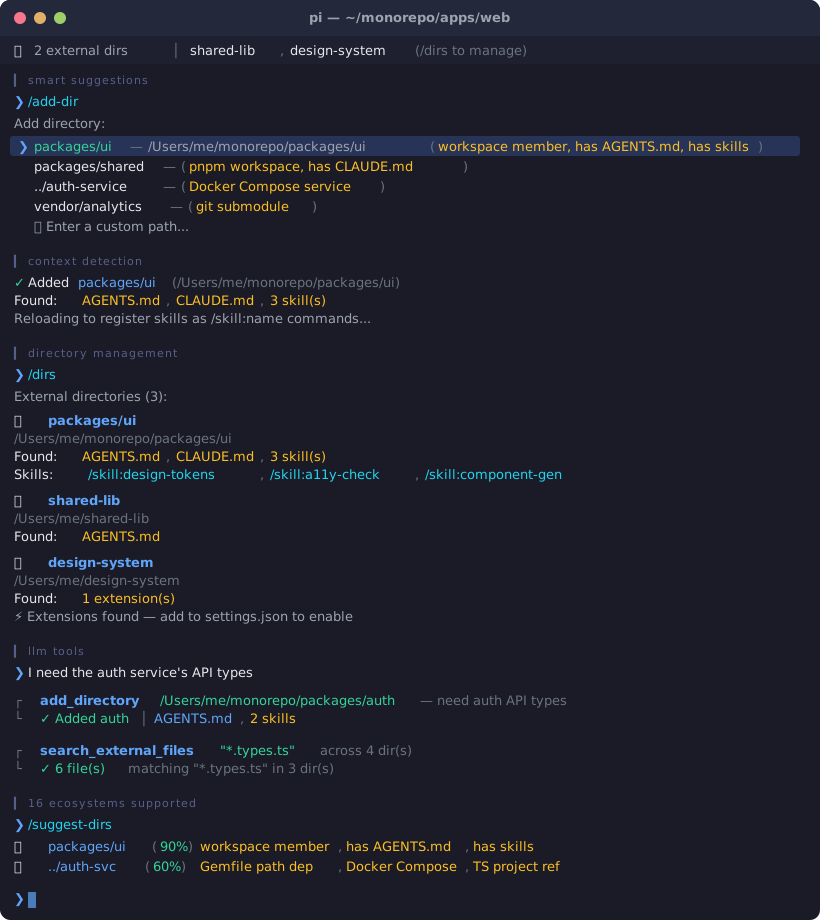
Add external directories to your pi session — loads their AGENTS.md, CLAUDE.md, and skills into context.
Package details
Install pi-add-dir from npm and Pi will load the resources declared by the package manifest.
$ pi install npm:pi-add-dir- Package
pi-add-dir- Version
1.3.1- Published
- Mar 31, 2026
- Downloads
- 897/mo · 306/wk
- Author
- itisbryan
- License
- MIT
- Types
- extension
- Size
- 79 KB
- Dependencies
- 0 dependencies · 3 peers
Pi manifest JSON
{
  "extensions": [
    "./extensions"
  ],
  "image": "https://raw.githubusercontent.com/itisbryan/pi-add-dir/main/demo.svg"
}
Security note
Pi packages can execute code and influence agent behavior. Review the source before installing third-party packages.
README
pi-add-dir
Add external directories to your pi session
Install · Usage · How it works
Add directories from outside your current working directory to a pi session. Their AGENTS.md, CLAUDE.md, and skills are automatically loaded into context every turn — so the agent understands both projects at once.
Skills from external directories are registered natively as /skill:name commands via pi's resources_discover event.
Install
pi install npm:pi-add-dir
Or from git:
pi install https://github.com/itisbryan/pi-add-dir
Then /reload in pi.
Usage
Commands
| Command | Description |
|---|---|
/add-dir <path> |
Add an external directory to this session |
/add-dir |
Interactive mode — shows smart suggestions based on project structure |
/suggest-dirs |
Show all directory suggestions with relevance scores |
/remove-dir [path] |
Remove a directory (interactive picker if no path, tab-completion supported) |
/dirs |
List all added directories with their detected context |
Examples
/add-dir /Users/me/other-project
/add-dir ../shared-library
/add-dir ~/Desktop/design-system
/dirs
/remove-dir /Users/me/other-project
LLM Tools
Two tools are available for the agent:
| Tool | Description |
|---|---|
add_directory |
Add an external directory (loads its AGENTS.md, skills, etc.) |
search_external_files |
Search for files across all external directories by name/pattern |
The agent can request adding a directory on its own:
"I need to reference the shared library at /Users/me/libs/core — let me add it to the session."
And search across external dirs when @ file picker isn't available:
"Let me search for config files across the external directories."
Smart Suggestions
When you run /add-dir without arguments, the extension analyzes your project structure and suggests relevant directories:
- Workspace members — npm, pnpm, Cargo, Go, Python (uv), and monorepo packages
- Local dependencies —
file:/link:/portal:in package.json,path:in Gemfile/Cargo.toml - Git submodules — paths from
.gitmodules - Sibling projects — related projects alongside your cwd
- TypeScript project references —
referencesintsconfig.json - Docker Compose services —
build.contextpaths - Gradle project modules —
include()insettings.gradle(.kts) - Maven multi-module —
<modules>inpom.xml - uv Python workspaces —
[tool.uv.workspace]members inpyproject.toml - .NET solutions — project references in
.slnfiles - PHP Composer —
pathrepository references incomposer.json - Flutter/Dart —
path:dependencies inpubspec.yaml - Swift PM —
.package(path:)local dependencies inPackage.swift - Elixir —
{:dep, path: "..."}inmix.exs - Context-rich directories — prioritizes dirs with
AGENTS.md,CLAUDE.md, or skills
Directories with context files get higher relevance scores, making the most useful suggestions appear first.
Widget
When directories are added, a widget appears above the editor:
📂 2 external dirs │ other-project, shared-library (/dirs to manage)
The widget automatically truncates to fit your terminal width.
How It Works
┌─────────────────────────────────────────────────────────┐
│  pi session (cwd: /my-project)                          │
│                                                         │
│  /add-dir /other-project                                │
│     │                                                   │
│     ├─► Scans /other-project for:                       │
│     │     AGENTS.md, CLAUDE.md                          │
│     │     .pi/skills/, .agents/skills/, .claude/skills/ │
│     │     .pi/extensions/ (detection only)              │
│     │                                                   │
│     ├─► Persists to session (survives restart)          │
│     │                                                   │
│     ├─► Registers skills via resources_discover         │
│     │   (auto-reloads pi to activate /skill:name)       │
│     │                                                   │
│     └─► Every turn: injects found context files         │
│         into the system prompt via                      │
│         before_agent_start event                        │
│                                                         │
│  Agent now knows both projects' rules & conventions     │
│  Agent can read/edit/write files in /other-project      │
│  using absolute paths (always worked — now it has       │
│  the context to do it intelligently)                    │
│                                                         │
│  Skills from /other-project work as /skill:name         │
│  commands, just like local skills                       │
└─────────────────────────────────────────────────────────┘
What gets injected
For each added directory, the extension reads:
| File | Location(s) checked |
|---|---|
AGENTS.md |
<dir>/AGENTS.md, <dir>/.pi/AGENTS.md |
CLAUDE.md |
<dir>/CLAUDE.md, <dir>/.pi/CLAUDE.md |
| Skills | <dir>/.pi/skills/*/SKILL.md, <dir>/.agents/skills/*/SKILL.md, <dir>/.claude/skills/*/SKILL.md |
Context files are appended to the system prompt on every turn (cached — filesystem is only re-scanned when directories change).
Skills are registered natively with pi via the resources_discover event, so they appear as /skill:name commands with full autocomplete support.
What's persisted
Added directories are stored in the session via pi.appendEntry(). When you /resume a session, the directories are automatically restored.
A temp file (/tmp/pi-add-dir-<hash>.json) is also maintained so resources_discover can read the directory list before the session is fully loaded. This file is automatically synced with session state and cleaned up on session_shutdown.
Extension detection
When adding a directory that contains .pi/extensions/, the extension detects them and shows actionable instructions:
Found 2 extension(s) in other-project/.pi/extensions/.
   To enable them, add to your settings.json:
   { "extensions": ["/path/to/other-project/.pi/extensions"] }
   Then /reload to activate.
Extensions cannot be loaded dynamically at runtime (pi platform limitation), but the extension tells you exactly how to enable them.
Performance
Context injection is cached — the filesystem is only re-scanned when directories are added or removed, not on every turn. This keeps the before_agent_start hook fast.
Auto-reload behavior
When you add or remove a directory that contains skills, pi automatically reloads to register/unregister those skills as /skill:name commands. This is a brief operation — your session state is preserved.
Limitations
| Works ✅ | Platform limitation ❌ |
|---|---|
| AGENTS.md / CLAUDE.md loaded into system prompt | @ file fuzzy search doesn't include external dirs¹ |
Skills registered as native /skill:name commands |
External .pi/extensions/ are not auto-loaded² |
| Agent can read/edit/write any path | Can't change ctx.cwd at runtime³ |
| Persists across session restarts | |
| File search across external dirs via LLM tool | |
| Extension detection with setup instructions |
Notes:
- The
@file picker is a TUI-level feature that can't be extended from an extension. Use thesearch_external_filestool as a workaround — the agent can call it to find files across all external directories. - Pi doesn't support loading extensions dynamically at runtime. When extensions are detected, you'll see instructions to add them to
settings.jsonmanually. ctx.cwdis read-only in the pi extension API. The agent uses absolute paths for external directories, which works well in practice.
Changelog
See CHANGELOG.md for release history.
License
MIT