pi-advisor-flow
Advanced Executor/Advisor flow for Pi, fully configurable and extendable.
Package details
Install pi-advisor-flow from npm and Pi will load the resources declared by the package manifest.
$ pi install npm:pi-advisor-flow- Package
pi-advisor-flow- Version
0.2.3- Published
- Jul 20, 2026
- Downloads
- 1,278/mo · 1,278/wk
- Author
- philipbrembeck
- License
- MIT
- Types
- extension
- Size
- 110.6 KB
- Dependencies
- 0 dependencies · 4 peers
Pi manifest JSON
{
  "extensions": [
    "./extensions/index.ts"
  ],
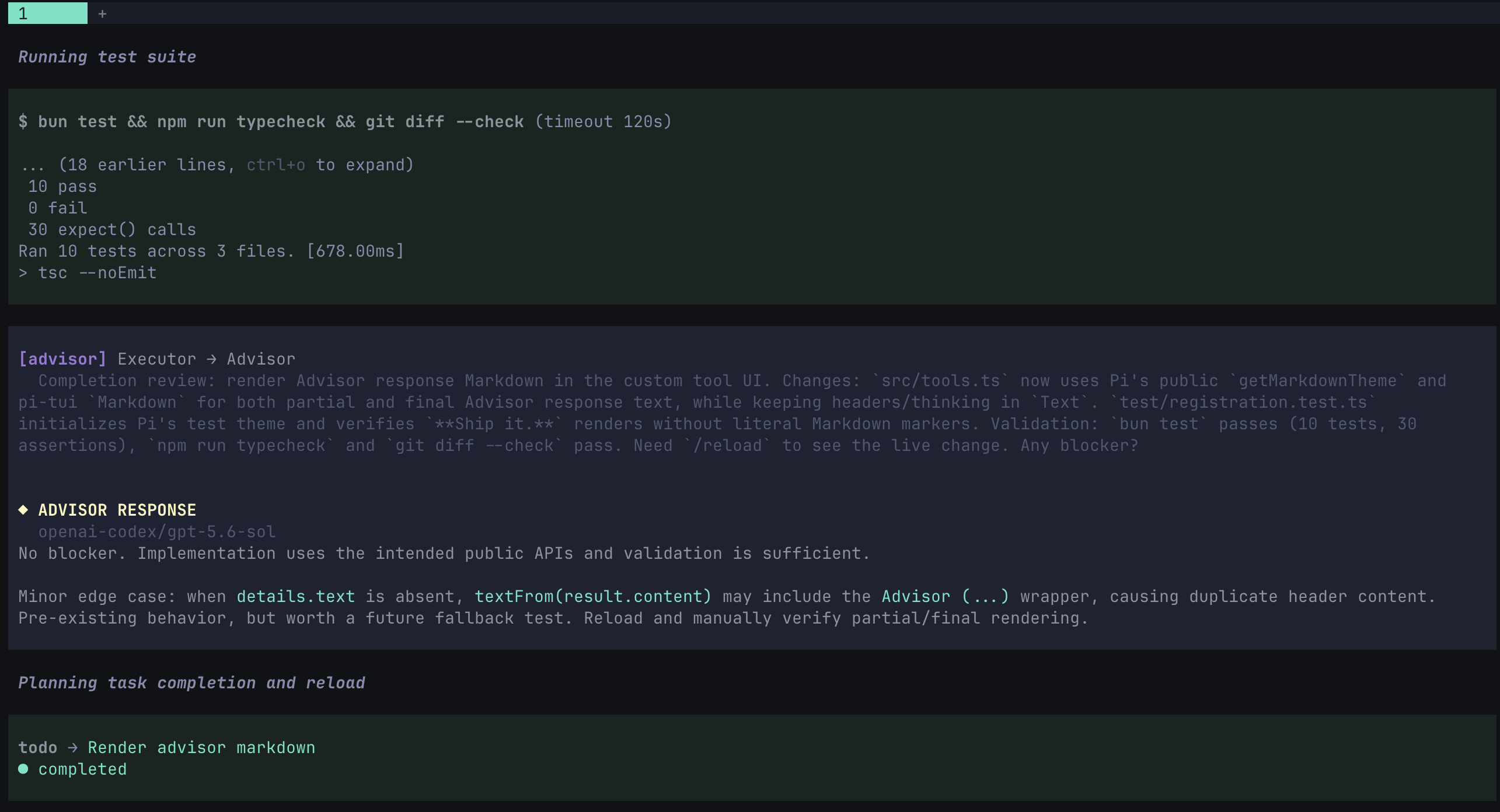
  "image": "https://raw.githubusercontent.com/philipbrembeck/pi-advisor/refs/heads/main/assets/hero.png"
}
Security note
Pi packages can execute code and influence agent behavior. Review the source before installing third-party packages.
README
pi-advisor
A configurable second-opinion workflow for Pi coding agents.
Keep the work to the executor model, while the advisor steers it.
This extension introduces a strategic "Executor/Advisor" workflow, inspired by Claudes Advisor.
pi-advisor-flow keeps one model focused on execution and makes a second, smarter model available for consequential decisions, stalled work, and final reviews. The Executor still owns the work. The Advisor provides a concise review, answers questions and can provide help; it does not take over planning or run tools.
Read more about Advisors here.
Install
Install into your Pi agent environment:
# npm
pi install npm:pi-advisor-flow

# GitHub
pi install git:github.com/philipbrembeck/pi-advisor.git

# local checkout, useful during development
pi install /path/to/pi-advisor
Restart or reload Pi after installation, then run /advisor in a session.
Start using it
- Run
/advisorto enable the flow and registerask_advisor. - Run
/advisor-modelsto choose the Executor and Advisor models. - Run
/advisor-settingsto set context, gates, privacy controls, and output limits.
Enable with models in one command when preferred:
/advisor executor=anthropic/claude-sonnet-5 advisor=openai/gpt-5.6-sol
/advisor contextMaxChars=30000 sets the reconstructed-context limit for the current session. Use 0 for no history. The ALL option in settings represents the complete current branch and is still subject to the Advisor model's context limit.
Commands
| Command | Purpose |
|---|---|
/advisor |
Enable the flow, select the configured Executor, and register ask_advisor. Accepts executor=, advisor=, and contextMaxChars= overrides. |
/advisor-manual [focus] |
Start a parallel Advisor consultation without interrupting the current Executor turn. |
/advisor-models |
Choose Executor and Advisor models plus their reasoning effort. |
/advisor-settings |
Open all Advisor settings in one keyboard-navigable screen. |
/advisor-off |
Disable the flow and remove ask_advisor from the active session. |
ask_advisor
The Executor calls ask_advisor({}) for a general review of the current task and reconstructed conversation. It can pass a question for a targeted review.
Use the Advisor after the Executor has investigated and formed a candidate direction. It is intended to challenge assumptions, expose risks, and confirm the next verification step—not to replace the Executor's work.
Normal consultations preserve the provider's final Markdown. They do not parse a verdict or block execution.
Automatic loop gate
The optional loop gate detects consecutive calls with the same normalized tool signature. By default, it consults the Advisor after three repeats.
Unlike ordinary consultations, a loop-gate reply must start with exactly one decision header:
Decision: proceed
Decision: revise
Decision: blocked
| Decision | Effect |
|---|---|
proceed |
Reset the repeat counter and allow the tool action. |
revise |
Block the repeated tool action. |
blocked |
Apply the configured gate-failure policy. |
Malformed, missing, duplicate, or contradictory decisions are gate failures. The same policy also applies when the Advisor is unavailable or the shared call budget is exhausted.
| Failure mode | Effect |
|---|---|
block-session (default) |
Block the session. |
block-tool |
Block only the current tool action. |
warn-and-continue |
Show a warning and continue. |
| Condition | block-session |
block-tool |
warn-and-continue |
|---|---|---|---|
| Advisor unavailable or timed out | Block session | Block tool action | Warn and continue |
| Missing, malformed, duplicate, or contradictory decision | Block session | Block tool action | Warn and continue |
| Shared budget exhausted | Block session | Block tool action | Warn and continue |
Decision: blocked |
Block session | Block tool action | Warn and continue |
advisorBlockOnBlocked controls whether a session block immediately aborts the active run. It never turns a session block into a tool-only block.
Settings and configuration
/advisor-models and /advisor-settings save to advisor.json in the Pi agent directory. If a trusted project already has its own configuration, Pi uses that file instead.
All fields are optional. This example shows the available settings and their normal defaults:
{
  "executor": "openai/gpt-5.6-luna",
  "advisor": "anthropic/claude-fable-5",
  "executorEffort": "medium",
  "advisorEffort": "xhigh",
  "contextMaxChars": 25000,

  "advisorPlanGate": true,
  "advisorFailureGate": true,
  "advisorCompletionGate": true,
  "advisorCustomInvocation": "before changing a production deployment",
  "advisorCollapseResponses": false,

  "advisorAutoLoopGate": true,
  "advisorLoopThreshold": 3,
  "advisorMaxCallsPerSession": 5,
  "advisorBlockOnBlocked": true,
  "gateFailureMode": "block-session",

  "advisorSessionSummary": true,
  "advisorHerdrIntegration": true,
  "advisorToolResultMaxLines": 2000,
  "advisorToolResultMaxBytes": 51200,

  "advisorRedactSecrets": false,
  "advisorToolPolicies": {
    "bash": "summary",
    "deploy": "exclude"
  }
}
Context and limits
contextMaxCharsdefaults to15000. It preserves complete semantic entries and adds an omission marker rather than splitting a message.- Set
contextMaxCharsto0to omit reconstructed history.9007199254740991is the persisted value forALL. - Tool results default to Pi's
2000lines and50 KiBlimits. Oversized results preserve their beginning and end with an omission marker. advisorLoopThresholdis an integer of at least2; its default is3.- Omit
advisorMaxCallsPerSessionfor an unlimited shared budget. Otherwise it must be a non-negative safe integer.
Privacy controls
Advisor context can contain user messages, tool calls, and tool results. Configure disclosure deliberately:
advisorRedactSecretsdefaults tofalse. When enabled, pi-advisor locally redacts common credential patterns before including context in an Advisor request.advisorToolPoliciesmatches an exact tool name. Each tool may usefull,summary, orexclude.fullincludes the call arguments and capped result output.summaryomits call arguments and result output but includes result status and size metadata.excludeomits both call details and output.
- Tools not listed in
advisorToolPolicies, including custom and newly added tools, usefullfor backward compatibility.
Redaction and output limits reduce accidental disclosure; they are not a data-classification system and cannot guarantee every secret is found. Use tool policies for content that must not be sent to the Advisor.
Session summary and Herdr
The optional Session Advisor Summary is local and in-memory only. It appears after a non-blocked settled run and is never persisted.
It distinguishes regular Markdown advice from gate decisions and records the trigger, model, usage/cost when available, failures, budget, and execution effect.
Herdr integration is enabled by default. It reports Advisor activity and blocked state through Herdr's metadata paths; disable it with advisorHerdrIntegration.
Development
git clone git@github.com:philipbrembeck/pi-advisor.git
cd pi-advisor
bun install

bun test
bun run typecheck
bun run lint