pi-aftc-toolset
Stats bar. Isolated SSH. Documentation generation (docx). Persistent self-educating cache-aware skills on demand (codex). Usage reports. Audio notifications. Shortcuts. Skills. Themes ++
Package details
Install pi-aftc-toolset from npm and Pi will load the resources declared by the package manifest.
$ pi install npm:pi-aftc-toolset- Package
pi-aftc-toolset- Version
1.20.7- Published
- Aug 9, 2026
- Downloads
- 3,735/mo · 1,862/wk
- Author
- darceylloyd
- License
- MIT
- Types
- extension, skill, theme
- Size
- 6.7 MB
- Dependencies
- 2 dependencies · 4 peers
Pi manifest JSON
{
  "extensions": [
    "./extensions"
  ],
  "skills": [
    "./skills"
  ],
  "themes": [
    "./themes"
  ]
}
Security note
Pi packages can execute code and influence agent behavior. Review the source before installing third-party packages.
README
pi-aftc-toolset




Got any feedback? Spotted any issues? Feel free to log an issue on github or leave feedback via https://dev.aftc.uk/pi-aftc-toolset/feedback/
Description
This is an extension for pi (pi.dev) which helps me in my everyday work. If there's something I feel I need I usually bolt it on. So what does it do?
AFTC Codex (/codex)
Self learning, self loading (manual also), cache aware resource (like skills) to better one-shot those complex tasks and to stop the AI model from making the same mistakes over and over and over.
DocX (/docx)
Will back up your old documentation (if you have any) and generate a hierarchical load on demand, AI and human friendly documentation and maps for each part of your project. Just added /docx-update to keep your documentation updated.
SSH (/ssh-*)
Full and isolated SSH for pi, saved connections, slash commands for you, 20 tools for the AI model and a full-screen interactive terminal. Runs through a packaged Python carrier, opens no listening sockets, and your credentials never reach the model.
Usage Report (/usage-report)
Records metrics for every assistant turn (never your prompts) into a local SQLite database, then generates and serves a web report - cost, cache hit rates, timings, task times and projections. All your data stays on your machine.
Footer Widget (/aftc-footer)
A themed dashboard bar under the editor showing live model, context, cache and cost info, plus long-term averages and subscription quota countdowns for supported providers.
run_script
A model tool for running large or multi-line shell scripts reliably - the script is written to a temp file first, working around a pi bug that silently truncates big inline bash commands.
Sub Agents (/007 Alpha 1)
Delegate work to your own custom AI agents (planner, researcher, worker - whatever you build). Off by default, enable it via /007 > settings and create your own agents from the agents folder. NOTE: This is an ALPHA 1 release.
Audio Notifications (/aftc-notifications) (Beta 2)
I didn't think it would be useful, I started programming it as some fun, but it turns out I use it all the time now. What do you get? You get to choose from a set list of MP3s for different spoken sequences for startup, question, task complete, error and aborted (questions when detected by pi), there are also context notifications for 25%, 50% and 75%, feel free to add your own, restart pi or /reload and they will be shown.
WHATS NEW
AFTC CODEX UPDATES (/codex)
Various resource updates, usually with every update. Codex cloud contributions are stored online, I may remove this as I'm not sure how much data I will get any parsing it all for shipping in codex resources may be more work than it's worth. You can turn this feature off via the /codex menu and setting Codex Cloud Resource Contribution to No.. Codex resources are now re-structured for a 2 tier category system rather than a single flat category (it was bugging me).
Sub Agents /007 (ALPHA 1)
I had been thinking about it for a while, and finally gave it a go. It's in alpha but it's live and usable. It is turned off by default, to enable it sub agents use /007 > settings > enable. This is in alpha, it works but it has a way to go before I consider it respectable. Make your own agents via /007 > open agents folder, there's a .MD file there with guidance. /007-edit is a quick edit tool for them and /007-new is work in progress. At the moment it's best to see the MD file and create your own in vscode etc. I have also integrated it into the footer widget, so you can see what your sub agents are doing.
DocX gets "/docx-update" to maintain generated DocX project documentation (BETA 1)
Stop the drift! You know AI models even when instructed wont do it right, so /docx-update is here to help keep your documentation up to date. It will backup the previous version of docx, just in case.
Project Documentation Generator /DocX (BETA 6)
The generation prompt is now tailored by project type: after the
confirmations a picker modal (auto-detect pre-selected) asks for the
closest stack and ONE focused type pack is appended to a slim core prompt
(10 packs: web-app, basic-website, webgpu-webgl, desktop-app, juce-vst,
mobile-app, python-app, cli-tool, shell-scripts, generic). The generated
layout changed: docx/ IS the documentation folder - the docs tree mirrors
the structure map as <id>_<name>/ folders, every reachable surface gets
its own build-ready doc, and old docs are recon hints only (source wins).
The hard context gate dropped from 50% to 25% - /new first above that,
even with --yes.
PI UPDATE COMPATIBILITY CHECK
Testing, and a few minor adjustments.
Install
pi install npm:pi-aftc-toolset
Then in pi:
/aftc-install     # installs better-sqlite3 + packaged SSH carrier deps (python)
/reload
Runtime dependencies:
pi installdoes not install all the required runtime deps. Run/aftc-installafter extension installation.
Quick Documentation & Links
DOCX Documentation Generator (BETA 6)
WARNING: This will re-write readme.md and move all existing documentation. If you have a docs folder it will move all documentation to
./docx/old_docs/(zipped into./docx/backups/when the run completes) before generating in-depth modular documentation designed for AI use while staying human-friendly. This can take a long time the larger the project is.NOTE: run
/newfirst, then/docx- a fresh session means no compaction risk mid-generation and no prior conversation steering the docs./docxflat-out refuses at 25%+ context use (even with--yes) and advises a fresh session at 20%+. Context use itself is modest - measured runs used only 5-8% of a 1M-token window and even large projects stayed under 20% - but expect a LONG wait: the bigger and more complex the project, the longer it takes.-
WARNING: AFTC Codex injects rules + guidance into your system prompt and tells the model to load additional topic docs on demand. This results in the model having access to potentially a lot of rules, issues & solutions and gotchas. Loading 1 to 5 is light enough, loading 20 can be costly but necessary when you have something complex that you want the AI to have its best shot at working out and one shotting it.
I recommend you create a plan.md and a tasks.md first so that you can maximise your use of the codex skills.
Audio notifications /aftc-notifications
Slash commands /aftc-* /codex-*
Keyboard shortcuts Alt+C / Alt+N / Alt+X
-
Reliable large/multi-line script execution. Works around a pi bash-tool truncation bug that silently drops inline commands past a few KB.
Footer widget

A themed dashboard bar below the editor (/aftc-footer to configure:
enable, averages line, timeframe). Lines 1-4 always available; line 5 only
for supported subscription providers; line 6 only while Sub Agents (/007)
is enabled.
Line 1 - what's happening right now
Model name + thinking level, context window size with pi's own context-use %, last-turn cache hit vs session average (with trend arrow), and the session's cached vs new token split.
Line 2 - your money and prompts
User vs AI prompt counts, last turn cost, live Task Time, Session Time (wall-clock since your first prompt), Session Time Cost, and the burn rate ($/hr and $/min).
Line 3 - speed and tools
Turn thinking time and response time (last + averages), active tool count with estimated schema tokens, and skills used/available.
Line 4 - long-term averages
Prefixed with the chosen window (eg 3 Day Averages:), from the persistent
usage DB: total cost, window prompt sums (User/AI), average cache hit %,
and Avg Task Time (completed tasks only). 19 windows via /aftc-footer →
Set averages timeframe: ten rolling "Last …" windows (1h-72h) and nine
calendar-anchored windows (1 Day → 1 Year).
Line 5 - subscription quota (some providers only)
5-hour rolling + weekly allowance usage with live reset countdowns. Supported: ChatGPT/Codex (OAuth), Anthropic (OAuth subscription headers), MiniMax Token Plan, ZAI/GLM Coding Plan, Kimi for Coding. All other providers: the line stays hidden.
Line 6 - sub agents (only while /007 is enabled)
Always visible while the Sub Agents feature is on: runs active vs max concurrent, this session's total sub-agent cost, the average task time of completed runs, and which agents are running right now (each with its context-window %).
SSH
Operate remote servers from pi - model tools for the AI, slash commands for you, a full-screen interactive terminal for hands-on work. Everything runs through a packaged Python (Paramiko) carrier over local stdio - it opens no listening socket.
Ensure dependencies are installed
/aftc-install
Installs/verifies the carrier environment: Python 3 + uv + uv sync --locked of the packaged sidecar.
SSH commands
| Command | What it does |
|---|---|
/ssh-cm (alias /ssh-connection-manager) |
Full-screen connection manager: add / edit / delete saved connections |
/ssh-connect [name] |
Connect a saved connection (quotes for names with spaces; no name → picker) |
/ssh-connections |
List saved connection names |
/ssh-status |
Show connection status |
/ssh-select [id] |
Select the active session for local commands |
/ssh-disconnect [id] |
Disconnect a session |
/ssh-shell |
Open the full-screen interactive terminal on the selected session |
/ssh-close-shell <id> |
Close an interactive shell |
/ssh-interrupt <id> |
Send Ctrl+C + Ctrl+D recovery keys to a shell |
/ssh-upload <local> <remote> [--preserve] |
Upload a file (overwrite confirmation; --preserve keeps attrs) |
/ssh-download <remote> <local> [--preserve] |
Download a file (overwrite confirmation) |
/ssh-rename <from> <to> |
Rename a remote path after confirmation |
/ssh-auto-accept-session-on / -off |
Trust NEW host keys without asking / restore the prompt (changed keys are always rejected) |
/ssh-help |
SSH workflow guidance |
How to manage connections
/ssh-cm opens the connection manager: [ Add new connection ],
[ Edit ], [ Delete ]. The add dialog collects name, username, host,
port (22), timeout (30 s), optional key path and optional password (saved
locally, never exposed to the model).
How to connect
/ssh-connect [name] - or just ask the model, which uses ssh_connect.
New host keys ask for approval (or auto-accept when enabled).
How to disconnect
/ssh-disconnect [id] - or the model's ssh_disconnect. Idle carriers are
reaped automatically and re-spawned on demand.
Run commands and pick a session
/ssh-select chooses the session the local commands act on. For driven
work, the model uses ssh_run (bounded, 120 s max timeout, optional
bounded stdin - never for credentials).
Interactive shells
/ssh-shell opens a full-screen terminal (nano, vim, htop, top, less all
render properly). All keys go to the remote program - including Esc;
Ctrl+] exits locally. The model drives programs through
ssh_open_shell + ssh_send_keys / ssh_paste / ssh_peek /
ssh_resize / ssh_interrupt / ssh_close.
Transfer files
/ssh-upload + /ssh-download (or the model's ssh_upload /
ssh_download): files or whole directory trees, symlinks never followed,
cancellable, --preserve restores timestamps/permissions.
Manage remote files
Model tools: ssh_list_dir, ssh_read_file, ssh_stat, ssh_write_file,
ssh_mkdir, ssh_rename, ssh_remove - every mutation needs local-user
approval.
Model tools
20 tools: ssh_status, ssh_connect, ssh_disconnect, ssh_run,
ssh_open_shell, ssh_send_keys, ssh_paste, ssh_resize, ssh_close,
ssh_peek, ssh_interrupt, ssh_upload, ssh_download, ssh_list_dir,
ssh_read_file, ssh_stat, ssh_write_file, ssh_mkdir, ssh_rename,
ssh_remove. A bundled ssh skill teaches the model the workflow.
Credential isolation
Connections are saved in your local ssh.json; the model only ever sees
saved NAMES and opaque session/shell ids. Credentials are collected by
local prompts, all model-facing output is redacted, and errors are mapped
to safe categories (timeout, cancelled, not connected, unavailable) - no
host/port/key diagnostics ever reach the model.
aftc-codex (knowledge base)
An OPT-IN, self-educating knowledge base: the maintainer's unified rules +
thinking guidance + a generated resource list ride your system prompt, and
the model fetches topic docs on demand with codex_load (aliases: ts, py,
js; specials: rules, guidance, list, markdown).
/codex- settings menu (enable, guidance inject, auto-detect & load, auto-sync on startup, cloud contribution, resources & updates).- Cloud codex contribution (on by default) - when the AI records a new
codex entry (
codex_add_entry), a copy is silently submitted in the background to the maintainer's curation inbox so the best lessons can be included in future releases. Nothing is shown in the chat, nothing is logged, and it only ever fires when the AI adds an entry. Turn it off with/codex→ Cloud Codex Resource Contribution → No (it's on by default because it costs nothing and nobody would ever turn it on themselves). /codex-enable//codex-disable- first enable asks: Pre-trained (rules + all shipped topic docs) or Fresh Start./codex-init//codex-refresh- prep the session (auto-detects your project's stack and loads the relevant docs) / strip + re-prep./codex-status- state, resource counts, version row./codex-sync- NON-DESTRUCTIVE update: merges new shipped content into your live codex; learned entries are never touched./codex-install- wipe + fresh re-seed./codex-learn- record durable lessons via thecodex_add_entry/codex_edit_entry/codex_remove_entrytools (IDs generated, formats validated, generality + secrets guards enforced)./codex-inject-rules- session-only critical-rules injection (works even when disabled; cleared by/new).
Your live copy lives in your data dir (aftc-codex/); the shipped seed is
versioned (codexVersion 14) and merges forward automatically on startup
when Auto Sync is on.
Usage report
/usage-report seeds a small report web app into your data dir
(usage-report/), generates a fresh data.json from your recorded
usage, and starts a bundled local server in its own terminal window -
your browser opens automatically. No internet needed: Chart.js ships
with the app. Close the server window (or Ctrl+C) to stop it; it also
shuts itself down after 30 minutes idle. Requires Node.js (you have it
if pi runs). Every assistant turn is recorded as metrics only -
never prompt or response text. /usage-clear wipes the database
behind a confirmation.
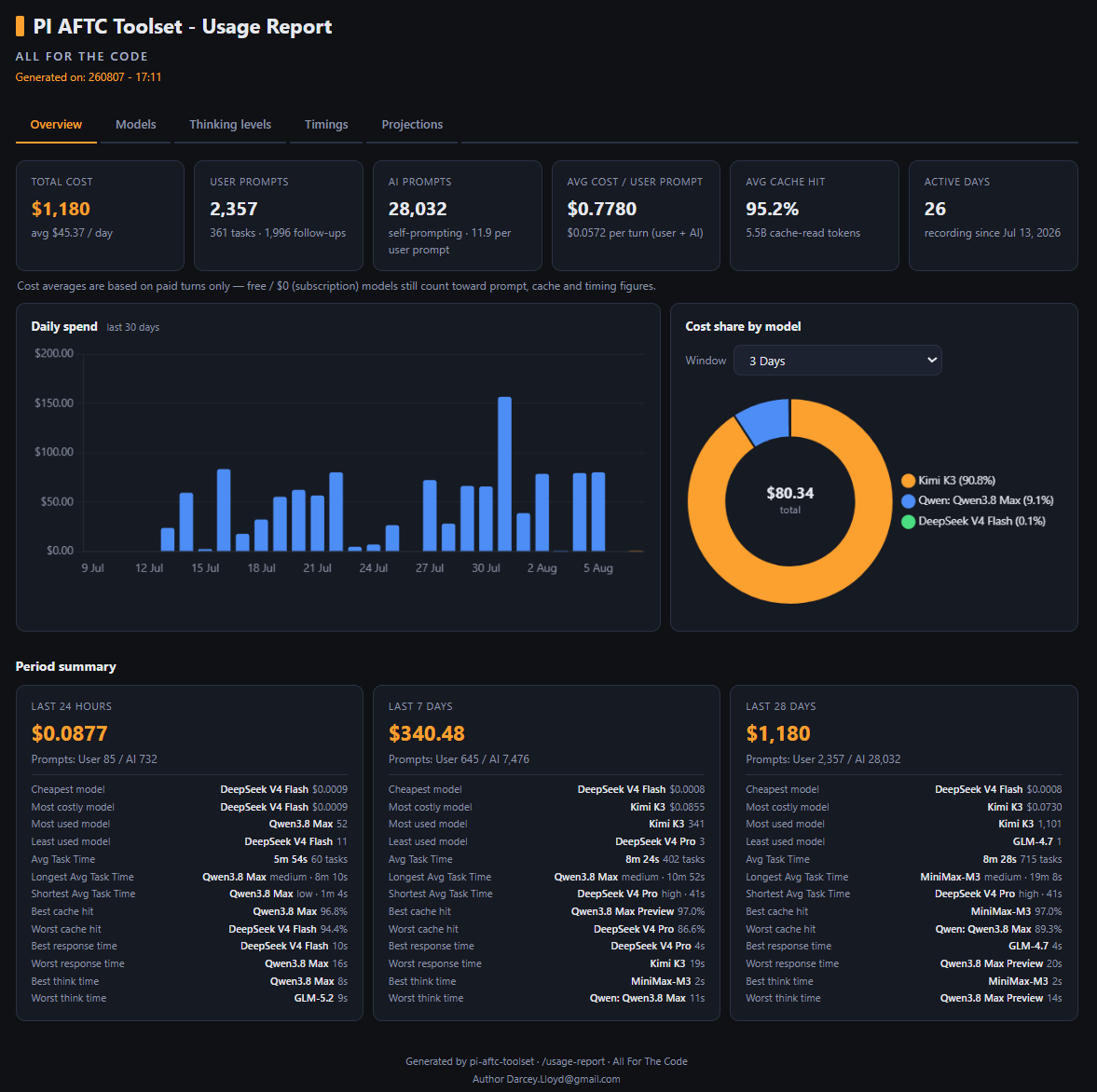
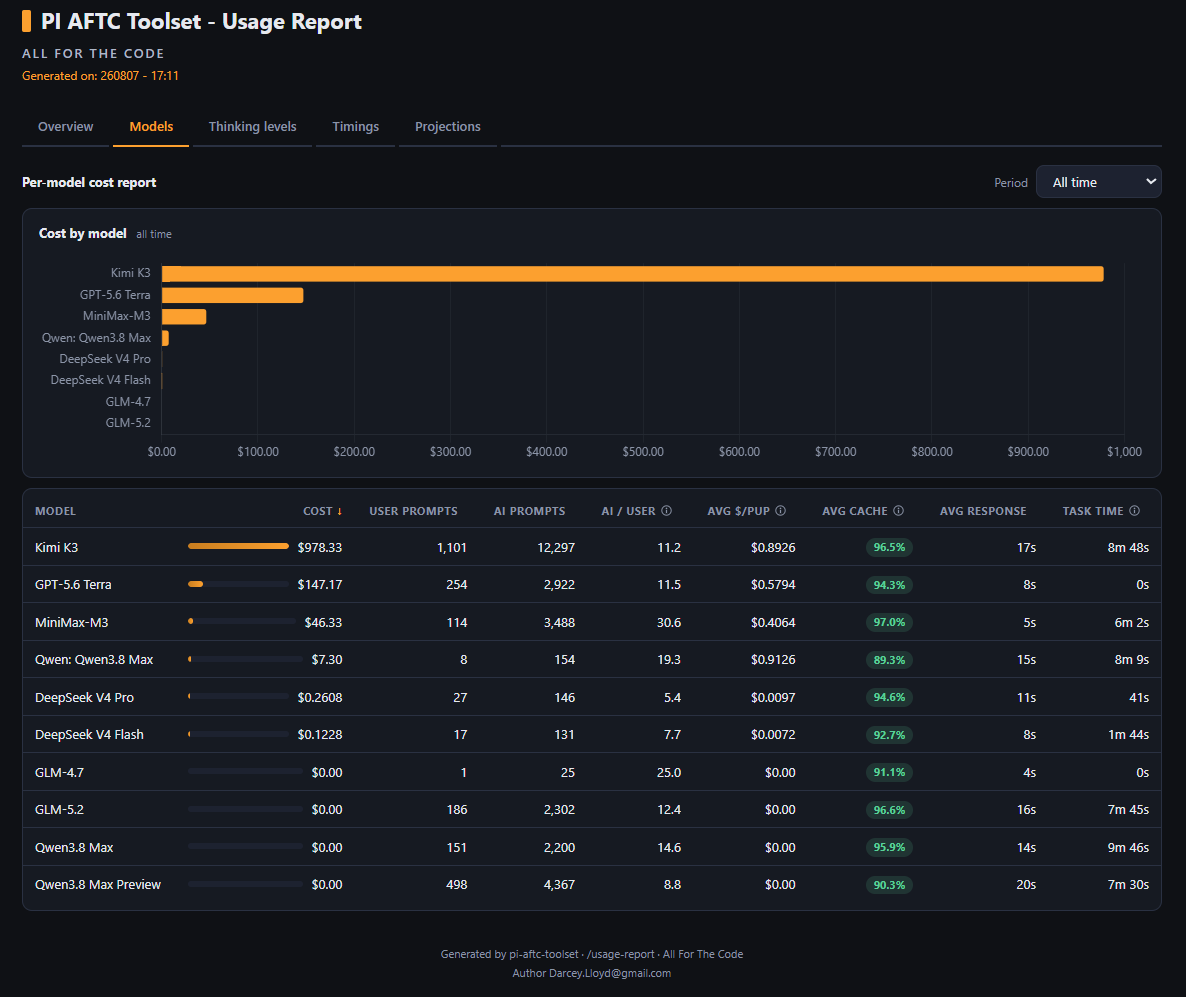
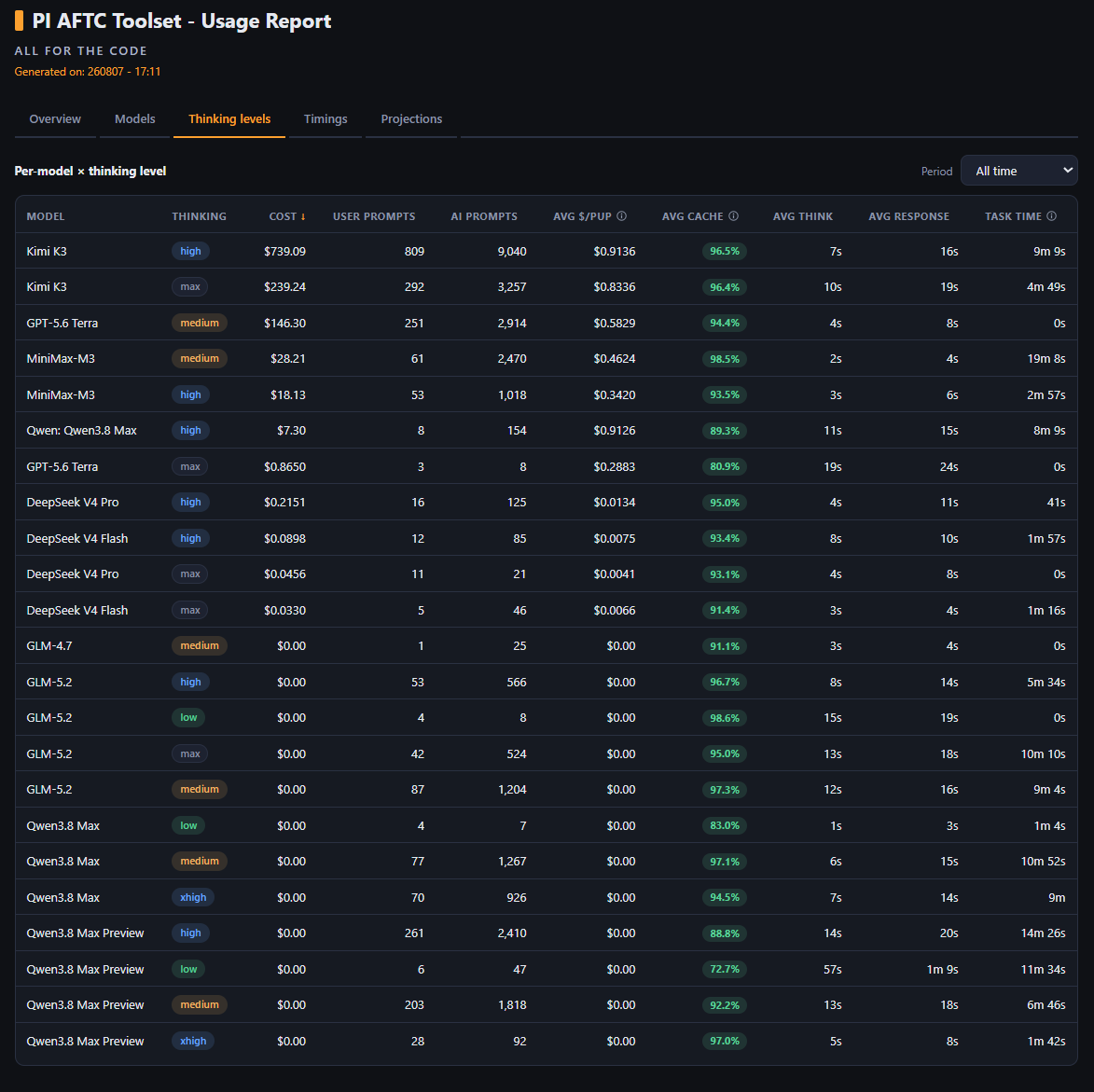
Five tabs:
| Tab | Contents |
|---|---|
| Overview | Headline cards (total cost, prompts, calls, cache hit, active days), 30-day spend chart, cost-share doughnut, 24h/7d/28d summaries with per-model scoreboards |
| Models | Per-model sortable table + period selector + cost-by-model chart, Task Time column |
| Thinking levels | Per-model × thinking-level table + period selector |
| Timings | Task Time analysis: avg/longest task, turns per task, error/abort counts, think/respond/overhead split, user vs AI turns, top-10 longest tasks |
| Projections | Burn rate ($/day, projected month/year) + per-model × thinking projections from spend ÷ active days |


/docx project documentation generator
Regenerates a project's full documentation set: a fresh GitHub README
(written last), plus ./docx/ - master document, structure map, and a
mirrored tree of ID-prefixed deep docs - per the shipped documentation
guide. Before anything is generated, existing documentation is moved to
./docx/old_docs/ (zipped into ./docx/backups/ as a timestamped backup
at the end); AGENTS.md is edited in place, never replaced.
/docx                # confirmations + project-type picker (auto-detect pre-selected)
/docx --yes          # headless: skip confirmations
/docx --type <key>   # headless: pick the prompt pack
Already have a ./docx/ set? /docx-update reconciles it with the source
instead of regenerating: new files get docs, removed files lose theirs,
drifted docs are corrected in place, and your README is fact-checked
WITHOUT being rewritten (same gates, confirmations and backup).
Safeguards: refuses at ≥25% context use (compaction-corruption risk),
advises /new at ≥20%, verified backup counts, sub-project folders stay
read-only.
Think-tag processing
Models that emit thinking as inline <think>…</think> text tags (the
DeepSeek/Qwen convention) get those tags converted into pi's native
collapsible thinking blocks at message-finalize time. Off by default:
/aftc-enable-think-processing / /aftc-disable-think-processing. Safe by
construction: skips messages that already have thinking blocks, errored /
aborted turns, and provider-signed text.
Cache diagnostics
Everything the footer shows, on demand:
/cache-profile- per-tool schema token costs, skills loaded, cache prefix shape (system/tools/prefix hashes), churn analysis./cache-stats- session cache statistics, cache-write ROI (net saved, payback turns), cost burn rate./cache-reset- zero the accumulators (debugging)./cls- clear the terminal screen.
Hit-rate formula: cacheRead / (cacheRead + input) - pi's input is NEW
prompt tokens only. Prefix churn (system prompt or tool schema changes
breaking the cache) is detected per turn and warned.
run_script (reliable large scripts)
The run_script model tool writes the script body to a temp file and runs
bash <file> - no inline-size limit, working around pi's bash-tool
truncation bug (a few KB+ inline commands get silently cut). Bash-only
(git-bash on Windows); default timeout 120 s, max 1800 s. Toggle:
/run-script-on / /run-script-off (default on).
Sub Agents (/007)
Delegate focused work to isolated child pi processes. Each sub-agent runs in its own fresh context window with a profile-locked toolset and hands back a bounded report - your main session stays clean. Nine built-in agents ship (worker, planner, researcher, reviewer, explorer, advisor, documenter, designer, tester); make your own in your agents folder (a guide file lives there too).
- Off by default - enable and configure via
/007- Settings. /007is the main menu: browse agents, active work, settings, guide./007-statusshows a live table of running agents.- The footer (line 6) shows what sub-agents are running while /007 is enabled.
- Your agents live in your data dir (
subagents/);/007-edittweaks them.
Audio notifications
Play event sounds as pi works - enabled via the /aftc-audio-notifications
settings hub, which also has per-category sound pickers and an "open sounds
dir" option. Off by default (fresh installs are silent).
- Sounds fire for: startup, when the agent asks a question, task complete, error, aborted, and when context-window usage crosses 25% / 50% / 75%.
/aftc-notify-time [sec]sets the minimum task duration before the completion sound plays (0 disables it).- Context-window alerts fire on the way UP past a threshold and stay quiet until usage genuinely drops back below it - reloading or resuming never replays them.
Keyboard shortcuts
| Shortcut | Action |
|---|---|
Alt+C |
Clear the input editor |
Alt+N |
Insert a newline at the cursor |
Alt+X |
Cut all input text to the clipboard |
Ctrl+T |
Toggle thinking blocks (pi built-in) |
Bundled themes
- aftc-orange-viz - orange-accented variant of the sea-shells palette (the AFTC default, recommended).
- cache-viz - cache-focused green/cyan colour scheme.
- aftc-black-n-blue - dark blue accents on black.
Switch themes with /theme.
Bundled skills
34 skills ship with the package - activate with /skill:<name>:
- Workflows:
cache-audit,bulk-read,aftc-codex,ssh,tmux - Languages:
typescript,javascript-mjs,javascript-transpiled,python,go,php,pinescript,bash,bat,ps1,markdown,csharp - Frameworks/runtimes:
react,vue,angular,web-frontend,bun,deno,nodejs - Styling/markup:
html,css,scss - Ops:
docker,devops,nginx,linux,godot - Media:
ffmpeg
Slash Commands
Run /aftc-help inside pi for the same list grouped by category.
General
| Command | What it does |
|---|---|
/aftc-help |
Grouped command/shortcut reference |
/aftc-install |
Install runtime deps (SQLite + packaged SSH carrier) |
/aftc-response-divider |
Toggle the themed divider above each assistant reply |
/aftc-intro-off |
Disable the AFTC text startup animation |
/aftc-intro-on |
Enable and play the AFTC text startup animation |
/cls |
Clear the terminal |
/theme |
Open a theme picker (arrow keys, page jumps, live preview, pre-selects active theme) |
/run-script-on |
Enable the run_script tool (reliable large-script execution); /reload to apply |
/run-script-off |
Disable the run_script tool (eg once pi fixes its bash truncation); /reload to apply |
/aftc-debug-log-on |
Turn on [aftc-toolset] diagnostic console output (off by default; errors always print) |
/aftc-debug-log-off |
Turn diagnostic console output back off |
/aftc-cut-input |
Cut all input-editor text to the clipboard (same as Alt+X) |
/docx [--yes] [--type <key>] |
Regenerate the project's full documentation set into ./docx/; old docs zipped into docx/backups/ (--yes skips the confirmations, --type picks the prompt pack) |
/docx-update [--yes] [--type <key>] |
Reconcile an existing ./docx/ set with the source: mint/retire docs, fix drift, fact-check the README without rewriting it |
Interrupt
| Command | What it does |
|---|---|
/aftc-stop |
Abort the current agent operation |
/stfu |
Short alias for /aftc-stop |
Navigation
| Command | What it does |
|---|---|
/dir (alias /ls) |
Show the current directory name + platform-native listing |
/cwd |
Show the current working directory as an inline card |
/qd |
Quick dir access menu: open the users data dir or the .pi dir |
Footer, cache, timing
| Command | What it does |
|---|---|
/aftc-footer |
Open the footer dashboard menu: Enable footer (ON/OFF), Show recorded averages (ON/OFF - the line-4 averages), Set averages timeframe (19 rolling / calendar windows) |
/cache-profile |
Per-tool token costs, prefix shape, churn analysis |
/cache-stats |
Current-context cache diagnostics + cost rate |
/cache-reset |
Zero accumulators and timer (debugging) |
SSH
See the SSH section for the full command reference, model tools, and workflows.
Usage
| Command | What it does |
|---|---|
/usage-report |
Seed the report web app, generate a fresh data.json, start the local server (browser opens) |
/usage-clear |
Delete all SQLite rows (with confirmation) |
Replay
| Command | What it does |
|---|---|
/save-replay-prompt <text> |
Save <text> as a replay prompt (persists across reload/sessions) and add a visual save confirmation to conversation history |
/replay |
Re-execute the saved prompt as a fresh user message (queued as follow-up when busy) |
/r |
Short alias for /replay - same action, fewer keystrokes |
Model behaviour
| Command | What it does |
|---|---|
/keep-it-short |
Send a fixed "be concise" instruction prompt to the active model (queued as follow-up when busy) |
/kis |
Short alias for /keep-it-short - same action, fewer keystrokes |
Thinking
| Command | What it does |
|---|---|
/aftc-enable-think-processing |
Turn on inline <think>…</think> tag parsing (off by default; /reload to apply) |
/aftc-disable-think-processing |
Turn off inline <think>…</think> tag parsing (/reload to apply) |
Sub Agents
| Command | What it does |
|---|---|
/007 |
Main menu: browse agents, active work, settings, guide, enable/disable |
/007-status |
Live table of running agents (state, elapsed, context %) |
/007-kill [id] |
Kill running agents (multi-select, or a single run id) |
/007-edit [name] |
Agent picker → options menu (feature toggles, edit raw file, reset to default) |
/007-reset <name> |
Reset an agent to the shipped default (with confirmation) |
/007-install |
Seed the built-in agents into your agents folder |
/007-sync |
Merge improved shipped agents in without touching your edits |
/007-open-agent-dir |
Open your agents folder in the OS file manager |
/007-guide |
The sub-agents walkthrough |
/007-settings |
Presets, concurrency, budgets, watchdogs, footer line |
/007-doctor |
Check your sub-agents setup |
Audio notification
| Command | What it does |
|---|---|
/aftc-audio-notifications (alias /aftc-notifications) |
Settings hub: enable toggle + per-category sound pickers (startup, question, task-complete, error, aborted, context 25/50/75%) + open the sounds dir |
/aftc-notify-time [sec] |
Show or set the minimum task duration before the completion sound (0 disables) |
aftc-codex
See the aftc-codex section - /codex,
/codex-enable, /codex-disable, /codex-init, /codex-refresh,
/codex-status, /codex-install, /codex-sync, /codex-learn,
/codex-inject-rules, /codex-live-to-seed (maintainer, dev-gated) (+ /aftc-codex-* full names).
Providers
Currently disabled - pi now registers providers natively. The module stays in the package and can be re-enabled in a future release.
PI AFTC Toolset Defaults
| Feature | Default state |
|---|---|
| Footer widget | Enabled |
| Footer averages line (line 4) | Enabled |
| Footer timeframe | 3 Days |
| SSH | Available (command-driven) |
| Usage recording | Enabled (when SQLite installed) |
| aftc-codex knowledge base | Disabled |
| Codex guidance inject / auto-load / auto-sync | Enabled (once codex is on) |
| Cloud codex contribution | Enabled (silent; toggle off in the /codex menu) |
| Audio notifications | Disabled (fresh installs silent) |
| run_script tool | Enabled |
| Think-tag processing | Disabled |
| Sub Agents (/007) | Disabled |
| Response divider | Enabled |
| AFTC text intro | Enabled |
| Debug logging (stdout chatter) | Disabled (errors always print) |
Data location
The toolset stores its runtime data - usage history (turns.db), preferences (config.json), saved SSH connections (ssh.json), the live codex (aftc-codex/), sub-agent config and agents (subagents-config.json, subagents/), the debug log (debug.log) and the report web app (usage-report/ with its generated data.json) - in a per-user folder outside the installed package, so it survives pi update. Location per operating system:
| OS | Data folder |
|---|---|
| Windows | %APPDATA%\pi-aftc-toolset\data\ (eg C:\Users\<you>\AppData\Roaming\pi-aftc-toolset\data\) |
| Linux | $XDG_DATA_HOME/pi-aftc-toolset/data/, falling back to ~/.local/share/pi-aftc-toolset/data/ |
| macOS | ~/Library/Application Support/pi-aftc-toolset/data/ |
Set the AFTC_TOOLSET_DATA_ROOT environment variable to override the location (used by tests and power users). /qd opens the folder in your file manager.
Uninstall note: this folder lives outside the package, so
pi removedoes not delete it - your usage history and preferences remain after uninstall. Delete the folder above manually for a full clean-up.
Updating
pi update npm:pi-aftc-toolset
or install a pinned GitHub release:
pi install git:github.com/DarceyLloyd/pi-aftc-toolset@v<version>
Then /reload in pi. When an update ships new codex content, your live
codex merges it automatically on startup (Auto Sync) - otherwise
/codex-sync (non-destructive) or /codex-install (fresh) when prompted.
Uninstall
pi remove npm:pi-aftc-toolset          # global
pi remove npm:pi-aftc-toolset -l       # project-local
or if you installed via GitHub:
pi remove git:github.com/DarceyLloyd/pi-aftc-toolset
Then /reload or restart pi.
Advanced installation
npm variants
pi install npm:pi-aftc-toolset          # global
pi install npm:pi-aftc-toolset -l       # project-local
pi -e npm:pi-aftc-toolset               # ephemeral (current session only)
GitHub variants
pi install git:github.com/DarceyLloyd/pi-aftc-toolset         # latest main
pi install git:github.com/DarceyLloyd/pi-aftc-toolset@v1.6.0  # pinned release
pi install git:github.com/DarceyLloyd/pi-aftc-toolset -l      # project-local
GitHub installs skip npm post-install hooks - run
/aftc-installonce after the first install.
Local clone
git clone https://github.com/DarceyLloyd/pi-aftc-toolset.git
pi install /path/to/pi-aftc-toolset -l
Dependency installer
/aftc-install (see Slash Commands) installs and verifies:
better-sqlite3vianpm install- Packaged SSH carrier dependencies via
uv sync --locked - The platform-native
uvexecutable, usinguv.exeon Windows anduvon Linux and macOS - A Python 3 interpreter (
py/pythonon Windows,python3/pythonelsewhere)
If Node, Python, or uv is missing it reports platform-specific recovery guidance without exposing saved connection data.
Reload pi afterwards. The footer works without SQLite, but usage recording, reporting, and SSH require /aftc-install.
Requirements
- pi CLI (developed against 0.83.0)
- Node.js / npm
- Providers that expose
usage.cacheReadandusage.cacheWritefor full cache metrics (other providers may show zero / incomplete cache values) - Python 3.10+ and uv for the packaged SSH carrier.
/aftc-installverifies the carrier environment.
Development
Install from a clone:
pi install /path/to/pi-aftc-toolset -l
After edits, reload pi with /reload. Full developer documentation
(workflow, release discipline, architecture) lives in ./docx/; how to
run the tests (which suites, timeouts, the full-suite policy) is in
AGENTS.md.
Project map (lite)
pi-aftc-toolset
|- 1 Extension source (extensions/aftc-toolset)   all feature modules
|    UI framework · Footer/cache/usage · Feature modules
|    SSH (+ Python carrier) · aftc-codex · docx generator · Sub Agents (007)
|- 2 Packaging & shipped assets (data, skills, themes, release scripts)
|- 3 Tests (tests/)
\- 4 Project website & feedback (dev.aftc.uk/)
Persistent files
Runtime data lives in a per-user folder outside the installed package
(see Data location), so it survives pi update. Every
file is created lazily from built-in defaults - none of it is shipped or
committed, and the whole data dir is excluded from git and npm publishing.
| File | Purpose |
|---|---|
config.json |
Cross-session user preferences: footer (on/off, averages line on/off, timeframe window), response divider, think-tag processing, intro animation, audio notifications, replay prompt, run_script tool and aftc-codex switches. Created with defaults on first access; only re-written when a value actually changes. |
ssh.json |
Local SSH connection metadata (name, username, host, port, timeout, optional key path, optional saved password) + new-host-key auto-accept flag. Local-only, never shipped. |
turns.db |
SQLite usage database (turns + tasks tables - metrics only, never prompt text) |
usage-report/ |
Seeded report web app + freshly generated data.json (your recorded usage) |
debug.log |
Rotating [aftc-toolset] diagnostic log (5 MB cap + one .old generation) |
aftc-codex/ |
Your live codex knowledge base (seeded from the shipped copy; learned entries yours) |
subagents-config.json |
Sub Agents (/007) preferences: presets, concurrency, budgets, watchdogs |
subagents/ |
Your live sub-agents (seeded built-ins you can edit) + per-run records |
Your data survives updates. Because the data dir is outside the
package, pi update no longer wipes it. Upgrading from a version that
stored data inside the install folder moves any still-present files over
automatically on first run (data already lost to an older update can't be
recovered).
In-memory only (per-session, not persisted): cache accumulators, model info, per-turn timings, context-window clock start time.
SSH sessions, shell buffers, credentials, and carrier processes are in-memory only and are cleared during shutdown.
Project documentation
For more details please see docx/project_documentation.md and docx/project_map.md.
Change log
The full change history is now in change-log.txt.
License
MIT - Author Darcey.Lloyd@gmail.com